YMTC PC550 512GB Review: PCIe 5.0 Performance Tested
SSDsAt a Glance
Key specifications translated into real-world meaning
10,000
MB/s
Sequential Read
PCIe 5.0 performance ceiling
7,600
MB/s
Sequential Write
~40% faster than PCIe 4.0 peak
1.1M
IOPS
Random Write
Tuned for desktop mixed workloads
5yr
Coverage
Manufacturer Warranty
Above the 3-year segment norm
Design and Build Quality
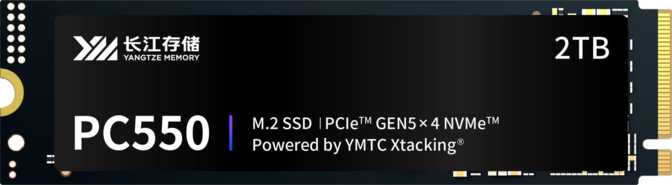
The PC550 follows the standard M.2 form factor, sliding directly into the M.2 slot on any compatible motherboard without brackets, power cables, or additional hardware. The physical package is purposefully unadorned.
There is no RGB lighting and no factory-installed heatsink. For a drive capable of the thermal output that PCIe 5.0 workloads generate, the absent heatsink is worth planning around before installation.
The no-heatsink, no-RGB approach keeps costs contained and fits cleanly in compact builds where clearance around the M.2 slot is tight. It is a practical design decision — but one that shifts thermal responsibility to the buyer.
Thermal Planning Required
Most modern motherboards include M.2 heatsink covers — use them. If yours does not, an affordable aftermarket M.2 heatsink protects both sustained performance and long-term drive health. Passive cooling is sufficient for typical desktop environments; no active fan cooling is necessary.
Performance Analysis
What the specifications actually mean for file transfers, daily computing, and heavy workloads
Sequential Speed — The File Transfer Experience
When moving large files — video projects, game installs, OS images, or bulk photo archives — sequential speed is what you feel directly. The PC550 reads large data streams at up to 10,000 MB/s and writes at up to 7,600 MB/s. A 100 GB video project transfer that takes roughly 30 seconds on a fast PCIe 4.0 drive completes in about 10 seconds here. For professionals who move large assets repeatedly, that reduction compounds across an entire working day.
Sequential Read Speed Comparison (MB/s)
Random Speed — The Snappy, Responsive Feel
Sequential speed tells you how fast a drive moves large files. Random speed tells you how fast it responds to everything else — launching applications, switching browser tabs, booting the OS, and accessing game assets mid-session. IOPS (Input/Output Operations Per Second) measures how many small, scattered read or write tasks the drive handles simultaneously.
880,000 IOPS
Rapid access to scattered small files — directly responsible for how quickly applications open and how responsive the OS feels under load.
1,100,000 IOPS
Higher than random read — an unusual and notable result. It reflects controller optimization for the fragmented, mixed-load environment a busy desktop OS produces constantly.
PCIe 5.0 and NVMe 2.0 — What the Platform Means in Practice
PCIe 5.0 doubles the bandwidth available per lane compared to PCIe 4.0 — the wider pipe is what enables the 10,000 MB/s performance ceiling. NVMe 2.0 brings efficiency improvements in queue management, power handling, and command processing alongside that extra bandwidth.
NVMe 2.0 also introduces improved Host Memory Buffer support, better error handling, and forward-looking platform features. For a drive you plan to use for five or more years, this future-proofing matters in ways NVMe 1.x drives simply cannot match.
The Cacheless Architecture — What It Actually Means
The PC550 operates without a dedicated DRAM cache module. Traditional high-performance SSDs include a small DRAM chip that acts as a fast-access directory — the drive looks up where data lives in that chip rather than querying the NAND flash directly. Without it, the PC550 uses Host Memory Buffer (HMB), borrowing a small slice of system RAM instead. HMB is natively supported under NVMe 2.0.
For desktop use, the performance gap versus DRAM-cached drives is narrow and rarely noticeable. A DRAM cache delivers its greatest benefit under heavy sustained random write workloads on a nearly full drive — database servers and enterprise write-intensive tasks. The cacheless design also means lower power draw and one fewer component that can fail over years of use.
DRAM Cache vs. HMB
- DRAM Cache
- Dedicated on-drive memory chip. Fastest directory lookup. Higher cost and power draw.
- Host Memory Buffer (HMB)
- Borrows from system RAM via NVMe 2.0. Near-equivalent desktop performance. Lower cost and power draw.
Storage Capacity: Who 512 GB Is Right For
512 GB is the entry point for this drive family, and it requires an honest conversation. At this performance tier, capacity is the most significant limiting variable for many potential buyers.
For a primary OS and applications drive paired with secondary storage — a larger HDD, NAS, or secondary SSD for bulk files — 512 GB works well. Your operating system, core applications, and an active project folder fit comfortably.
For users who want a single-drive solution holding everything — a full games library, media archive, and complete creative project history — 512 GB will create friction sooner than expected. SSDs also perform best when not operating near full capacity. Keeping 10–15% free is sound practice, which narrows comfortable working capacity to roughly 430–450 GB.
Capacity Management Tip
If you find yourself consistently managing files to stay below 85% capacity, the 512 GB model is not the right fit. A larger-capacity model in the PC550 family — or a dedicated secondary storage drive — is the better long-term decision. Sustained near-full operation impacts both performance and endurance over time.
Endurance and Long-Term Reliability
300 TBW
Write Endurance
At 50 GB written daily — heavy professional use — rated endurance covers over 16 years. Most users write 10–20 GB per day, extending rated life well beyond a decade.
2M hrs
MTBF Rating
Mean Time Between Failures — a statistical measure indicating extremely high expected reliability throughout the drive's service life.
5 Years
Warranty Period
Many PCIe 5.0 competitors offer 3-year coverage. YMTC's 5-year warranty signals genuine hardware confidence that buyers should factor into the long-term decision.
Why TLC NAND Is the Right Choice Here
| NAND Type | Bits Per Cell | Endurance | Cost | Best For |
|---|---|---|---|---|
| QLC | 4 bits | Lower | Lower | High-capacity budget storage |
| TLC PC550 | 3 bits | Strong | Mid-range | Performance consumer & pro desktop |
| MLC | 2 bits | Very High | Premium | Enterprise & specialized workloads |
TLC is the NAND technology used in flagship SSDs from all major manufacturers. It delivers the right balance of density, cost, and endurance for professional-grade desktop storage.
Who Should Buy the YMTC PC550 512 GB
This Drive Is For
- Enthusiast desktop builders on a PCIe 5.0 M.2 platform who want the fastest available storage without compromise
- Creative professionals working with large video, audio, or 3D project files who feel storage friction in their daily pipeline
- Developers and power users running virtualization, containers, or heavy compilation workloads where storage I/O is a real bottleneck
- Future-focused builders who want a drive that will not become the system bottleneck as other components evolve
This Drive Is Not For
- Laptop users or compact builds — PCIe 5.0 M.2 is currently limited to high-end desktop platforms; verify board compatibility before purchasing
- Budget-first buyers — PCIe 5.0 carries a price premium; if your workload is not speed-sensitive, a fast PCIe 4.0 alternative will serve you better
- Single-drive users needing 1 TB or more — 512 GB will constrain you; a larger-capacity model in the same family is the right choice
- PCIe 4.0 or older platform users — the drive will downgrade gracefully, but you would be paying for performance you cannot unlock
How It Compares to the Alternatives
The PC550's primary competition is other PCIe 5.0 M.2 drives and the best PCIe 4.0 models. At the PCIe 5.0 tier, sequential peaks converge — the real differentiators become sustained performance under thermal load, random I/O optimization, and price per gigabyte. The PC550's 1.1 million random write IOPS is competitively strong even within the PCIe 5.0 segment.
| Drive Tier | Interface | Seq. Read | Key Trade-off vs. PC550 |
|---|---|---|---|
| This DriveYMTC PC550 512 GB | PCIe 5.0 / NVMe 2.0 | ~10,000 MB/s | — |
| Top PCIe 4.0 (e.g. Samsung 990 Pro) | PCIe 4.0 / NVMe 1.3 | ~7,400 MB/s | 25–35% slower reads; wider platform support |
| Mid PCIe 4.0 (e.g. WD Black SN850X) | PCIe 4.0 / NVMe 1.4 | ~7,300 MB/s | Similar speed; strong random I/O; broader availability |
| Entry PCIe 4.0 | PCIe 4.0 / NVMe 1.3 | ~4,500 MB/s | Significantly slower; considerably lower cost |
| PCIe 3.0 Mainstream | PCIe 3.0 / NVMe 1.3 | ~3,500 MB/s | Less than 35% of the PC550's throughput |
Sequential read figures are approximate and representative of each interface tier. The PC550 is backward-compatible with PCIe 4.0 and PCIe 3.0 slots but will operate at those interfaces' lower performance levels.
Honest Assessment
Where It Excels
The PC550's strongest case is performance consistency at the top of the consumer speed chart. The sequential figures are among the highest available, and the random write IOPS — 1.1 million — suggests a controller tuned for mixed-load desktop environments rather than solely for synthetic benchmark results.
The 5-year warranty is a genuine differentiator. Many PCIe 5.0 competitors offer 3-year coverage. YMTC's decision to back the hardware for five years signals confidence that buyers should weigh seriously when making a long-term platform investment.
Where to Manage Expectations
The absent integrated heatsink is the most immediate practical concern. It is not a design flaw — motherboard heatsink solutions are often superior — but thermal planning becomes the buyer's responsibility. Skipping a thermal solution on a PCIe 5.0 drive under any workload is not advisable.
The 512 GB capacity at flagship pricing means you are paying primarily for speed. If that speed genuinely transforms your workflow, the value proposition is real. If the appeal is primarily aspirational, a larger-capacity PCIe 4.0 drive may deliver better overall value for most real-world use cases.
A Note on the Cacheless Design
Buyers accustomed to DRAM-cached drives should verify their platform supports HMB under NVMe 2.0 before purchasing. For the vast majority of modern desktop platforms this is not a concern — but it is worth confirming, particularly on older systems being upgraded with a PCIe 5.0 add-in card rather than a native motherboard slot.
Common Questions Before You Buy
Final Verdict
YMTC PC550 512 GB
PCIe 5.0 NVMe 2.0 M.2 SSD
Buy It If
You have a PCIe 5.0 platform, your workload genuinely taxes storage speed, and you have a thermal solution ready. Pair it with a larger secondary drive if capacity is any concern at all.
Skip It If
Your motherboard tops out at PCIe 4.0 — you would not unlock the performance you are paying for. A well-chosen PCIe 4.0 drive covers the vast majority of real-world use cases at a lower price.
Consider Upgrading If
512 GB is even a marginal concern for your storage habits. A larger-capacity PC550 delivers the same peak performance without the capacity compromise.
The Bottom Line
The YMTC PC550 512 GB is a genuine top-tier PCIe 5.0 SSD that earns its place at the performance ceiling of consumer storage. The sequential and random figures are not marketing aspirations — they reflect what a well-engineered PCIe 5.0 platform can deliver. The 5-year warranty signals that YMTC stands behind the hardware with the kind of confidence that matters when making a long-term investment. For the buyer who has the platform to match it and the workload to need it, the PC550 512 GB is a clear, confident recommendation.