YMTC PC550 2TB Review: Full PCIe 5.0 NVMe Performance Breakdown
SSDsAt a Glance
The essential numbers — translated into what they mean for your system before you read further.
Design and Physical Format
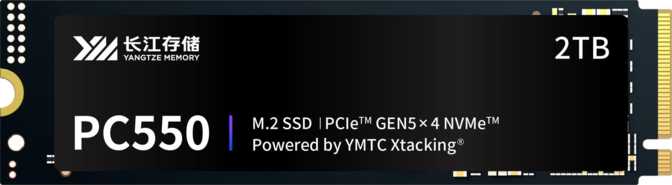
The PC550 ships in the M.2 form factor — a compact rectangular card that slots directly into a motherboard without any cables. This is the standard form factor for modern high-performance SSDs, and the vast majority of desktop motherboards released in recent years include at least one M.2 slot. There are no bays to manage and no power connectors required.
Thermal Considerations
There is no integrated heatsink included with the drive. PCIe 5.0 drives generate meaningfully more heat under sustained load than their PCIe 4.0 predecessors — a natural consequence of moving data at this speed. Using the M.2 heatsink cover that ships with most current motherboards is strongly recommended, not optional. Running the PC550 without thermal management during heavy workloads will trigger throttling, where the drive temporarily reduces its own speed to protect itself from heat damage.
Notable Omissions
- No integrated heatsink — plan to use your motherboard's M.2 cover or a dedicated aftermarket cooler.
- No RGB lighting — the drive will sit beneath a heatsink in most builds, making its absence inconsequential.
- No onboard DRAM cache — the drive uses Host Memory Buffer via PCIe instead. Performance implications are covered in the next section.
Performance Analysis
What the specifications actually mean for the speed you experience every day.
Sequential Transfers — Moving Large Files
At up to 10,500 MB/s reads and 10,000 MB/s writes, the PC550 handles large file transfers at a pace that feels nearly instant in practice. A 50GB game installation moves from another drive in around 5 seconds. A 20GB archive of RAW photos copies in roughly 2 seconds. Compared to PCIe 4.0 drives — which top out around 7,400 MB/s in the best cases — the PC550 delivers approximately 40 to 50 percent more sequential throughput.
Whether that difference is perceptible depends entirely on what you do. For video editing scratch disks, large asset transfers, and DirectStorage game streaming, the improvement is real. For web browsing and document work, the gap is invisible.
Sequential read comparison by PCIe interface generation. Figures represent typical category maximums, not a specific competing product.
Random Access — The Speed You Feel Most
Sequential speed dominates benchmark headlines, but random access performance is what determines how responsive a system feels during real work. Every application launch, file open, and operating system action involves thousands of small, scattered read requests rather than a single continuous data stream.
The PC550 handles up to 1.3 million random read and write operations per second. Mid-range PCIe 4.0 drives typically land between 700,000 and 1,000,000 IOPS under ideal conditions. The PC550's ceiling reflects both the expanded bandwidth of the PCIe 5.0 interface and the controller's ability to queue and process requests efficiently across its four active channels.
Controller Architecture and Caching
4-Channel Controller
Some competing PCIe 5.0 drives deploy eight channels, which provides greater parallelism and more consistent behavior during sustained write sessions. The four-channel configuration in the PC550 still reaches its headline speeds, but may show more variability during prolonged heavy transfers — tasks measured in minutes rather than seconds. For gaming, booting, and most creative workflows, the distinction is unlikely to surface in practice.
HMB Instead of Dedicated DRAM
Without onboard DRAM, the drive uses Host Memory Buffer — a PCIe standard that borrows a small portion of your system's RAM as a data-mapping table. HMB is largely transparent in consumer workloads. Under extreme synthetic scenarios involving deep-queue sustained random I/O — more relevant to enterprise storage than home desktops — dedicated DRAM drives may hold an edge. For day-to-day use, the practical impact is minimal.
NAND Technology: TLC Flash Explained
The PC550 uses Triple-Level Cell (TLC) NAND flash — the dominant technology in performance consumer SSDs today. Each memory cell stores three bits of data, striking a practical balance between storage density, write endurance, and manufacturing cost that suits the majority of users.
Vertical Integration Advantage
YMTC manufactures its own NAND flash chips rather than sourcing them from a third party. This places YMTC in the same structural position as Samsung — a company that controls both the memory and the drive. That integration enables tighter optimization between the NAND characteristics and the controller firmware, which can translate to more consistent, reliable performance over the drive's lifetime rather than just during fresh benchmark runs.
Endurance and Long-Term Reliability
How long this drive will realistically last — and what each reliability metric means in practical terms.
1,200 TBW Rating
The PC550 2TB is rated for 1,200 terabytes of cumulative data written. A typical desktop user writing 20 to 30GB per day would not reach this limit for well over a century of use. Even a demanding professional writing 200GB daily — video rendering, database operations, large file exports — would need more than 16 years of continuous use to exhaust it.
At this tier, TBW is a statement of engineering confidence rather than a ceiling most buyers will ever approach.
2 Million Hour MTBF
The Mean Time Between Failures rating of 2 million hours is a population-level reliability statistic derived from failure-rate modeling across many drives — it does not mean any single unit will run for that duration. What it signals is that premature failure should be statistically rare. This figure is consistent with what premium consumer and enterprise-class drives from established manufacturers publish.
MTBF is a reliability confidence metric, not a countdown timer.
5-Year Warranty
The five-year warranty is the standard coverage period for premium consumer SSDs and carries real weight: if the drive fails within that window, you have a direct path to replacement. It also reflects YMTC's own confidence in the product's durability — manufacturers do not offer long warranty coverage on drives they expect to fail early.
The warranty matters as much as the endurance rating itself when evaluating long-term value.
Platform Requirements: Check Before You Buy
This drive only reaches its rated speed in a PCIe 5.0 M.2 slot.
The M.2 connector looks identical across PCIe 3.0, 4.0, and 5.0 — the PC550 will physically fit in an older slot but will operate at that slot's speed ceiling, not its own. Paying PCIe 5.0 prices for PCIe 4.0 results is a meaningful mismatch. Verify your motherboard's M.2 slot version in its specification sheet before purchasing.
What Your System Needs
- A PCIe 5.0 M.2 slot — present on current-generation Intel and AMD platforms, but not on every board within them. Check your specific motherboard's specs directly.
- A compatible CPU — PCIe 5.0 lane support is determined by the CPU generation. Older processors do not expose PCIe 5.0 lanes regardless of the motherboard installed.
- M.2 thermal management — a motherboard heatsink cover or aftermarket M.2 cooler. Sustained workloads without cooling will cause thermal throttling and reduce effective performance.
NVMe 2.0: What the Newer Protocol Adds
The PC550 supports NVMe 2.0, the current revision of the communication protocol between an SSD and the CPU. Improvements over earlier NVMe versions include more efficient handling of simultaneous I/O requests, better power management states, and expanded management capabilities for the drive.
Most current operating systems fully support NVMe 2.0. For end users, the practical benefit shows primarily in workloads involving many concurrent requests and in systems where power efficiency matters — a real consideration in laptops with compatible hardware, where idle power draw affects battery life.
Who Should Buy the YMTC PC550 2TB
Match your situation to one of these columns before deciding.
- PC builders on a current-generation PCIe 5.0 platform who want the fastest available storage and plan to keep their system for several years
- Video editors and content creators who regularly move large files, work with high-resolution footage, or maintain large project libraries on their primary drive
- Gamers with a DirectStorage-capable setup who want to maximize asset streaming performance and reduce level-load times
- Enthusiasts who treat their primary drive as a long-term infrastructure investment and want both peak performance and a warranty to match
- Your motherboard only supports PCIe 3.0 or 4.0 — a PCIe 4.0 drive delivers equivalent real-world results at a significantly better price in those systems
- You are upgrading a laptop — PCIe 5.0 M.2 slots in slim systems are rare, and sustained thermal management in thin chassis is rarely adequate for this drive tier
- Budget is the primary factor — cost per gigabyte at this performance tier is higher than mid-range alternatives, and the speed premium is invisible in casual use
- Your system has no M.2 heatsink solution — the drive will throttle under sustained load without thermal management in place
How It Compares to the Competition
The PC550 2TB positioned against the categories of drives you would realistically consider at this level.
| Feature | YMTC PC550 2TB | Typical PCIe 5.0 Rival | Typical PCIe 4.0 Flagship |
|---|---|---|---|
| Interface | PCIe 5.0 | PCIe 5.0 | PCIe 4.0 |
| Sequential Read | ~10,500 MB/s | 10,000–14,000 MB/s | 7,000–7,400 MB/s |
| Sequential Write | ~10,000 MB/s | 9,500–12,000 MB/s | 6,500–7,000 MB/s |
| Random IOPS (R/W) | 1.3M / 1.3M | 1.2M–1.5M | 800K–1.0M |
| DRAM Cache | HMB Only | Often Present | Often Present |
| Controller Channels | 4 channels | 4 or 8 | 4 or 8 |
| Endurance (TBW) | 1,200 TB | 1,200–2,000 TB | 1,200–1,400 TB |
| Heatsink Included | No | Varies by model | Varies by model |
| Warranty | 5 Years | 5 Years | 5 Years |
Common Questions Before Buying
The questions real buyers search for — answered directly.
Final Verdict
The YMTC PC550 2TB is a legitimate, high-performance PCIe 5.0 drive that earns its place at the top tier of consumer storage. Its throughput figures are class-competitive, its endurance backing is strong, and the five-year warranty provides real purchase confidence that matters beyond the spec sheet.
The platform requirement is non-negotiable — this drive is only worth its premium in a PCIe 5.0 system with proper M.2 thermal management. For builders who meet those criteria, the PC550 2TB is a well-rounded choice. The HMB-only cache and four-channel controller are worth understanding before purchasing, but neither diminishes the drive's fitness for the vast majority of real-world workloads it will encounter.
Strengths
Limitations
Buy It If
You are building or upgrading a PCIe 5.0 platform and want future-proof, high-endurance storage with no compromise on peak throughput.
Wait or Look Elsewhere If
Your platform is PCIe 4.0 or older, you require maximum sustained write consistency, or price per gigabyte is your primary decision factor.