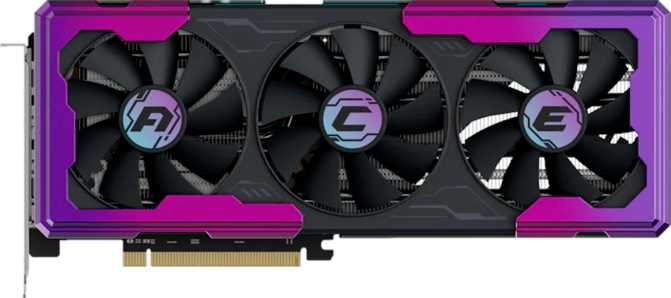
Yeston Game Ace RTX 5060 Ti 16GB: Full Review and Honest Verdict
Graphics Cards16 GB at This Price? Here Is What That Actually Means
The mid-range GPU market is where most people actually live. Not everyone needs a flagship card that costs more than a used car. The Yeston Game Ace GeForce RTX 5060 Ti 16GB lands squarely in this territory, carrying NVIDIA's latest Blackwell architecture down to a price tier where it can genuinely change how mainstream gamers experience their hobby. The story, however, is more nuanced than the marketing suggests, and a few specification choices deserve a hard look before committing.
This card arrives with a headline feature most competitors in its class cannot match: 16 gigabytes of next-generation video memory. Whether that advantage outweighs certain trade-offs depends entirely on how you use your system. The analysis below works through every angle honestly.
Strong mid-range GPU for 1440p gaming
Design, Build Quality, and Physical Experience
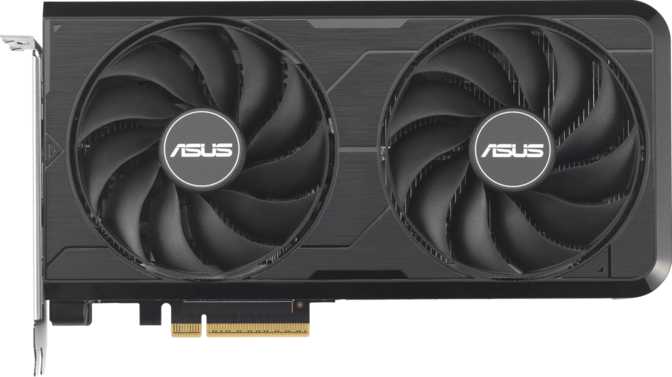
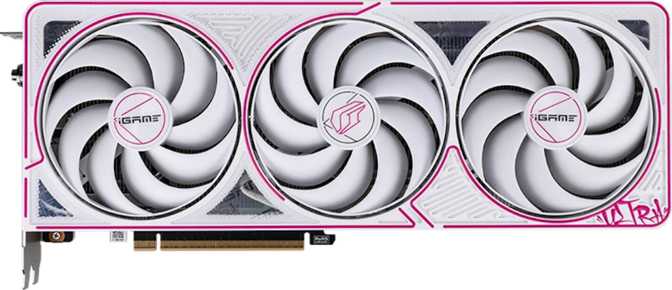
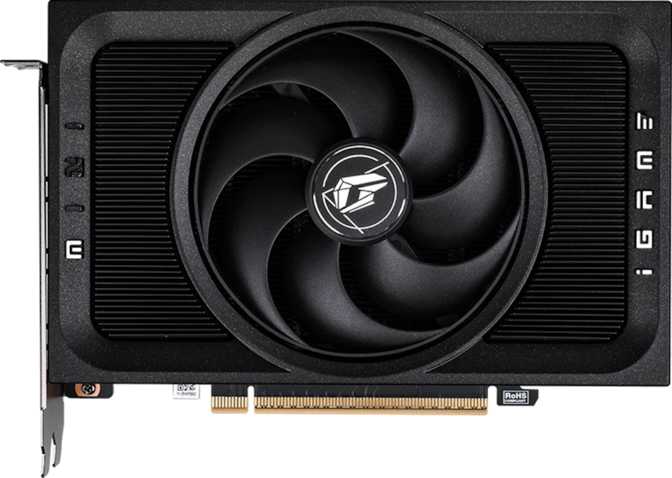
Yeston is a Chinese AIB (add-in board) partner that has steadily built a reputation for well-finished cards at competitive prices. The Game Ace line is their gaming-focused tier, and the RTX 5060 Ti wearing that badge arrives with a look that won't embarrass itself in a windowed case. RGB lighting is present throughout, offering customizable visual character for builds where aesthetics matter alongside performance.
The card measures 318 mm in length and 141 mm in height — just over 31 centimeters long. Most modern mid-tower cases accommodate cards up to 330–360 mm without modification, so compatibility is broad. That said, measuring your specific case clearance before ordering is worthwhile, particularly in compact mid-towers with front-mounted radiators or storage cages positioned near the GPU bay.
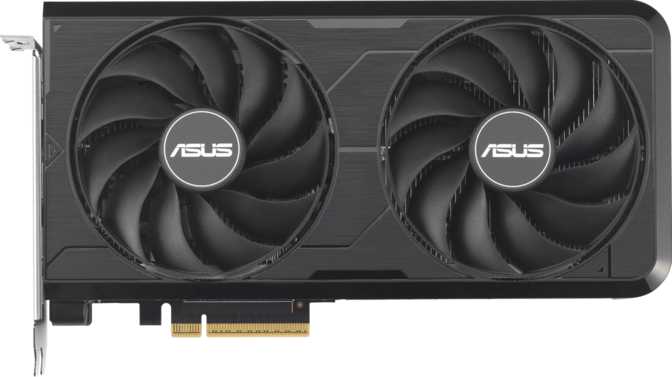
The cooler is a multi-fan air cooling solution. No liquid or hybrid option is offered in this configuration, which is entirely appropriate for a 180 W thermal envelope. Air cooling at this power level handles sustained gaming loads without drama when the fan shroud is properly designed.
Yeston doesn't carry the same brand recognition as the top-tier AIB partners in Western markets — that either matters to you or it doesn't. The hardware itself reflects a genuine effort to deliver a premium finish at a competitive price. RMA processes, warranty coverage, and support infrastructure vary by retailer and region, so verifying those specifics through your point of purchase before ordering is sensible practice for any lesser-known AIB.
Physical Specifications
- Length
- 318 mm
- Height
- 141 mm
- Cooling
- Air (multi-fan)
- RGB Lighting
- Yes
- Interface
- PCIe 5.0
- Process Node
- 5 nm
The Blackwell Architecture: Why It Matters Here
NVIDIA's Blackwell architecture represents a full generational leap from its predecessor. Built on a 5-nanometer manufacturing process with approximately 21.9 billion transistors, it enables a different class of efficiency and capability at the mid-range price tier — and understanding what that means in practice helps explain why this card competes differently from prior options.
Third-Gen Ray Tracing
Lighting, shadow, and reflection calculations execute more efficiently per clock cycle than the previous generation. The practical result is that ray tracing at 1440p is a realistic everyday option on this card, not a frame rate killer reserved for technology demonstrations.
Fifth-Gen Tensor Cores
These dedicated AI processing units power DLSS and every AI-assisted rendering feature on the card. More capable Tensor Cores translate directly to higher-quality upscaling and faster Frame Generation performance in supported titles.
Improved Rasterization
Shader scheduling and execution have been refined at the architectural level. A direct clock-speed comparison to a prior-generation card understates what Blackwell actually delivers — more rendering work gets done per cycle at a given frequency.
The RTX 5060 Ti packs approximately 21.9 billion transistors — a figure that would have sat at the high-end tier just two generations ago. It reflects how modern 5 nm fabrication enables NVIDIA to deliver current-generation architectural advantages across the full product stack, not just at flagship price points.
Core Performance: Reading the Numbers Honestly
Raw specifications only tell part of the story. Here is what the RTX 5060 Ti's numbers mean for the gaming experience you will actually have — and where the architecture-level advantages show up in practice.
Clock Speed and Compute Throughput
The GPU runs at a base clock of 2,407 MHz and boosts to 2,662 MHz under sustained load — figures that rank among the higher clock speeds in the consumer GPU space. These numbers reflect Blackwell's efficiency at the 5 nm node rather than aggressive overclocking pushing thermal limits.
Floating-point throughput reaches 24.53 trillion operations per second. This is the number that drives rendering speed across games, content creation, and compute workloads alike. At this level, the RTX 5060 Ti sits firmly in competitive 1440p territory across the current game library.
Texture throughput is handled by 144 dedicated texture mapping units delivering 383.3 billion texels per second. Complex scenes with high-resolution surface detail are processed without the stuttering or pop-in that lower-tier cards exhibit under similar scene complexity.
Key Metrics at a Glance
| Boost Clock | 2,662 MHz |
| Compute Throughput | 24.53 TFLOPS |
| Texture Fill Rate | 383.3 GT/s |
| Pixel Fill Rate | 127.8 GP/s |
| Shading Units | 4,608 |
| Render Output Units | 48 ROPs |
With 48 ROPs, pixel output sits on the leaner side relative to higher-tier cards. This is where the card's identity as a 1440p performer — rather than an unconstrained 4K renderer — becomes most apparent in the specification sheet.
The 16 GB GDDR7 Memory: The Card's Defining Advantage
This is the single most important reason this card exists in the market at this price tier — and it deserves a thorough, honest explanation, including the one trade-off that comes with it.
The RTX 5060 Ti ships with 16 gigabytes of GDDR7 video memory. For a GPU at this price tier, that amount of onboard memory is exceptional. Most competing cards carry 8 GB or 12 GB at comparable price points, and the gap matters more now than it did two years ago.
Modern games are increasingly memory-hungry. High-resolution texture packs, larger open worlds, and titles without strict memory budgets can push 8 GB cards into territory where they actively swap data out to system RAM. The result is stuttering and frame time inconsistencies that no driver update can fix. A card with 16 GB simply doesn't encounter that wall within current titles.
The memory itself is the newest generation available in consumer GPUs. Its effective speed produces 448 gigabytes per second of memory bandwidth — fast enough that the GPU rarely waits for data during normal gaming workloads. ECC (error-correcting code) support is also present, which matters for professional GPU-accelerated workloads requiring bit-perfect numerical accuracy.
- Capacity
- 16 GB
- Type
- GDDR7
- Bandwidth
- 448 GB/s
- Bus Width
- 128-bit
- ECC Support
- Yes
The Bus Width Trade-Off: Full Transparency
This memory runs across a 128-bit bus. Bus width determines how much data can move in parallel each cycle, and 128-bit is narrower than the 192-bit or 256-bit configurations found in higher-tier cards. The reason this card achieves 448 GB/s despite a narrower bus is that GDDR7 runs fast enough to compensate — at a given bus width, GDDR7 moves roughly twice the data per second compared to GDDR6.
The honest summary: you get the capacity benefit of 16 GB and the speed benefit of GDDR7, but total bandwidth is lower than it would be on a wider interface. For 1440p gaming at high settings, this configuration is effective. For 4K gaming with texture-heavy titles at maximum settings, bandwidth can become a bottleneck before VRAM capacity ever does.
Feature Set: DLSS, Ray Tracing, and Display Support
DLSS and AI Rendering
The RTX 5060 Ti supports DLSS in its latest Blackwell iteration. DLSS allows the GPU to render a game at a lower internal resolution and reconstruct a higher-quality image using a trained neural network running on dedicated Tensor Cores — delivering frame rates that can rival or match native resolution rendering with minimal visible quality loss in Quality mode.
For RTX 5060 Ti owners, DLSS is not an optional luxury. It is a core part of how this GPU delivers smooth performance in demanding titles. A game targeting 1440p output might render internally closer to 1080p, then reconstruct to full 1440p quality without visible degradation.
DLSS also includes Frame Generation, which synthesizes additional frames between rendered frames using AI. For cinematic single-player titles, the frame rate gains are dramatic. For competitive games where response time is paramount, most users prefer DLSS upscaling without Frame Generation active.
Hardware Ray Tracing
Hardware-accelerated ray tracing is fully supported. Rather than using the approximations that traditional rasterization relies on, ray tracing simulates how light actually behaves — bouncing off surfaces, casting accurate shadows, and producing physically correct reflections in real time.
On Blackwell, ray tracing performance is meaningfully improved over the previous generation at this price tier. The RTX 5060 Ti can run ray tracing at 1440p in many titles at playable frame rates, particularly when paired with DLSS Quality mode upscaling.
Full path tracing — the most demanding form, used in titles like Cyberpunk 2077's Overdrive mode — remains a workload where this card leans heavily on DLSS to maintain smooth frame rates. With DLSS enabled, the combination is viable. Without it, path tracing at high resolutions is demanding for any card in this class.
Display Connectivity
HDMI 2.1b handles 4K at 144 Hz or 8K at 60 Hz, covering modern high-refresh gaming monitors and premium televisions. The three DisplayPort outputs accommodate ultra-wide and multi-monitor configurations without needing adapters. Users whose display or workstation depends on USB-C video output will need to factor in an active adapter.
API and Software Compatibility
DirectX 12 Ultimate support means the full set of features Microsoft's latest gaming API defines — Variable Rate Shading, Mesh Shaders, DirectX Raytracing, and Sampler Feedback — are all accessible. Intel Resizable BAR (which AMD platforms also support through the same underlying PCIe specification) allows the processor to access the full GPU frame buffer directly, improving performance by several percent in games that benefit from it.
Power and Efficiency: 180 W Is Genuinely Reasonable
The RTX 5060 Ti operates at a Thermal Design Power of 180 watts — the maximum sustained power draw under full gaming load. This figure often gets less attention than frame rates in reviews, but it has real practical consequences for your build.
Previous-generation mid-range cards frequently consumed 200 W or more, with some high-tier options exceeding 300 W. At 180 W, the RTX 5060 Ti generates less heat, which translates to quieter fan behaviour and lower electricity costs over extended gaming sessions. In compact cases or builds where airflow is constrained, the lower TDP matters more than any benchmark number.
The PCIe 5.0 interface ensures communication with the rest of the system at the maximum bandwidth the current generation of motherboards supports. Real-world gaming loads don't saturate PCIe 4.0, let alone 5.0 — but PCIe 5.0 means this card is forward-compatible with future platforms without any interface ceiling ever becoming a concern.
The card uses conventional multi-fan air cooling, which is entirely adequate for 180 W. A well-designed cooler at this power level keeps the GPU comfortably below thermal limits during sustained gaming without the complexity or added cost of liquid or hybrid cooling solutions.
PSU Compatibility Guide
Who Should Buy This Card?
The RTX 5060 Ti 16GB has a clearly defined target audience. Understanding whether you fall inside or outside that group is the most practically useful thing this review can tell you.
The Right Choice If You...
-
Game primarily at 1440p.The architecture, clock speeds, and DLSS support make this a capable 1440p GPU in most current titles — and a highly capable one in titles with DLSS enabled.
-
Play memory-intensive games.Open-world titles, games with high-resolution texture packs, or heavily modded games. The 16 GB buffer gives headroom that 8 GB and 12 GB competitors at this price simply don't have.
-
Intend to keep this card for several years.16 GB will remain adequate as game requirements grow far longer than 8 GB would. This is future-proofing with direct, measurable value.
-
Run a multi-monitor setup.Four outputs — including three DisplayPort and one HDMI 2.1b — serve multi-display configurations without compromise or adapters.
-
Have a power-conscious or compact build.At 180 W, this card is compatible with systems that might struggle to cleanly power a 250 W+ GPU, and keeps thermals and noise in check throughout.
Think Carefully Before Buying If You...
-
Game at 4K with everything maxed.The 128-bit memory bus and 48 ROPs become limiting factors in the most demanding 4K scenarios. A card with a wider bus and more ROPs will serve native 4K better — at a higher price.
-
Prioritise raw 1080p frame rates for competitive play.Lighter, less expensive cards can deliver very high frame rates in esports titles. The 5060 Ti is not the highest frame-rate-per-dollar option in that specific use case.
-
Need USB-C video output.No USB-C ports are present on this card. Active adapters add cost and occasional compatibility friction with certain monitors and docking stations.
-
Are on a tight PSU budget with an older 450–500 W supply.Upgrading the power supply alongside this GPU adds meaningfully to total system cost and should be factored into the budget from the outset.
Competitive Positioning: Where This Card Sits
Rather than naming specific competitors — which would require benchmark data beyond the card's specifications — the table below frames where the RTX 5060 Ti 16GB sits structurally against the alternatives a buyer at this price tier would realistically consider.
| Consideration | RTX 5060 Ti 16GB | Typical Mid-Range Alternatives |
|---|---|---|
| VRAM Capacity | 16 GB | 8 GB–12 GB is common at this tier |
| Memory Generation | GDDR7 | GDDR6 or GDDR6X on older designs |
| Memory Bus Width | 128-bit | 128–192-bit depending on the card |
| Architecture Generation | Blackwell (current) | Previous-gen on older competing cards |
| Power Envelope | 180 W | 150 W–220 W across this segment |
| AI Upscaling | DLSS (latest gen) | Varies by manufacturer and generation |
| Ray Tracing Hardware | 3rd-gen hardware RT | Varies; older RT cores on prior-gen cards |
| Display Outputs | 4 (incl. HDMI 2.1b) | Broadly comparable across this segment |
The core competitive argument for this card is the combination of Blackwell's efficiency, next-generation memory speed, and an unusually large 16 GB VRAM buffer. For buyers who value future-proofing their system's memory capacity over extracting maximum 4K performance today, this card's positioning makes a compelling, clearly reasoned case.
Strengths and Honest Weaknesses
Where It Genuinely Excels
The memory configuration — 16 GB of GDDR7 — is genuinely unusual at this price tier and solves a problem that 8 GB card owners are already encountering in current titles. Paired with Blackwell's improved ray tracing architecture and the latest DLSS generation, the card delivers a qualitatively better experience in supported titles than raw rasterization numbers alone would suggest.
The 180 W power draw is a practical advantage that often goes underappreciated in spec sheet comparisons. It means quieter cooling, lower heat output inside your case, and compatibility with power supplies that might struggle to cleanly deliver current to a 250 W+ card. For builders upgrading an existing system without replacing the PSU, this matters more than almost any other single specification on the sheet.
Where It Shows Its Limits
The 128-bit bus, even with GDDR7's impressive per-pin speed, produces a bandwidth ceiling that higher-tier cards exceed by substantial margins. At 1440p this ceiling is largely academic — you won't hit it in most games. At 4K with demanding titles, particularly those with heavy ray tracing loads, you will feel it. The 48 ROPs tell a similar story: appropriate for the card's target resolution, but they define a ceiling that 4K-focused buyers should acknowledge before purchasing.
The Yeston brand is a meaningful variable for some buyers. Their products are widely available and well-regarded in Asian markets, but RMA processes, warranty coverage, and support infrastructure in Western regions vary by retailer. Verifying warranty terms through your specific point of purchase is sensible advice that applies here in a way it might not for the highest-profile AIB partners.
Answers to Common Pre-Purchase Questions
A Clear, Direct Purchase Recommendation
The Yeston Game Ace GeForce RTX 5060 Ti 16GB is a well-considered GPU for the buyer who values memory capacity, power efficiency, and architectural modernity over raw performance ceiling at the highest resolutions.
If you game at 1440p — or at 1080p with an eye toward upgrading your monitor — this card handles that workload comfortably and will continue doing so as games grow more demanding. The 16 GB GDDR7 buffer is the single most compelling reason to choose it over the competition at this tier: it solves a real problem that buyers of 8 GB cards are already encountering, and that advantage compounds with time.
The trade-offs are real but manageable. The 128-bit memory bus means this is not the card for buyers whose primary goal is 4K gaming at maximum settings without AI upscaling. The Yeston brand requires due diligence on local warranty terms. The absence of USB-C output is a minor but genuine omission for a subset of users.
For the buyer who fits the target profile — 1440p gaming, value-conscious, future-aware — this is a strong and specific recommendation. It earns its place in a crowded market by doing the things that actually matter for its intended use case better than most alternatives at its price point.