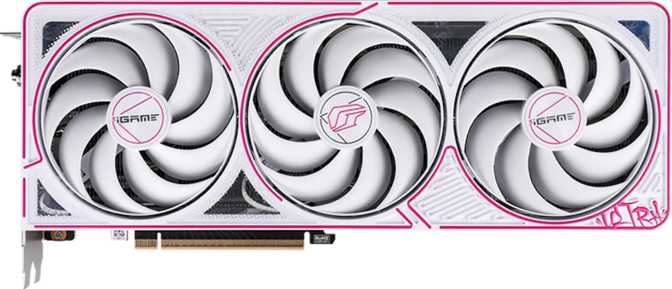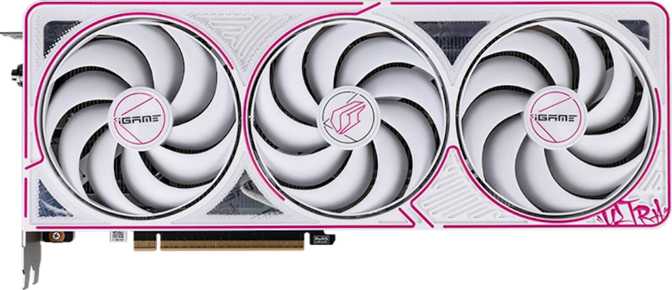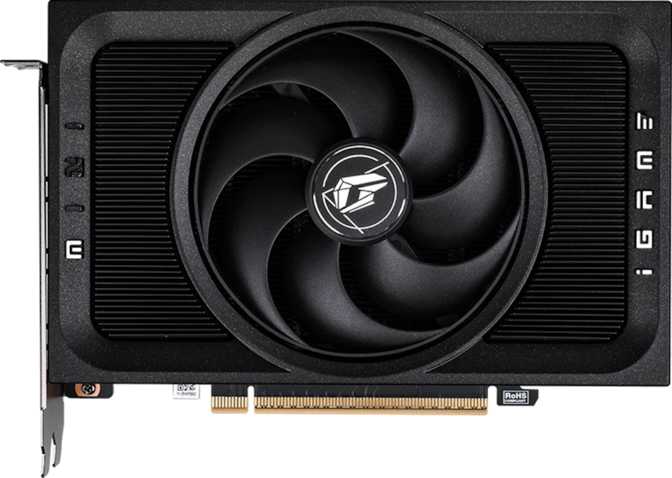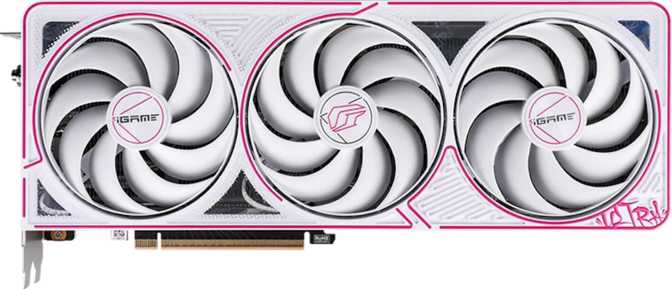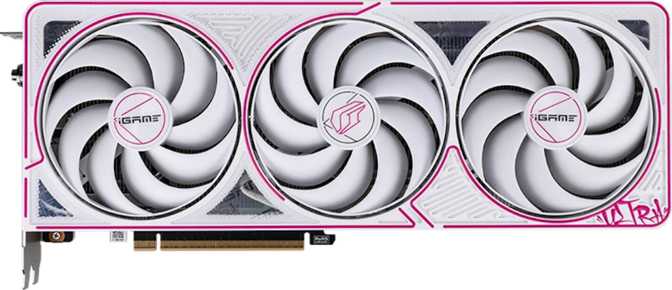
Colorful iGame GeForce RTX 5060 Ti Ultra Z OC 16GB: Full Review
Graphics CardsOverall Score
out of 10
A Mainstream GPU That Refuses to Act Like One
The RTX 5060 Ti is priced and marketed to everyday gamers, yet the Blackwell silicon underneath tells a more ambitious story. Colorful's iGame Ultra Z OC treatment — factory overclocking, a triple-fan cooler, and 16GB of GDDR7 memory — produces a card that punches meaningfully above its price bracket's expectations. Whether you are a first-time builder seeking a generational leap or an informed buyer weighing this variant against a stock model, the details here matter.
Architecture
Blackwell 5nm
VRAM
16GB GDDR7
Bandwidth
448 GB/s
Power Draw
180W TDP
AI Upscaling
DLSS Support
Max Displays
4 Outputs
Design and Build Quality
Physical Presence and Form Factor
At just over 300mm in length and 120mm tall, the Ultra Z OC is a full-length card that demands a mid-tower or larger case. Before buying, measure your case's maximum GPU length — most modern mid-towers accommodate cards up to 330–340mm, so this should fit, but verify before purchasing. It is not a compact card, and that size is there for good reason.
The shroud follows Colorful's iGame aesthetic: angular lines, a dark metallic finish, and three fans arranged across a backplate that covers the full PCB length. The card feels dense and solid. The dual-BIOS switch on the rear edge is a welcome inclusion for enthusiasts who want to toggle between a performance profile and a quieter operation mode without reflashing anything.
Cooling Architecture
Colorful built this card around a sizable heatsink stack with three fans, each of which stops completely at low loads. This zero-fan-idle behavior eliminates unnecessary noise when the GPU idles on the desktop or handles light content. The 180W thermal ceiling of the underlying chip is well within what a well-engineered triple-fan air cooler manages comfortably. This card runs cool and quiet when it can, and controlled-but-audible when it needs to work hard.
RGB Lighting
Addressable RGB lighting runs along the shroud and is controllable through Colorful's iGame Center software. It supports standard lighting sync ecosystems and can be disabled entirely for a clean build. With the side panel closed, it is present but unobtrusive — a functional addition that does not define the card's character.
Physical Specifications
- Length
- 300.5 mm
- Height
- 120 mm
- Cooling Type
- Triple-fan Air
- Fan Stop at Idle
- Yes
- Dual BIOS
- Yes
- RGB Lighting
- Addressable
Case Compatibility
At 300.5mm, this card requires at least 310mm of GPU clearance. Verify your case specifications before ordering, especially in smaller mid-tower builds.
Architecture and Performance Analysis
Blackwell: What the New Generation Actually Means
The RTX 5060 Ti is built on NVIDIA's Blackwell architecture, fabricated on a 5-nanometer process and housing just under 22 billion transistors. Fitting that many transistors on a chip that runs at 180 watts represents a meaningful efficiency improvement over previous generations — more processing capability per watt, which translates to better performance per dollar and lower heat output relative to delivered performance.
Blackwell introduces architectural improvements to the shader execution model, updated tensor cores for AI-driven workloads, and a revised ray tracing engine. These are not incremental refinements — they change how the card handles workloads that previous generations had to brute-force.
Compute Throughput
24.26
TFLOPS (FP32)
Pixel Fill Rate
126.3
GPixels / second
Texture Throughput
379
GTexels / second
What These Numbers Mean in Practice
The compute throughput sits roughly in line with what upper-tier cards from two generations ago achieved — now available in a mainstream package. Floating-point throughput determines how quickly the GPU processes complex shader calculations, physics, and lighting effects. At over 24 trillion operations per second, this is not a card that gets overwhelmed by demanding workloads at 1440p.
The pixel fill rate and texture throughput matter most in demanding, heavily detailed scenes: open-world games with dense environments, games running at higher resolutions, and scenarios with heavy post-processing effects. In practice, neither figure becomes your bottleneck in any mainstream gaming workload at 1080p or 1440p.
Shader and Compute Unit Breakdown
The GPU carries 4,608 shading units alongside 144 texture mapping units and 48 render output units (ROPs). The 48 ROPs are adequate for 1440p gaming but begin to show constraint at native 4K in the most demanding titles. This architecture is optimized for 1440p as its primary resolution — an honest reflection of the card's positioning, not a weakness.
Memory: Where This Card Stands Apart
The headline spec is not just the 16 gigabytes of capacity — it is the use of GDDR7, the newest generation of graphics memory. Effective memory speed reaches the equivalent of 28,000 MHz, producing a peak memory bandwidth of 448 gigabytes per second.
Bandwidth determines how quickly the GPU feeds data to its processing units. Texture-heavy scenes, high-resolution assets, and complex lighting calculations all demand memory bandwidth. Running short of it causes frame pacing issues and stutters — not just lower average frame rates.
128-Bit Bus Width in Context
The memory interface is 128 bits wide — narrower than higher-end cards, and the one area where the RTX 5060 Ti shows its mainstream positioning. However, GDDR7's raw speed largely compensates, delivering bandwidth figures that would have required a 192-bit or 256-bit GDDR6 configuration to match. The trade-off is intentional and effective.
- Memory Type
- GDDR7
- Capacity
- 16 GB
- Peak Bandwidth
- 448 GB/s
- Bus Width
- 128-bit
16GB in Practice: A Future-Proof Advantage
Sixteen gigabytes of VRAM is generous for this price tier. Current AAA games running at 1440p with maximum texture quality can consume 8–12GB of VRAM in demanding titles. Having 16GB means this card will not be VRAM-constrained for the foreseeable future, even as texture budgets continue to grow.
Competing cards at similar price points with 8GB of VRAM may face real limitations within two to three years of game releases. This card is unlikely to encounter that ceiling. ECC memory support is also present — rarely relevant for gaming, but useful for anyone running light compute or machine learning workloads alongside gaming.
Gaming Features That Change How You Play
DLSS
DLSS uses dedicated tensor core hardware to render at a lower internal resolution and reconstruct frames via a trained neural network — with results often indistinguishable from native rendering. Frame Generation extends this by synthesizing intermediate frames. At this performance tier, DLSS is not optional: it is the mechanism through which you extract maximum performance from demanding titles at 1440p.
Ray Tracing
Hardware-accelerated ray tracing simulates physically accurate light behavior — reflections, shadows, and ambient occlusion that react correctly to the scene. Blackwell's revised RT engine improves on prior generations. With DLSS engaged, ray tracing is very playable in the majority of current titles at 1440p. Full path tracing in the most demanding games will still require DLSS assistance to stay smooth.
DirectX 12 Ultimate
Full DirectX 12 Ultimate compliance covers the complete set of current-generation API features: mesh shaders, DirectX Raytracing, Sampler Feedback, and Variable Rate Shading. These represent real rendering capabilities that current and upcoming game engines use to produce better-looking scenes more efficiently. OpenGL 4.6 and OpenCL 3.0 cover creative and compute workloads beyond gaming.
Resizable BAR
Intel Resizable BAR allows the CPU to access the full VRAM pool simultaneously rather than in small chunks, producing measurable frame rate improvements in many titles — typically 2–8% in affected games. It requires a compatible motherboard BIOS and a modern Intel platform to enable, but the performance benefit is entirely free once activated.
Stereoscopic 3D and Multi-Display Support
The card supports stereoscopic 3D output and can drive up to four displays simultaneously, making it capable for both immersive gaming setups and productivity multi-monitor configurations.
Display Output and Connectivity
The Ultra Z OC provides four display outputs: three DisplayPort connections and one HDMI 2.1b port. There are no USB-C display outputs and no legacy DVI ports — a reflection of where the industry has moved. The four-output total supports simultaneous multi-monitor configurations for gaming or productivity.
| Port | Count | Version | Max Capability | Best Use Case |
|---|---|---|---|---|
| DisplayPort | 3 | DP 2.1 (Blackwell) | 4K @ 165Hz+ | Gaming monitors, high-refresh setups |
| HDMI | 1 | HDMI 2.1b | 4K @ 144Hz / 8K @ 60Hz with HDR | TV gaming, living room setups |
| USB-C | 0 | — | — | Not supported |
| DVI | 0 | — | — | Not supported |
HDMI 2.1b for TV Gaming
HDMI 2.1b supports 4K at 144Hz or 8K at 60Hz with full HDR signaling. Connecting this card to a high-refresh-rate gaming TV requires no compression or compromises — a full-bandwidth connection throughout.
No USB-C Display Output
Users with USB-C monitors will need a DisplayPort-to-USB-C cable rather than a direct connection. Verify your display's input options before purchase.
Power, Connectivity, and System Requirements
Thermal Design Power
180W
Efficient for the performance tier — well below previous-generation equivalents at comparable output
Recommended PSU
650W
Pairs comfortably with any modern mid-range CPU — 750W or above recommended for additional headroom
PCIe Interface
PCIe 5.0
Backward compatible with PCIe 4.0 and 3.0 slots — older motherboards work without meaningful performance loss
The 180W TDP is genuinely efficient for the performance on offer. A quality 650W power supply handles this card alongside a modern mid-range CPU with headroom to spare. Users with 750W units have no concerns at all.
The factory overclock on this variant may push transient power draw slightly above the rated TDP during peak loads, but nothing that requires upgrading a competently-sized PSU. PCIe 5.0 is current-generation — while backward compatibility with PCIe 4.0 and 3.0 slots works without meaningful performance loss for gaming workloads, pairing with a current-generation platform fully exploits available bandwidth.
Who Should Buy This GPU
- You game primarily at 1440p and want consistently high frame rates in current and upcoming AAA titles, with or without ray tracing.
- You want a card that will remain VRAM-relevant through the next several years of game releases without needing an early upgrade.
- You are building or upgrading on a mid-range budget and want factory-overclocked performance without manual tuning or risk.
- You do light creative work — video editing, 3D rendering, AI image generation — alongside gaming and want GPU compute capability for those tasks.
- You are upgrading from an RTX 3060 Ti, RX 6700 XT, or older equivalent and want a generational leap that is genuinely noticeable.
- Your primary goal is 4K native gaming at ultra settings with maximum ray tracing — this card manages 4K in many titles, but it is not architecturally optimized for it.
- You are on a tight budget and only need 1080p at medium settings — a lower-tier card will serve that use case at meaningfully lower cost.
- You require a USB-C display output for your monitor — this card has no USB-C ports, and an adapter will be needed.
- You have a compact ITX case — at over 300mm, this card will not fit in true ITX builds and requires careful measurement even in smaller mid-towers.
Competitive Positioning
The RTX 5060 Ti sits in a crowded segment where choices matter. Here is how the Colorful iGame Ultra Z OC compares to the most relevant alternatives a buyer in this price range will consider.
| GPU | VRAM | Memory Type | Approx. TDP | Key Trade-off |
|---|---|---|---|---|
| This CardRTX 5060 Ti 16GB | 16 GB | GDDR7 | 180W | Excellent VRAM and bandwidth; 128-bit bus is the only architectural constraint |
| RTX 5060 Ti 8GB | 8 GB | GDDR7 | ~165W | Lower cost; risks hitting VRAM ceiling sooner as game texture budgets grow |
| RTX 4070 (prior gen) | 12 GB | GDDR6X | 200W | More ROPs; older architecture; higher power draw; no current-gen DLSS |
| RX 7700 XT | 12 GB | GDDR6 | 245W | AMD ecosystem; significantly higher TDP; no DLSS support |
| RTX 5070 (step-up) | 12–16 GB | GDDR7 | ~250W | Substantially faster; substantially more expensive; a different budget tier entirely |
The 16GB variant is the smarter long-term buy over the 8GB version for anyone planning to keep this card for three or more years. GDDR7's speed advantage over the previous generation's offerings is real, and the lower TDP makes the 5060 Ti more system-friendly in compact or budget builds.
Strengths and Weaknesses
The iGame RTX 5060 Ti Ultra Z OC 16GB gets most things right for its intended audience. The combination of GDDR7 memory, 16GB capacity, and Blackwell's architectural efficiency produces a genuinely capable 1440p card positioned well for longevity. The factory overclock delivers above-reference performance without requiring any manual configuration knowledge from the buyer.
The dual-BIOS switch is a small but meaningful quality-of-life feature that distinguishes this model from budget AIB variants. The triple-fan cooler keeps thermals controlled across the full range of gaming loads, and the zero-fan-idle behavior meaningfully reduces system noise during lighter workloads.
The 180W power draw keeps system build costs and complexity low — this is a card that works with a modest PSU rather than demanding upgrades to everything around it.
The 48 ROPs and 128-bit memory bus are both appropriate for 1440p but limiting at 4K native, particularly in the heaviest current and upcoming titles. Buyers expecting 4K at maximum settings with full ray tracing will find this card working harder than is comfortable. At 1080p and 1440p, neither limitation surfaces in practice.
The absence of a USB-C port is a minor inconvenience for an increasingly common monitor connection standard. It is not a dealbreaker, but it is a gap compared to some competing AIB designs that have added USB-C outputs to their recent cards.
The 300.5mm physical length, while not extreme, adds a compatibility consideration for buyers with smaller cases — a step that should not exist in a product targeting a broad market, even if it reflects the cooling priorities that make this variant worth buying.
Buyer Questions Answered
Real questions buyers search for before purchasing — answered directly.
Final Verdict
Highly Recommended for 1440p GamingThe Colorful iGame GeForce RTX 5060 Ti Ultra Z OC 16GB is the most complete version of NVIDIA's mid-range Blackwell offering. The combination of next-generation GDDR7 memory, generous 16GB capacity, efficient 5nm architecture, and Colorful's polished factory overclock and cooling solution makes this a card that delivers genuine value to the 1440p gaming audience.
It is not a card that tries to do everything — it is precisely positioned and competently executed. If 1440p gaming is your primary use case, if you want a card that will remain capable and VRAM-relevant through the next major product cycle, and if you appreciate a factory-tuned, premium AIB design that eliminates guesswork, this is a strong buy.
Buy This Card If...
You are building or upgrading a 1440p gaming system on a mid-to-high mid-range budget and want a long-life, well-cooled, factory-overclocked GPU with generous VRAM headroom for years of use.
Skip This Card If...
4K native gaming at maximum settings with full ray tracing is your primary goal. For that use case, the step to a higher-tier card is worth the additional investment.