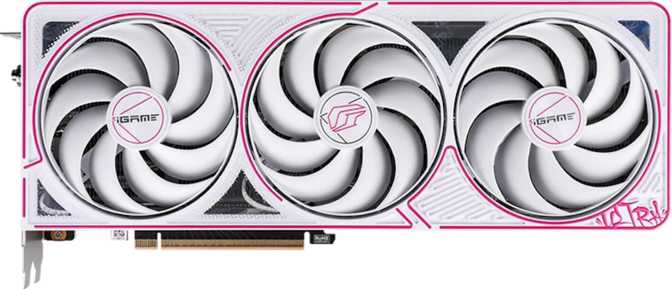
Colorful iGame GeForce RTX 5070 Ultra Z OC — Full Review
Graphics CardsNVIDIA's Blackwell architecture arrived with serious expectations, and the mid-to-high tier of that lineup has become the sweet spot most enthusiast buyers are actually targeting. The Colorful iGame GeForce RTX 5070 Ultra Z OC positions itself squarely in that conversation — aggressive factory overclocking, a premium thermal solution, and the aesthetic flair the iGame line is known for. Whether that combination earns your money is what this review settles.
Editor's Rating
4.5 / 5
Highly Recommended
Design and Build Quality
Physical dimensions, materials, and what to expect before it arrives
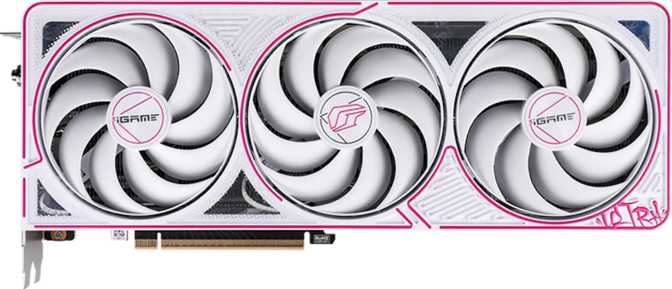
The iGame Ultra Z OC is a large card. At just over 300 mm in length, it commands real estate inside your case — this is not a card you squeeze into a compact mATX build without planning ahead. The 120 mm height means it occupies its slot width comfortably in line with what this performance class demands. Before purchasing, confirm your case's maximum GPU clearance, especially if you're running cable management bars or a front-mounted radiator.
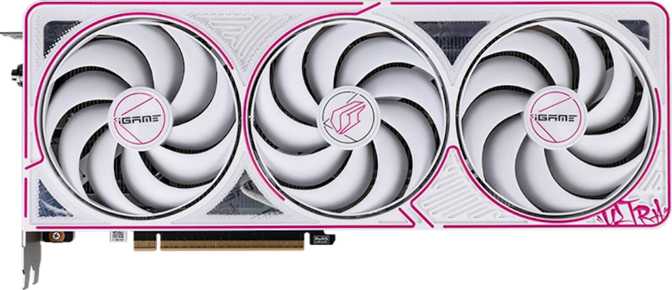
The physical build reflects Colorful's premium positioning within the iGame sub-brand. The shroud uses a multi-fan cooling array appropriate for a card at this thermal envelope, paired with a rigid backplate that adds structural integrity and prevents PCB flex under the card's own weight over time. For a card at this length, a full-cover backplate is the right engineering choice — not a cosmetic one.
RGB lighting is fully present and controllable through Colorful's software suite. Static colors, synchronized effects, or complete darkness are all supported. The overall construction feels deliberate rather than flashy-for-flashy's-sake: built to look striking in a windowed case without sacrificing the cooling surface area that keeps it running cleanly under load.
Physical Specifications
- Card Length
- 300.5 mm
- Card Height
- 120 mm
- Cooling Type
- Air — Multi-Fan Array
- Liquid Cooling Block
- Not Included
- Backplate
- Full-Cover
- RGB Lighting
- Present
- Architecture
- Blackwell
Core Performance
Blackwell architecture analyzed — what the specifications actually deliver in practice
The GPU Architecture
Built on NVIDIA's Blackwell architecture using a 5-nanometer fabrication process, this card packs over 31 billion transistors — a figure associated with server-class hardware just a few years ago. Smaller transistors packed more densely means more computing power delivered per watt compared to previous generations. The efficiency gains are real and show up in both performance and power draw.
Colorful pushes the boost clock to 2,557 MHz — beyond NVIDIA's reference specification. The practical result is faster out-of-the-box performance without any manual tuning on your part. That factory headroom is tangible performance delivered by default.
The architecture deploys 6,144 shader processors paired with 192 texture mapping units and 80 render output units — a balanced configuration for both high-resolution rendering and high-framerate gaming across 1440p and 4K targets.
Throughput in Real Terms
Approximately 31.4 trillion floating-point operations per second is the workload currency of ray tracing, AI upscaling, and modern game engines. More TFLOPS means more headroom for demanding titles at higher settings — and at 4K, headroom is exactly what you need.
Memory — The 12 GB GDDR7 Discussion
Capacity, memory technology, bandwidth, and the honest trade-off buyers need to understand
Capacity and Memory Type
The 12 GB VRAM figure will be the most debated aspect of this card among enthusiasts, so it deserves a direct, honest treatment. Twelve gigabytes is sufficient for the overwhelming majority of games at 1440p and handles most 4K titles cleanly today. It is not unlimited future-proofing — some texture-heavy titles at 4K ultra settings can push toward or past that ceiling — but for the current game library and the near-term roadmap, 12 GB is a workable allocation at this performance tier.
What matters as much as capacity is the memory generation: GDDR7. This is the newest graphics memory technology, operating at effective speeds that represent a generational leap over GDDR6X found in previous-generation cards. The result is a bandwidth figure of 672 GB/s — where previous-generation cards in a comparable tier often operated in the 400–504 GB/s range. Higher bandwidth means the GPU is less starved of data, particularly in high-resolution scenarios where texture assets are large and frequent.
Bus Width and the Bandwidth Trade-off
The memory interface is 192 bits wide. Some buyers see this and compare it unfavorably to wider interfaces on higher-tier cards — and that comparison has merit at the very top of the market. But GDDR7 speed compensates substantially: the effective bandwidth this configuration achieves rivals or exceeds what wider-bus GDDR6X configurations from the previous generation produced.
ECC (Error-Correcting Code) memory support is also present. For pure gaming, this is irrelevant. For professional workloads — 3D rendering, simulation, scientific computation — ECC ensures data integrity under sustained load, broadening the card's practical appeal beyond gaming.
Memory Specifications
| Capacity | 12 GB |
| Memory Type | GDDR7 |
| Effective Speed | 28,000 MHz |
| Bus Width | 192-bit |
| Total Bandwidth | 672 GB/s |
| ECC Support | Yes |
Bandwidth — Generational Context
Key Features Explained
What each technology means for daily use — not raw spec values
DLSS 4 with Frame Generation
Instead of rendering every frame from scratch, DLSS 4's AI generates additional frames between rendered frames — multiplying effective framerates significantly in supported titles. A game running at 60 fps can appear to run at 120 fps or higher with minimal visual compromise. This is Blackwell's most meaningful differentiating feature over all previous GPU generations.
Hardware Ray Tracing
Blackwell handles ray tracing workloads more efficiently than previous generations, meaning the performance penalty of enabling it is lower than it used to be. Real-time reflections, shadow rendering, and ambient occlusion behave physically correctly. Combined with DLSS, running ray tracing at 1440p and at many 4K titles is genuinely achievable without framerate misery.
Display Connectivity
Four simultaneous displays are supported via three DisplayPort outputs and one HDMI 2.1b port. HDMI 2.1b handles 4K at 144Hz and 8K output — fully compatible with modern TVs for couch gaming. No USB-C or DVI outputs are present, which matches current market expectations and is not a meaningful omission for this class of card.
PCIe 5.0 Interface
For current game workloads, the difference between PCIe 5.0 and PCIe 4.0 is negligible — the bandwidth ceiling of even PCIe 4.0 is not a real bottleneck for GPU rendering today. Where PCIe 5.0 matters is forward compatibility: as workloads grow more GPU-compute intensive, the higher headroom ensures this card won't become interface-limited during its useful lifespan.
Resizable BAR Support
Intel Resizable BAR allows the CPU to access the full VRAM pool simultaneously rather than in small chunks. In supported games, this reduces CPU-side bottlenecking with modest but real performance gains — typically 2–8% depending on the title. Enabling it requires a one-time BIOS toggle and is worth doing on any compatible platform.
Factory Overclock Advantage
Colorful's factory overclock pushes the boost clock beyond NVIDIA's reference specification without the stability risks of manual tuning. These clocks are tested and validated against the card's purpose-built thermal solution. You receive measurably faster performance from day one, without touching any software or accepting any warranty trade-offs.
Power Consumption and Thermal Behavior
What your power supply needs to budget for — and how the cooling keeps up
Power Supply Requirements
The card carries a Thermal Design Power rating of 250 watts — the sustained draw under full load that your PSU needs to budget for. At this performance level, 250W is relatively efficient compared to prior-generation top performers that often consumed 300W or more for equivalent or lesser output. The efficiency gains of the Blackwell fabrication process are real and visible here.
Cooling Configuration
The cooling solution is air-based — there is no built-in liquid cooling block or hybrid configuration. Given the 250W TDP, well-designed air cooling is entirely adequate here. Colorful's multi-fan array provides the thermal surface area to manage temperatures under sustained load without drama.
This is not a card that requires exotic case airflow to run well. A standard mid-tower with reasonable front-intake ventilation handles it cleanly. Boutique liquid-cooling case setups aren't necessary — and won't provide meaningful additional benefit unless you plan to push manual overclocking beyond the factory settings.
Who This Card Is For
Matching the right buyer to this specific product — and being direct about the mismatches
Buy This Card If You Are...
-
A 1440p gamer targeting high refresh ratesThis card has more headroom than most current games can saturate at 1440p. That margin translates directly to longevity — you won't be GPU-limited before the platform moves on.
-
Making the move to 4K gamingThe 4K transition is smooth here, especially with DLSS handling the heavy lifting. Mainstream AAA titles run cleanly at high settings at 4K without demanding quality compromises.
-
A content creator running GPU-accelerated workloadsVideo encoding, 3D rendering, and compositing all benefit from the compute throughput and ECC memory support. CUDA acceleration works across DaVinci Resolve, Blender, and Adobe's suite.
-
A competitive gamer wanting maximum framerateDLSS 4 with frame generation means triple-digit framerates in demanding titles are achievable with visual quality settings turned up, at both 1080p and 1440p.
Look Elsewhere If You Are...
-
Gaming at 1080p on a tighter budgetThe cost-to-benefit ratio doesn't favor this card at 1080p. A lower-tier GPU in the current generation will serve you completely fine and leave meaningful money in your pocket.
-
Running VRAM-intensive professional workflowsLarge-scene Unreal Engine development, high-resolution AI model inference, or 8K video with complex color grading may benefit from the 16 GB configurations available on higher-tier cards in the current lineup.
-
Prioritizing XeSS hardware accelerationThis card does not support Intel XeSS via XMX hardware. DLSS is NVIDIA-proprietary, and while AMD FSR runs as a software implementation on any GPU, it won't have the dedicated hardware advantage that DLSS enjoys on this architecture.
Competitive Positioning
How the iGame Ultra Z OC stacks up against logical alternatives at this performance tier
The factory overclock is the primary differentiator between the iGame Ultra Z OC and a reference RTX 5070 — the performance gap is measured in single-digit percentage points, but it arrives pre-validated without the stability trade-offs of manual overclocking. Against the previous generation's 4070 Ti Super, the RTX 5070 trades a wider VRAM buffer for a newer architecture with DLSS 4 frame generation, lower power draw, and Blackwell's efficiency gains — a net positive for most real-world gaming scenarios.
| Feature | iGame RTX 5070 Ultra Z OC | RTX 5070 Reference | RTX 4070 Ti Super (Prev-Gen) |
|---|---|---|---|
| Boost Clock | 2,557 MHz Factory OC | ~2,512 MHz | ~2,610 MHz |
| VRAM | 12 GB GDDR7 | 12 GB GDDR7 | 16 GB GDDR6X |
| Memory Bandwidth | 672 GB/s | 672 GB/s | ~672 GB/s |
| Total TDP | 250 W | 250 W | 285 W |
| Architecture | Blackwell | Blackwell | Ada Lovelace |
| DLSS Version | DLSS 4 Frame Gen | DLSS 4 + Frame Gen | DLSS 3.5 |
| PCIe Generation | Gen 5 | Gen 5 | Gen 4 |
Honest Assessment
Strengths and weaknesses stated without softening — credibility requires both
Where It Excels
At 250W, this card delivers a compute profile that would have required significantly more power from prior-generation hardware. Lower electricity costs over the card's lifespan and a manageable thermal situation that air cooling can handle without drama are direct, practical benefits of the Blackwell fabrication process.
Colorful's factory overclock adds measurable performance without manual tuning or the stability risks that come with aggressive user overclocking. The thermal solution is purpose-built for these specific clocks — you're not taking on any reliability trade-off over a reference card.
The generational memory bandwidth leap substantially compensates for the 192-bit bus width. Effective bandwidth rivals wider-bus configurations from the previous generation, reducing the real-world memory bottlenecks that high-resolution workloads create.
Multi Frame Generation is the most meaningful feature separation between Blackwell and everything that came before it. For buyers who want cinematic quality at high framerates, this is not a minor feature — it fundamentally redefines what's achievable at this performance tier.
Where It Falls Short
NVIDIA maintaining 12 GB at this tier — when the previous generation's equivalent offered 16 GB — is a capacity regression that enthusiasts rightly notice. GDDR7's bandwidth efficiency counters some of this, but future titles pressuring that ceiling more aggressively remain a legitimate long-term concern.
Users with USB-C monitors or VR headsets connecting via USB-C will need an adapter. It's a minor practical inconvenience rather than a deal-breaker for most buyers, but it's worth confirming before purchase if your setup relies on that connector type.
Some texture-heavy titles at 4K with every quality slider maximized can approach the 12 GB boundary. Today's library handles it cleanly in the vast majority of cases, but this is the one area where the card asks for an honest assessment of how long you intend to keep it.
Frequently Asked Questions
Answers to what real buyers search for before committing to this purchase
Final Verdict
Colorful iGame GeForce RTX 5070 Ultra Z OC
The Colorful iGame GeForce RTX 5070 Ultra Z OC is a well-executed implementation of what is already a strong GPU. Blackwell's efficiency gains, GDDR7's bandwidth improvement, and DLSS 4's frame generation combine to make this a meaningfully better card than its price-point predecessor — not just incrementally better. Colorful's factory overclock and thermal solution add genuine value rather than superficial differentiation.
The 12 GB VRAM figure is the one legitimate hesitation, and whether it matters depends entirely on your use case. For 1440p gaming it's a non-issue; for 4K it covers today's library comfortably. For specific professional workloads with heavy texture requirements, evaluate your pipeline against that number before committing.
Buy This Card If:
- You're gaming at 1440p high-refresh or targeting 4K
- DLSS 4 frame generation is a core priority for you
- You want a factory-tuned, thermally competent package
Consider Alternatives If:
- Your workflow consistently requires 16 GB+ VRAM
- You're gaming at 1080p where a lower-tier card suffices
- XeSS hardware acceleration is a specific priority