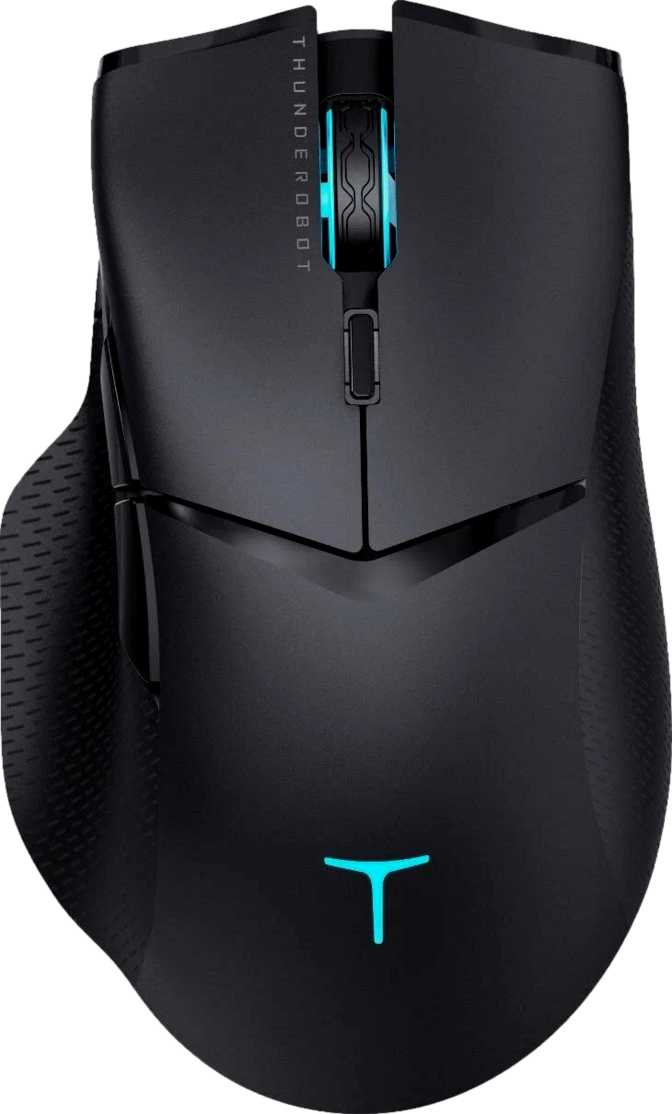
Thunderobot ML703 Pro Review: Flagship Sensor at a Mid-Range Price
MiceCategory Ratings
Key Specifications
-
PixArt PAW3370 SensorFlagship-class optical tracking
-
90-Hour Wireless BatteryUp to 6 weeks per charge
-
2.4GHz + USB Dual ModeZero-latency wireless or wired
-
5 Programmable ButtonsFull custom macro assignment
-
1,000Hz Polling Rate1ms input response interval
What Kind of Mouse Is This, Really?
The Thunderobot ML703 Pro occupies an interesting position in the gaming peripheral market — a wireless gaming mouse built around a sensor that premium brands charge significantly more to access. If you've been frustrated by the choice between budget wireless mice with mediocre sensors and flagship mice at flagship prices, this product is positioned directly at that gap.
Whether it fills that gap cleanly depends on how you use your setup. This review covers everything: what the hardware actually delivers, where the design choices force trade-offs, and who walks away satisfied versus disappointed. Technical buyers and newcomers alike will find the information they need to make a confident decision here.
Design, Shape, and Physical Build
The ML703 Pro is a right-handed ergonomic mouse with a traditional silhouette — the kind that cradles the palm naturally and guides the fingers into position. At 123mm long and 67mm wide, it fits medium to large hands most comfortably. Smaller hands may find the reach slightly extended but won't be fighting the shape.
At 76 grams — roughly the weight of a medium apple — the ML703 Pro lands in territory most competitive players consider ideal. Light enough to reduce fatigue during extended sessions, yet substantial enough to feel controlled and deliberate during fast movements. This is not an ultralight mouse designed to feel weightless; it is a balanced tool optimized for accuracy and endurance simultaneously.
The 39mm arch height produces a mid-profile body that accommodates palm and claw grip most effectively. Fingertip grip users — who prefer a flatter body with the palm fully raised — may find the arch slightly tall for their preferred position. Build quality presents solid matte-finished plastic construction that resists fingerprint smudging and provides reliable friction during motion. RGB lighting is included and adds visual customization without defining the mouse's identity.
Grip compatibility note: Palm and claw grip users will feel at home immediately. Fingertip grip users should handle this mouse before committing — the 39mm arch height may sit too high for that technique.
Physical Specifications
- Length123 mm
- Width67 mm
- Arch Height39 mm
- Weight76 g
- OrientationRight-Handed
- Best Grip StylePalm / Claw
- RGB LightingIncluded
- Adjustable WeightsNot Included
Competitive weight context: most gaming mice fall between 60–95g. At 76g, the ML703 Pro sits comfortably within the sweet spot preferred by most serious players.
The Sensor: Why the PixArt PAW3370 Matters
The most important component in any gaming mouse is the sensor — because all other features rest on whether it tracks accurately. The Thunderobot ML703 Pro uses the PixArt PAW3370, a flagship-class optical sensor that appears in gaming mice from well-regarded manufacturers at considerably higher prices. Its presence here is the primary reason this mouse demands serious consideration.
True 1:1 Tracking
Every physical movement translates directly to cursor movement — no interpolation, smoothing, or acceleration. What your hand does is exactly what the cursor does.
Beyond Human Speed
The sensor tracks faster than any human hand can physically move during gameplay. Even during the most explosive flick shots, you will never outrun the tracking.
Full DPI Range
Covers every sensitivity preference — from precise low-sensitivity aiming to sweeping multi-monitor navigation — without precision loss across the spectrum.
1ms Report Rate
Position updates 1,000 times per second. Cursor motion appears perfectly fluid at any speed, with no perceivable delay between hand movement and screen response.
How Optical Tracking Actually Works
Optical sensors function by photographing the surface texture beneath the mouse thousands of times per second and computing movement between those frames. The quality of this process determines whether your cursor moves exactly where your hand moved, or whether it drifts, skips, or introduces artificial curves into your path.
The PAW3370 carries no built-in acceleration — the cursor moves at a fixed ratio to your hand regardless of swipe speed. No prediction algorithm guesses your next position. No smoothing filter rounds out abrupt direction changes. For competitive gaming, these properties are not optional extras — they are the baseline requirement for trusting your equipment.
What DPI Actually Means for You
DPI determines how far the cursor travels on screen relative to physical mouse movement. High DPI means a small movement creates a large cursor jump; low DPI means the cursor responds more gradually. This is a calibration preference — not a quality measurement.
Most competitive FPS players operate between 400 and 3,200 DPI, often at the lower end for precise aim. Higher values serve ultra-wide setups, multi-monitor configurations, and productivity workflows where covering screen space matters more than pinpoint precision.
For beginners: Don't chase high DPI numbers. The best DPI is whichever value feels natural for your arm movement and screen size. The ML703 Pro's range simply ensures it won't be your limiting factor.
Wired or Wireless: The ML703 Pro Does Both
The ML703 Pro ships with dual connectivity — 2.4GHz wireless and a USB cable — both fully functional and equal in gaming performance. Understanding the difference between these modes, and when to use each, is important context for anyone who has previously avoided wireless mice.
2.4GHz Wireless
This is not Bluetooth. 2.4GHz dedicated gaming wireless uses a small USB dongle plugged into your PC and communicates on a dedicated radio frequency. The connection is stable, low-latency, and functionally equivalent to wired USB input for gaming purposes.
The latency concerns that previously made wireless mice unacceptable for competitive play were valid for older technology — not for this type of connection. At the 1,000Hz polling rate the ML703 Pro operates at, you will not perceive any difference compared to wired play.
Wired USB Mode
The USB cable serves three practical purposes: charging the battery during play, operating as the primary connection when the wireless dongle isn't available, and providing a fallback in rare environments where 2.4GHz interference is a concern.
The most important benefit is that you can continue playing while charging. A low-battery warning mid-match never means stopping — plug in and keep playing. Performance in wired mode is identical to wireless in every respect.
Battery Life: One of the ML703 Pro's Strongest Arguments
Battery endurance is where the ML703 Pro makes one of its most compelling cases — competing with products at considerably higher price points on the single metric that most wireless buyers care about most.
Far Above Category Norms
Most mid-range wireless gaming mice offer 40 to 70 hours. The ML703 Pro's runtime competes with flagship products at significantly higher prices — making it an outlier in the best possible sense.
Play While Charging
Connecting the USB cable allows continued use with zero interruption. A low-battery notification during a competitive session never forces a pause — the mouse operates fully while charging.
Internal Rechargeable
No AA batteries to purchase or dispose of. The internal cell recharges via USB — no ongoing cost, no disposable waste, no battery-swapping workflow to manage.
Charging as a Background Task
At typical usage levels, charging becomes a biweekly ritual at most. Battery state simply isn't a daily concern — which is exactly what wireless peripherals should aspire to.
Who This Mouse Is Built For — and Who Should Look Elsewhere
The ML703 Pro has a clearly defined ideal buyer. Knowing whether you fit that profile is the most actionable guidance this review can provide.
Best Suited For
-
FPS and Competitive PlayersThose who prize tracking accuracy and wireless freedom will find the PAW3370 sensor and 2.4GHz connection deliver exactly the foundation their gameplay demands.
-
Daily Gamers (2+ Hours Per Session)At two to three hours of daily play, one charge lasts four to six weeks. Battery management simply stops being a part of the experience.
-
Right-Handed Palm or Claw Grip UsersMedium to large hands using palm or claw grip will find the ergonomic shape intuitive from the first session — no adaptation period required.
-
Performance-Aware Budget BuyersBuyers who recognize the PAW3370's quality tier get flagship-class tracking without paying the premium brand tax. That gap is where the ML703 Pro's value lives.
Not Recommended For
-
Left-Handed PlayersThe ergonomic shape is designed exclusively for right-hand use. There is no ambidextrous or left-handed version of this form factor.
-
Small-Hand or Fingertip Grip UsersThe 39mm arch height and 123mm body may feel oversized for strict fingertip grip, which works best with flatter, more compact mouse bodies.
-
Multi-Machine UsersNo onboard memory means custom settings don't follow the mouse. If you regularly move between computers and need your configuration to travel, look for an alternative with onboard profiles.
-
Complex Multi-Profile UsersStreamers and players who maintain separate macro setups for multiple games will find the absence of a profile switching button a recurring friction point.
How It Compares to the Competition
The wireless gaming mouse market divides into three tiers: budget products that compromise on sensor quality, mid-range options with decent but not flagship sensors, and premium products from major brands where name equity drives pricing as much as hardware. The ML703 Pro positions itself in the mid-range bracket with a sensor that belongs in the premium tier — this is the core of its value argument.
Most alternatives in this price range use a sensor one tier below the PAW3370, or pair a comparable sensor with a shorter battery life. The ML703 Pro's main competitive concession is onboard memory — a gap most competing enthusiast-tier products do not share.
| Feature | ML703 Pro | Typical Mid-Range Wireless | Premium Brand Wireless |
|---|---|---|---|
| Sensor Class | Flagship (PAW3370) | Mid-Tier Optical | Flagship / Proprietary |
| Battery Life | ~90 hours | 40–70 hours | 70–95 hours |
| Onboard Profiles | None | 1–5 profiles | 1–5 profiles |
| Weight | 76g | 80–95g | 61–80g |
| Use While Charging | Yes | Varies | Usually Yes |
| Dual Connectivity | Yes | Varies | Usually Yes |
| Tilt Scroll Wheel | No | Rarely included | Some models |
Competitive takeaway: The ML703 Pro's principal edge is sensor quality and battery endurance at its price point. Where it concedes ground is onboard memory — a gap that competing products with even a single saved profile address for multi-machine users.
An Honest Assessment
Every product has a case for it and a case against it. Here is both, without hedging.
Where It Excels
-
Flagship Sensor at Mid-Range PricingThe PAW3370's presence transforms the value calculation. Users spending significantly more would expect this tracking quality — its inclusion here is the headline argument.
-
Category-Leading Battery Endurance90 hours is not a marginal improvement — it places the ML703 Pro in a class that includes products at noticeably higher prices, regardless of brand.
-
Dual Connectivity with a FailsafeThe ability to drop into wired mode at any moment — for charging or as a backup — means the wireless experience has a reliable safety net built in.
-
Well-Judged, Competitive Weight76 grams is light enough for rapid, precise movement without feeling insubstantial. It conveys purpose without contributing to session fatigue.
-
Play-While-Charging CapabilityA low battery state is never a session-ending event. Plug in and keep playing — no degradation, no interruption, no drama.
Where It Falls Short
-
No Onboard Memory — The Biggest GapSettings don't travel with the mouse. This is unusual at this sensor tier and the clearest limitation relative to competing products at similar prices.
-
Right-Hand Only ShapeLeft-handed players are excluded entirely. There is no ambidextrous version of this mouse form factor available.
-
No Tilting Scroll WheelFor competitive gaming this is irrelevant. For productivity-heavy users in horizontal-scroll workflows — wide spreadsheets, panoramic editing — the absence is a daily friction point.
-
1-Year Warranty PeriodOn the shorter end of the gaming peripheral market. Some competing products offer two-year coverage. For heavy daily users, long-term peace of mind is a factor to weigh.
-
Limited Brand Recognition Outside AsiaThunderobot has less community presence and support infrastructure than established brands in Western markets. The hardware is strong; the brand ecosystem less so.
Questions Real Buyers Ask
The answers to the questions buyers most often search for before purchasing this mouse.
Final Verdict
The Thunderobot ML703 Pro makes a compelling case for buyers who care about sensor quality and wireless battery life above all else — and don't want to pay flagship prices for those priorities. The PixArt PAW3370 is not a concession; it is a deliberate choice that experienced buyers will recognize immediately. Pairing it with close to four continuous days of battery runtime and a dual-mode connection that keeps the mouse operational while charging creates a wireless experience that simply doesn't require managing.
The trade-off is clear: no onboard memory makes this mouse perform at its best as a single-machine dedicated peripheral. Know that going in, and the value case is strong. Overlook it, and frustration follows.
Buy It If You...
- Have a dedicated single-PC gaming setup
- Understand and value what a flagship sensor delivers
- Want wireless freedom without daily charging obligations
- Use right-hand palm or claw grip on medium to large hands
Skip It If You...
- Frequently move between multiple computers
- Are left-handed or use strict fingertip grip
- Rely on multiple saved profiles for different games
- Need a tilting scroll wheel for heavy productivity use