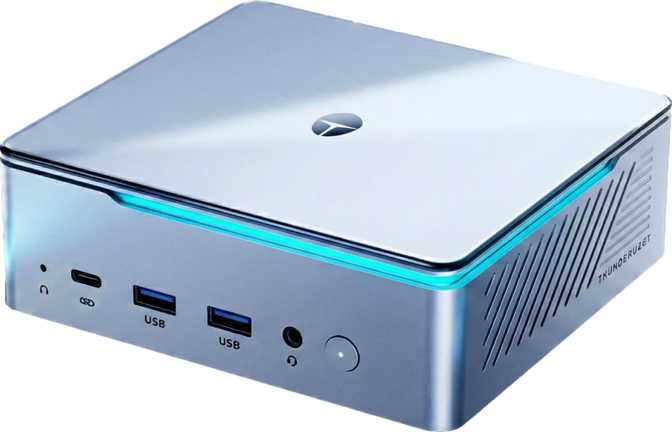
Thunderobot Mix Pro II Full Review – Compact Power Done Right
Mini PCs5.4 GHz
Turbo Boost Clock
64 GB
DDR5 RAM
1 TB
NVMe SSD
34,431
PassMark Score
Compact PCs occupy a peculiar middle ground in the market: too powerful to dismiss as casual machines, but too constrained by size to compete with full desktop towers. The Thunderobot Mix Pro II lands squarely in that space — and it makes a genuinely compelling argument for why that middle ground deserves more respect than it usually gets.
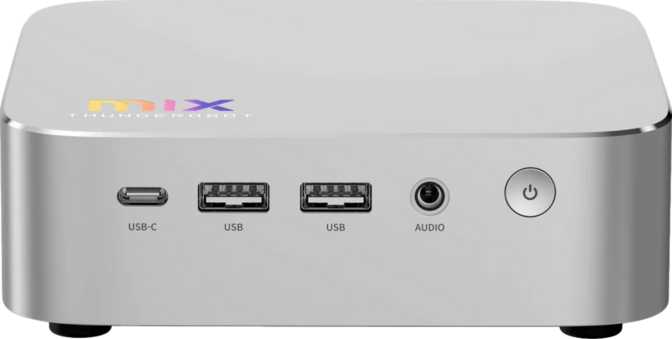
This is a Micro-ATX form factor machine powered by a laptop-class processor soldered directly to the board. That last detail shapes everything about who should buy this machine and who should look elsewhere. What you get in return for accepting a non-upgradeable CPU is a system that punches well above its footprint — with a generous memory configuration, a capable integrated GPU architecture, and a connectivity suite that embarrasses machines twice its size.
Design and Build Quality
A Machine That Owns Its Size
The Micro-ATX chassis strikes the balance between "small enough to live on a desk" and "large enough to breathe." Micro-ATX is not the most compact form factor available, but the extra volume pays real dividends: there is room for adequate thermal management around a 45-watt processor, and the port layout is not the compromised afterthought you see on truly tiny mini PCs.
The overall build impression is that of a machine designed for permanence. This is not a travel PC or a pocketable media box — it is a compact primary workstation intended to sit behind or beside a monitor and stay there. The lack of a VGA connector and the absence of legacy USB 2.0 ports signals that Thunderobot designed this for modern peripheral ecosystems rather than backward-compatibility duty.
- Form FactorMicro-ATX
- CPU SocketBGA 2049 (Soldered)
- VGA OutputNone
- USB 2.0 PortsNone
- 3.5mm Audio JackYes
- S/PDIF OutputNone
The Processor: Hybrid Architecture at 45 Watts
Performance and Efficiency Cores Working in Concert
The CPU uses a hybrid core design — a combination of higher-clocked performance cores and more power-efficient cores. In practice, this means the system is intelligent about workload distribution: demanding tasks like video rendering or compiling code get routed to the faster cores, while background processes run on the efficiency cores without burning unnecessary power.
The total of 14 physical cores operates across 16 threads, with the performance cluster reaching up to 5.4 GHz under boost. That boost figure matters for single-threaded workloads — applications that can only use one core at a time, such as legacy software, certain simulations, and many everyday productivity tools.
Thermal Design and Sustained Performance
A 45-watt TDP means this processor sustains significantly more power than a standard ultrabook chip — which typically operates at 15–28 watts — without requiring the elaborate cooling of a desktop part running at 65–125 watts. The thermal ceiling sits at 110°C, a temperature the chip can reach before throttling. In a well-ventilated Micro-ATX chassis, hitting that limit under normal use is unlikely.
The 24 MB of L3 cache allows the processor to keep more frequently accessed data close at hand, reducing the memory latency penalty for large spreadsheet calculations, code compilation, and sizeable dataset processing. This cache depth provides a tangible, if subtle, throughput advantage in those specific workflows.
- ArchitectureHybrid (Big.LITTLE)
- Total Cores14 (6P + 8E)
- Threads16
- Turbo Boost5.4 GHz
- TDP45W
- L3 Cache24 MB
- Thermal Limit110°C
- Instruction SetsAVX2, AES, FMA3+
- 64-Bit SupportYes
Graphics: The Intel Arc 140T Explained
Not a Compromise — Up to a Point
The integrated GPU here is the Intel Arc 140T, and it deserves a more honest introduction than the phrase "integrated graphics" typically receives. This is not the graphics solution found in a basic office laptop. The Arc 140T is a purpose-built GPU architecture, not a salvaged slice of a general-purpose chip, and it shows in the specification profile.
- Shader Units1,024
- Execution Units128
- Texture Units (TMUs)64
- Render Outputs (ROPs)32
- Boost Clock2,350 MHz
- Process Node3 nm
- DirectX12 Ultimate
- OpenGL4.6
- OpenCL3.0
- PCIe VersionGen 5
- Max Displays4
With 1,024 shader units, 64 texture mapping units, 32 render output units, and 128 execution units operating at a boost clock of 2,350 MHz, this GPU is meaningfully more capable than the older Intel Xe graphics found in previous-generation ultrabooks. It supports DirectX 12 Ultimate — the same API standard required by the latest PC games — along with OpenGL 4.6 and OpenCL 3, which matters for creative and compute workloads beyond gaming.
The 3-nanometer process node means more performance per watt and less heat per unit of computation — directly relevant in a compact chassis where thermal headroom is finite. The GPU drives up to four displays simultaneously. Pair this with HDMI 2.1, the DisplayPort, and the USB4 40 Gbps port and you have a machine that can realistically feed a demanding multi-monitor productivity setup.
Gaming Expectations: Set Them Honestly
The Arc 140T can run modern games — but with expectations properly calibrated. At 1080p with reduced quality settings, many titles will run playably. Competitive and esports titles with lighter graphical demands will run well. Demanding recent releases at high quality settings will not. This is not a machine for someone whose primary goal is AAA gaming at maximum settings.
Memory and Storage
Built With Tomorrow's Workloads in Mind
64 Gigabytes — and That's the Point
The Mix Pro II ships with 64 GB of DDR5 memory in a dual-channel configuration. Mainstream laptops and compact desktops typically ship with 16 to 32 GB. Doubling that baseline has direct practical consequences: large browser sessions, virtual machines, video editing timelines with uncompressed footage, and professional applications that reward abundant RAM all benefit immediately.
DDR5 is the current-generation memory standard, offering higher bandwidth per channel than DDR4. The platform supports memory speeds up to 8,400 MHz, and the system can be expanded to a maximum of 128 GB — a future upgrade path that most users will never exhaust, but it is there.
Storage: Fast From the Start
The 1 TB NVMe SSD connects through the PCIe bus rather than the older SATA interface, delivering read and write speeds several times faster than a SATA SSD. Applications launch quickly, large file transfers are less painful, and system responsiveness under load stays sharp.
One terabyte suits most users who manage their libraries thoughtfully — a full operating system installation, a suite of creative applications, and a working project library fit comfortably. Users with large game libraries or extensive raw media archives should plan for external storage or a NAS.
Connectivity: Where the Mix Pro II Genuinely Excels
A Port Layout That Means Business
The connectivity suite is one of the most impressive aspects of the Thunderobot Mix Pro II. Both a USB4 40 Gbps port and a dedicated Thunderbolt 4 port are present simultaneously — an unusual combination in a compact system that provides two independent high-bandwidth connections for demanding peripheral setups at the same time.
USB and High-Speed Ports
Display, Network, and Audio
Why Dual Ethernet Is More Than a Spec
Two wired network connections enable link aggregation for doubled bandwidth on a compatible switch, failover redundancy if one connection fails, or simultaneous connection to two separate networks — a practical feature for developers, home lab users, and professionals who regularly work with network-segmented environments.
Benchmark Performance in Context
What the Numbers Actually Mean for Day-to-Day Use
| Benchmark | Score | Real-World Context |
|---|---|---|
| PassMark (Multi-Core) | 34,431 | Competitive with recent mid-tier desktop CPUs — strong sustained parallel throughput for this form factor |
| PassMark (Single-Core) | 4,475 | Strong per-core performance — everyday applications and legacy software feel fast and responsive |
| Geekbench 6 (Multi-Core) | 14,803 | Handles sustained parallel workloads with confidence — video exports, compilation, and batch processing |
| Geekbench 6 (Single-Core) | 2,611 | Fast single-thread execution — applications that only use one core at a time respond fluidly |
The overclocked PassMark result (34,411) is virtually identical to the stock score. The locked multiplier confirms the processor runs at its factory-tuned thermal limits — expected and appropriate for a compact system where cooling has been optimized for a specific power envelope. There is no performance left on the table from overclocking.
Who Should Buy the Thunderobot Mix Pro II
Matching the Machine to the Right Buyer
- Creative professionals — video editors, graphic designers, and audio producers who need real processing power without a tower footprint
- Multi-monitor productivity users — four simultaneous display outputs and Thunderbolt 4 with USB4 make this a natural hub for demanding desk setups
- Developers and engineers — 64 GB of RAM handles multiple virtual machines, Docker containers, and large codebases; dual Ethernet enables complex local network configurations
- Secondary system buyers — a capable compact companion to a primary gaming rig for office work, media, or light creative tasks
- Light and casual gamers — the Arc 140T handles less demanding titles well enough that gaming is genuinely on the table
- Dedicated gamers — anyone whose primary goal is playing demanding modern titles at medium-to-high settings needs a discrete GPU, which this system cannot accept
- Users who want CPU upgradeability — the BGA-soldered processor is permanent; the system you buy is the system you keep, CPU-wise
- Heavy 3D rendering or simulation — workflows that saturate dozens of cores for hours benefit more from a workstation-class desktop with a higher sustained wattage ceiling
- Raw compute-first buyers — a desktop tower CPU at a similar price point will outperform in pure multi-core benchmarks that can sustain maximum wattage indefinitely
How It Compares to the Alternatives
Competitive Positioning in the Compact PC Category
| Feature | Thunderobot Mix Pro II | Intel NUC-Style Mini PC | Budget Micro-ATX Compact |
|---|---|---|---|
| CPU Tier | 45W hybrid, 14 cores | 28W mobile, 8–12 cores | 65W desktop quad/hex-core |
| Integrated GPU | Arc 140T | Iris Xe (basic) | UHD / RDNA (varies) |
| RAM Installed | 64 GB DDR5 | 16–32 GB DDR4/5 | 16–32 GB DDR4 |
| USB4 / Thunderbolt 4 | Both present | Often one or neither | Rarely present |
| Dual Ethernet | Occasionally | ||
| Max Display Outputs | 4 | 2–3 | 2 |
| CPU Upgradeability | Soldered | Soldered | Sometimes possible |
Honest Assessment: Strengths and Limitations
Where It Delivers
The Thunderobot Mix Pro II gets a lot of things right in a category where machines often get one thing right at the expense of everything else. The memory specification alone — 64 GB DDR5 in a Micro-ATX compact chassis — signals that this machine was designed by people who understand how professional workloads actually behave. Memory pressure is the silent killer of multitasking performance, and the Mix Pro II eliminates that bottleneck before it starts.
The connectivity design is thoughtful rather than merely complete. Dual Ethernet reflects an understanding that professionals sometimes need network segmentation or link aggregation. Thunderbolt 4 alongside USB4 40 Gbps reflects an understanding that high-bandwidth peripheral ecosystems are increasingly central to creative and development workflows.
The Arc 140T is a genuine generational step beyond what "integrated graphics" has historically implied. It handles GPU-accelerated creative workloads better than most alternatives at this size and thermal budget, and supports the full modern graphics API stack including DirectX 12 Ultimate.
Where It Asks for Compromise
The processor is permanent. Long-term platform longevity depends entirely on how relevant the CPU remains as software requirements evolve. Buyers who want the option to swap in a faster chip in two or three years will need to look elsewhere from the start.
The absence of a discrete GPU slot means gaming performance will always be bounded by what the Arc 140T can achieve. That boundary is higher than expected for an integrated solution, but it remains well below any dedicated mid-range GPU card. Users who anticipate needing more graphics power have no upgrade path within this chassis.
The 3.5mm audio jack covers basic audio needs, but the absence of S/PDIF digital optical output means audiophiles routing through a high-end DAC or AV receiver will need an adapter or external solution. A minor limitation, but worth knowing if your audio chain depends on it.
Questions Real Buyers Ask
Answers to the most common pre-purchase concerns
Final Verdict
The Thunderobot Mix Pro II is the compact PC for people who are tired of compact PCs asking them to compromise. It delivers a CPU configuration that sustains real performance under load, a memory specification that eliminates multitasking friction, and a connectivity lineup that handles demanding peripheral setups without adapters and workarounds.
The Arc 140T GPU punches meaningfully above the "integrated graphics" label that might otherwise cause buyers to pass it over, and the combination of dual Ethernet, Thunderbolt 4, and USB4 40 Gbps makes this a credible hub for a fully professional workstation setup in a fraction of the desk space a tower demands.
The locked CPU and the absence of any discrete GPU slot are real trade-offs, and they matter for specific buyer profiles. If GPU upgradeability or CPU replaceability are requirements, this machine will disappoint. For the right buyer — a creative professional, developer, or power user who wants a capable compact primary desktop and can live without discrete GPU gaming performance — the Thunderobot Mix Pro II makes a strong, coherent case for itself. It knows what it is, delivers on that identity thoroughly, and wastes almost nothing in the process.