PowerColor Radeon AI Pro R9700S: Full Review for AI Workstation Users
Graphics CardsKey Specifications at a Glance
What This Card Actually Is — And Who It Is For
Most graphics cards get reviewed through the lens of gaming frame rates. The PowerColor Radeon AI Pro R9700S demands a different conversation entirely. Built on AMD's RDNA 4.0 architecture and carrying 32 gigabytes of error-corrected memory, this card is engineered for workloads reshaping how professionals use compute hardware: AI model inference, machine learning experimentation, large-scale content creation, and technical visualization.
It wears the "AI Pro" designation honestly. This is not a gaming card dressed in professional packaging — the memory configuration, ECC support, and double-precision compute capability make its priorities unmistakably clear from the specification level up. Understanding where it excels and where it makes deliberate trade-offs is the whole point of this review.
Design and Build: Understated, Professional, Purposeful
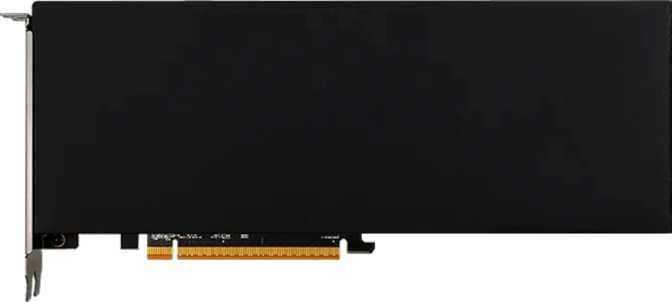
The R9700S carries a notably compact footprint for a card with this level of capability. At 267mm long and just over 111mm tall, it occupies a smaller physical envelope than many high-end consumer GPUs competing at the same performance tier. This matters in professional workstation contexts where chassis clearance, airflow management, and multi-card configurations are real planning concerns.
There is no RGB lighting anywhere on this card. For enthusiast builds centered on aesthetics, that is a known omission. For the target user — a data scientist, a creative professional, or an engineer running a workstation — the absence of decorative lighting is a practical feature, not a shortcoming. Professional environments value visual neutrality, and the R9700S delivers exactly that.
Cooling is handled through an air-based solution. The card's thermal ceiling sits at 300 watts, which demands adequate case ventilation. The physical dimensions suggest a well-engineered cooling stack rather than the bloated triple-fan assemblies that dominate top-tier gaming cards.
Physical Profile
| Length | 267.2 mm |
|---|---|
| Height | 111.2 mm |
| Cooling Type | Air (Active) |
| RGB Lighting | None |
| Aesthetic Profile | Professional / Neutral |
| Warranty | 2 Years |
Core Architecture: What RDNA 4.0 at 4nm Actually Means
The foundation of this card's capability is AMD's RDNA 4.0 architecture, manufactured on a 4-nanometer process node. A smaller manufacturing node means more transistors in a given physical space, translating to improved energy efficiency and greater raw compute density. The R9700S houses approximately 53.9 billion transistors — a figure that reflects the sheer computational complexity packed into this chip.
That density translates directly into the card's compute throughput. Nearly 48 TFLOPS of single-precision floating-point performance is the primary metric for AI inference and general compute tasks. Many workstation GPUs from previous generations that cost significantly more measured in the low-to-mid teens of TFLOPS. The jump to this range marks a meaningful generational leap.
Clock Speeds and What They Mean in Practice
The GPU runs a base clock around 1,660 MHz and can boost to 2,920 MHz under load. The wide spread between base and boost is characteristic of modern power-aware architectures that scale aggressively when thermal headroom permits. For sustained workloads like extended AI inference or long rendering jobs, sustained clock stability matters more than peak boost numbers — and the thermal design here is built around that reality.
The card also supports Double Precision Floating Point (DPFP) operations. Double precision matters in scientific computing, engineering simulation, and specific AI training pipelines where numerical accuracy at the bit level is non-negotiable. Many consumer-grade GPUs — even powerful ones — artificially limit double-precision performance. The R9700S does not.
Memory: The Defining Specification
If one specification separates the R9700S from everything else in its class, it is the memory configuration. This card carries 32 gigabytes of GDDR6 memory on a 256-bit bus, with an effective memory speed of 20,000 MHz and a peak bandwidth approaching 645 gigabytes per second.
32GB Capacity
Running large language models locally, fine-tuning foundation models, or processing high-resolution imagery through diffusion pipelines all share one constraint: GPU memory capacity. The R9700S's 32GB ceiling means users can load substantially larger models in full precision, work with higher batch sizes during training, or process wider context windows without offloading to slower system memory. Most professional-class cards in the previous generation topped out at 16–24GB — the jump to 32GB fundamentally changes which workloads fit entirely within GPU memory.
ECC Memory
Error Correcting Code memory detects and corrects single-bit memory errors in real time, preventing silent data corruption during long computational jobs. This feature is almost exclusively found on professional and datacenter hardware. For AI training runs that execute over hours or days, or for scientific simulations where numerical integrity is mandatory, ECC is not a luxury — it is a requirement. Consumer gaming cards universally omit it. The R9700S includes full ECC support as a hardware-level capability.
~645 GB/s Bandwidth
Memory bandwidth determines how fast data moves between the GPU's compute units and its memory pool. For AI workloads, bandwidth is frequently the primary bottleneck — not raw compute. A card with high TFLOPS but constrained bandwidth will stall, waiting for data. The R9700S's bandwidth aligns well with its compute throughput, meaning both halves of the equation are matched. Compared to the 350–500 GB/s typical of prosumer 16GB cards, this figure represents a substantial practical advantage for data-intensive pipelines.
Memory configuration summary: 32GB GDDR6 • 256-bit bus • ~20,000 MHz effective speed • ~645 GB/s peak bandwidth • Full ECC support enabled
Display and Connectivity: A Professional-Only Setup
The port configuration on the R9700S makes one thing immediately clear: this card was designed for professional workstations, not multimedia home setups. It carries four DisplayPort outputs and zero HDMI ports. For users connecting to standard consumer televisions or HDMI-only monitors, this will require an active adapter. For workstation users driving multiple professional-grade monitors — which are almost universally DisplayPort — this is exactly the right configuration.
Up to four simultaneous displays are supported, which serves multi-screen creative workflows, monitoring dashboards, and visualization setups without additional hardware. There are no USB-C ports and no DVI connections. The simplicity of four identical DisplayPort outputs reflects a purpose-built choice rather than an oversight.
No HDMI port is present. Buyers connecting to consumer televisions or HDMI-only monitors will need an active DisplayPort-to-HDMI adapter. Passive adapters may not function reliably — only active adapters handle the signal conversion correctly.
Port Configuration
| Output Type | Count | Available |
|---|---|---|
| DisplayPort | 4 | Yes |
| HDMI | 0 | None |
| USB-C | 0 | None |
| DVI | 0 | None |
| Max Simultaneous Displays | 4 | Yes |
Software Ecosystem and API Support
The R9700S's software compatibility stack covers the full range of professional and compute use cases. Each supported API unlocks a different category of workflow, so understanding what they actually enable matters more than listing version numbers.
The current ceiling of the DirectX specification. Any rendering or simulation pipeline built on modern Windows APIs is fully supported, including hardware-accelerated ray tracing through the DXR pipeline.
Full OpenGL 4.6 support ensures compatibility with professional CAD, engineering, and scientific visualization applications that rely on OpenGL rather than DirectX — a common requirement across the entire category.
Opens the card to general-purpose GPU computing frameworks. Researchers and engineers using Python-based AI tooling through AMD's ROCm platform will find OpenCL 2.2 compatibility a prerequisite for many core workflows.
Ray tracing is present at the hardware level. Beyond real-time gaming use, it has direct applications in architectural visualization, product rendering, and virtual production where physically accurate light simulation is required.
Smart Access Memory allows a compatible AMD Ryzen processor to access the full GPU memory pool directly, reducing transfer latency and delivering measurable performance gains on AMD-based workstations.
Unlike consumer GPUs that throttle double-precision throughput, the R9700S supports it without artificial limits. This unlocks scientific computing, engineering simulation, and precision-critical AI training pipelines.
DLSS is an NVIDIA-exclusive upscaling technology. XeSS's XMX hardware variant is Intel-specific. Neither is relevant to AMD hardware. AMD's FSR upscaling is implemented at the driver and application level and is not a hardware-level specification. This is standard for all AMD GPUs and is not a meaningful limitation for the R9700S's target audience.
Power and Platform Requirements
The R9700S has a 300-watt thermal design power rating. Under full sustained load the card will consume up to 300 watts, with brief excursions potentially beyond that during transient spikes. A workstation housing this card needs a power supply with genuine headroom: accounting for the CPU, storage, and other components, a 750–850 watt unit is the practical minimum for a stable, long-running build.
The card connects through PCIe 5.0, the latest generation of the interface. Current high-end desktop and workstation motherboards with PCIe 5.0 x16 slots will deliver the maximum available bandwidth. On PCIe 4.0 platforms, the card functions fully — PCIe is backward compatible — but the interface bandwidth ceiling is halved. For most AI and visualization workloads, this is unlikely to create a perceptible bottleneck.
Real-World Use Scenarios
The R9700S has a well-defined target audience. Understanding whether your workload belongs in that group — or clearly outside it — will save a purchase decision from expensive mismatch.
This Card Is an Excellent Fit For
-
Local AI Inference and Development Researchers and engineers running large language models, image generation models, or multimodal AI systems locally. The 32GB ECC pool directly removes the VRAM ceiling that forces compromises on most alternatives.
-
AI Model Fine-Tuning Fine-tuning foundation models on prosumer hardware requires holding large parameter sets in GPU memory simultaneously. The R9700S handles model sizes that overflow cards with smaller pools.
-
Professional Content Creation 3D artists, VFX compositors, and architects working with GPU-accelerated renderers benefit from both the raw compute and the large memory pool for complex scenes, high-resolution textures, and volumetric data.
-
Scientific and Engineering Computation DPFP support and ECC memory make this card legitimate for research workflows requiring numerical precision that consumer GPUs cannot reliably deliver.
-
Multi-Display Workstation Setups Four DisplayPort outputs with simultaneous display support covers most professional multi-monitor configurations without dongles or splitters.
This Card Is Not the Right Choice For
-
Pure Gaming Builds No HDMI output, no RGB, and a value proposition not tuned around gaming frame rates. A consumer-targeted Radeon RX card delivers better practical gaming value at lower cost.
-
Budget-Conscious Buyers The R9700S is a professional-class product. Its memory capacity, ECC support, and DPFP capability place it in a price bracket that only makes sense for workloads that actively use those features.
-
HDMI-Only Monitor Setups Without an active DisplayPort-to-HDMI adapter, this card cannot connect to HDMI displays. Buyers should account for this before purchase — it is a hard incompatibility, not a driver issue.
-
Workloads That Fit Comfortably in 16GB If your existing pipeline never strains against a 16GB VRAM limit, the R9700S's premium over smaller-capacity cards is not justified. The upgrade pays off when memory capacity is the active constraint.
How the R9700S Compares to Its Logical Alternatives
The R9700S does not compete in the gaming GPU market. Its logical comparisons are the category of prosumer 16GB cards at the tier below and professional 24GB-class workstation cards it is challenging from below on price while exceeding on raw throughput.
| Specification | PowerColor Radeon AI Pro R9700S | Typical Prosumer 16GB | Professional 24GB Class |
|---|---|---|---|
| VRAM Capacity | 32 GB | 16 GB | 24 GB |
| ECC Memory | Yes | Rarely | Typically |
| DPFP Support | Yes | No | Yes |
| Memory Bandwidth | ~645 GB/s | ~350–500 GB/s | ~430–576 GB/s |
| Compute (TFLOPS) | ~47.8 | ~20–35 | ~30–40 |
| Display Outputs | 4× DisplayPort | Mixed (incl. HDMI) | 4× DisplayPort |
| PCIe Generation | 5.0 | 4.0 | 4.0–5.0 |
| Primary Use Case | AI / Workstation | Gaming / Light WS | Workstation / Viz |
Honest Assessment: Strengths and Trade-offs
Where It Genuinely Excels
The R9700S makes a compelling case in any workload where memory capacity and AI compute throughput are the limiting factors. The 32GB GDDR6 pool with ECC support is not a marketing differentiator — it is a functional requirement for the work this card targets, and very few alternatives at this tier offer it at all.
The DPFP support is quieter than the VRAM headline but arguably equally significant. Professionals who have hit the soft wall of consumer GPUs — where double-precision throughput is deliberately throttled — will find this card's full double-precision capability a meaningful unlock for scientific and precision compute work.
The move to PCIe 5.0, combined with an architecture built on a 4nm node, gives this card considerable runway as platforms and software pipelines evolve. Buyers are not purchasing aging infrastructure — they are buying into AMD's current generation.
The compact physical size relative to its performance tier is a practical bonus for workstation builders managing chassis constraints. And the absence of RGB is simply right for the professional environment it targets.
Trade-offs to Understand Before Buying
The 300W power draw is substantial and cannot be understated for system planning. This is not a card to install in an older workstation without auditing the power supply and cooling infrastructure first. It demands both — and the builder is responsible for providing them.
The absence of any HDMI port will catch buyers off-guard if they do not read carefully. It is the correct call for the target professional market, but it is a hard incompatibility with a large portion of the display market. Active adapters solve this, but they add a purchase and a failure point.
AMD's ROCm compute ecosystem, while expanded substantially with recent RDNA generations, still trails NVIDIA's CUDA in terms of framework breadth and developer tooling familiarity. Buyers whose specific frameworks require CUDA-only features should verify ROCm compatibility thoroughly before committing.
The 2-year warranty period is workmanlike rather than generous for a professional product. Buyers deploying this card in commercial production workflows may want to assess third-party extended coverage given the card's role in critical pipelines.
Common Questions Before Buying
PowerColor Radeon AI Pro R9700S
A professional AI compute card with a clear and honest purpose
The PowerColor Radeon AI Pro R9700S is a professional compute card that has a clear and honest purpose: it gives AI developers, researchers, and workstation power users access to substantial GPU memory and compute throughput at a tier that, until recently, required significantly higher expenditure in the dedicated workstation GPU market.
The 32GB ECC memory pool is the headline feature, and it earns that status. For the workflows where VRAM capacity is the hard constraint — and in AI development, it frequently is — this card removes a ceiling that frustrates users on smaller configurations. The DPFP support and OpenCL compatibility extend its legitimacy into scientific and engineering compute territory that consumer cards cannot credibly address.
Recommended For
- AI engineers and researchers running local inference or fine-tuning workflows
- Machine learning practitioners where 16–24GB VRAM is the active bottleneck
- 3D and VFX professionals working with GPU-accelerated render pipelines
- Engineers and researchers requiring DPFP and ECC in a workstation GPU
Not Recommended For
- Gamers — a consumer Radeon RX card delivers better gaming value
- Buyers on HDMI-only display setups without active adapters
- Workloads that fit comfortably in 16GB today with no near-term growth
- Buyers whose AI toolchain requires CUDA and has no confirmed ROCm path