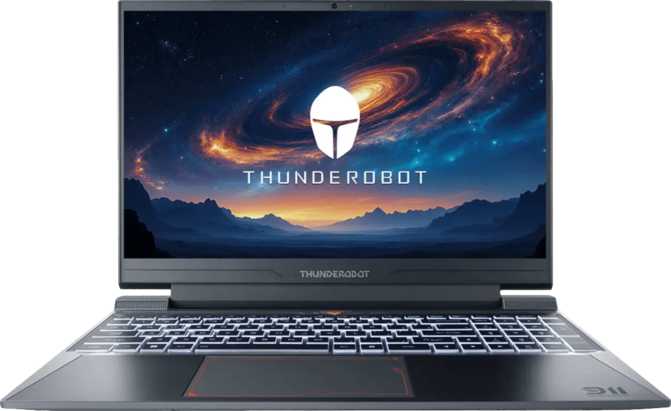
Thunderobot 911 X Wild Hunter G3 Pro – Full Review & Real-World Performance
LaptopsThe Thunderobot 911 X Wild Hunter G3 Pro is a current-generation gaming laptop that leads with Blackwell GPU architecture and GDDR7 memory in a chassis slimmer than most of its direct rivals. The trade-offs are real but manageable for the right buyer.
Editor's Score
Best for plugged-in 1080p gaming
What Kind of Machine Is This, Really?
The Thunderobot 911 X Wild Hunter G3 Pro sits at an interesting crossroads in the gaming laptop market. It carries a name that sounds purpose-built for all-night sessions and competitive play, and for the most part, the hardware underneath justifies that branding. What makes it worth examining closely is the GPU generation it ships with — NVIDIA's Blackwell architecture, paired with next-generation GDDR7 memory — in a chassis that is thinner and lighter than most gaming laptops at this screen size.
That combination raises an immediate question for any serious buyer: does the performance match the promise, and are there any corners cut to achieve that slim profile? The short answer is mostly yes on performance, and a few deliberate trade-offs on the chassis side.
This review covers everything from GPU architecture and display performance to battery life, port selection, and competitive positioning. Skip to any section using the navigation below.
Design and Build: Sleek for a Gaming Laptop, With Known Trade-offs
Chassis and Dimensions
At 21 millimeters thin, the Wild Hunter G3 Pro is genuinely slim for a machine in this category. Most gaming laptops at this screen size hover between 23 and 28 millimeters, so Thunderobot has made a real design priority of keeping the profile low.
The footprint — roughly 358mm wide by 257mm deep — is standard for a 15.6-inch class machine and fits comfortably in most backpacks designed for laptops.
The weight lands at 2.5 kilograms. Not light by any notebook standard, but at the lighter end of the gaming laptop spectrum. Compared to desktop-replacement gaming rigs, it is manageable for daily commutes.
What You Won't Find
- No weather sealing or ruggedized casing — this is a gaming machine, not a field device. The lid and body are optimized for aesthetics and thinness rather than military-grade durability.
- No biometric login of any kind — no fingerprint reader, no facial recognition camera. You are back to passwords and PINs, which feels like a genuine oversight at this tier.
- Backlit keyboard is present, as expected on any gaming machine worth considering — with RGB illumination in line with Thunderobot's 911-series tradition.
Display: Fast, Flat, and Functional
The 165Hz Advantage — Why It Matters
The 15.6-inch IPS panel runs at full HD resolution — 1920 by 1080 pixels — delivering a pixel density of around 141 pixels per inch. At normal viewing distances, this is sufficiently sharp that individual pixels are not visible to the naked eye.
The 165Hz refresh rate is the standout specification. The practical difference between 60Hz and 165Hz is immediately visible and far from subtle: motion is dramatically smoother, fast-moving objects stay sharp instead of blurring, and in competitive titles there is a real reduction in input lag that affects how quickly your actions appear on screen.
For players of shooters, racing games, or any title where split-second reactions matter, 165Hz is a meaningful step above the 144Hz standard still common in budget gaming laptops, and a world away from the 60Hz panels that appear in some cut-price gaming machines.
The IPS panel technology means viewing angles are wide and colors remain consistent when you shift position. Contrast is not the deepest — IPS cannot match OLED or VA in pure black levels — but colors are accurate and stable.
Display Specifications at a Glance
| Panel Size | 15.6 inches |
| Resolution | 1920 × 1080 (Full HD) |
| Pixel Density | 141 PPI |
| Panel Type | IPS, LED-backlit |
| Refresh Rate | 165Hz |
| Touch Screen | No |
| Anti-Reflection | No |
| External Displays | Up to 4 simultaneously |
| HDMI Version | HDMI 2.1 |
No Anti-Reflection Coating
In bright rooms or near windows, glare is a real concern on this panel. If you work or game near windows frequently, plan for a screen hood or darker room setup.
Performance: Blackwell Architecture Meets Hybrid CPU Design
The CPU: Efficient by Design
The processor uses a hybrid core architecture — a design philosophy where not all cores are equal. Four performance cores run at a base clock of 2.1GHz and can reach up to 4.6GHz under peak load, while four efficiency cores run at 1.5GHz and handle lighter background tasks. This arrangement, across twelve processing threads total, is built to conserve battery during everyday use while unlocking full speed for gaming or intensive workloads.
The chip is fabbed on a 5-nanometer process, placing it in the current generation of efficiency-focused CPU designs. The 45-watt thermal design ceiling means Thunderobot has headroom to let the CPU push hard — though in a 21mm chassis, thermal management will matter, and fans will be audible under sustained load.
The multi-core PassMark result of approximately 17,400 puts this CPU in a respectable mid-range tier — comfortably ahead of entry-level gaming laptops. The single-core score of around 3,400 is adequate for most gaming workloads but not exceptional for tasks that rely on one core at a time.
PassMark Benchmark Context
Mid-range tier — competitive for the category
Adequate — not class-leading for single-threaded tasks
CPU Quick Facts
- 8 cores (4P + 4E), 12 threads
- Up to 4.6GHz turbo clock speed
- 5nm manufacturing process
- 45W TDP with active cooling
- big.LITTLE hybrid architecture
The GPU: GDDR7 and Blackwell — The Real Story
This is where the Wild Hunter G3 Pro stakes its strongest claim.
GPU Architecture Breakdown
| Architecture | Blackwell |
| VRAM | 8GB GDDR7 |
| Memory Bandwidth | ~448 GB/s |
| Floating-Point Perf. | 9.68 TFLOPS |
| Shading Units | 3,328 |
| Memory Bus | 128-bit |
| Transistors | 21.9 billion |
| Ray Tracing | Supported |
| DLSS | Supported |
| Resizable BAR | Enabled |
| PCIe Version | PCIe 4.0 |
GDDR7 is a significant upgrade over the GDDR6 and GDDR6X memory found in the previous generation. The effective memory speed here translates to a bandwidth figure approaching 450 gigabytes per second — roughly double what GDDR6 at the same bus width can deliver. In practical terms, the GPU is not bottlenecked at the memory interface when processing high-resolution textures or complex scene geometry.
The GPU's floating-point performance lands just under 10 TFLOPS. This is meaningfully above last-generation mid-range laptop GPUs and approaches the lower range of what previous high-end laptop GPUs could offer. For 1080p gaming at high to ultra settings, this is more than sufficient across virtually all current titles. At 1440p on an external monitor, it handles modern games competently with some settings adjustments for the most demanding titles.
The Blackwell architecture brings full support for ray tracing and DLSS — NVIDIA's AI-driven upscaling technology. DLSS in particular is a practical tool: it renders the scene at a lower resolution internally and upscales it using trained neural networks, achieving near-native image quality at significantly higher frame rates. On a 165Hz panel, DLSS can be the difference between hitting that ceiling smoothly and struggling in the 90–100fps range.
Intel Resizable BAR is enabled, allowing the CPU to access the full GPU framebuffer simultaneously. Some titles show a 5 to 15 percent performance improvement with this feature active — and it costs nothing to enable.
On Integrated Graphics
The machine also carries Intel Iris Xe integrated graphics, which handles display output during light workloads and battery-saving modes. The discrete Blackwell GPU takes over for all gaming scenarios automatically.
Storage: Fast and Roomy
The 1TB NVMe SSD operating on PCIe 4.0 delivers read and write speeds substantially beyond what older SATA or PCIe 3.0 drives offer. Game loading times are genuinely quick, and large game installs — which routinely exceed 100GB — feel proportionate to the storage capacity. One terabyte comfortably holds 10 to 15 large modern games simultaneously.
There is no secondary drive slot confirmed in the specifications, so if storage expansion is important, verify before purchase whether the chassis allows a second M.2 drive.
RAM: A Solid Base With Room to Grow
Sixteen gigabytes of DDR5 memory running at 4,800MHz across a dual-channel configuration is the current functional standard for gaming laptops. It handles all current games without issue and leaves enough headroom for a browser and Discord running alongside.
The maximum supported memory reaches 96 gigabytes — well above gaming requirements, but relevant for buyers who intend to use this machine for video editing, 3D rendering, or virtual machines. Upgrading RAM is a realistic option.
Battery Life: Honest Expectations Required
The 63 watt-hour battery is a moderate capacity for a 15.6-inch gaming laptop. Under gaming load, laptops of this class typically deliver between 60 and 90 minutes of runtime before needing the wall adapter. This is not a criticism unique to the Wild Hunter G3 Pro — it is a category-wide reality. Discrete GPUs under gaming load consume far more power than the battery can sustain for long periods.
For lighter workloads — browsing, documents, video playback — the hybrid CPU architecture helps meaningfully. Efficiency cores handling low-demand tasks draw far less power, so you can realistically expect three to five hours of productivity-style use away from a plug, though this varies significantly based on display brightness and background processes.
The USB-C port supports charging, and the machine includes sleep-and-charge USB capability. A compatible USB-C power bank or dock can top up the machine in a pinch — a useful option for travel.
Bottom Line on Battery
Treat this as a plugged-in machine for gaming. It is not built for all-day untethered use and makes no pretense of being one.
Expected Runtime by Use Case
Estimates based on 63Wh capacity and category norms. Actual results vary by brightness, background apps, and settings.
Connectivity: Covered on the Basics, Limited on the High End
Port Selection
| Port Type | Count | Notes |
|---|---|---|
| USB-A 3.2 Gen 1 | 3 | Covers most gaming peripherals |
| USB-C 3.2 Gen 2 | 1 | Supports charging; no Thunderbolt |
| HDMI 2.1 | 1 | 4K/120Hz capable |
| Ethernet RJ45 | 1 | Essential for competitive play |
| 3.5mm Audio Jack | 1 | Headset-ready |
| Thunderbolt 3/4 | 0 | Not supported — no eGPU option |
| SD Card Slot | 0 | Limitation for photographers |
Three USB-A ports is a generous count for a slim gaming laptop — most peripherals still use the traditional USB-A connector, so you will rarely need a hub for standard gaming setups.
The single USB-C port is functional but not Thunderbolt. There is no Thunderbolt 3 or 4 support, which means external GPU enclosures and certain high-bandwidth docking stations are off the table. For buyers who want to connect a Thunderbolt display or an eGPU, this is a hard limitation.
Wireless and Audio
-
Wi-Fi 6 (802.11ax)
Good throughput and lower latency than older Wi-Fi 5 devices. Backward compatible with Wi-Fi 4 and 5 networks.
-
Bluetooth 5.2
Covers peripherals and audio with modern efficiency. Suitable for wireless headsets and controllers.
-
Stereo Speakers + 3.5mm Jack
Dolby Atmos is not supported. Speakers are adequate for casual use; a headset is recommended for gaming.
-
2MP Front Camera + Single Mic
Usable for video calls in good lighting. No IR sensor, no facial recognition. Streamers will want an external microphone.
Who Should Buy This — and Who Should Look Elsewhere
The Right Buyer
- Plays modern titles at 1080p and wants consistently high frame rates above 100fps in competitive games
- Values a thinner, slightly more portable chassis without giving up discrete GPU performance
- Plans to use the machine primarily at a desk, plugged in, with a 165Hz screen for that workflow
- Interested in next-generation GPU architecture and GDDR7, which will remain relevant longer than older-generation equivalents
- Needs an ethernet port for competitive online play and does not want to rely solely on Wi-Fi
Look Elsewhere If You...
- Need Thunderbolt: No Thunderbolt means no eGPU and limited docking. Consider Dell XPS 15 or ASUS ProArt Studiobook if this is critical.
- Need all-day battery: The battery cannot sustain 8+ hours away from a charger. If you need that, look elsewhere.
- Want biometric security: No fingerprint reader, no facial recognition — not suited for users requiring quick secure enterprise login.
- Want a 2K or 4K display: If display fidelity for creative work is a priority, other options deliver higher-resolution panels.
- Stream heavily: The single mic and no Dolby Atmos limit the out-of-box streaming audio experience.
How It Compares to the Competition
The mid-range gaming laptop space at 15.6 inches is crowded. Here is how the Wild Hunter G3 Pro stacks up against the most common alternatives buyers consider.
| Feature | Thunderobot 911 X Wild Hunter G3 Pro | Typical Rival A (Previous-Gen GPU) |
Typical Rival B (Thicker Build) |
|---|---|---|---|
| GPU Generation | Blackwell (current) | Ada Lovelace (prev.) | Ada Lovelace |
| GPU Memory Type | GDDR7 | GDDR6 | GDDR6 |
| Display Refresh | 165Hz | 144Hz typical | 144–165Hz |
| Display Resolution | 1080p | 1080p or 1440p | 1080p |
| Chassis Thickness | 21mm | 22–25mm | 25–30mm |
| Thunderbolt | None | Varies | Often present |
| Battery Capacity | 63Wh | 72–86Wh typical | 86–99Wh |
| Biometric Login | None | Often fingerprint | Often fingerprint |
The Wild Hunter G3 Pro leads on GPU generation and memory technology. It trades away Thunderbolt, a larger battery, and biometric login to stay slim and current-generation. If raw GPU architecture currency matters, this machine is positioned ahead of many competitors still selling previous-generation GPUs.
Honest Strengths and Weaknesses
Where It Excels
The Wild Hunter G3 Pro makes a compelling case precisely because of when its GPU landed. Blackwell with GDDR7 is genuinely current-generation hardware, and in a market where many laptops in the same price bracket are still shipping older GPU architectures, that longevity advantage is real. Games leaning on ray tracing and AI upscaling will run well on this hardware for years.
The 165Hz IPS display is a clean choice for gaming — fast, accurate, wide-angle, and at a resolution the GPU can actually saturate at high frame rates.
The 21mm chassis achieves something genuinely useful: a gaming machine that does not look and feel like a brick when carried around. For buyers who move between home and desk setups, that matters.
Where It Falls Short
The battery life is functional but unimpressive. Charging away from a wall outlet requires planning, and the single USB-C port will push most users toward a hub for a complete desk setup.
The absence of Thunderbolt is a genuine gap for users who want flexibility in docking, external GPU options, or high-bandwidth peripherals. This is a decision, not an oversight — but buyers should know it going in.
The camera and microphone setup is basic at best — workable for a quick Teams call, but not the hardware you lead with if media production or regular video meetings are core to your workflow.
The 1-year warranty period is on the shorter side for a machine at this performance level. Extended coverage through a third-party plan is worth budgeting for.
Questions Real Buyers Ask Before Purchasing
Final Verdict
Thunderobot 911 X Wild Hunter G3 Pro 15.6"
The Thunderobot 911 X Wild Hunter G3 Pro is a well-targeted mid-range gaming laptop that leads with its GPU generation and display speed in a chassis that stands out for its relative slimness. If your priority is a current-generation gaming machine at 1080p — one that handles ray tracing, benefits from AI upscaling, and looks presentable outside the house — this machine checks most of the boxes at a form factor that most similarly-specced competitors cannot match.
The trade-offs are real but predictable: battery life is strictly supplemental, Thunderbolt is absent, biometric login is missing, and the single USB-C port will push most users toward a hub for a complete desk setup. None of these are surprising for a gaming laptop at this price point, but they are worth knowing before you commit.
Buy it if:
You game primarily at home, plugged in, at 1080p, and want current-generation GPU architecture with a 165Hz display in a form factor that still travels decently.
Skip it if:
Thunderbolt connectivity, all-day battery, or biometric security are non-negotiable for your workflow.
Category Scores
Overall Score