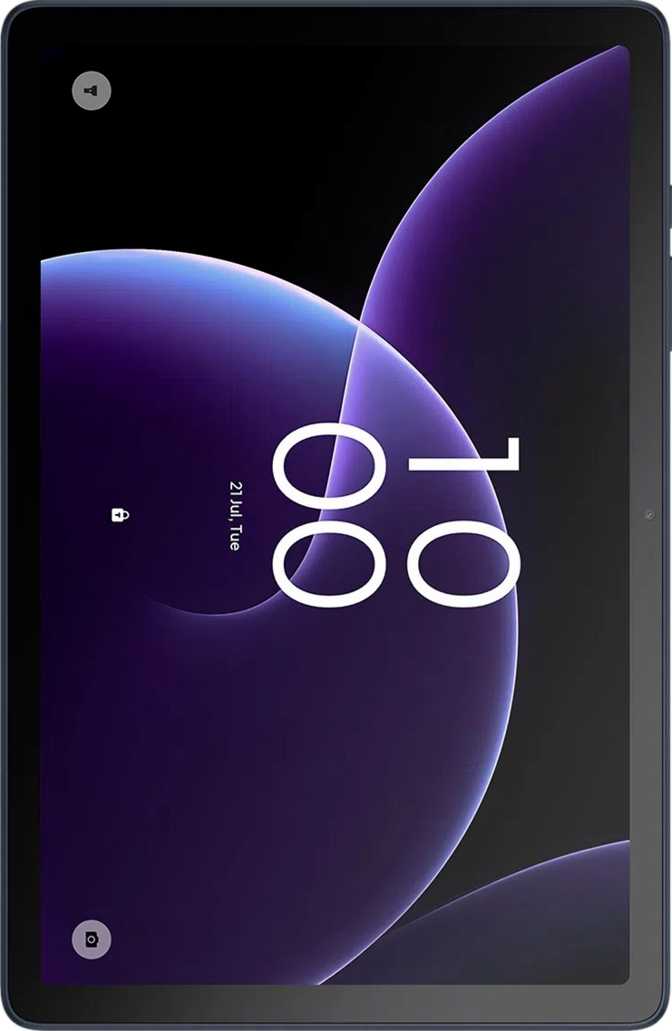
TCL Tab 10 Gen 4 Review: A Budget Tablet That Gets the Basics Right
TabletsBudget tablets occupy a tricky middle ground. Too underpowered and they frustrate within weeks; too stripped-down and they disappoint on the first day. The TCL Tab 10 Gen 4 targets buyers who need a real daily-use 10-inch Android tablet without a flagship price. Running Android 15 out of the box, with genuine LTE connectivity and 128GB of on-board storage, it arrives with an immediate edge over many rivals in its class. Whether that edge holds up under daily scrutiny is exactly what this review works through.
Key Specifications at a Glance
Design and Build Quality
At 7.5mm thin and weighing just under 430 grams, the TCL Tab 10 Gen 4 sits comfortably in the lighter half of the 10-inch tablet category. Most 10-inch tablets in this price class hover between 450 and 500 grams — that difference becomes noticeable during extended reading or video sessions where your arms bear the weight without a surface to rest on.
The 239mm-by-155mm footprint is standard for a 10-inch form factor and won't feel unfamiliar if you've held a tablet before. One-handed landscape gripping is feasible for most adults, though two hands remain more comfortable for extended sessions. The slim profile makes it easy to slip into a bag sleeve or alongside a laptop without adding meaningful bulk.
There is no water resistance rating of any kind. Using this tablet around kitchens, poolside, or outdoors in unpredictable weather carries genuine risk of damage. A protective case is not optional for those scenarios — it's the only available protection.
No fingerprint scanner is present, meaning biometric unlocking depends on face recognition via the front camera rather than a dedicated hardware-secured sensor — less convenient and less cryptographically secure than a fingerprint approach. No stylus is included and no detachable keyboard option exists. This is a consumption and light-productivity device, not a creative workstation.
Physical Dimensions
- Weight
- 430 g
- Thickness
- 7.5 mm
- Width × Height
- 238.9 × 155.2 mm
- Water Resistance
- None
- Stylus Included
- No
- Fingerprint Sensor
- No
Display: Where the Tab 10 Gen 4 Punches Above Its Weight
The 10.1-inch IPS LCD panel is the single strongest argument for this tablet at its price. A resolution of 1920 by 1200 pixels produces a density of 224 pixels per inch — sharp enough that individual pixels are invisible at normal viewing distances. Text is genuinely crisp, web content renders cleanly, and video looks good rather than merely acceptable.
Brightness & Outdoors
At 400 nits, the screen handles indoor environments and shaded outdoor use well. Direct sunlight makes it harder to read — expected at this tier. The anti-reflection coating reduces glare meaningfully and partially compensates for the modest brightness ceiling.
Refresh Rate
The panel runs at 60Hz — standard for this price range. Scrolling and animation feel smooth for everyday tasks, and video at standard frame rates looks natural. The 90Hz or 120Hz fluidity found on premium tablets is absent, but for buyers upgrading from an older device, 60Hz will not disappoint.
HDR & Color
No HDR10, HDR10+, or Dolby Vision certification. HDR content from streaming platforms plays in standard dynamic range — colors are accurate and pleasant, but without the expanded brightness range of a certified panel. For casual streaming this is rarely noticeable; for serious cinematic viewing it is a real limitation.
Display Takeaway: The IPS panel delivers a sharper, more polished visual experience than the price implies. The anti-reflection coating is a real everyday advantage. What it lacks — HDR and a higher refresh rate — reflects its budget positioning honestly rather than as a surprise shortcoming.
Performance: Honest About Its Tier
The Processor Explained
The Tab 10 Gen 4 uses an octa-core processor built on a 12-nanometer process. Two performance-oriented cores handle demanding workloads while six efficiency cores manage lighter tasks — an architecture that scales power consumption intelligently depending on what you're doing. The practical result: the device stays responsive for everyday use without drawing unnecessary battery during simple tasks.
Geekbench 5 testing places this chip at approximately 320 in single-core and around 1,280 in multi-core — numbers that comfortably cover web browsing, social media, email, document editing, video streaming, and casual gaming. Where the ceiling shows is in sustained heavy use: demanding 3D titles, video editing applications, or rapidly cycling through many open apps will produce noticeable loading pauses.
RAM and Storage
Four gigabytes of RAM is the baseline Android 15 needs to run without constant app reloading. It handles three to five simultaneously open apps comfortably, but heavy multitaskers who keep ten-plus active apps running will occasionally find apps restarting when revisited rather than resuming where they left off.
The 128GB starting storage is a genuine strength — many competing budget tablets begin at 32 or 64GB, creating chronic storage management friction. With microSD expansion supporting up to 1 terabyte, storage effectively becomes a non-issue for the vast majority of users.
Handles Well
- Browsing & social media
- Full HD video streaming
- Documents & email
- Casual & 2D gaming
Shows Limits With
- Demanding 3D games
- Video editing apps
- Heavy multitasking
Cameras: Functional, Not a Feature
Capable of 1080p video at 30 frames per second, with manual controls for ISO, focus, white balance, and exposure — a surprisingly full set of manual options for a tablet in this class. Touch autofocus and continuous autofocus during recording both function as expected. What it lacks is optical image stabilization, any form of flash, and a back-illuminated sensor, meaning low-light results are noticeably soft and grainy.
- Touch & continuous autofocus
- Manual ISO, exposure & white balance
- Full HD 1080p recording
- No optical image stabilization
- No flash of any kind
- Weak in low-light conditions
Designed primarily for video calls and virtual meetings. In good lighting it delivers a clean, recognizable image for Teams, Zoom, or Google Meet sessions. No front-facing flash is present. Portrait-quality results should not be expected, but for communication purposes the camera performs its intended role reliably.
Audio: A Quiet Highlight
Stereo speakers are present here — not guaranteed at this price point — and they produce a noticeably wider soundstage than a single mono speaker allows. Whether you're watching a film, listening to a podcast, or on a video call, the stereo configuration makes a real, perceptible difference in how audio fills the space around the device.
The 3.5mm headphone jack survives on this device. In an era where many tablets have removed it entirely, that's worth calling out explicitly for anyone with wired headphones or in-ear monitors who'd rather not carry a USB-C adapter as a daily essential.
Bluetooth 5.1 handles wireless audio with stable, energy-efficient connections. The tablet does not support higher-fidelity codecs such as aptX HD or LDAC — audiophiles with high-end wireless headphones will receive standard SBC or AAC quality rather than lossless-adjacent streaming. For everyday listening this distinction is rarely meaningful; for enthusiasts, it's a known limitation worth noting.
-
Stereo SpeakersWider soundstage vs. mono speaker
-
3.5mm Headphone JackNo adapter required for wired audio
-
Bluetooth 5.1Stable, low-energy wireless pairing
-
No Hi-Fi Bluetooth CodecsNo aptX HD, LDAC, or aptX Adaptive
-
Single MicrophoneAdequate for quiet environments only
Battery Life: The Tablet's Most Compelling Strength
A 6,000 mAh battery in a 10-inch tablet at this performance tier is capable of genuinely long runtimes. Light to moderate users — browsing, reading, and streaming through the day — can realistically reach multiple days between charges. Heavier users keeping the screen bright or running extended video will land somewhere in the eight to twelve hour range per charge, which still covers a full working day with room to spare.
Fast charging support reduces wall time when the battery does run low. Wireless charging is not available — a cable is required for every top-up. If a charging pad is part of your daily routine, that's a friction point that will surface regularly.
The built-in battery health check tool lets you monitor the cell's condition over time — a small but genuinely useful feature for understanding how usage patterns affect long-term capacity degradation.
Connectivity: 4G LTE Ready, Wi-Fi Covered
Mobile Connectivity
A built-in LTE modem and single SIM card slot mean you can pair the tablet with any mobile data plan and use it anywhere with a mobile signal — no Wi-Fi required. This is a meaningful advantage over Wi-Fi-only tablets and makes this a practical choice for travel, commuting, and areas without reliable wireless coverage.
GPS is built in alongside Galileo satellite support — a European positioning network that supplements standard GPS for improved accuracy in dense urban environments. This makes the tablet capable of standalone navigation without depending on a phone or Wi-Fi connection.
Wi-Fi, Bluetooth & Ports
Wi-Fi 4 and Wi-Fi 5 (802.11n and 802.11ac) cover the vast majority of home and office routers in current use. Wi-Fi 6 is not supported — you'll be capped at Wi-Fi 5 speeds, which remain more than ample for 4K streaming and large file transfers.
- USB Type-C — modern reversible charging and data
- Bluetooth 5.1 — stable, low-energy peripheral connections
- GPS + Galileo — accurate navigation without Wi-Fi dependency
- No NFC — contactless payments are not available
- No 5G — 4G LTE ceiling
- No HDMI output — no wired display mirroring to a TV
Software: Android 15 and What It Unlocks
Shipping with Android 15 gives the TCL Tab 10 Gen 4 a real software advantage over many competitors that still arrive on older Android versions. The latest platform brings refined privacy controls and a full set of productivity tools that work well on a 10-inch screen.
Privacy Controls
Granular camera and microphone permissions, app tracking restrictions, location privacy options, and clipboard warnings — more user control than older Android versions provide.
Productivity Tools
Split-screen multitasking, Picture-in-Picture mode, and full-page screenshots come standard. Widgets, dynamic theming, and dark mode allow genuine interface personalization.
Family & Multi-User
Multi-user profile support and a built-in child lock make this practical for shared household use — each user gets an independent app environment and settings profile.
Offline Capabilities
On-device machine learning enables offline voice recognition and Live Text — interacting with text inside photos without needing a data connection. Useful in low-coverage environments.
Update Schedule — Know This
OS updates are managed by TCL, not delivered directly from Google. Updates arrive later than on Pixel devices and may not extend as many years. Plan your ownership timeline with this in mind.
Comfort Features
Dark mode, extra dim mode, and battery health monitoring are all present — quality-of-life features that add up to a noticeably more comfortable daily experience, especially for evening reading or long sessions.
Who Should Buy This Tablet — and Who Shouldn't
-
Students and remote learnersVideo lessons, document work, and research without a laptop-level investment.
-
Household media tabletsStreaming, reading, and video calls shared among family with multi-user profiles enabled.
-
Travelers and commutersLTE independence and a battery that lasts a full travel day make it a dependable mobile companion.
-
Budget-conscious buyers128GB storage, a sharp display, and solid build quality without paying a premium.
-
First-time users and older adultsLarge readable screen, familiar headphone jack, and uncomplicated Android software reduce the learning curve.
-
Heavy processing demandsVideo editing, demanding 3D gaming, and sustained heavy multitasking will reach the chip's ceiling quickly.
-
Stylus and note-taking useNo pen input means it can't replace a Samsung Tab S or iPad with Apple Pencil for handwriting or creative work.
-
Long-term software update priorityTCL's update cadence doesn't match Google or Samsung's multi-year direct update commitments.
-
Photography-focused workThe camera covers basic needs only — for anything you care about photographically, use a smartphone.
-
Wet or rough environmentsZero water resistance makes this a genuine risk near pools, kitchens, or unpredictable outdoor conditions.
How It Stacks Up Against the Alternatives
The Tab 10 Gen 4's value sits at the intersection of display resolution, base storage, and LTE connectivity — a combination that's hard to match at this price. Here's an honest side-by-side with the two most likely alternatives a buyer in this category would consider.
| Feature | TCL Tab 10 Gen 4 | Budget Competitor Wi-Fi Only |
Mid-Range Step-Up |
|---|---|---|---|
| Display Resolution | 1920 × 1200 (FHD+) | 1280 × 800 (HD) | 2000 × 1200+ |
| Starting Storage | 128GB | 32–64GB | 64–128GB |
| Max Expandable Storage | 1TB microSD | 512GB | 512GB–1TB |
| LTE Connectivity | Yes | No | Often add-on cost |
| Android Version | Android 15 | Android 13–14 | Android 13–14 |
| Stereo Speakers | Yes | Often mono only | Yes |
| 3.5mm Headphone Jack | Yes | Varies by model | Often removed |
| Battery Capacity | 6,000 mAh | 4,000–5,000 mAh | 7,000–8,000 mAh |
| Fingerprint Scanner | No | Rarely included | Often included |
| Water Resistance | None | None | Occasionally IP52 |
Honest Assessment: Strengths and Where It Falls Short
The display is better than its price suggests. At 224 pixels per inch with an IPS panel and anti-reflection coating, it outperforms the low-resolution screens common in cheaper tablets and holds up well in real-world lighting conditions — the anti-glare treatment is a practical day-to-day benefit, not just a marketing line.
The 128GB base storage removes one of the most persistent frustrations in budget tablets. Paired with a 1TB microSD ceiling, storage anxiety simply doesn't apply here — and that quality-of-life improvement is felt from the moment you start installing apps.
The 6,000 mAh battery is large enough to stop daily charging from feeling mandatory. Combined with Android 15's efficient power management, this is a device you can pick up without automatically checking whether it charged overnight.
Android 15 out of the box brings privacy controls and software refinements that most buyers benefit from without fully realising it — cleaner permission management, better multitasking, and a more polished base experience than older Android builds provide.
Four gigabytes of RAM is enough to function — but it's a floor, not a comfortable margin. Heavy multitaskers who keep many apps active simultaneously will encounter app reloading more than they'd like. This is the specification most likely to define the device's aging curve as apps grow heavier with updates over time.
The absence of a fingerprint scanner is a friction point that compounds over daily use. Reaching to a face-unlock camera or entering a PIN every single time becomes measurably more annoying than a tap on a sensor — it's a small inconvenience that accumulates into a larger one.
The camera system, while functional, consistently reminds you it isn't the primary focus of this device. Low-light performance, absent optical stabilization, and zero flash mean results fall clearly short of what a modern mid-range smartphone delivers in the same conditions.
The software update trajectory is the concern most buyers skip over and later regret. TCL-managed updates arrive later and likely for fewer years than a Google or Samsung device. For anyone planning four-to-five years of active ownership, this deserves serious consideration before purchasing.
Frequently Asked Questions
The TCL Tab 10 Gen 4 is a well-assembled budget tablet that earns its price point by making smart decisions where they're most visible. The display is sharper than competing devices in this class. The 128GB base storage removes a persistent frustration common in cheaper alternatives. The 6,000 mAh battery is large enough that daily charging stops feeling mandatory. LTE connectivity makes it genuinely mobile. And Android 15 brings software maturity that many budget tablets skip entirely.
What holds it back is equally clear: 4GB of RAM is a floor, not a ceiling; the 60Hz display and absence of HDR set a visible ceiling on media quality; no fingerprint scanner makes secure unlocking slower than it should feel in daily use; and the camera system is best understood as a utility tool rather than a photography feature.
The software update trajectory is the concern most buyers overlook until later. TCL-managed updates don't arrive with the speed or longevity of Google's own devices. Factor that honestly into your ownership timeline before committing.
Purchase Verdict
For everyday users — students, families, travelers, and first-time tablet buyers — the TCL Tab 10 Gen 4 delivers on everything it promises at its price. If your needs fit its strengths, there's little to complain about. If your needs push beyond its limits — pen support, sustained performance, guaranteed long-term updates, or premium cameras — spending more will buy you real, substantive improvements. The honest job of this review was to tell you which category you're in. Most buyers in the budget 10-inch segment will find the TCL Tab 10 Gen 4 is exactly what they needed.