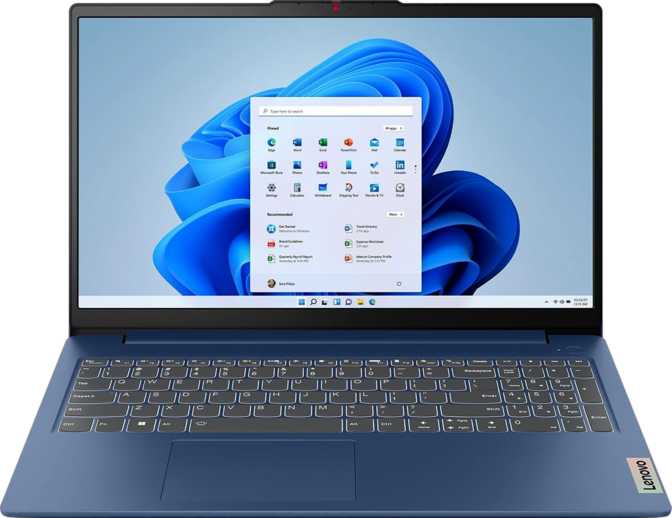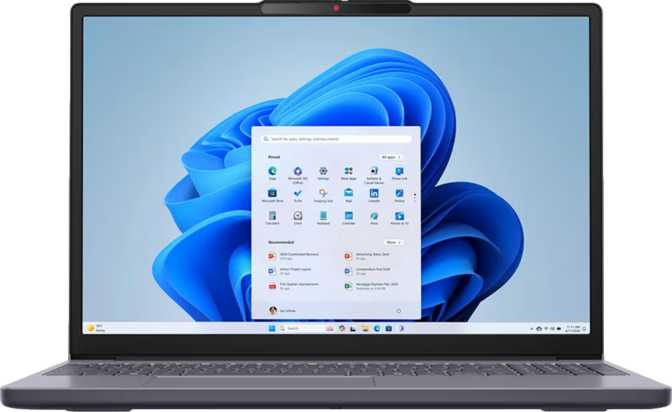
Lenovo IdeaPad Slim 3 Gen 10 15-Inch: Full Review and Buying Verdict
LaptopsThe mainstream laptop market is crowded with machines that look identical on paper but disappoint in practice. The Lenovo IdeaPad Slim 3 Gen 10 15″ enters that space with a specification profile that defies the typical trade-offs: a display wider than the 16:9 norm, a generous memory ceiling, a fast solid-state drive, and an integrated graphics solution capable of light creative work — all wrapped in a chassis thin enough to slip into a backpack without second thoughts. Whether it actually delivers on that promise requires looking past the marketing sheet and into what these numbers mean for real daily use.
Key Specifications at a Glance
Design and Build Quality
The Slim 3 Gen 10 makes its priorities clear the moment you pick it up. At just under 1.6 kilograms, it sits comfortably in the lighter half of the 15-inch category — many competing machines in this size class tip the scales noticeably heavier, making the difference felt after a full commute or a day moving between meeting rooms.
The chassis measures 17mm at its thickest point — genuinely slim for a 15-inch productivity machine. The footprint of 343mm wide by 239mm deep leaves adequate palm rest space on either side of the trackpad. Stereo speakers and a dual-microphone array round out the built-in audio hardware without adding bulk.
The two-year warranty stands above the one-year coverage that ships with most competitors at this price tier. For a laptop positioned as a daily productivity workhorse, that extra year of manufacturer coverage meaningfully reduces the long-term cost risk of ownership.
Physical Specifications
- Width
- 343 mm
- Depth
- 239 mm
- Thickness
- 17 mm
- Weight
- 1,590 g
- Warranty
- 2 Years
- Microphones
- 2 (Dual Array)
Notable Build Details
Display: Wider Than You Expect, Better Than You’d Assume
The 15.3-inch screen uses a 16:10 aspect ratio at 1920×1200 pixels. For anyone used to conventional 1920×1080 laptops, the extra 120 vertical pixels are immediately noticeable — and immediately useful. Web pages, spreadsheets, and document editors all benefit from that additional vertical real estate, reducing how frequently you need to scroll mid-document.
The IPS panel technology means colors remain accurate and consistent when viewed from angles. This matters in collaborative settings and when positioning the screen away from direct overhead lighting. The anti-reflection coating is a practical quality-of-life feature: near windows or under office fluorescents, the matte-treated surface tones down fatigue-inducing reflections significantly.
At 147 pixels per inch, text edges are clean and icons are well-defined. The 60Hz refresh rate is appropriate for productivity use — scrolling through documents and web pages is smooth and meets expectations for the core tasks this machine handles.
The display controller supports output to up to four external monitors simultaneously — an unusually capable figure for a machine at this price tier, making a multi-monitor desk setup a realistic configuration.
| Screen Size | 15.3″ (16:10) |
| Resolution | 1920 × 1200 px |
| Pixel Density | 147 ppi |
| Panel Type | IPS, LED-backlit |
| Refresh Rate | 60Hz |
| Anti-Reflection | Yes |
| Touch Screen | No |
| External Displays | Up to 4 simultaneously |
Performance: An 8-Core Processor That Rewrites Mid-Range Expectations
The processor operates with eight physical cores and sixteen processing threads. At a base frequency of 3.2GHz climbing to a peak of 4.75GHz under demand, the CPU handles simultaneous workloads with headroom to spare. The 6-nanometer manufacturing process balances high performance with thermal management inside a 17mm chassis.
The 35-watt thermal design power allocation is significant. Many ultrabooks constrain their processors to 15 watts to stay thin and quiet, dramatically limiting sustained performance. At 35 watts, the chip maintains high clock speeds under continuous load — the difference shows most clearly in tasks that take minutes rather than seconds.
Memory & Storage
Twenty-four gigabytes of DDR5 memory is a substantial allocation for a mainstream productivity laptop. Running a full professional workflow simultaneously — a video call, twenty-plus browser tabs, a spreadsheet, and a PDF editor — will not cause memory pressure slowdowns.
The one-terabyte NVMe SSD on PCIe Gen 4 means boots complete in seconds and opening heavyweight applications feels immediate. Note that a single memory slot means the 24GB ceiling is permanent — no RAM upgrade path exists on this model.
Benchmark Results in Context
| Benchmark Test | Score | Relative Performance | What It Means |
|---|---|---|---|
| Geekbench 6 Multi-Core | 8,979 | Strong parallel workload throughput | |
| Geekbench 6 Single-Core | 1,929 | Solid single-task app responsiveness | |
| PassMark Overall | 23,164 | Upper tier of mainstream productivity laptops | |
| PassMark Single-Thread | 3,295 | Above average; snappy UI and app launches | |
| Cinebench R20 Multi-Core | 5,420 | Competitive sustained rendering performance | |
| Cinebench R20 Single-Core | 604 | Mid-range per-core speed |
Bars indicate relative performance within the mainstream productivity laptop category. Higher is better.
Radeon 680M: The Integrated GPU That Changes the Category
Integrated graphics on budget laptops have historically been a concession — something you tolerate rather than use. The AMD Radeon 680M changes that narrative. Running at up to 2,200MHz with 768 shader processors, 32 render output units, and 48 texture mapping units, this GPU operates with compute resources that belonged to capable discrete graphics only a few years ago.
Because the GPU draws from the same DDR5 memory pool as the processor, the faster memory speed directly benefits graphics throughput — an inherent advantage over integrated graphics paired with slower DDR4 memory in competing machines at this price tier.
What the Radeon 680M Can Handle
-
Casual and Older GamingTitles from five-plus years ago, indie games, and less demanding modern releases run at playable frame rates at reduced settings.
-
4K Video PlaybackHigh-resolution streaming and local video files are handled smoothly through hardware acceleration with no dropped frames.
-
Creative ApplicationsPhoto retouching, light 3D model previews, and GPU-accelerated video filters all benefit from the 680M’s shader resources.
-
Multi-Monitor WorkstationManages up to four simultaneous external displays — a realistic multi-screen desk setup is well within reach.
-
No Ray Tracing or DLSS UpscalingModern AAA gaming with advanced visual effects requires dedicated GPU hardware. The 680M is a strong integrated solution, not a discrete GPU substitute.
Connectivity: Practical but Not Generous
Available Ports & Connections
| Interface | Specification |
|---|---|
| USB-C | 1× USB 3.2 Gen 1 — 5Gbps, sleep-and-charge |
| USB-A | 2× USB 3.2 Gen 1 — 5Gbps each |
| HDMI | 1× HDMI 1.4 output |
| Audio | 3.5mm combo jack (headset) |
| Card Reader | microSD slot |
| Wi-Fi | Wi-Fi 6 (802.11ax) |
| Bluetooth | Version 5.3 |
Notable Absences
Battery Life: Realistic Expectations Required
The 50Wh battery sits at the lower end of what the market currently offers for this form factor — premium ultrabooks in this size class commonly carry 60 to 75Wh cells. The 35-watt processor TDP means the chip draws meaningfully from that reserve under load, compressing runtime during heavier tasks.
For light productivity use — document editing, web browsing, video calls — power draw is moderate and the machine should carry most users through a standard working day. For sustained processor-intensive workloads, battery runtime will shorten noticeably. Carrying the charger for full-day sessions away from a desk is a sensible precaution.
The sleep-and-charge USB-C port is a genuinely useful travel feature: devices plugged in continue receiving power even when the laptop sleeps, keeping a phone charged overnight without the system fully waking.
Battery Summary
Who This Laptop Is For — and Who Should Look Elsewhere
-
Office & Remote WorkersHandles documents, email, video conferencing, and browser-based applications with significant performance headroom.
-
StudentsMulti-application coursework, design programs, and media work all benefit from 24GB DDR5 and the Radeon 680M’s capabilities.
-
Home Users Stepping Up24GB DDR5 and a PCIe Gen 4 NVMe drive represent a configuration typically found in more expensive machines.
-
Multi-Monitor Desk WorkersFour-display support makes this a practical hub for an external monitor workstation using HDMI and USB-C outputs.
-
PhotographersThe built-in microSD card slot eliminates a common pain point for camera card workflow — no adapter required.
-
Gamers Seeking AAA PerformanceThe Radeon 680M handles light gaming but is categorically outmatched by any discrete GPU in machines designed for modern titles.
-
Frequent Low-Light WorkersNo keyboard backlight makes evening, flight, and dim-room work genuinely uncomfortable if you rely on visual key reference.
-
Users Who Need Future UpgradabilityA single memory slot with no expansion path means the 24GB ceiling is fixed for the machine’s entire lifetime.
-
Wired Network UsersNo Ethernet port means a USB adapter is required — an added inconvenience for cable-connected environments.
-
Premium-Feel BuyersBuilt practically rather than luxuriously. Machined-aluminum aesthetics and premium keyboard feel require looking at higher-priced options.
How It Compares to the Competition
| Feature | IdeaPad Slim 3 Gen 10 15″ | Typical Entry-Level 15″ | Typical Mid-Range 15″ |
|---|---|---|---|
| RAM | 24GB DDR5 | 8–16GB DDR4 | 16GB DDR5 |
| Storage | 1TB NVMe PCIe 4 | 256–512GB NVMe | 512GB–1TB NVMe |
| Display Aspect | 16:10 (1920×1200) | 16:9 (1920×1080) | 16:9 or 16:10 |
| Integrated GPU | Radeon 680M | Intel Iris Xe / Basic Radeon | Intel Arc / Radeon 680M |
| CPU Cores / Threads | 8 Cores / 16 Threads | 4–6 Cores / 8–12 Threads | 8 Cores / 16 Threads |
| Keyboard Backlight | No | Sometimes | Usually Yes |
| Warranty | 2 Years | 1 Year | 1–2 Years |
| Weight | 1.59 kg | 1.7–2.0 kg | 1.6–1.9 kg |
Honest Assessment: Strengths and Weaknesses
-
24GB DDR5 memory — generous capacity with faster bandwidth that benefits both the processor and integrated GPU in ways DDR4 machines at this price cannot match.
-
PCIe Gen 4 NVMe storage — noticeably faster than Gen 3 drives typical of budget machines; boots, transfers, and app launches feel immediate rather than sluggish.
-
Radeon 680M integrated graphics — extends usability well beyond typical integrated solutions; light gaming, 4K video, and GPU-accelerated creative work are all realistic use cases.
-
16:10 display ratio — the additional vertical pixels over the standard 16:9 immediately improve productivity in document, web, and spreadsheet workflows.
-
Two-year warranty — above the category norm; communicates Lenovo’s confidence in this as a serious working machine rather than a disposable one.
-
Strong benchmark results — multi-core and overall scores place this machine comfortably in the upper tier of mainstream productivity laptops.
-
No keyboard backlight — the most visible omission; unusual on a machine with this memory and processor profile. A genuine usability cost in evening or low-light use.
-
Single memory slot with no upgrade path — the 24GB ceiling is permanent. Users whose needs grow beyond that will need to replace the machine entirely.
-
HDMI 1.4 limits display options — 4K output at 60Hz through the HDMI connector is not possible; the USB-C port is required for that configuration.
-
No Thunderbolt connectivity — high-speed docks and Thunderbolt storage are unsupported, limiting workstation-grade desk setups significantly.
-
Modest 50Wh battery — below category norms for this screen size; all-day unplugged high-performance use requires careful workload management.
-
No Ethernet or fingerprint reader — wired network users need a separate adapter; biometric login options are limited to camera-based methods only.
Common Questions Before Buying
Final Verdict
Lenovo IdeaPad Slim 3 Gen 10 15″
The Lenovo IdeaPad Slim 3 Gen 10 15″ makes smart choices where they matter most for its intended audience. Equipping a mainstream machine with 24GB of DDR5 memory and a PCIe Gen 4 NVMe drive means it will not feel underpowered in two years. The Radeon 680M integrated GPU genuinely extends what this machine can handle beyond typical budget-laptop limits. The 16:10 screen adds immediate, practical value for anyone who spends hours in documents or spreadsheets. And at under 1.6 kilograms, it carries easier than most 15-inch competitors.
The missing keyboard backlight is the most visible frustration, and it is worth factoring carefully against your specific working environment. The port ecosystem is functional but not generous, and the battery requires realistic rather than optimistic expectations. For users whose primary needs are document work, communication, light creative tasks, and capable everyday computing — particularly those who value a larger display with meaningful vertical space — the Slim 3 Gen 10 15″ earns a confident recommendation.
Best For
Students, office professionals, home office users, and multi-taskers who need genuine memory headroom and capable everyday computing in a portable 15-inch chassis.
Skip It If You Need
A backlit keyboard, Thunderbolt connectivity, dependable all-day battery without a charger, dedicated gaming performance, or a premium-feel chassis.