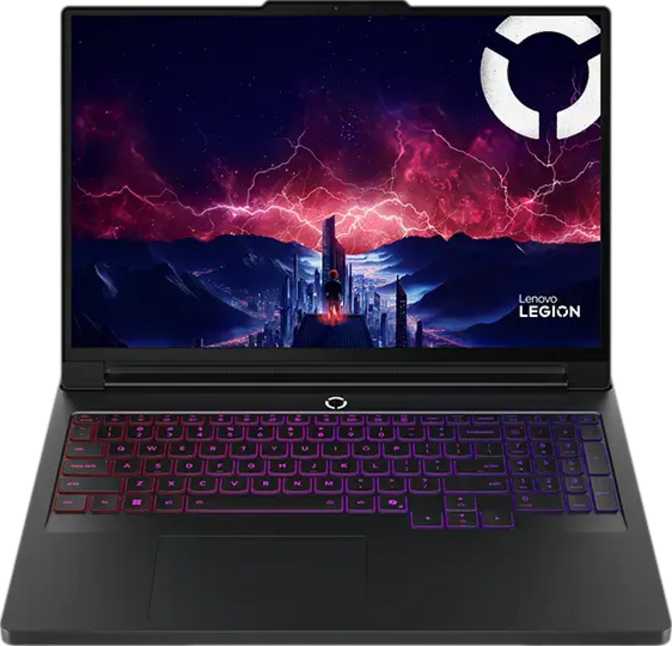
Lenovo Legion Pro 7 Gen 10 (2025) 16″ Review: Blackwell OLED Flagship
LaptopsOverall Score
out of 10
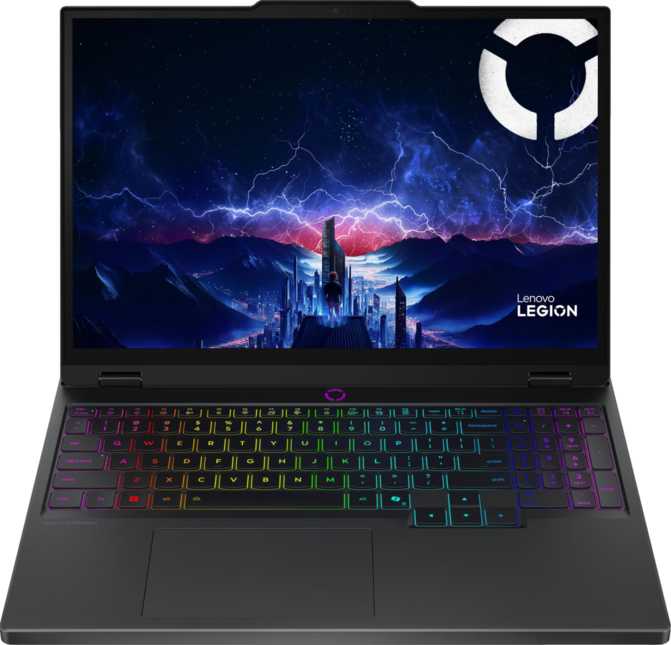
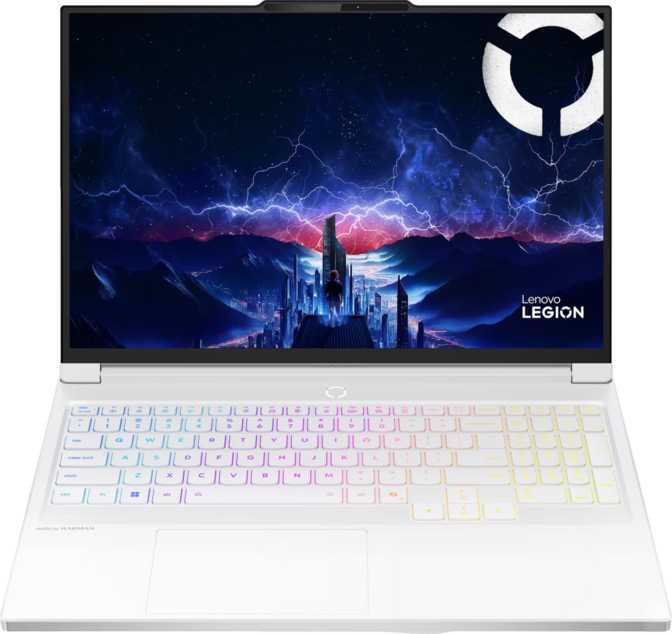
The Lenovo Legion Pro 7 Gen 10 (2025) arrives at the summit of portable gaming hardware, pairing the latest Blackwell GPU architecture with a 240Hz OLED panel and an uncompromised hardware stack. For gamers, creators, and power users ready to stop settling, this machine draws a clear line between what previous generations offered and what current technology actually delivers.
At a Glance: Key Specifications
Design and Build Quality
Serious performance in a chassis that doesn’t beg for extra desk space.
The Legion Pro 7 Gen 10 occupies a precise zone in the gaming laptop world: it is unmistakably a performance machine without descending into the theatrical bulk of the most extreme desktop-replacement designs. At 364mm wide and 275mm deep with a profile just over 21mm thin, it sits flat and confident on a desk without demanding excessive square footage.
The weight comes in just over 2.5 kilograms — roughly equivalent to two large hardcover books in a sleeve. For a laptop housing the cooling infrastructure required for sustained, high-wattage workloads, this is genuinely well-managed. Anyone who has owned a previous-generation flagship gaming laptop will find the bulk here easier to accept than expected.
The backlit keyboard reinforces the premium positioning and Legion’s implementations have historically been among the most comfortable in the gaming laptop category for extended typing sessions. The chassis volume — just over 2,100 cubic centimeters — keeps the layout feeling dense and well-assembled rather than hollow. A two-year warranty sits above the single-year standard common among direct competitors, which is a meaningful confidence signal at this investment level.
Environment Note
The Legion Pro 7 Gen 10 is not weather-sealed and carries no ruggedized rating. It is designed for desk-to-bag-to-desk use in controlled environments — not field conditions, outdoor exposure, or rough handling. Treat it accordingly.
Physical Specifications
- Width
- 364 mm
- Depth
- 275 mm
- Thickness
- 21 mm
- Weight
- 2.56 kg (5.64 lbs)
- Keyboard
- Backlit
- Warranty
- 2 Years
- Weather Sealed
- No
- Rugged Build
- No
Display: The 240Hz OLED Argument, Finally Settled
Why this panel changes the gaming laptop equation — and where its one real limit lies.
What OLED at 240Hz Actually Means
For years, gaming laptop buyers faced a forced choice: a fast IPS panel with high refresh rates and acceptable color, or an OLED with stunning visuals historically limited to 60Hz. The Legion Pro 7 Gen 10’s display refuses that compromise completely.
OLED technology produces light from individual pixels rather than relying on a backlight shining through liquid crystal layers. Dark areas in any game, film, or application are genuinely black — not dark gray — because those pixels switch completely off. Contrast becomes effectively infinite, and colors appear with a saturation and accuracy that backlit panels cannot replicate. At 188 pixels per inch across the 16-inch surface, text is sharp, in-game character detail is precise, and UI elements never look soft or smeared.
The 240Hz refresh rate means the screen redraws a completely new image up to 240 times per second. At competitive gaming standards of 144Hz, the motion improvement over a 60Hz panel is already transformative. At 240Hz, fast-moving games feel closer to the fluid reality of a high-end desktop monitor setup than any previous generation of portable displays. For first-person shooters, racing titles, and fighting games, the responsiveness difference is not subtle.
Brightness and the One Real Limitation
The panel delivers 500 nits of typical brightness. For any indoor environment — even a well-lit office — this is comfortable throughout the day. The limitation appears outdoors or under direct sunlight, where the reflective OLED surface — without an anti-reflection coating — becomes an obstacle. This display was not designed for outdoor use.
For the environments where gaming laptops actually live — desks, couches, studio setups, and hotel rooms — the brightness and panel quality are matched precisely to every use case this machine was built for. It can also drive up to four total displays simultaneously, making it capable of anchoring a professional multi-monitor workstation without a separate desktop.
Display Specifications
- Panel Size16 inches
- Panel TypeOLED / AMOLED
- Resolution2560 × 1600
- Aspect Ratio16:10
- Refresh Rate240 Hz
- Pixel Density188 ppi
- Brightness500 nits (typical)
- Touch Screen No
- Anti-Reflection No
Outdoor Limitation
No anti-reflection coating on the OLED surface. Bright ambient light and direct sunlight significantly reduce usability. Plan desk or indoor use.
Performance: What the Hardware Actually Delivers
A grounded breakdown of the processor, the GPU, and what the benchmark scores mean in practice.
The Processor
The processor inside this machine is a 16-core, 32-thread chip built at 4 nanometers — the same transistor density used in the most advanced chips shipping in any computing segment today. Base clocks run conservatively to sustain thermal stability under extended workloads, while the peak single-core boost reaches 5.4 GHz for demanding, lightly-threaded tasks like game logic and script execution.
The defining characteristic of this architecture is its 128 megabytes of L3 cache — eight megabytes per core. In practical terms, the processor holds enormous amounts of frequently accessed data close to its cores without waiting on slower system memory. Open-world games, compilers, and video editing software all benefit directly because data re-use is structurally high in all three workloads.
The 80-watt sustained thermal allocation tells you Lenovo has configured this chip to run hard rather than throttle conservatively. This is the right call for a performance flagship, and the chassis cooling infrastructure is built around that decision.
The Graphics Card
The discrete GPU is built on NVIDIA’s Blackwell architecture — the most recent GPU design generation, succeeding Ada Lovelace found in RTX 40-series hardware. It contains nearly 7,700 shader processors and delivers over 23 trillion floating-point operations per second — a figure that represented a top-tier professional workstation card only a few years ago. It is now mobile.
Sixteen gigabytes of GDDR7 video memory on a 256-bit bus delivers peak bandwidth exceeding 800 gigabytes per second. At high resolutions with dense texture sets, this headroom ensures the GPU never stalls waiting on its own memory. For local AI inference, 16GB of fast VRAM enables loading generative models that would otherwise require a cloud service.
DLSS support renders games at a lower internal resolution and reconstructs a sharper output using AI inference — effectively multiplying frame rates well beyond what raw native rendering delivers. Ray tracing, once a heavy performance tax, runs as a mainstream feature on Blackwell hardware rather than a showcase compromise.
Benchmark Results in Context
Geekbench 6 — Multi-Core
Parallel workload performance
Geekbench 6 — Single-Core
Per-task speed and responsiveness
PassMark — Multi-Core
Industry-standard CPU benchmark
PassMark — Single-Core
Critical for game and UI responsiveness
Reading These Numbers
A typical mid-range gaming laptop scores between 14,000 and 20,000 in PassMark multi-core. A score exceeding 61,000 places this processor in direct competition with mid-tier desktop builds — which operate with no thermal constraints and no size limits to manage.
Memory and Storage: No Bottlenecks
How 64GB of DDR5 and a PCIe Gen 5 SSD prevent the CPU and GPU from ever waiting.
Sixty-four gigabytes of DDR5 system memory running at 5,600 MHz is the configuration that makes the rest of the hardware perform without hesitation. Modern AAA games frequently consume 16 to 24 gigabytes of RAM when the operating system, the game, and background processes are all accounted for. With 64GB available, a game, a streaming encoder, a browser with multiple tabs, and a communication application can all run simultaneously without any of them competing for resources.
The two-terabyte NVMe SSD runs on PCIe Gen 5 — the latest and fastest storage interface available in laptops. Drives at this specification deliver transfer speeds roughly double those of the PCIe Gen 4 drives that represent the current mainstream standard. Game load times drop from measurable pauses to near-instantaneous transitions. Operating system boot is fast enough to feel trivial rather than routine.
On the GPU side, 16 gigabytes of GDDR7 memory with a 256-bit bus and peak bandwidth exceeding 800 gigabytes per second means the graphics card never stalls waiting on its own memory pool at any resolution or texture density this generation of games can produce.
Memory Upgrade Note
Both memory slots are occupied to reach the 64GB maximum. Future upgrades require replacing both sticks simultaneously — incremental capacity expansion is not possible. If you anticipate needing more RAM, note that 64GB is already the supported ceiling.
Memory & Storage Specs
- System RAM64GB DDR5
- Memory Speed5,600 MHz
- DDR GenerationDDR5
- Memory Slots2 (both occupied)
- Maximum RAM64GB
- Storage Capacity2TB NVMe SSD
- Storage InterfacePCIe Gen 5
- GPU VRAM16GB GDDR7
- GPU Memory Bandwidth811.5 GB/s
Battery Life: Power Management at the Edge
The largest permitted aircraft battery in a laptop — and what that actually means day to day.
The 99.9 watt-hour battery is the largest capacity commercially permitted on aircraft — Lenovo has used every available milliwatt-hour the regulations allow. This reflects a deliberate engineering acknowledgment that the hardware inside this chassis has a significant power appetite, and useful runtime requires starting with the maximum possible energy reserve.
Under full gaming load with the discrete GPU running, sustained sessions drain the battery within two to three hours. This is not a criticism — it is a physics reality shared by every laptop in this performance category. Gaming laptops of this caliber are portable desktop replacements that move between locations, not devices designed to game continuously away from an outlet.
Sleep-and-charge USB ports keep phones and peripherals powered even when the laptop is sleeping — a practical quality-of-life feature that adds genuine value during travel without requiring any compromise elsewhere in the design.
Battery Specifications
- Capacity99.9 Wh
- Travel ClassificationAircraft-permitted
- Sleep-and-Charge Ports Yes
- MagSafe Adapter No
Connectivity: Well-Equipped With One Notable Gap
What’s here, what’s missing, and exactly why each matters — or doesn’t.
Port Layout
| Port / Interface | Count | Practical Purpose |
|---|---|---|
| USB-C (USB 3.2 Gen 2, 10Gbps) | 2 | Fast storage, display output, charging |
| USB-A (USB 3.2 Gen 2, 10Gbps) | 1 | High-bandwidth drives and peripherals |
| USB-A (USB 3.2 Gen 1, 5Gbps) | 2 | Mice, keyboards, standard accessories |
| HDMI 2.1 | 1 | External display up to 4K 120Hz or 8K 60Hz |
| RJ45 Ethernet | 1 | Stable, low-latency wired gaming connection |
| 3.5mm Audio Jack | 1 | Wired headphones and headsets |
| Thunderbolt 4 | None | Not present — see note |
Wireless Connectivity
- Wi-Fi 7 (802.11be)Latest generation — higher throughput, lower latency in congested environments
- Bluetooth 5.4Current generation standard for controllers, headsets, and accessories
No Thunderbolt 4 — Read Before Buying
There are no Thunderbolt 4 ports on the Legion Pro 7 Gen 10. For pure gaming this is completely irrelevant — Thunderbolt 4 provides bandwidth for docks and external GPU enclosures, none of which affect in-game performance. For users who manage a multi-monitor desk setup through a single Thunderbolt cable, or who use Thunderbolt for ultra-fast external storage arrays, this requires reassessing your connectivity workflow before purchasing.
Why Wi-Fi 7 Matters Here
Wi-Fi 7 delivers meaningfully higher peak speeds and reduced latency compared to Wi-Fi 6E — the standard most competitors offer — particularly in environments with many connected devices. For competitive gaming, this translates to more consistent wireless performance even in congested network conditions. The wired Ethernet port remains the first recommendation for latency-sensitive competitive play, but Wi-Fi 7 future-proofs the machine’s wireless capability for its full useful lifespan.
Features Worth Knowing
The components you interact with every day — beyond the GPU and display.
Camera and Audio
The 5-megapixel front camera is a meaningful step above the 2-megapixel offering standard on most laptops. Sharpness and detail in video calls is noticeably better, and the dual-microphone array provides cleaner voice capture than a single-mic arrangement — practical for streaming, video calls, and content creation.
Stereo speakers are present alongside a retained 3.5mm headphone jack for wired audio. The absence of Dolby Atmos certification is noted; users who prioritize spatial audio in headphone mode may prefer an external DAC or headset with its own processing.
- 5MP front camera
- Dual microphone array
- Stereo speakers
- 3.5mm headphone / microphone jack
- No Dolby Atmos
Security and Advanced Graphics
There is no fingerprint scanner and no facial recognition system on this machine. Login relies on password or PIN input. At this price point, that is a notable omission compared to competitors that include Windows Hello fingerprint or IR camera authentication. It has no effect on gaming or creative performance, but users who prioritize fast, passwordless login should factor this in.
The GPU includes full hardware-level support for DLSS, ray tracing, and DirectX 12 Ultimate — the complete current API stack for modern PC gaming. DirectX 12 Ultimate enables mesh shaders, variable rate shading, and sampler feedback, allowing developers to extract additional visual quality and performance from supported titles.
- DLSS support (AI-based upscaling)
- Ray tracing hardware support
- DirectX 12 Ultimate
- Intel Resizable BAR enabled
- No fingerprint scanner
- No IR camera / facial recognition
Who Should — and Should Not — Buy This Laptop
Matching the right buyer to the right machine is what an honest review is for.
Ideal Buyers
-
Serious PC gamers who travel or move between locations
The GPU performance and display quality handle every current game at maximum settings. The form factor makes it movable without requiring a dedicated desktop at every location.
-
Creative professionals in video, 3D, and generative AI
16GB of high-bandwidth VRAM, 64GB of system RAM, and PCIe Gen 5 storage apply directly to professional rendering, simulation, and local AI inference workloads that previously required a desktop workstation.
-
Power users who run multiple demanding apps simultaneously
Streamers, developers, and content creators running recording software alongside their primary workload benefit from 64GB that removes the need to close applications to free resources.
Who Should Look Elsewhere
-
Ultraportable users who need all-day battery on the go
If the priority is the lightest possible laptop and maximum unplugged endurance during transit, this machine’s physics do not accommodate that. Different product categories exist for exactly this reason.
-
Buyers whose gaming library doesn’t demand top-tier GPU power
If your library is primarily older or less demanding titles, the cost premium of this specific GPU configuration doesn’t translate into proportionally better experiences. The same platform exists in lower-tier GPU configs at meaningfully lower prices.
-
Thunderbolt dock users with an invested desk setup
If you rely on a Thunderbolt 4 docking station to manage multiple monitors and peripherals through a single cable, the absent Thunderbolt support requires reassessing your full connectivity workflow before purchasing.
Competitive Positioning
How the Legion Pro 7 Gen 10 stacks up against its direct rivals in the flagship 16-inch gaming laptop segment.
| Feature | Legion Pro 7 Gen 10 | ASUS ROG Strix Scar 16 | Razer Blade 16 | MSI Titan Class |
|---|---|---|---|---|
| Display Type | OLED 240Hz | Mostly IPS / Mini-LED | OLED (select configs) | IPS / Mini-LED |
| GPU Generation | Blackwell (current gen) | Mixed gen availability | Mixed gen availability | Mixed gen availability |
| VRAM | 16GB GDDR7 | 12–16GB GDDR6/6X | 12–16GB GDDR6X | 12–16GB GDDR6 |
| System RAM (base) | 64GB DDR5 | 32GB base / 64GB opt. | 32GB base / 64GB opt. | 32GB base / 64GB opt. |
| Storage Interface | 2TB PCIe Gen 5 | Typically PCIe Gen 4 | Typically PCIe Gen 4 | Mix of Gen 4 / Gen 5 |
| Wi-Fi Standard | Wi-Fi 7 | Wi-Fi 6E (most models) | Wi-Fi 6E | Wi-Fi 6E |
| Thunderbolt 4 | Not present | Often included | Often included | Varies by model |
| Standard Warranty | 2 Years | 1 Year | 1 Year | 1 Year |
| Biometric Login | None | Varies by model | Varies by model | Varies by model |
Competitor data represents typical flagship configurations across model ranges. Exact specs vary by SKU and region — verify directly with each manufacturer for specific build details.
Honest Assessment: Strengths and Trade-offs
No product at this price should get a free pass on its weaknesses. Here is the full picture.
Where It Genuinely Excels
The Legion Pro 7 Gen 10 earns its price through a combination of factors that are genuinely rare to find together. The OLED display at 240Hz is not a feature that sounds good in a bullet list — it is a daily, constant difference in how the machine feels to use. No comparable display quality exists in the IPS or Mini-LED panels most rivals default to in this class.
The GPU architecture delivers current-generation performance that will remain relevant and capable for years under normal workload escalation. With 16GB of GDDR7 and peak memory bandwidth exceeding 800 gigabytes per second, it is configured to handle whatever the next several years of games and AI applications demand.
The 64GB memory and PCIe Gen 5 storage configuration eliminates every internal bottleneck that would otherwise prevent the processor and GPU from operating at full effectiveness. The two-year warranty coverage is a manufacturer confidence signal that is appreciated at this investment level.
Wi-Fi 7 meaningfully improves wireless performance in congested environments and future-proofs the machine’s wireless capability for the full useful lifespan of the hardware — a thoughtful inclusion that most competitors have not yet adopted as standard.
Trade-offs Worth Acknowledging
The weight, while well-managed for the performance class, is real. Daily bag carry becomes a deliberate choice rather than an afterthought. This is not a machine for people whose primary requirement is casual portability during commutes or travel days.
Power consumption under full gaming load is substantial. Sustained gaming away from a wall outlet is a finite activity measured in hours, not a working day. This is a physics constraint no laptop in this performance tier escapes — but it is honest to state plainly rather than bury in fine print.
The absent biometric login — no fingerprint scanner, no IR camera — is an inconvenience rather than a functional flaw. It has zero effect on gaming or creative performance. It is, however, notable when competitors at this price point increasingly include one or both as standard.
The OLED display, for all its brilliance, comes without an anti-reflection coating. In typical indoor environments this is not a daily problem. For anyone whose workspace involves strong ambient light sources behind or beside them, it is a real — if manageable — consideration to account for before purchasing.
Questions Buyers Ask Before Purchasing
Direct answers to the real concerns that drive searches before a purchase decision at this price level.
Final Verdict
Lenovo Legion Pro 7 Gen 10 (2025) 16″
Reasons to Buy
- Best-in-class OLED panel at a true 240Hz gaming refresh rate
- Current-generation Blackwell GPU at the ceiling of mobile performance
- 64GB DDR5 and PCIe Gen 5 storage eliminate every internal bottleneck
- Wi-Fi 7 for future-ready wireless performance
- Two-year warranty — above the category standard
- Capable professional creative workstation, not just a gaming machine
Reasons to Pause
- No Thunderbolt 4 — limits single-cable docking configurations
- No biometric login — fingerprint scanner and IR camera both absent
- 2–3 hours gaming battery — wall-outlet gaming is the practical norm
- OLED without anti-reflection coating — bright rooms present challenges
- 2.5kg weight makes deliberate packing a habit, not an afterthought
The Lenovo Legion Pro 7 Gen 10 makes a clear, unambiguous statement: maximum performance, a best-in-class display, and a hardware configuration that does not cut corners anywhere it can be audited. The trade-offs are real — but they are the trade-offs of a machine that chose not to compromise on what it set out to do. If you are buying one gaming laptop to cover everything — high-fidelity gaming, creative production, and future-resistant performance — this belongs at the top of your shortlist.
Recommended for
Serious gamers, creative professionals, and power users who want the best portable performance available — without compromise on display quality.