Lenovo V15 Gen 4 i (2025) Full Review: Performance Over Polish

Lenovo V15 Gen 4 i (2025) Full Review: Performance Over Polish

Laptops

Key Specifications at a Glance

Processor

10-Core Hybrid

Turbo to 4.9GHz

Memory

40GB DDR4

Up to 64GB

Storage

1TB NVMe SSD

PCIe Gen 5

Display

15.6" FHD 60Hz

Anti-Glare

Graphics

Intel UHD 770

Integrated, 64 EU

Weight

1.65 kg / 3.6 lbs

19mm Thin

Not every laptop needs to make a statement. Some need to show up reliably, handle serious work without drama, and not empty your bank account while doing it. The Lenovo V15 Gen 4 i is exactly that kind of machine — a 15.6-inch business productivity laptop aimed squarely at professionals, small business owners, and students who need real processing muscle without the premium price tag of a flagship commercial laptop or consumer ultrabook.

What makes this generation worth a closer look is the combination of a genuinely capable hybrid processor architecture, a surprisingly large memory configuration, and fast NVMe storage — all packed into a chassis that prioritizes practicality over glamour. If you have been burned before by budget laptops that stumble under multitasking pressure, the V15 Gen 4 i deserves your attention. But it also has real trade-offs, and knowing them upfront will save you from buyer's remorse.

Design and Build Quality

Chassis and Physical Presence

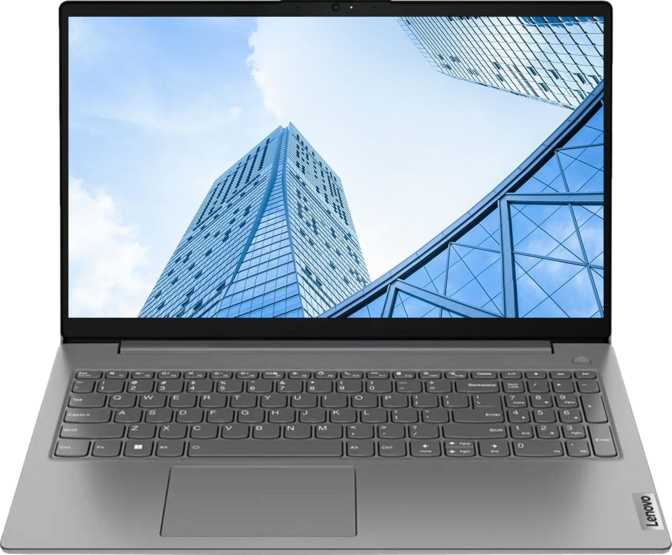
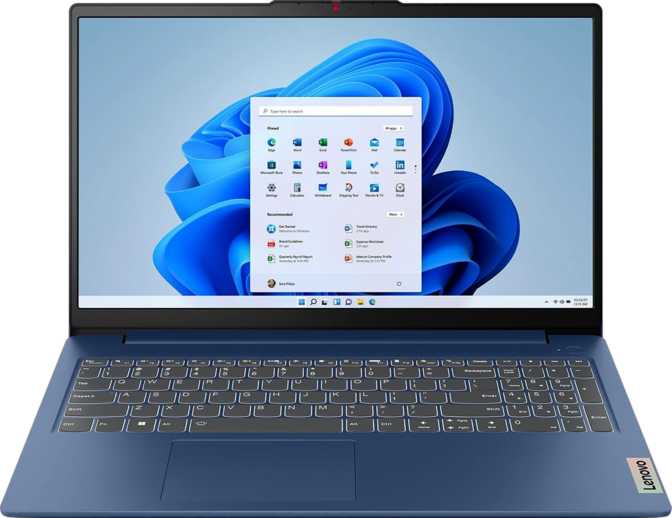
The V15 Gen 4 i is not trying to win design awards. Lenovo has kept the aesthetic deliberately understated — a clean, matte-finished body that communicates "professional tool" rather than "lifestyle accessory." At 359mm wide, 235mm deep, and just 19mm thick, it sits comfortably on a desk or lap without dominating your space.

Weighing approximately 1.65 kg (just under 3.7 lbs), it is genuinely portable enough for daily commutes without turning the trip into a workout. The chassis dimensions reflect a deliberate choice to accommodate proper active cooling for a processor with meaningful thermal headroom — a trade-off that pays dividends in sustained performance.

The build uses plastic throughout, which is typical for this price tier. It will flex slightly under pressure on the lid or keyboard deck, but it holds together with the reassuring solidity Lenovo's productivity line is known for. This is not a rugged device and carries no splash-resistance rating.

Keyboard and Input

The keyboard is a standard chiclet-style layout adequate for sustained typing sessions. There is, however, one noticeable omission: no keyboard backlight. For users who frequently type in low-light conditions — evening work, dimly lit meeting rooms, or travel — this is a non-trivial limitation worth factoring into your decision.

There is no stylus support and no touchscreen. This is a traditional keyboard-and-trackpad productivity machine, designed to be driven the way most office work actually happens.

Display: Sharp, Comfortable, Workmanlike

Everyday Usability

The 15.6-inch Full HD panel delivers 1920×1080 resolution at approximately 141 pixels per inch — the standard density for this screen size. Text is crisp and clear, spreadsheets render with enough sharpness for all-day use, and video calls come through cleanly. You will not see individual pixels at a normal viewing distance.

The panel refreshes at 60Hz, which is the productivity standard. For document editing, coding, email, and data work, 60Hz is perfectly adequate and contributes to sensible power draw. The display does not support touch input — this is a traditional non-touch panel suited to keyboard-and-mouse workflows.

Multi-Monitor Support

The graphics subsystem officially supports up to four simultaneous displays — a meaningful capability for power users who depend on extended desktop setups. In practice, available output ports govern real-world configurations, but the underlying hardware support is there for those who need it.

Display Highlights

  • Anti-Reflection CoatingReduces eye strain under office lighting and near windows — more practically useful for all-day work than a higher refresh rate would be.
  • Full HD at 141 PPICrisp, comfortable text rendering at standard viewing distances with no noticeable pixelation in documents or interfaces.
  • No Touch SupportTraditional non-touch panel only — no stylus, no gesture input of any kind.

Performance Analysis

Processor Architecture

The processor uses Intel's hybrid core design, combining two distinct groups of cores: six higher-power performance cores that burst to just under 5GHz, plus four efficiency cores handling lighter background tasks. Together they deliver 16 processing threads, allowing the chip to manage 16 simultaneous computational tasks without queuing.

This architecture pays off in daily use. Background processes — cloud syncing, antivirus scans, system maintenance — are handled by the smaller cores, preserving the performance cores for whatever you are actively doing. The result is a machine that stays responsive under load rather than bogging down when multiple apps compete for attention.

The chip operates at a 45-watt thermal design rating — high enough to sustain demanding workloads, which is why this machine uses active fan cooling rather than the silent passive cooling found in thinner ultrabooks. In exchange, the cooling system allows the processor to maintain its burst speeds longer than a thermally constrained lower-TDP chip could.

Benchmark Scores in Context

Multi-Core Performance23,805 pts

Solid mid-range tier — handles compiling, large spreadsheets, and heavy multitasking comfortably without approaching workstation-class territory.

Single-Core Performance3,569 pts

Strong result reflecting the near-5GHz burst capability. Everyday software interactions — launching apps, switching tasks — feel sharp and immediate.

40GB Memory Advantage

Shipping with 40GB of DDR4 is unusual at this price tier — most competitors offer 8–16GB. This headroom lets virtual machines, professional analytical software, and dozens of browser tabs coexist without slowdown. The dual-channel configuration also boosts integrated graphics throughput. Upgradeable to a maximum of 64GB.

PCIe 5 NVMe Storage

The 1TB NVMe SSD uses the current-generation PCIe 5 interface, delivering read and write speeds meaningfully faster than the PCIe 3 drives found in many budget competitors. Boot times are fast, large file operations are snappy, and the full terabyte keeps most users within onboard storage comfortably for years.

Integrated Graphics Reality

The Intel UHD Graphics 770 with 64 execution units handles office applications, 4K video playback, light photo work, and multi-monitor desktop use gracefully. It does not support hardware ray tracing or AI-based upscaling. Modern 3D games and GPU-accelerated creative workloads are outside its comfortable range.

Port Selection and Wireless Connectivity

Port / InterfaceSpecificationPractical Note
USB-CUSB 3.2 Gen 1 (5Gbps)Data and charging; no Thunderbolt
USB-A (Fast)USB 3.2 Gen 1 (5Gbps)Fast peripheral connectivity
USB-A (Standard)USB 2.0Mouse, keyboard, low-speed dongles
HDMI1x Full-Size HDMIExternal monitor or projector
Ethernet1x RJ-45 GigabitWired network — ideal for offices
Audio3.5mm Combo JackHeadphones or headset

Wireless Connectivity

Wi-Fi 6 support is a genuine modern standard — faster and more efficient in dense wireless environments than the older Wi-Fi 5 specification. This matters in offices, co-working spaces, and apartments where many devices compete for bandwidth on the same network.

The dedicated Gigabit Ethernet port remains the most reliable option for video calls, large file transfers, or any situation where wireless instability is unacceptable.

Battery Life and Power

Specific battery capacity and rated runtime figures are not published in the available specification data, making a precise estimate impossible. What the specifications reveal provides useful context: the 45-watt processor thermal rating means meaningful power draw under sustained full load. Under lighter office workloads, the hybrid architecture's efficiency cores step in to moderate consumption considerably.

45W TDP Under Sustained Load

Efficiency Cores Reduce Idle Drain

No MagSafe or Sleep-Charge Port

There is no MagSafe-style magnetic charging connector and no sleep-and-charge USB port — standard AC adapter only. Users who prioritize exceptional battery endurance should directly compare runtime figures with lower-TDP ultrabooks before committing.

Who Should Buy the Lenovo V15 Gen 4 i?

Ideal For

  • Office Professionals and Remote WorkersThe 40GB RAM prevents multitasking slowdowns that plague underpowered machines — running spreadsheets, video calls, presentations, and cloud apps simultaneously feels genuinely smooth.
  • Developers and Technical UsersLocal development environments, virtual machines, and code compilation workloads benefit directly from the memory headroom and fast NVMe storage.
  • Students in Demanding ProgramsEngineering, data science, and business analytics students running resource-intensive software will find this machine keeps pace where a basic 8GB laptop would not.
  • Small Business UsersReliable Gigabit Ethernet, Wi-Fi 6, and a capable processor make this a dependable all-day office workhorse at a practical price.

Not Right For

  • GamersThe integrated graphics cannot deliver acceptable frame rates in modern 3D games. This is not a gaming machine in any meaningful sense.
  • Creative Professionals with GPU WorkloadsVideo editors, 3D modelers, and color graders will find the lack of dedicated graphics a significant bottleneck regardless of RAM or CPU speed.
  • Heavy Peripheral UsersNo Thunderbolt, no SD reader, and no high-speed USB-C means an external hub becomes a day-one necessity for anyone running multiple peripherals.
  • Security-Focused ProfessionalsNo fingerprint reader, no facial recognition, and no weather sealing may place this below the hardware security requirements of some enterprise environments.

How It Compares to the Competition

The V15 Gen 4 i occupies a specific market position. Here is how it stacks up against the two most logical alternatives a buyer in this price range would consider.

FeatureLenovo V15 Gen 4 iTypical Budget RivalMid-Range Ultrabook
RAM40GB DDR48–16GB16GB LPDDR5
Storage1TB NVMe PCIe 5256–512GB PCIe 3512GB–1TB PCIe 4
Display15.6" FHD, Anti-Glare15.6" FHD, No Coating13–14" FHD / QHD
Backlit KeyboardNoRarelyUsually Yes
BiometricsNoneOccasionallyUsually Yes
Ethernet PortGigabitSometimesRarely
ThunderboltNoNoOften Yes
Weight~1.65 kg~1.7–2.0 kg~1.2–1.4 kg

Honest Assessment: Strengths and Weaknesses

Where It Excels

  • Exceptional Memory for the Price

    40GB of DDR4 directly addresses the most common frustration with budget laptops — sluggish multitasking that gets worse over time as software grows heavier. This machine ages better than most competitors at this price.

  • Fast, Spacious NVMe Storage

    A full terabyte of PCIe 5 NVMe storage outpaces most rivals on both capacity and raw speed in this price category — a combination rarely seen together at this tier.

  • Capable Hybrid Processor

    The 10-core design handles mixed workloads efficiently, and the near-5GHz burst speed ensures demanding single-threaded tasks feel sharp rather than sluggish.

  • Reliable Networking in Any Environment

    Wi-Fi 6 and Gigabit Ethernet together ensure stable connectivity in offices, home setups, and dense wireless environments — an underappreciated combination at this price.

Where It Falls Short

  • Thin Port Selection

    One moderate-speed USB-C, one fast USB-A, one USB 2.0, and an HDMI port is a lean lineup for a desk-oriented machine. No card reader, no Thunderbolt, no high-bandwidth options.

  • No Backlit Keyboard or Biometrics

    Both omissions feel dated for a business-positioned machine. Fingerprint readers and keyboard backlighting are now available on many budget competitors.

  • Integrated-Only Graphics

    The Intel UHD 770 handles productivity comfortably but creates a hard ceiling for gaming, 3D rendering, and GPU-accelerated video workflows that no software workaround can overcome.

  • Battery Runtime Undisclosed

    Without a published capacity or runtime figure, direct comparison on battery life is not possible — a meaningful gap for users who rely heavily on unplugged use.

Common Buyer Questions Answered

The maximum supported memory is 64GB, which suggests the 40GB configuration uses a combination of soldered onboard memory and one user-accessible slot. Upgrading to 64GB is technically possible if one slot is accessible — but verify the exact configuration for your regional variant before purchasing if upgradeability is a priority.

The PCIe 5 NVMe interface strongly suggests a standard M.2 slot, which is typical for Lenovo's V-series lineup and implies user-replaceability. Confirm this for your specific regional variant before assuming replaceability — some market configurations may differ.

Yes. The processor, 40GB of memory, and Wi-Fi 6 connectivity are all well-suited to sustained video conferencing. The single built-in microphone is functional but basic — a headset or external microphone will deliver noticeably better audio quality in professional meeting contexts.

Yes. Using the HDMI port for one display and a compatible USB-C DisplayPort adapter for the second, you can run a three-screen setup — laptop screen plus two externals. This covers most multi-monitor productivity needs without additional docking hardware.

The 40GB of RAM makes this machine genuinely suited to virtualization workloads. Running a virtual machine with 8–16GB allocated while keeping the host system responsive is practical here — something that would feel painful on a standard 16GB machine. The fast NVMe storage also contributes meaningfully to VM performance.

For text-based work, data analysis, development, video calling, and standard media consumption — no. For GPU-accelerated machine learning, 3D modeling, video color grading, or gaming — yes, the absence of dedicated graphics creates a genuine limitation that no amount of RAM or CPU speed can overcome.

Final Verdict

4.0 / 5.0

The Lenovo V15 Gen 4 i occupies a specific and well-defined niche: a capable, no-frills productivity workhorse that makes a convincing argument where budget buyers are typically shortchanged — primarily RAM and storage. If your work involves heavy multitasking, local development environments, or demanding office applications, the memory headroom here makes a tangible daily difference that cheaper, RAM-starved alternatives cannot match.

The machine is not trying to be premium. It is not sleek or glamorous, it lacks a backlit keyboard, and its port selection will require adapter patience. If biometric security, Thunderbolt connectivity, or backlit typing are requirements rather than preferences, look elsewhere.

Recommended For

Developers, office power users, students in technical disciplines, and small business users who prioritize multitasking performance and storage capacity over portability and premium feature sets.

Skip It If

You need dedicated GPU performance, Thunderbolt connectivity, biometric authentication, or a backlit keyboard — or if battery runtime away from an outlet is a primary purchase criterion.
Arjun Sharma Mumbai, India

Storage & SSD Performance Reviewer

Data storage engineer and cloud infrastructure specialist who benchmarks SSDs, NAS drives, and portable storage solutions under real-world workloads. Delivers transfer-speed comparisons and endurance ratings that go far beyond manufacturer specs.

SSDs Storage Solutions PC Components Data Recovery Cloud Hardware
  • AWS Certified Solutions Architect
  • MSc in Data Engineering
View Full Profile