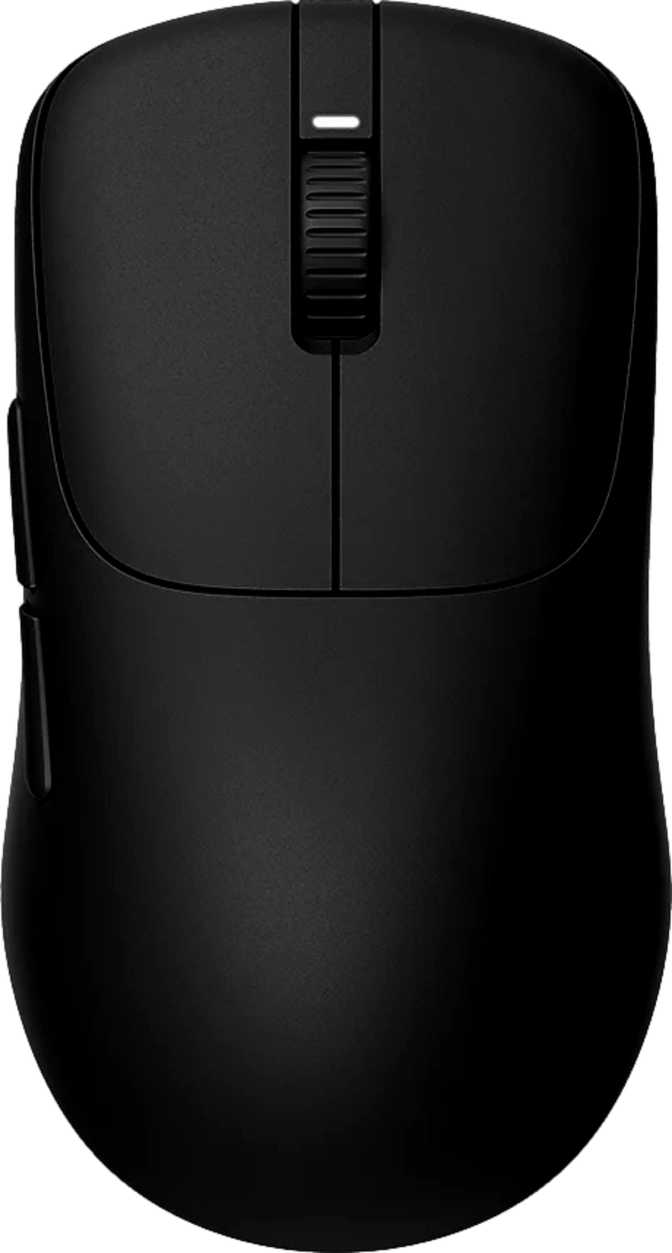
Sony Inzone Mouse-A: An Honest Ultralight Gaming Mouse Review
MiceThe Mouse That Changed the Weight Conversation
There is a specific moment most competitive gamers remember: the first time they picked up a truly ultralight mouse. The shock of it — that a piece of gaming hardware could feel this insubstantial — is immediately followed by the realization that everything they had used before was fighting against them. The Sony Inzone Mouse-A is engineered to create that moment.
At under 41 grams, this is one of the lightest fully wireless gaming mice ever built with a sealed, non-perforated shell. It pairs that weight with performance specifications that belong on flagship hardware — a polling rate that runs circles around the current industry standard, a battery that lasts weeks between charges, and a sensor built to exceed every physical limit a human hand can impose.
Whether those choices add up to the right mouse for you depends on what you are actually looking for. This review covers everything you need to make that call.
Design and Build Quality
Physical construction, ergonomics, and what 40.8g actually feels like in hand.
Shape and Ergonomics
The Inzone Mouse-A uses a symmetrical ambidextrous profile — identical curves on both sides, built to work equally well in the left or right hand without adaptation or compromise. At roughly 120mm long, 64mm wide, and 40mm tall, it falls in the compact-to-medium size range that suits fingertip and claw grip styles most naturally.
Palm grips with large hands may find the body just short of ideal, though the slim dimensions keep it accessible for most hand sizes in those alternative styles. Sony has avoided the common ambidextrous pitfall of a shape that is technically neutral but practically awkward — the curvature flows naturally, and the contact points feel intentionally placed.
Weight: The Defining Feature
Sub-41 grams is not just a number. The typical gaming mouse weighs between 80 and 120 grams. Lightweight gaming mice aim for 60–80 grams. The Inzone Mouse-A slots below nearly everything in a category where reductions of even five grams are considered significant.
More impressively, this weight is achieved with a solid, closed shell — not a honeycomb-perforated body. Most mice in this weight range drill holes through the plastic to shed mass. Sony maintains a clean, continuous exterior at a weight honeycomb mice work hard to approach.
There are no removable weight inserts. The mouse is tuned to one fixed weight — and that weight is already near the engineering floor for wireless construction.
RGB Lighting
RGB lighting is included, implemented with restraint. This is not a mouse designed to be the centrepiece of a light show — the illumination is present for those who want it and unobtrusive enough for those who prefer clean setups.
Full control over colour, pattern, and brightness is available through Sony's Inzone Hub software, including the option to disable it entirely. Performance-focused players will find the lighting easy to dismiss entirely.
Sensor and Tracking Performance
The 3950IZ sensor explained — and what the DPI range means for real-world play.
The 3950IZ Sensor
The Inzone Mouse-A is powered by Sony's proprietary 3950IZ optical sensor — purpose-built for competitive gaming. Its tracking ceiling is set high enough that it will never be the limiting factor in any human-driven movement. The maximum tracking speed far exceeds what any physical hand swipe could produce.
In practical terms: you cannot move this mouse faster than the sensor can follow. For competitive players, this means zero tracking degradation at high flick speeds — the sensor architecture simply will not be the reason you miss a shot.
The sensor is the brain of the mouse. A high-end sensor ensures that every millimeter of physical movement is translated precisely to the screen — no slipping, no cutting corners on fast movements.
DPI Range and What It Means
The sensitivity scale runs from 800 DPI up to 30,000 DPI, adjustable in custom increments. To be clear: 30,000 DPI is an astronomical figure that no competitive player uses in practice. Most professionals operate between 400 and 1,600 DPI. The extreme ceiling signals sensor architecture capable of extreme precision at any point across its range.
A wide ceiling means the lower sensitivity settings are just as accurate as the higher ones — that architectural quality is the real benefit, not the headline number.
The sensor cannot go below 800 DPI. Players who use very low sensitivities — common in tactical FPS games, typically 400 DPI or below — will find this mouse does not natively support those settings. There is no workaround.
8,000 Hz Polling Rate: What It Means and When It Matters
Industry context, practical benefits, and honest caveats for every type of setup.
Standard gaming mice report their position to your computer 1,000 times per second. The Inzone Mouse-A reports its position eight times more frequently — 8,000 times per second. The result is dramatically smoother cursor movement and near-zero perceptible latency between physical hand movement and on-screen reaction.
For Beginners
Think of polling rate like a camera's frame rate. A camera shooting 8,000 frames per second captures motion far more precisely than one shooting 1,000. To see that difference, though, you also need a screen that can display it. On a 60Hz monitor, the benefit is limited. At 240Hz and above, the improvement is visible and immediately felt. If your monitor runs below 165Hz today, this is infrastructure you are buying for the future — the hardware will grow into it.
For Experienced Players
8,000 Hz is the emerging frontier for high-end peripherals. The perceptual difference over 1,000 Hz is real and demonstrable in fast-twitch aiming mechanics, particularly in first-person shooters. The honest caveat: higher polling generates more CPU overhead for processing positional data. On high-core-count modern processors this is negligible. On older systems, expect a marginal load increase. High-refresh displays at 240Hz or above are required to perceive the maximum benefit.
Connectivity: Three Modes, One Mouse
USB wired, 2.4 GHz wireless, and Bluetooth 5 — each mode explained.
2.4 GHz Wireless
The primary mode for competitive gaming. The dedicated USB receiver establishes a low-interference link with a latency profile effectively indistinguishable from wired use under real gaming conditions. This is the mode that delivers the full 8,000 Hz polling rate experience without the constraint of a cable.
Bluetooth 5
Designed for versatility rather than peak performance. Ideal for laptops, tablets, or any setup where a USB port is unavailable. Bluetooth 5 is stable and ranges well. Latency is higher than the 2.4 GHz receiver — standard across the industry and not a Sony-specific limitation.
Wired USB
Zero battery concerns, maximum compatibility. More importantly, the Inzone Mouse-A can be used fully while plugged in and charging simultaneously — no forced pause for power delivery. A feature that budget-tier wireless mice frequently omit, here treated as standard.
Battery Life: What 90 Hours Actually Means Day to Day
Real-world charge frequency and how it compares to category norms.
Game for three hours every day and you will need to charge this mouse approximately once per month. Heavy users logging five or six hours daily still get two to three weeks between charges. This figure stands out significantly in the ultralight category — achieving low weight and high capacity simultaneously is a genuine engineering challenge.
Battery Life at a Glance
Who the Sony Inzone Mouse-A Is For
A clear breakdown of the ideal buyer — and who should look elsewhere.
Buy This Mouse If You Are:
- A competitive FPS or battle royale player who wants the lightest possible mouse without sacrificing wireless performance
- A left-handed gamer looking for a high-performance option with genuine ambidextrous ergonomics
- A multi-device user who wants one mouse connecting via 2.4 GHz for gaming and Bluetooth for a laptop
- Someone already in the Sony Inzone ecosystem who wants a unified companion app experience
- A player upgrading from a heavier mouse who wants to experience what genuinely ultralight hardware feels like
Look Elsewhere If You Are:
- A player who regularly uses multiple computers and needs button profiles to travel automatically with the mouse
- Someone who plays at sensitivities below 800 DPI and cannot or will not adapt their playstyle upward
- A player who prefers a larger, taller palm-filling body shape for extended comfort during long sessions
- A user who needs more than two side buttons for heavily keybind-dependent games like MMOs or MOBAs
- Anyone on a strict budget — this is a premium product positioned at a premium price point
How It Stands Against the Competition
Spec-for-spec positioning in the ultralight wireless gaming mouse market.
The Inzone Mouse-A enters a competitive market with a specific, defensible profile. Its wins are clear on weight and polling rate. Where competitors hold advantages is onboard storage, and in some cases a lower DPI floor and higher button count.
| Feature | Sony Inzone Mouse-A | High-End Ultralight Alt. | Standard Wireless Alt. |
|---|---|---|---|
| Weight | ~41g (sealed shell) | ~55–65g | 80–100g |
| Polling Rate | 8,000 Hz | 1,000–2,000 Hz | 1,000 Hz |
| Connectivity | USB / 2.4G / BT5 | USB / 2.4G | USB / 2.4G |
| Battery Life | ~90 hrs | 60–80 hrs | 40–60 hrs |
| Onboard Profiles | None | 1–5 | 1–5 |
| Ambidextrous | Yes | Mostly No | Mostly No |
| Shell Type | Sealed (No Holes) | Often Perforated | Sealed |
Category comparisons represent typical specifications across competing products at similar price tiers. Individual models vary.
Honest Assessment: Strengths and Limitations
Where the Inzone Mouse-A excels and where it falls short — written plainly.
Where It Excels
The Inzone Mouse-A executes two ideas with uncommon quality: weight and wireless performance. The 2.4 GHz connection holds its own against the best in class, the battery lasts long enough that charging becomes a monthly consideration, and the 8,000 Hz polling rate marks this as genuinely current-generation hardware.
The sealed shell construction deserves specific credit. Reaching sub-41 gram territory without perforating the chassis is a meaningful engineering achievement. The result is a mouse that feels durable despite its low mass — not fragile or toy-like, but genuinely light.
The battery-to-weight ratio is the strongest single argument for this mouse. Achieving 90-hour runtime in a sub-41 gram wireless frame represents a technical achievement that few competitors match in a single product.
Where It Falls Short
Five buttons and no onboard memory represent a deliberate minimalism that will register as insufficient for specific buyers. This is not cost-cutting — it is a design choice made in service of a focused competitive tool. But the consequence is real for anyone who needs portable settings or extensive key bindings.
The 800 DPI minimum eliminates a segment of players who use very low sensitivities and cannot adapt upward. For tactical FPS players accustomed to 400 DPI or below, this is a hardware constraint with no workaround.
Sony's one-year warranty is standard industry coverage. In a premium product tier where some manufacturers offer two-year protection on wireless hardware, it simply meets expectations rather than exceeding them.
Questions Real Buyers Are Asking
Answers to the most common pre-purchase questions about the Sony Inzone Mouse-A.
Final Verdict
The Sony Inzone Mouse-A is a precision-first, performance-forward wireless gaming mouse that earns its place among the best ultralight options on the market. Its sub-41 gram weight, 8,000 Hz polling rate, and 90-hour battery life form a combination that no competitor currently matches cleanly in a single package.
The limitations are real and should not be minimised. The absence of onboard memory is a genuine inconvenience for specific use cases. The 800 DPI floor eliminates a segment of players. And the five-button layout is lean. These are deliberate design choices, not cost-cutting — but their impact depends entirely on who is using the mouse.
Buy It If
You are a competitive player who wants the lightest, most responsive wireless mouse available and operates primarily on a single gaming PC where the software dependency becomes irrelevant.
Pass On It If
You need onboard profile portability, require sub-800 DPI sensitivity, or want a wider button layout for heavily keybind-dependent games.
For competitive FPS players and anyone seeking a genuine ultralight wireless upgrade, the Sony Inzone Mouse-A is one of the most compelling options available at its tier.