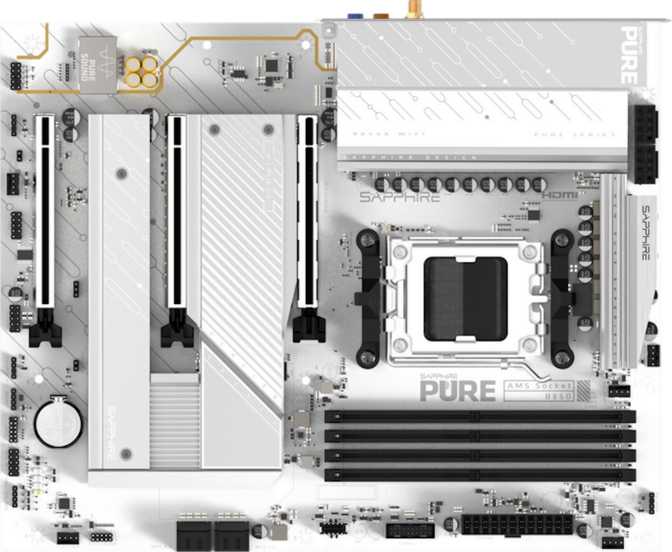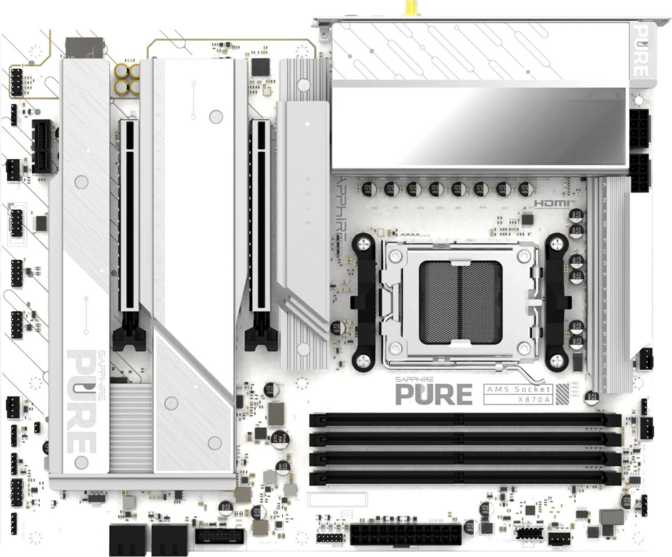
Sapphire Pure X870A Wi-Fi 7 Review: A Strong AM5 Mid-Range Motherboard
MotherboardsWhat Is the Sapphire Pure X870A Wi-Fi 7?
Sapphire is a name long associated with AMD graphics cards, but the Pure X870A Wi-Fi 7 is a reminder that the company has serious ambitions in the motherboard market too. Built on AMD’s X870 chipset for the AM5 platform, this ATX board targets the enthusiast mid-range — the sweet spot where buyers want every meaningful modern feature without paying the premium of a flagship X870E board. It ships with Wi-Fi 7 wireless, a Thunderbolt 4 port, PCIe 5.0 graphics support, and DDR5 memory compatibility. On paper, that’s a compelling package. But the details matter, and some of them will shape whether this board belongs in your build or not.
At a Glance
- Socket
- AM5
- Chipset
- AMD X870
- Form Factor
- ATX (305×245 mm)
- Memory
- 4× DDR5 / 256 GB
- M.2 Slots
- 3
- USB 4 / TB4
- 1 each (40 Gbps)
- Wireless
- Wi-Fi 7 / BT 5.4
- Audio
- 7.1 Channel
- Warranty
- 3 Years
Design and Build Quality
The Pure X870A follows ATX’s standard 305 mm × 245 mm footprint, which means it fits comfortably in the overwhelming majority of mid-tower and full-tower cases. Nothing unusual to plan around here — if your case supports ATX, this board drops right in.
The “Pure” branding suggests a clean aesthetic, and the board does carry RGB lighting for those who want some visual identity in a windowed build. The lighting is accent-level rather than an overwhelming lightshow — a sensible choice for a board positioned as a serious platform rather than a showpiece.
Build quality on X870-class boards is generally solid given the price bracket they occupy, and the Pure X870A reflects that. Heatsinks cover the VRM and chipset areas, which is important for sustained workloads — especially relevant for AM5’s Ryzen 7000 and 9000 series processors, which can draw significant power under all-core loads.
One design note worth understanding upfront: this board does not include a dedicated clear-CMOS button on the rear I/O panel, and it uses a single BIOS chip rather than a dual-BIOS arrangement. For most users these omissions won’t matter. For overclockers who push memory or CPU limits aggressively, the lack of a quick-reset mechanism on the I/O panel means you’ll need to use the onboard jumper process if a bad profile bricks the system — a minor inconvenience worth knowing before you commit.
Physical Highlights
- Standard ATX footprint — fits all ATX-compatible cases
- RGB lighting included for windowed builds
- VRM and chipset heatsink coverage for sustained loads
- No rear-panel clear-CMOS button
- Single BIOS chip — no dual-BIOS recovery fallback
Platform and Processor Compatibility
The Pure X870A uses AMD’s AM5 socket — the current-generation platform supporting Ryzen 7000 and Ryzen 9000 series processors. AM5 is a long-term platform commitment from AMD, meaning this board should accommodate future Ryzen generations as BIOS updates arrive.
The X870 chipset sits one tier below the X870E, which affects a few things. X870E boards typically offer more PCIe 5.0 lanes, particularly for NVMe storage. With X870, the primary PCIe 5.0 allocation goes to the graphics card slot, and the M.2 slots operate at PCIe 4.0 speeds. For today’s fastest consumer SSDs — most of which remain PCIe 4.0 — this is a non-issue. If you’re specifically targeting next-generation PCIe 5.0 NVMe drives, an X870E board would be the more future-proof choice.
Overclocking Readiness
The board is rated as easy to overclock, and the DDR5 memory controller supports profiles up to 8400 MHz — a ceiling well above what most DDR5 kits are rated to reach. Whether you’re enabling an XMP/EXPO profile on a 6000 or 6400 MHz kit, or pushing a high-end kit further, the headroom is genuinely generous.
Without a dual-BIOS safety net or rear-panel CMOS reset button, aggressive memory overclocking that produces a no-boot situation requires the internal jumper process to recover. Budget extra time for initial setup if you plan to push memory profiles hard.
Memory: DDR5 Headroom That Won’t Hold You Back
The board carries four DDR5 DIMM slots in a dual-channel configuration — two slots per channel. Maximum supported capacity reaches 256 GB, well beyond any current consumer workload, confirming that high-density configurations are fully within scope for long-term future-proofing.
Standard DDR5 speeds are supported from the base, and EXPO and XMP profiles allow out-of-the-box performance tuning without manual overclocking knowledge. Reaching 6000–6400 MHz — the widely recommended sweet spot for Ryzen on AM5 — requires nothing more than enabling the memory profile in BIOS.
Memory Configuration
- 4 DIMM slots in dual-channel layout
- 256 GB maximum supported capacity
- Up to 8400 MHz with overclocked profiles enabled
- EXPO & XMP support for one-click speed profiles
- DDR5 only — no DDR4 compatibility
Important Limitation
This board does not support ECC memory. For workstation users running data-sensitive applications — scientific computing, financial modeling, or archival video editing — ECC is a meaningful safety net. This board is built for consumer and prosumer gaming and content creation, not mission-critical computation where data integrity errors cannot be tolerated.
Storage Configuration
M.2 NVMe Slots
Three M.2 slots give you room for a primary NVMe boot drive, a secondary fast storage drive, and a third for overflow or a dedicated game library — all without touching a single SATA port. A practical allocation for modern builds where traditional drives are increasingly secondary citizens.
SATA Connectivity
Four SATA 3 ports handle traditional storage — mechanical hard drives, older SATA SSDs, and optical drives. That’s enough for a mixed storage system or a home media server setup without requiring a dedicated add-in controller card.
RAID Support
Full RAID capability across all major configurations:
- RAID 0 — Striping for speed
- RAID 1 — Mirroring for redundancy
- RAID 5 — Parity-based redundancy
- RAID 10 — Combined mirror & stripe
Connectivity: The Rear I/O Breakdown
The rear I/O panel is where a motherboard either earns its place or reveals its compromises. Here’s what the Pure X870A delivers across every port category.
High-Speed Ports
-
40 Gbps
USB 4 Port
Matches Thunderbolt 3 speeds. Ideal for fast external SSDs and high-bandwidth docks.
-
40 Gbps
Thunderbolt 4 Port
Adds daisy-chaining, Thunderbolt dock support, and Apple Thunderbolt ecosystem compatibility — an unusual and welcome feature on an AMD platform board.
USB-A Rear Ports
- 1× USB-A10 Gbps
- 4× USB-A (peripherals)5 Gbps
- 2× USB-A (legacy)USB 2.0
Display Outputs
HDMI and DisplayPort support Ryzen APUs with integrated graphics. Useful during initial setup, troubleshooting, or as a secondary display output even with a discrete GPU installed.
- HDMI output
- DisplayPort output
Networking
A single RJ45 port handles wired connectivity. At the X870 mid-range tier, 2.5 Gigabit Ethernet is the standard — a meaningful step above legacy Gigabit and practical for modern home networks and NAS environments.
Front Panel Headers
- 2× USB 3.2 Gen 1 (5 Gbps)
- 1× USB-C header (10 Gbps)
- 4× USB 2.0 internal headers
Fully populated, the front panel adds substantial extra port count unlikely to run short even in a heavily equipped workstation.
Wireless: Wi-Fi 7 and Bluetooth 5.4
Wi-Fi 7 is the headline wireless feature, and it’s genuinely meaningful rather than speculative marketing. Wi-Fi 7 supports the 6 GHz band alongside the older 5 GHz and 2.4 GHz bands. On a compatible router, you can expect lower latency, higher peak throughput, and better handling of congested network environments compared to Wi-Fi 6E.
In practical terms: if your router is Wi-Fi 6 or earlier, Wi-Fi 7 on this board delivers no tangible difference today. The router must also support Wi-Fi 7 for the new capabilities to activate. But buying Wi-Fi 7 now means you won’t need to upgrade the motherboard when your networking hardware catches up — a sound forward-looking decision.
The board is backward compatible all the way to Wi-Fi 4 (802.11n), ensuring connectivity with any router you currently own.
Wi-Fi Compatibility Stack
- Wi-Fi 7 (802.11be)Latest
- Wi-Fi 6E (802.11ax 6 GHz)Supported
- Wi-Fi 6 (802.11ax)Supported
- Wi-Fi 5 (802.11ac)Supported
- Wi-Fi 4 (802.11n)Supported
Bluetooth 5.4 provides current-generation wireless peripheral and audio support, but aptX codec support is absent. If you rely on aptX for low-latency Bluetooth audio, a separate USB Bluetooth adapter with aptX support will be needed.
Expansion Slots
The PCIe layout covers the essentials without overcomplicating things. A single full-bandwidth PCIe 5.0 x16 slot handles a discrete GPU, and all current consumer graphics cards sit well within what PCIe 4.0 can saturate — making PCIe 5.0 a genuine future-proofing advantage rather than a premature specification.
| Slot | Interface | Best Used For |
|---|---|---|
| Primary x16 | PCIe 5.0 x16 | Discrete graphics card — full bandwidth for current and next-gen GPUs |
| Secondary | PCIe x4 | Add-in NVMe card, capture card, 10 GbE network adapter |
| Third | PCIe x1 | Sound card, USB expansion hub, smaller add-in cards |
There are no PCIe 3.0 legacy slots, reflecting the platform’s modern positioning. Older PCIe expansion cards will still function — PCIe is backward compatible — but they will operate at lower speeds within the available slots.
Audio
The onboard audio system supports a 7.1 surround configuration with six physical audio jacks on the rear I/O — covering front, rear, center, subwoofer, and side channels for a full home theater or dedicated gaming setup. This is above average for a board in this category, where 5.1 is more common.
There is no S/PDIF optical output. Users who route audio through a digital-optical connection to a receiver, DAC, or surround processor will need either a USB audio interface or an add-in sound card. For the majority of users connecting via 3.5 mm headsets or analog surround speaker sets, this omission is completely irrelevant.
Audio Summary
- 7.1 surround sound support
- 6 rear I/O audio jacks
- Above-average channel count for the price tier
- No S/PDIF optical output
- No aptX Bluetooth codec
Who Should Buy the Sapphire Pure X870A Wi-Fi 7
Excellent Fit For
- AM5 builders who want Wi-Fi 7 without paying X870E prices
- Content creators and streamers needing generous USB counts and fast internal storage expansion
- Gamers wanting a clean, modern platform with PCIe 5.0 GPU slot readiness
- Users who need Thunderbolt 4 on an AMD system — a relatively rare combination at this price tier
- Home office users wanting both Ethernet reliability and Wi-Fi 7 flexibility in one build
- Builders running mixed storage: NVMe boot drives alongside several SATA devices
- Home NAS builders who want RAID capability without a dedicated add-in controller
Not Ideal For
- Users who require dual BIOS or a rear-panel clear-CMOS button for aggressive overclocking recovery
- Workstation users who need ECC memory for data integrity in mission-critical applications
- Anyone targeting PCIe 5.0 NVMe storage specifically — X870E handles that better at the platform level
- Bluetooth aptX audio users who depend on that specific codec for low-latency wireless audio
- Builds with legacy components requiring many USB 2.0 rear ports or PS/2 connectors
How It Compares to the Competition
The Pure X870A sits in a crowded mid-range X870 market. Thunderbolt 4 is the standout differentiator — most competing boards at this price skip it entirely. Here’s how the key decision points line up across tiers.
| Feature | Sapphire Pure X870A Wi-Fi 7 | Typical X870 Mid-Range | X870E High-End |
|---|---|---|---|
| Wi-Fi Generation | Wi-Fi 7 | Wi-Fi 6E or Wi-Fi 7 | Wi-Fi 7 |
| Thunderbolt 4 | Rarely included | Sometimes included | |
| PCIe 5.0 NVMe | Sometimes | ||
| Dual BIOS | Often included | Usually included | |
| DDR5 OC Ceiling | 8400 MHz | 6400–8000 MHz | 8000–9000 MHz |
| M.2 Slot Count | 3 | 3–4 | 4–5 |
| Price Tier | Mid-Range | Mid-Range | Premium |
Strengths and Weaknesses: An Honest Assessment
The Pure X870A gets a lot right. Thunderbolt 4 on an AMD platform board at this price is genuinely uncommon, and its inclusion alongside USB 4 at 40 Gbps makes this one of the stronger connectivity packages at the X870 mid-range level. Wi-Fi 7 is present and correct. The DDR5 memory ceiling is high enough that it won’t be the bottleneck even for serious memory enthusiasts. Storage expansion — three M.2 slots plus four SATA ports plus full RAID capability — is well-rounded for almost any use case.
The audio section is better than average. The expansion slot layout is sensible and clean. The three-year warranty adds genuine confidence in Sapphire’s backing of the product.
Where the board shows restraint rather than weakness: it is a single-BIOS, no-clear-CMOS-button design, which reduces the safety net during adventurous tuning sessions. The USB-C situation on the rear is handled by the USB 4/Thunderbolt 4 port rather than a dedicated standalone USB-C — functional, but limited to one USB-C connection at the back without an expansion hub. And for those targeting PCIe 5.0 storage, this board routes that bandwidth to the GPU slot rather than splitting it with M.2 — a chipset-level decision, not a board-level failure, but an important distinction.
None of these points disqualify the board. They simply mean you should be clear-eyed about what you’re getting and what you’re not.
Common Questions Before Buying
Final Verdict
The Sapphire Pure X870A Wi-Fi 7 earns a confident recommendation for AM5 builders who want a feature-complete, modern foundation without stepping up to X870E pricing.
The combination of Wi-Fi 7, Thunderbolt 4, PCIe 5.0 graphics support, and a well-populated USB ecosystem makes it a board you can build into today without feeling the need to replace it next year. Thunderbolt 4 at this price tier, on an AMD platform, is the single most differentiated feature on this board — and it alone justifies serious consideration over competing mid-range X870 options.
It is not the right board if you need ECC memory, aggressive overclocking failsafes like dual BIOS, or PCIe 5.0 NVMe storage. For those specific requirements, there are better-suited options at each end of the market.
For the target buyer — an enthusiast building a high-performance gaming or creative workstation on AM5, who values future-ready connectivity over niche overclocking insurance — the Pure X870A Wi-Fi 7 delivers exactly what it promises, without padding the price with features you’d likely never use.
Quick Verdict
- Thunderbolt 4 on AMD — rare at this price
- Wi-Fi 7 & Bluetooth 5.4 onboard
- PCIe 5.0 GPU slot future-proofs GPU upgrades
- 8400 MHz DDR5 ceiling — headroom to spare
- Full RAID support on all four configurations
- 7.1 audio above average for this tier
- No dual BIOS or rear CMOS reset
- No ECC memory support
- PCIe 5.0 limited to GPU slot only