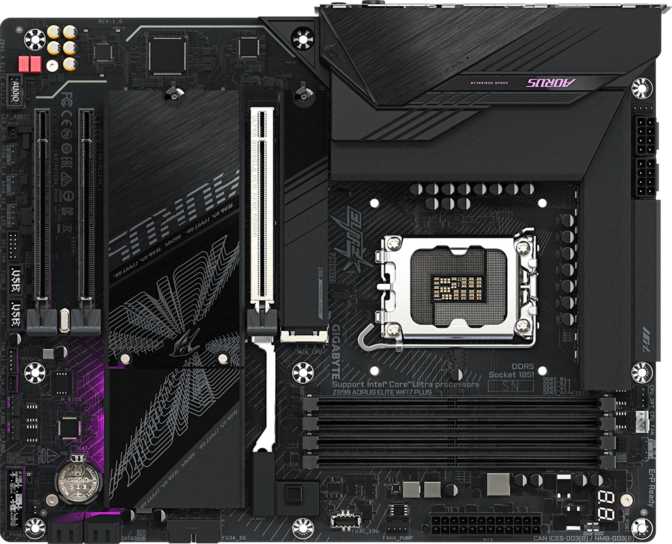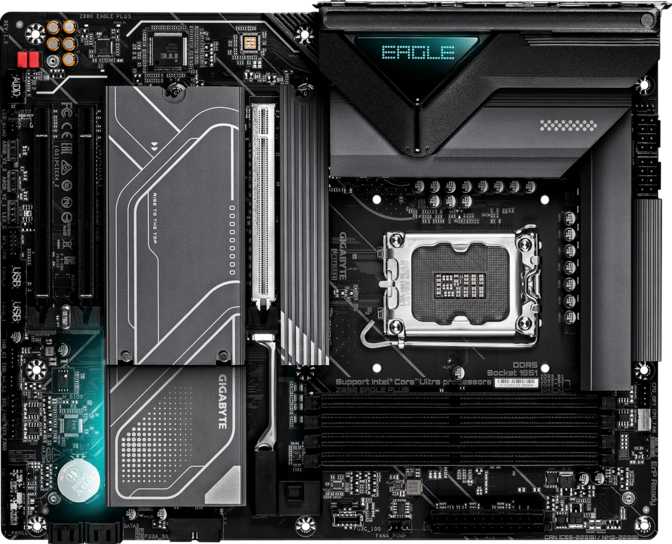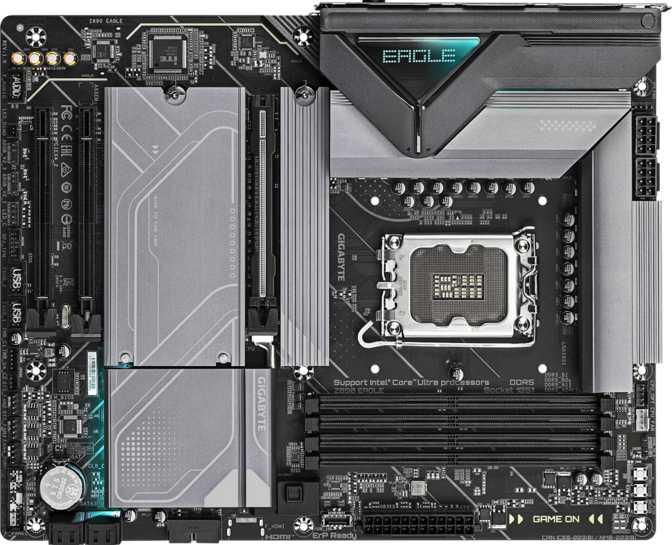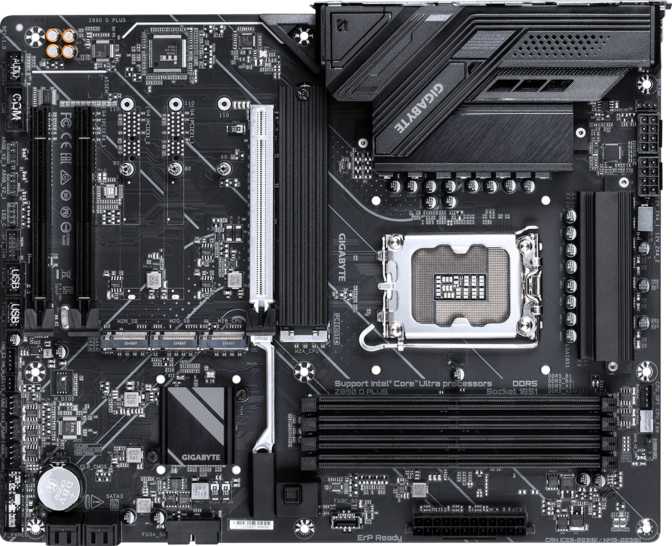
Gigabyte Z890 Eagle Wi-Fi 7 Plus: Full Review and Honest Verdict
MotherboardsThe Z890 Eagle Wi-Fi 7 Plus occupies a position that many builders find genuinely difficult to navigate: it sits above the bare-bones entry boards yet well below the flagship excess of HEDT-adjacent offerings. For anyone building around Intel's current-generation LGA 1851 platform, that middle ground is exactly where most real-world decisions get made. This board doesn't try to be everything — but what it does target, it covers with a level of consistency that deserves a careful look before you commit.
Performance at a Glance
Category scores across six key evaluation criteria
Design, Build Quality, and Physical Presence
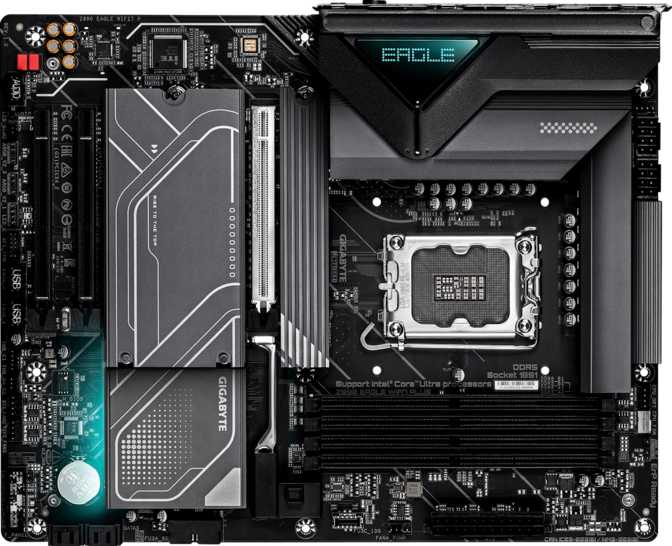
The Eagle line has always leaned into a clean, understated aesthetic rather than the aggressive RGB theatrics of Gigabyte's Aorus tier, and this board continues that tradition. The full ATX footprint — 305 mm wide, 244 mm tall — means it fills a standard mid-tower or full-tower case without issue, and gives Gigabyte enough board real estate to space connectors sensibly rather than stacking them into cramped corners.
The RGB lighting is present but measured. Illuminated zones integrate with Gigabyte's RGB Fusion ecosystem, but this isn't a board that screams for attention in a windowed panel. If subtle accent lighting appeals to you, it delivers. If you'd rather have none at all, the lighting can be switched off entirely through the BIOS or software.
Build quality at this tier generally means solid VRM heatsink coverage, reinforced PCIe and memory slots, and a board that won't feel flimsy during installation — and the Z890 Eagle lands there without incident. The physical layout follows a logical flow: the 24-pin ATX power connector sits at the right edge, EPS CPU power at the top-left, and the primary M.2 slots are positioned so that a standard cooler installation doesn't force you to fight the board.
Physical Highlights
- Standard ATX dimensions — fits mid-tower and full-tower cases universally
- Measured RGB lighting — accent zones present, fully disableable in BIOS
- Reinforced slots — primary PCIe and DIMM slots carry metal shielding
- Logical connector layout — installation follows a predictable, builder-friendly flow
- RGB Fusion ecosystem — syncs with compatible Gigabyte peripherals and components
Performance Foundation: What the Z890 Platform Actually Means
The Z890 chipset paired with the LGA 1851 socket represents Intel's current-generation platform, designed for the latest Intel Core Ultra processors. For buyers coming from older platforms, the generational uplift is meaningful — not because of the chipset alone, but because the platform was rebuilt around DDR5 memory and PCIe 5.0 as non-negotiable, native standards rather than optional tack-ons.
Memory: DDR5 With Real Headroom
Four DDR5 slots run in dual-channel configuration. The maximum supported capacity of 256 GB covers any workstation or creative workload that might push toward that ceiling, though for most gaming or general-use builds, that cap will never be approached.
The more meaningful figure for performance-focused builders is the validated overclocked memory ceiling, reaching into territory where latency-sensitive workloads — games, content creation pipelines, simulation tasks — see tangible gains. Hitting those upper limits requires matched high-frequency kits and BIOS tuning, but the platform fully supports it.
PCIe 5.0 Primary Slot
The primary GPU slot runs at PCIe 5.0 x16. Today's graphics cards don't fully saturate even PCIe 4.0 bandwidth in most rendering scenarios — but PCIe 5.0 here is a forward-compatibility investment. As GPU architectures and high-bandwidth accelerators evolve, this board won't become a bottleneck at the interconnect level for the foreseeable future.
The two additional expansion slots run at PCIe x4 speeds, suited for add-in cards like capture cards, high-speed NVMe expansion controllers, and networking adapters — but won't run a secondary GPU at full bandwidth. There are no legacy PCIe 3.0 or PCIe x1 slots, which is a clean, modern choice.
Storage: Four M.2 Slots and More
Four M.2 sockets is a genuinely generous allocation at this price tier. M.2 is the dominant form factor for fast NVMe SSDs — the kind that load operating systems in seconds and move large files at speeds that make traditional hard drives look stationary. Having four means you can build an entirely M.2-based storage array without touching the SATA ports, leaving those four SATA 3 connectors free for large-capacity mechanical drives or budget SSDs used for bulk storage.
For most home builders, RAID won't be necessary. But its availability means this board can serve a creative professional who wants NAS-like redundancy in a desktop without buying dedicated server hardware.
RAID Configuration Support
| RAID Mode | Description | Best For | Supported |
|---|---|---|---|
| RAID 0 | Stripe data across drives | Maximum read/write speed | |
| RAID 1 | Mirror data across drives | Data redundancy | |
| RAID 5 | Striped with distributed parity | Speed + redundancy balance | |
| RAID 10 | Mirrored stripe sets | High performance + redundancy |
Storage at a Glance
- M.2 Sockets4
- SATA 3 Connectors4
- SATA 2 ConnectorsNone
- U.2 SocketsNone
- RAID Support0, 1, 5, 10
- eSATA PortsNone
Connectivity: Ports, Wireless, and Future-Proofing
The rear panel port selection tells you a great deal about who Gigabyte designed this board for. The combination of USB 4, Thunderbolt 4, and multiple USB generations alongside Wi-Fi 7 gives this board a connectivity profile that competes well above its price bracket.
Rear I/O Panel Breakdown
| Port Type | Qty | Speed | Real-World Use |
|---|---|---|---|
| USB 4 Type-C | 1 | 40 Gbps | External NVMe enclosures, docks, high-bandwidth peripherals |
| Thunderbolt 4 | 1 | 40 Gbps | Apple ecosystem, pro docks, daisy-chaining displays |
| USB 3.2 Gen 2 Type-A | 2 | 10 Gbps | Fast external storage, modern peripherals |
| USB 3.2 Gen 1 Type-A | 3 | 5 Gbps | Keyboards, mice, webcams, hubs |
| USB 2.0 Type-A | 4 | 480 Mbps | Legacy devices, wireless dongles, low-bandwidth peripherals |
| DisplayPort | 1 | — | iGPU output — active only with a CPU that includes integrated graphics |
| RJ45 Ethernet | 1 | 2.5 Gbps | Wired networking — standard for this platform tier |
Wi-Fi 7 and Bluetooth 5.4
Wi-Fi 7 (802.11be) improves over its predecessors in three meaningful ways: higher theoretical throughput, lower latency through Multi-Link Operation, and better performance in congested environments with many simultaneously connected devices.
For builders who can't run a physical Ethernet cable to their desk, this module removes the wireless trade-off almost entirely. The board also supports all previous Wi-Fi generations, meaning it connects to any router you already own — a Wi-Fi 7 router is not required to use the board today.
Bluetooth 5.4 handles modern audio codecs, low-energy peripherals, and stable connections at range.
One Gap Worth Knowing
Beyond the USB 4 and Thunderbolt 4 connections, there are no additional USB-C ports on the rear panel. The board supports a front-panel USB-C header for compatible cases — which partially addresses modern case requirements — but builders with USB-C-heavy peripheral setups may feel the absence at the rear.
- Front-panel USB-C Gen 2 header available for compatible cases
- No additional mid-speed USB-C rear ports beyond the 40 Gbps connections
Audio: 7.1 Surround at 120 dB SNR
The onboard audio solution supports a full 7.1-channel speaker configuration and carries a signal-to-noise ratio of 120 dB. SNR in audio hardware measures how cleanly the signal separates from electrical interference — higher numbers mean the output is cleaner and more faithful to the source material.
At 120 dB, the Z890 Eagle's audio is competitive with mid-tier dedicated sound cards. Gamers using high-quality headsets, content creators doing voiceover work, and casual listeners will find the onboard solution sufficient without additional hardware. Only professional audio production — recording, mixing, mastering — would meaningfully benefit from a dedicated add-in audio interface instead.
The S/PDIF optical output on the rear panel allows connection to external DACs, home theater receivers, and high-end headphone amplifiers for those who want to bypass the onboard analog stage entirely.
Audio Specifications
- Signal-to-Noise Ratio120 dB
- Channel Support7.1 Surround
- S/PDIF OutputYes (Optical)
- Rear Audio Connectors2
Overclocking: Accessible Without Being Intimidating
The board carries Gigabyte's Easy Overclock designation, meaning the BIOS includes preconfigured XMP/EXPO memory profiles and accessible CPU performance tuning without requiring you to understand every underlying voltage and timing variable.
For experienced builders, the board supports manual memory subtiming adjustments, CPU core-specific voltage management, and memory frequency into validated overclocked territory. The absence of dual BIOS — a safety net that keeps a backup firmware copy in case a bad flash or unstable overclock corrupts the primary — is a genuine limitation at this tier.
Gigabyte does include a physical Clear CMOS button, which simplifies recovery from a failed BIOS state. That's a meaningful convenience, but dual BIOS would have been preferable and is found on higher-tier Eagle and Aorus boards.
Enabling XMP in the BIOS — a single toggle — pushes your memory to its rated speed automatically. Most DDR5 kits ship running slower than their label speed by default. This one step is often the most impactful tuning action available.
Manual subtiming control and core-level voltage adjustments are available. No dual BIOS means a corrupted flash requires the physical Clear CMOS button — plan accordingly before aggressive tuning sessions.
Internal Expansion and Case Compatibility
Fan and Thermal Management
Six fan headers across the board give builders meaningful flexibility in thermal layout. Six is sufficient to run a full case fan configuration — typically three front intake, two or three top/rear exhaust — plus CPU cooler connections, without needing a separate fan hub. That convenience matters in complex builds where wiring becomes its own challenge.
Front Panel Headers
Through internal connectors, the board adds two USB 3.2 Gen 1 ports, one USB-C 3.2 Gen 2 port, and four additional USB 2.0 ports accessible via front-panel headers on compatible cases. A TPM header is present for hardware-based encryption — relevant for enterprise deployments and users who require firmware-level security.
Who This Board Is For — and Who Should Look Elsewhere
Matching hardware to use case is the most important part of any buying decision. Here's an honest breakdown based on this board's actual strengths and limitations.
This Board Fits Well If You Are...
- Building a high-performance gaming or content creation desktop around an LGA 1851 processor and want modern wireless included without paying for it as an add-on
- A builder who values M.2 storage flexibility and wants four slots to work with
- Someone who uses or plans to use Thunderbolt 4 peripherals — high-resolution displays, fast docks, external storage
- A content creator or prosumer who wants RAID capability in a desktop without moving to server hardware
- Someone building a clean, moderately lit system rather than a full RGB showcase build
This Board Is Not Ideal If You Are...
- A builder who requires dual BIOS for overclock safety or BIOS update peace of mind — several competing boards at this tier include it
- Someone who needs multiple PCIe x16 slots for multi-GPU or high-bandwidth expansion scenarios
- A professional audio user — the onboard solution is strong, but a dedicated interface remains the right tool for studio recording work
- An ECC memory user — this is a consumer platform board with no ECC memory support
How It Stands Against the Competition
The Z890 Eagle punches toward the mid-high tier in wireless, USB connectivity, and audio quality while staying positioned closer to the mid-tier in price. The table below shows where it leads — and where it concedes ground to boards above and below it.
| Feature | Z890 Eagle Wi-Fi 7 Plus | Typical Z890 Entry Board | Typical Z890 Mid-High Board |
|---|---|---|---|
| Wi-Fi Generation | Wi-Fi 7 | Wi-Fi 6 / 6E | Wi-Fi 7 |
| M.2 Slots | 4 | 2–3 | 4–5 |
| USB 4 (40 Gbps) | Often No | ||
| Thunderbolt 4 | Rarely | ||
| PCIe Primary Slot | 5.0 x16 | 5.0 x16 | 5.0 x16 |
| Dual BIOS | No | No | Often Yes |
| RAID 5 Support | Sometimes | ||
| Audio SNR | 120 dB | 108–115 dB | 120 dB+ |
Honest Assessment: Strengths and Limitations
The Z890 Eagle Wi-Fi 7 Plus earns its positioning through a combination that's harder to find at this price point than it should be: four M.2 slots, Wi-Fi 7, Thunderbolt 4, a USB 4 port, and audio quality that doesn't embarrass itself — all on a standard ATX footprint with a three-year warranty covering the full board.
The three-year warranty deserves mention. At this tier, manufacturers sometimes trim warranty periods, and three years reflects a reasonable commitment to the product's lifespan — particularly relevant given BIOS updates continue to matter on LGA 1851 throughout the platform's life.
The missing dual BIOS is the one legitimate complaint for enthusiast builders, and it's worth weighing honestly. If that safety net matters to your build process, step up to the next tier within Gigabyte's lineup or look at MSI and ASUS equivalents that include it.
The lack of rear USB-C ports beyond the high-speed connections may frustrate someone with a USB-C-heavy desk. And the expansion slot configuration — one primary PCIe 5.0, two secondary PCIe x4 — suits single-GPU builds cleanly but leaves nothing for anyone who needs x16 bandwidth to secondary slots.
Where It Excels
- Wi-Fi 7 + Thunderbolt 4 + USB 4 at mid-tier pricing
- Four M.2 slots for all-solid-state storage builds
- 120 dB onboard audio competitive with mid-tier dedicated cards
- RAID 5 support for desktop NAS-style redundancy
- Three-year warranty at this price segment
Where It Falls Short
- No dual BIOS — corrupted firmware requires the physical Clear CMOS button to recover
- No secondary PCIe x16 slot for multi-GPU or high-bandwidth accelerator cards
- Limited rear USB-C options beyond the flagship-speed connections
- ECC memory not supported — consumer platform only
Frequently Asked Questions
Answers to the questions real buyers search for before purchasing this board.
Final Verdict
The Gigabyte Z890 Eagle Wi-Fi 7 Plus is a well-considered mid-tier board that over-delivers on connectivity and storage flexibility relative to where it sits in the market. Wi-Fi 7, Thunderbolt 4, USB 4, four M.2 slots, and a 120 dB audio solution together represent a feature density that typically costs more on competing platforms.
The missing dual BIOS is the one legitimate complaint for enthusiast builders. If that safety net matters to your build process, step up to the next tier within Gigabyte's lineup or look at MSI and ASUS equivalents that include it. For everyone else — single-GPU builders, content creators, gamers, and professionals who want a platform that won't need replacing the moment a new peripheral standard emerges — this board delivers the right package at the right position.
Building around LGA 1851 and want modern wireless and connectivity without paying flagship prices.
Dual BIOS is a priority or you need more than one full-bandwidth PCIe x16 expansion slot.