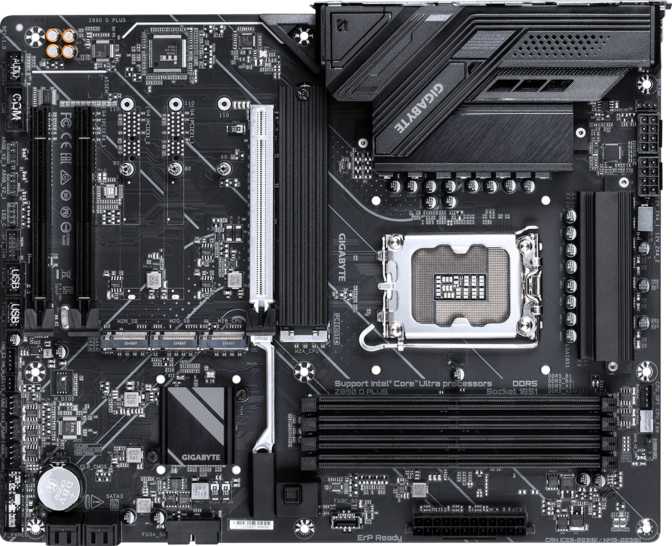
Gigabyte Z890 D Plus Review: Honest Strengths, Clear Trade-Offs
MotherboardsIntel's Arrow Lake platform demands a serious commitment: a new socket, new memory standard, new chipset. If you're building around a 14th or 15th-gen Intel CPU — stop, because this board isn't for you. The Z890 D Plus is purpose-built for Intel's Core Ultra 200 series processors, and within that context, it occupies an increasingly important position: it's the board you buy when you want a genuine Z890 platform without paying for features you'll never use.
That's a harder sell than it sounds. Z890 is Intel's enthusiast chipset tier, which typically comes loaded with wireless radios, premium audio, and connectivity options that push prices north of $300. The Z890 D Plus strips most of that away, landing at a price point where builders can put real money into a processor and GPU instead. Whether that trade-off works for you depends entirely on what you actually need — and this review will tell you whether that's a match.
At a Glance
Core specifications — Gigabyte Z890 D Plus
Design and Build Quality: Straightforward ATX Done Properly
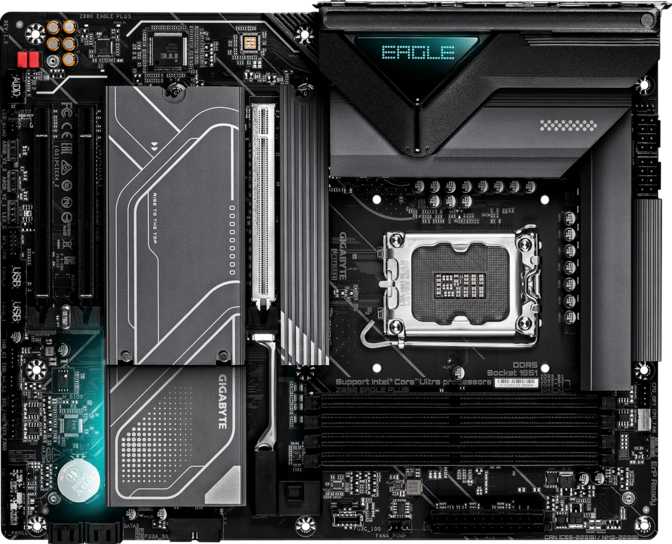
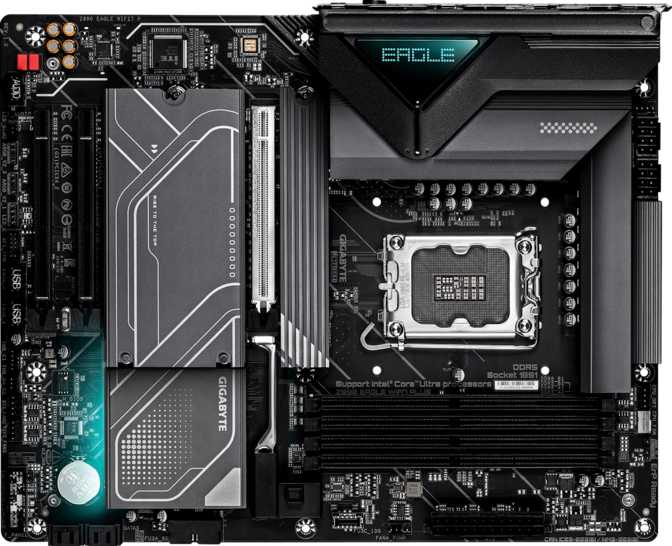
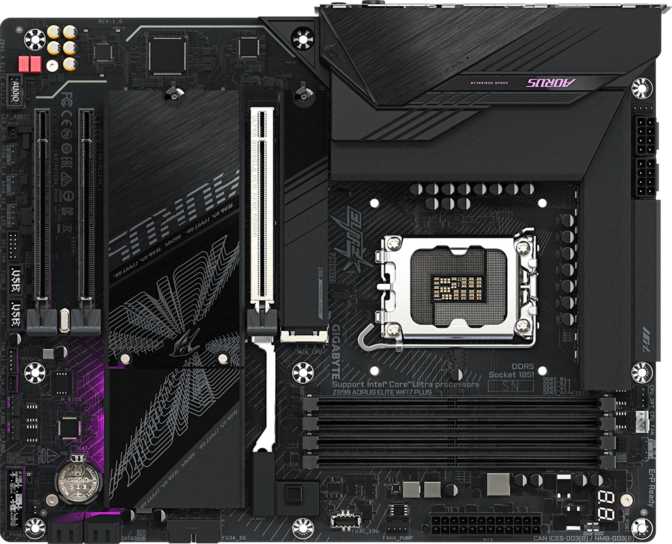
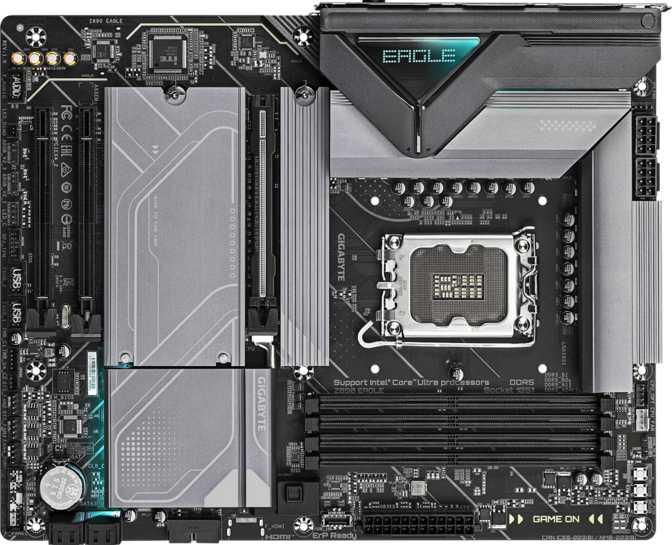
The Z890 D Plus follows the standard ATX footprint — 305 mm wide and 244 mm tall — which means it fits comfortably in the vast majority of mid-tower and full-tower cases without any compatibility concerns. If you've ever bought a board only to discover it needs a specific case cutout or unusual standoff configuration, you won't have that problem here.
Gigabyte has included RGB lighting on this board, giving builders some room for visual customization without needing to add external lighting strips. RGB synchronization through Gigabyte's software ecosystem means your lighting can coordinate with compatible components. Those who find RGB distracting can typically disable it entirely through BIOS settings.
The board omits dual BIOS — a feature found on higher-end Gigabyte models that provides a backup firmware chip in case an update goes wrong. At this price point, that's an acceptable omission, but it means you should be methodical about firmware updates. Gigabyte compensates with a dedicated clear CMOS mechanism, making recovery from a failed overclock or corrupted configuration straightforward without hunting for a buried jumper.
The three-year warranty is notably generous for this category. Many competing boards at similar prices offer only two years. That extra year matters when you're building a system you plan to run for a half-decade or more.
Platform Performance: What Z890 and LGA 1851 Actually Mean
LGA 1851 and the Core Ultra 200 Requirement
The LGA 1851 socket is Intel's current-generation interface, designed exclusively for Core Ultra 200 series processors. This isn't backward compatible with older Intel chips — anyone upgrading from a previous Intel platform will need a new processor alongside this board.
Z890 Overclocking: The Core Advantage
What the Z890 chipset provides over Intel's more affordable B860 alternative is primarily unlocked overclocking. The "Z" designation in Intel's chipset naming has always signaled full overclocking support, and the Z890 D Plus delivers on that. Pairing this board with an unlocked Core Ultra 200K or 200KF processor lets you push clock speeds beyond stock frequencies — a meaningful capability for builders who tune actively. For those buying a locked (non-K) processor, the Z890 advantage is largely wasted, and a B860 board would offer nearly identical everyday performance for less money.
PCIe 5.0 ×16: Current-Generation GPU Bandwidth
The single PCIe 5.0 x16 slot handles the primary graphics card. This is the fastest expansion interface in the current consumer generation, delivering bandwidth that no consumer GPU currently saturates — meaning your card won't be bottlenecked at the slot level regardless of tier. The two additional PCIe x4 slots provide space for expansion cards — capture cards, 10GbE networking adapters, additional storage controllers, or PCIe Wi-Fi cards — running at x4 bandwidth appropriate for everything except high-bandwidth GPU workloads.
DDR5 Memory: Performance With a Migration Cost
The Z890 platform requires DDR5 memory — DDR4 is not supported, full stop. If you're transitioning from an older build with DDR4 kits, budget for new RAM alongside this board.
Four physical memory slots support up to 256 GB total, running in dual-channel configuration. Install RAM in matched pairs — slots 1 and 3, or all four populated — to activate dual-channel mode. Dual-channel meaningfully outperforms single-channel in CPU-bound workloads and content creation tasks.
The overclocked memory ceiling reaches well past 9,400 MHz, effectively future-proofing this build against any retail memory kit available today. At stock settings, DDR5 runs at JEDEC-standard speeds; enabling XMP or EXPO profiles in BIOS pushes it to its rated speed automatically. Experienced builders can go further by adjusting timings manually — beginners don't need to touch any of this to get excellent performance.
| Type | DDR5 only (DDR4 not compatible) |
| Slots | 4 DIMM slots |
| Max Capacity | 256 GB |
| Channels | Dual-channel |
| OC Ceiling | 9,466 MHz (XMP / manual tuning) |
| ECC Support | Not supported |
- Install RAM in matched pairs to activate dual-channel and maximize bandwidth
- Enable XMP or EXPO in BIOS to reach your kit's rated speed automatically
- Exceptionally high OC ceiling means no current DDR5 kit will outpace this board
- DDR4 is not compatible — budget for new DDR5 RAM if upgrading from an older platform
Storage Configuration: Four M.2 Slots Is the Headline
Four M.2 sockets is genuinely impressive at this price point. M.2 is the slot format used by fast solid-state drives — the kind that load games in seconds and make video export feel near-instant. Having four means you can run a boot drive, a scratch drive for video editing, a game library drive, and a backup drive entirely on fast NVMe storage without touching the SATA ports.
Those four SATA 3 ports remain relevant. SATA handles 2.5-inch SSDs and spinning hard drives — useful for large-capacity storage where cost per terabyte matters more than peak speed. If you have an existing drive collection, those SATA connections let you carry them forward without purchasing new hardware.
RAID Support
Full RAID support across four levels adds functionality that most boards in this range either lack or limit. This isn't a feature most home builders activate, but it's meaningful for NAS-adjacent builds, home servers, or anyone who wants hardware-level redundancy without a dedicated storage controller.
Enabling multiple M.2 drives may share bandwidth with SATA ports in certain configurations. Consult the board manual before finalizing your drive layout.
Connectivity: Where the Trade-Offs Become Apparent
Rear I/O Ports
| Port | Speed | Qty |
|---|---|---|
| USB-A 3.2 Gen 2 | 10 Gbps | 1 |
| USB-C 3.2 Gen 2 | 10 Gbps | 1 |
| USB-A 3.2 Gen 1 | 5 Gbps | 4 |
| USB 2.0 (Type-A) | 480 Mbps | 4 |
| DisplayPort Output | iGPU only * | 1 |
| RJ45 Ethernet | 1 Gbps | 1 |
* Active only when using a CPU with integrated graphics. This board has no onboard video processing of its own.
Internal Headers
| Header | Speed | Qty |
|---|---|---|
| USB 3.2 Gen 1 Header | 5 Gbps | 2 |
| USB 2.0 Header | 480 Mbps | 4 |
| M.2 Sockets | NVMe / PCIe | 4 |
| SATA 3 Connectors | 6 Gbps | 4 |
| Fan Headers | PWM / DC | 6 |
| TPM Connector | Security | 1 |
What's Not Included
Audio Capabilities
The onboard audio handles 5.1 surround sound through three 3.5mm jacks — the standard combination of speakers or headphones, microphone, and line-in. This covers desktop speakers, gaming headsets with 3.5mm connectors, and standard home studio peripherals without any issues.
There is no S/PDIF digital output, which closes off optical connections to external audio receivers or DACs. Audiophiles running a dedicated DAC via optical will need to budget for an add-in sound card. For the majority of builders — those using USB headsets, USB audio interfaces, or analog desktop speakers — the onboard audio does everything needed.
Fan and Thermal Control
Six fan headers give builders meaningful airflow control. Running a standard configuration of two or three case fans, a CPU cooler fan, and an AIO pump still leaves headers to spare. This means every fan connects directly to the motherboard — no Y-splitter cables, no separate fan controllers required.
Six headers is a step above what entry-level boards typically offer. Centralized control through BIOS or Gigabyte's software lets you configure quiet profiles, aggressive cooling curves, or temperature-linked ramp behaviors — all from one interface without add-on hardware.
Who Should Buy the Gigabyte Z890 D Plus
This board has a defined target audience. Understanding whether you match that profile matters more than any individual specification.
This Board Is Right For You If...
- You're building near an ethernet outlet or are willing to add a PCIe Wi-Fi card separately
- You want to pair an unlocked Core Ultra 200K processor with a board that won't cap overclocking potential
- You plan to run multiple NVMe drives and want four M.2 slots without paying for premium board features
- You're optimizing your build budget to redirect savings toward CPU and GPU
- You need RAID storage capability for a home server or content creation workstation
- You value an extended 3-year warranty as a signal of long-term reliability
Look Elsewhere If You Need...
- Built-in wireless — no Wi-Fi or Bluetooth, and adding it later requires an extra component and expansion slot
- You're buying a locked (non-K) Core Ultra 200 CPU — overclocking goes unused, and a B860 board delivers similar results for less
- Thunderbolt connectivity for high-speed external devices or professional docking stations
- 2.5GbE networking for multi-gigabit internet connections or high-speed local transfers
- Optical S/PDIF audio output for an external DAC or home theatre receiver
- A dual BIOS safety net during aggressive firmware updates or overclocking sessions
How It Compares to the Alternatives
The Z890 D Plus sits between premium B860 boards and fully-featured Z890 options. Here's how the key differentiators line up against its most logical competitors.
| Feature | Z890 D Plus | Typical B860 Board | Mid-Range Z890 |
|---|---|---|---|
| CPU Overclocking | Yes — Full | No | Yes — Full |
| Wi-Fi / Bluetooth | None | Often included | Usually included |
| M.2 NVMe Slots | 4 | 2 – 3 | 3 – 4 |
| PCIe 5.0 ×16 | |||
| Thunderbolt | Sometimes | ||
| Dual BIOS | Varies | Often yes | |
| USB4 / 40 Gbps | Sometimes | ||
| RAID Support | 0, 1, 5, 10 | Limited | |
| Warranty | 3 Years | 2 – 3 Years | 3 Years |
Typical specifications represent common configurations across this tier — individual boards vary by manufacturer and model.
Honest Assessment: Strengths and Limitations
The Z890 D Plus earns credit in specific areas that matter for long-term builds. It also carries clear, non-negotiable limitations. Both deserve equal weight in your decision.
What It Gets Right
- Four M.2 slots at this price point is uncommon — boards costing considerably more often offer the same count or fewer
- Full RAID support (0, 1, 5, 10) adds functionality most boards in this range either lack or lock behind higher-tier models
- Unrestricted CPU and memory overclocking means this board won't become the limiting factor as you tune over time
- PCIe 5.0 ×16 handles any current consumer GPU without bandwidth constraints at the slot level
- Six fan headers enable centralized airflow management without splitter cables or external controllers
- Three-year warranty meaningfully differentiates this from two-year alternatives at similar prices
Where It Falls Short
- No Wi-Fi and no Bluetooth — adding wireless later costs an extra slot and adds to your total spend
- No dual BIOS removes a safety net that builders who push aggressive overclocks might genuinely want
- No USB4 or Thunderbolt puts professional docking stations and Thunderbolt storage completely off the table
- Gigabit ethernet only — no 2.5GbE for users with multi-gigabit internet or fast local network transfers
- No S/PDIF optical output limits audiophiles using external DACs or home theatre receivers
- Rear panel USB peaks at 10 Gbps — no ultra-fast ports for external NVMe enclosures or USB4 accessories
Common Buyer Questions
Answers to the questions buyers typically research before purchasing this board.
Final Verdict
Gigabyte Z890 D Plus — Recommended With Conditions
The Gigabyte Z890 D Plus is a board that delivers honestly within its constraints. It doesn't pretend to be a feature-complete enthusiast board — it's a focused, capable platform for builders who want genuine Z890 overclocking support, excellent storage expansion through four M.2 slots, and full DDR5 performance without spending on wireless connectivity and premium I/O they don't need.
For a builder pairing this with an unlocked Core Ultra 200K processor, running ethernet, and prioritizing the CPU and GPU budget over motherboard extras, the Z890 D Plus is a legitimate choice. It gives you the platform's full potential where it counts and trims the rest.
For anyone who needs Wi-Fi, plans to buy a locked processor, or wants Thunderbolt connectivity — this isn't your board. Those requirements push you either toward a B860 board (if you're dropping overclocking anyway) or a more fully-equipped Z890 option. The Z890 D Plus knows what it is. Whether that matches what you need is a clear question — and now you have the information to answer it.
- Unlocked Core Ultra 200K builds
- Wired ethernet setups
- Multi-NVMe storage configurations
- Budget-optimized Z890 overclocking builds
- Wireless-only locations
- Locked (non-K) Core Ultra 200 CPUs
- Thunderbolt or USB4 workflows
- Optical audio DAC setups