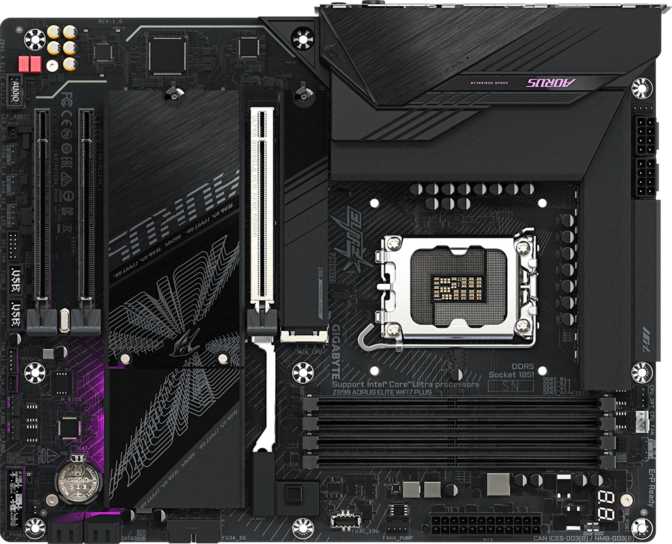
Gigabyte Z890 Aorus Elite Wi-Fi7 Plus: Full Review and Verdict
MotherboardsAt a Glance
The essential specifications, decoded for your build decision.
What Makes the Z890 Aorus Elite Wi-Fi7 Plus Worth Your Attention
The Z890 Aorus Elite Wi-Fi7 Plus sits at a compelling intersection: it carries enough horsepower for enthusiast-level builds without demanding the premium you'd pay for a flagship board. Built around Intel's LGA 1851 platform and the Z890 chipset, it's designed specifically for Intel's latest processor generation — meaning you're investing in a platform with genuine forward momentum rather than one running out of runway.
For builders who want meaningful overclocking headroom, next-generation connectivity, and a feature set that won't feel outdated two upgrade cycles from now, this board deserves serious consideration. It's not a budget entry point, and it's not a ceiling-scraping flagship. It occupies the space where most thoughtful PC builders actually live.
Design and Build Quality
Physical Presence and Layout
The Aorus Elite Wi-Fi7 Plus ships in standard ATX format — 305 mm wide by 244 mm tall — which fits virtually every mid-tower and full-tower case on the market without layout compromises. Gigabyte hasn't tried to reinvent the ATX footprint here, and that's the right call. Compatibility with the widest possible range of enclosures matters more than novelty for a board at this price tier.
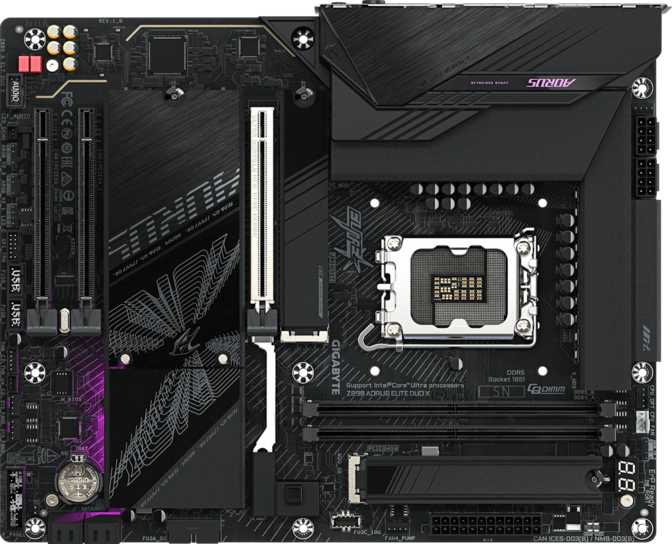
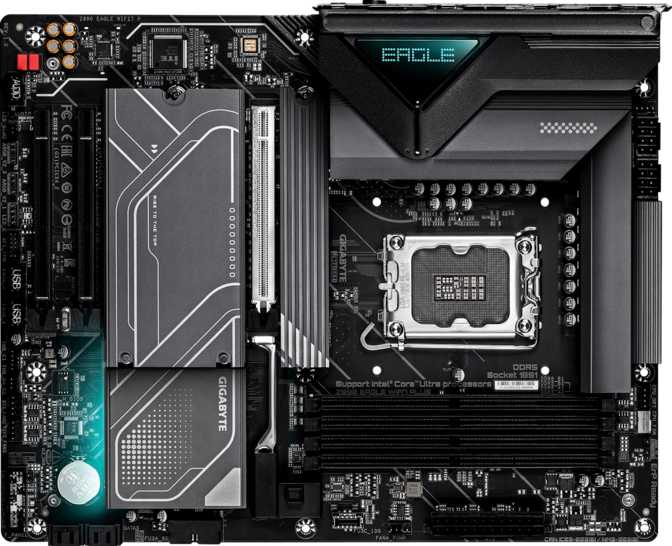
The board carries Gigabyte's Aorus visual language: angular heatsink shrouds, addressable RGB lighting across multiple zones, and a dark, purposeful aesthetic. The RGB implementation is controllable through Gigabyte's software ecosystem, and the lighting zones are spread across the board in a way that looks deliberate in a windowed case rather than afterthought decoration. Heatsink coverage on a Z890 board at this tier typically encompasses the VRM array, the chipset, and the M.2 slots — areas where thermal management directly influences sustained performance.
Practical Layout Considerations
The four DIMM slots sit in a standard dual-channel configuration, leaving adequate clearance for most tower coolers and 240 mm or 280 mm AIO radiators mounted at the top. The primary PCIe 5.0 x16 slot occupies the expected top position, well-separated from the lower expansion slots.
Six fan headers distributed across the board mean you can connect a full cooling setup — CPU pump, multiple case fans, radiator fans — without a separate fan hub.
A physical clear CMOS button is accessible directly on the board. When an aggressive memory profile or overclocking setting prevents the system from booting, recovery requires no tools and no battery removal — a detail that saves real time during tuning sessions.
Platform and CPU Performance
The LGA 1851 Foundation
The Z890 chipset paired with the LGA 1851 socket is Intel's current-generation consumer platform. LGA 1851 represents a socket transition — CPUs from previous Intel generations (LGA 1200, LGA 1700) are not compatible. You're committing to a new CPU purchase alongside this board, but you're also starting fresh on a platform with a longer usable lifespan ahead of it.
The Z890 chipset is Intel's unlocked, enthusiast-tier offering for this socket. The "Z" designation enables full CPU overclocking, expanded memory speed support, and greater PCIe lane allocation than locked chipsets like B860 or H870. Pair this board with a "K" or "KF" series processor and you'll have unobstructed access to frequency and voltage tuning.
Overclocking Accessibility
The board is explicitly designed for overclockers, with one-click and auto-overclocking features available through the BIOS. For builders who want to push their processor's limits without spending hours in manual voltage curves, this is a genuine convenience. For experienced overclockers, full granular controls remain accessible — automation is an option, not a constraint.
The physical BIOS reset button turns a failed-overclock, non-booting system into a minor inconvenience rather than a stressful recovery scenario. Press the button, the board resets, and you're back to a working baseline in seconds.
Memory: Speed, Capacity, and Real-World Impact
DDR5 Only
This board runs DDR5 exclusively — DDR4 compatibility is not present, which is expected on Z890. DDR5 brings lower base voltages, higher bandwidth potential, and on-module power management. The performance advantage over DDR4 is most visible in bandwidth-intensive workloads: video editing with large timelines, 3D rendering, large dataset processing, and memory-hungry gaming engines at high resolutions.
Four Slots, 256 GB Ceiling
Four DIMM slots operate in dual-channel mode — two slots per channel. Filling two matching sticks in the A2/B2 positions delivers optimal performance. All four slots populated also runs dual-channel; there is no quad-channel advantage regardless of configuration. The 256 GB maximum capacity is a non-issue for any consumer or prosumer workload — even professionals running virtual machines or large sample libraries will find 64 GB or 128 GB configurations more than sufficient.
Memory OC Ceiling in Context
This board supports memory overclocking up to approximately 9,466 MHz. To understand where that lands:
- Standard DDR5~4,800 MHz
- Mainstream Enthusiast6,000–7,200 MHz
- High-End Kits8,000–9,000 MHz
- This Board's Ceiling~9,466 MHz
Storage: Fast, Flexible, and Future-Ready
Four M.2 Slots Explained
Four M.2 sockets is a strong allocation for a board in this class. M.2 is the interface format used by modern NVMe SSDs — the compact, fast drives that have made traditional 2.5-inch SATA SSDs feel slow by comparison. With four slots, you can run dedicated drives for the operating system, applications, scratch or cache, and archival storage simultaneously, without a single SATA cable involved.
The top slot connects via PCIe 5.0 lanes directly from the CPU, supporting the latest generation of ultra-fast NVMe SSDs capable of sequential reads approaching or exceeding 14,000 MB/s. The remaining slots run at PCIe 4.0 speeds — still fast enough that the difference is imperceptible in real-world file operations for most users.
SATA Storage for Existing Drives
Four SATA 3 connectors accommodate traditional hard drives and SATA SSDs. If you're migrating from an older build with a library of SATA drives for media storage or backups, this board handles them without compromise.
RAID Configuration Support
All four primary RAID modes are supported across SATA and compatible M.2 storage:
| RAID Mode | Supported | Best For |
|---|---|---|
| RAID 0 | Speed — stripes data for maximum throughput | |
| RAID 1 | Redundancy — mirrors data across two drives | |
| RAID 5 | Balance — speed with distributed parity data | |
| RAID 10 | Both — combines mirroring and striping |
Consumer-grade RAID is not a substitute for proper off-site backups, but it adds meaningful protection for active working data against a single-drive failure.
Connectivity: A Genuinely Modern I/O Layout
The rear I/O panel is where the Aorus Elite Wi-Fi7 Plus makes its strongest case for multi-year relevance.
Rear Panel Port Breakdown
Internal Expansion Headers
Front-panel connectivity for your case:
- USB 3.2 Gen 1 Headers2 Headers
- USB-C 3.2 Gen 2 Header (front panel)1 Header
- USB 2.0 Headers4 Headers
- Fan / Pump Headers6 Headers
- SATA 3 Connectors4 Ports
- TPM Connector Present
No HDMI output is present. Only DisplayPort is available, and only when the CPU carries integrated graphics. Builders pairing this board with a GPU-less iGPU-absent processor cannot connect a display without a discrete graphics card installed.
Wi-Fi 7 and Bluetooth 5.4
What Wi-Fi 7 Actually Changes
Wi-Fi 7 (802.11be) introduces Multi-Link Operation, allowing a device to simultaneously transmit and receive across multiple frequency bands — 2.4 GHz, 5 GHz, and 6 GHz — at the same time. This improves both throughput and latency, particularly in environments with many competing wireless devices.
Reaching full Wi-Fi 7 potential requires a Wi-Fi 7 router on the other end. The on-board adapter is backward compatible with Wi-Fi 4, 5, 6, and 6E — it will connect at the highest standard your current router supports.
For anyone who can't run ethernet cable to their PC, having Wi-Fi 7 built in means the board stays relevant as home routers upgrade to the new standard. No add-in card or USB adapter will be needed later.
Bluetooth 5.4
Bluetooth 5.4 improves on earlier versions primarily in connection reliability, power efficiency for low-energy devices, and the ability to handle more simultaneous connections without degradation. For a desktop PC, this means cleaner connections to wireless headsets, controllers, and audio peripherals — particularly relevant when Bluetooth audio latency matters during gaming or media playback.
This board does not support the aptX audio codec over Bluetooth. Wireless audio quality relies on standard codecs (SBC, AAC). For highest-fidelity wireless audio from the desktop, a dedicated Bluetooth DAC or receiver with aptX or LDAC support is the appropriate upgrade path.
Audio: A Solid Onboard Solution
The onboard audio carries a 120 dB signal-to-noise ratio on its digital-to-analog converter, supports 7.1 surround channel output, and includes an S/PDIF optical output. The 120 dB SNR figure is competitive for integrated audio — it means the background noise floor is extremely low relative to signal, translating to clean, quiet audio with good dynamic range.
For gaming, streaming, music listening, and casual content creation, the onboard audio will satisfy most users without additional hardware. Two audio jacks on the rear panel is minimal — dedicated audiophiles or anyone running a complex multi-output setup may prefer a dedicated sound card or external DAC. But for the mainstream builder, the onboard solution is genuinely good, not a compromise placeholder.
The S/PDIF output enables a clean digital connection to external audio equipment like AV receivers and DAC amplifiers, bypassing the board's analog stage entirely and offloading all processing to dedicated hardware.
Expansion Slots: GPU and Beyond
PCIe 5.0 x16 — One High-Bandwidth GPU Slot
A single PCIe 5.0 x16 slot handles the primary GPU. PCIe 5.0 doubles the per-lane bandwidth of PCIe 4.0, which matters for the next generation of graphics cards beginning to demand the headroom. Current high-end GPUs don't fully saturate PCIe 4.0 x16 bandwidth in most scenarios, but PCIe 5.0 provides a meaningful buffer for longevity — your GPU slot won't be the bottleneck for at least the next two to three hardware generations.
Only one x16 slot means no multi-GPU configurations. Given that SLI and NVLink have been effectively discontinued across the consumer gaming market, this is not a practical limitation for any real-world build.
Two PCIe x4 Slots for Expansion
Two additional PCIe x4 slots accommodate capture cards, USB expansion cards, PCIe storage controllers, networking cards, or sound cards. Having two means you're not forced to choose — a capture card and a USB expansion can coexist without consuming a full x16 slot.
| Use | Slot Type | Qty |
|---|---|---|
| Primary GPU | PCIe 5.0 x16 | 1 |
| Expansion Cards | PCIe x4 | 2 |
Who Should Buy This Board
The Z890 Aorus Elite Wi-Fi7 Plus is not the right board for everyone. Here's who it genuinely serves — and who should look elsewhere.
This board suits you if...
You're building a high-performance desktop around a current Intel unlocked CPU and want full overclocking capability without paying flagship prices.
You're a content creator who needs multi-drive M.2 storage, fast USB for external drives and capture devices, and reliable wired and wireless networking.
You're a gamer who wants the latest built-in wireless networking, plans to run a single high-end GPU, and wants room to push memory performance.
You're invested in Thunderbolt peripherals and need guaranteed TB4 compatibility without the complexity of an add-in card.
You're migrating to DDR5 and the LGA 1851 platform and want a board that stays capable throughout the full platform lifespan.
Look elsewhere if...
You're budget-conscious and have no intention of overclocking. A B860 board costs less and delivers most of the same day-to-day experience without the Z890 premium.
Your CPU lacks integrated graphics and you need a display output before a discrete GPU arrives. No HDMI is present, and the DisplayPort is iGPU-dependent.
You require more than one USB 4 or Thunderbolt port. The board carries one of each, which may not satisfy workstation users with multiple high-bandwidth peripherals.
Your workloads require ECC memory. This board does not support error-correcting memory, making it unsuitable where data integrity under continuous load is a hard requirement.
Competitive Positioning
How the Z890 Aorus Elite Wi-Fi7 Plus stacks up against logical alternatives on the same LGA 1851 socket.
| Feature | Z890 Aorus Elite Wi-Fi7 Plus | Typical B860 Alternative | Typical Z890 Flagship |
|---|---|---|---|
| CPU Overclocking | Full | Memory Only | Full |
| M.2 Slots | 4 | 2–3 | 4–6 |
| Wi-Fi Generation | Wi-Fi 7 | Wi-Fi 6E or 7 | Wi-Fi 7 |
| USB 4 / Thunderbolt 4 | 1 each | Rarely included | 1–2 each |
| GPU Slot (PCIe Gen) | 5.0 x16 | 5.0 x16 | 5.0 x16 |
| Max Memory OC | ~9,466 MHz | Lower ceiling | Comparable or higher |
| SATA Ports | 4 | 4 | 4–6 |
| Dual BIOS | No | Varies | Yes |
| Price Tier | Mid-High | Low-Mid | Premium |
Honest Assessment
Where It Gets Things Right
Connectivity stack: The combination of USB 4 at 40 Gbps, Thunderbolt 4, and Wi-Fi 7 in a mid-range board is not a given. These ports ensure the board won't be a connectivity bottleneck as external hardware continues to advance.
Four M.2 slots: A strong allocation for this class. Users who want dedicated NVMe drives for OS, applications, scratch, and archival storage can achieve that configuration without any compromise.
Memory OC ceiling: Supporting overclocked memory up to approximately 9,466 MHz means this board won't bottleneck even the fastest consumer DDR5 kits currently on the market.
PCIe 5.0 GPU slot: Future graphics cards that genuinely require PCIe 5.0 bandwidth will find no compromise here. The primary slot is ready for at least the next two to three GPU generations.
Three-year warranty: Competitive and meaningful — Gigabyte is standing behind this product's long-term reliability in a way budget boards typically don't.
Where It Falls Short
No dual BIOS: This is a legitimate gripe at this price point. A backup BIOS chip protects against firmware corruption or a bad flash. Its absence is a cost-cutting decision that introduces real risk for users who update firmware regularly. The physical CMOS reset button helps overclockers, but it doesn't replace full firmware redundancy.
Limited USB-C on the rear panel: A single Thunderbolt 4 port handles the high-bandwidth USB-C use case, but there is no secondary USB-C at any speed. Users with multiple USB-C peripherals — audio interfaces, docking stations, external displays — will feel this gap.
DisplayPort only, no HDMI: Any builder pairing this with a CPU that lacks integrated graphics cannot connect a monitor without a discrete GPU physically installed. This creates a genuine gap during builds and testing phases.
No ECC memory support: Professional users in data science, scientific computing, or server-adjacent workloads who require error-correcting memory will need to look at an entirely different platform.
Questions Buyers Actually Ask
Real answers to the searches people run before purchasing the Gigabyte Z890 Aorus Elite Wi-Fi7 Plus.
Final Recommendation
The Gigabyte Z890 Aorus Elite Wi-Fi7 Plus is a well-calibrated board for builders who want genuine platform capability without paying for features they'll never use. The combination of full overclocking support, four M.2 slots, PCIe 5.0 graphics connectivity, Wi-Fi 7, and Thunderbolt 4 in a standard ATX package represents strong value at this tier.
It's the right choice if you're building a primary workstation or high-performance gaming rig on Intel's current platform and expect to keep the system running for three to five years or more. The connectivity stack — particularly the USB 4 and Thunderbolt 4 ports — ensures this board won't be a bottleneck as external hardware advances.
The lack of dual BIOS is a real omission at this price point, and the limited USB-C port count will frustrate users with modern, USB-C-heavy peripheral setups. Neither flaw is a dealbreaker for most buyers, but both are worth understanding before committing.
You need a capable, future-conscious Z890 board without flagship prices, and you're building around an Intel unlocked processor.
You're an extreme overclocker, run multiple Thunderbolt peripherals simultaneously, or place a premium on dual-BIOS firmware redundancy.