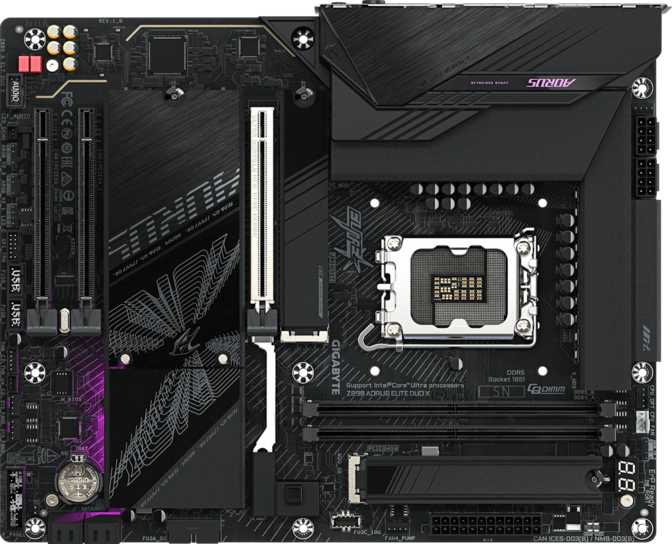
Gigabyte Z890 Aorus Elite Duo X: A Full Review for Serious Builders
MotherboardsThe Gigabyte Z890 Aorus Elite Duo X occupies a deliberate position in the Intel platform ecosystem — designed for enthusiast builders who want genuine overclocking headroom, a forward-looking feature set, and connectivity that won't feel limiting across hardware generations. It makes pointed decisions, most notably around memory slot count, that make it an excellent fit for certain builds and a genuine mismatch for others. This review covers both sides of that equation clearly.
Quick Verdict at a Glance
Overall Score
8.5
out of 10
RecommendedSocket
LGA 1851
Memory
DDR5 / 256 GB
Wireless
Wi-Fi 7
M.2 Slots
5 Slots
USB 4
40 Gbps + TB4
Warranty
3 Years
Design and Build Quality
Physical Presence and Case Compatibility
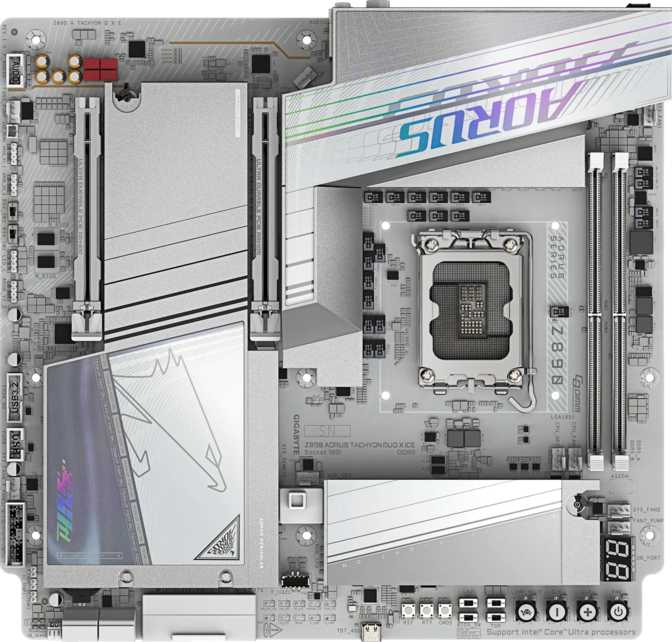
At standard ATX dimensions — 305 mm wide by 244 mm tall — the Z890 Aorus Elite Duo X fits any full-tower or mid-tower case that lists ATX compatibility. The mounting holes follow the standard ATX layout, so there are no edge-case compatibility surprises with mainstream enclosures, and installation follows the same procedure as any standard board at this size.
Gigabyte's Aorus line has always leaned into aesthetic assertiveness, and the Elite Duo X continues that tradition. Onboard RGB lighting integrates with Gigabyte's RGB Fusion ecosystem — meaningful if you're building a coordinated lighting setup across Gigabyte peripherals and components. If you intend to disable lighting or prefer a competing software ecosystem, the LEDs can be switched off without any effect on system performance.
Board Layout and Thermal Considerations
The layout prioritizes the M.2 ecosystem heavily, reflecting the storage philosophy baked into this platform tier. Five M.2 slots is a generous allocation, and their physical spread across the board reduces thermal conflict for builders using large GPU coolers that overhang the primary slot area. If your graphics card runs particularly hot, confirming the slot positions against the physical board diagram before purchasing is a worthwhile step.
Six fan headers distributed across the board give meaningful control over airflow without needing a separate fan controller hub — a practical detail that saves money and simplifies cable management in a serious build.
Standard ATX
305 x 244 mm — fits all standard mid and full-tower cases
6 Fan Headers
Full airflow control built in — no external fan hub required
RGB Fusion
Integrated lighting, fully controllable and disableable via software
Performance Architecture
The Z890 Platform: What the Chipset Actually Enables
The Z890 chipset is Intel's unlocked, enthusiast-tier platform for the current generation, paired here with the LGA 1851 socket for Intel's latest consumer processors. The Z890 designation specifically signals full overclocking support — CPU multiplier adjustment, memory frequency manipulation, and power limit tuning are all on the table, and the Aorus BIOS exposes all of it.
Gigabyte's Easy Overclocking access means beginners can apply automated performance profiles and see real gains without navigating complex BIOS menus. Experienced overclockers can go deep into voltage and timing granularity. BIOS recovery is also simplified with a dedicated Clear CMOS mechanism — a physical solution that resets the board to factory defaults without disassembly. For anyone who pushes aggressive settings and occasionally produces a system that won't POST, this is more valuable than it might initially appear.
Memory Configuration: The Two-Slot Trade-off
This Board Has Two Memory Slots — Not Four
This is the single most consequential design decision on this board. Read the full explanation below before deciding whether this is the right build platform for you.
The board has two DDR5 memory slots. For many builds this is entirely sufficient — and it is a deliberate engineering choice, not a cost-cutting measure. Fewer slots mean shorter memory traces, less electrical interference, and better stability at extreme frequencies. The memory ceiling this board supports — approaching 10,266 MHz in overclocked configurations — is only practically achievable because of this two-slot topology. That figure is not a marketing number; it reflects platform physics, and it matters for workloads sensitive to memory bandwidth such as data processing, AI inference, or simulation tasks.
For typical gaming, creative workflows, and serious content creation, two sticks of high-speed DDR5 is sufficient — and the board supports up to 256 GB total as higher-capacity modules become available. The trade-off is upgrade flexibility: start with two 32 GB modules today, and if you later need more RAM, your only path is replacing both sticks. You cannot add two more. Buyers who treat phased RAM upgrades as a planning strategy should weigh this carefully.
- Superior signal integrity enabling extreme memory frequencies
- Up to ~10,266 MHz OC — beyond what most four-slot designs can sustain
- Maximum 256 GB capacity supported with current-generation modules
- No phased expansion — adding sticks is impossible, only replacement
- Incremental RAM upgrade path is permanently closed
- ECC memory not supported — consumer platform only
Connectivity: Where This Board Earns Its Position
USB: A Genuinely Modern Port Lineup
The rear I/O panel tells a story about where PC connectivity is heading, and the Z890 Aorus Elite Duo X is well-positioned for it. The headline achievement is the simultaneous presence of a USB 4 port running at 40 gigabits per second and a dedicated Thunderbolt 4 port — both on the same rear panel, independently accessible.
USB 4 at 40 Gbps is fast enough to run external NVMe enclosures at full speed, transfer a 4K video project in seconds rather than minutes, and daisy-chain displays or docks without compromise. Thunderbolt 4 adds device certification and compatibility with the broad ecosystem of Thunderbolt-certified peripherals — external GPUs, high-end audio interfaces, and professional video capture cards included. Having both rather than one or the other is the key differentiator at this price tier.
| Port Type | Location | Speed | Count | Best Used For |
|---|---|---|---|---|
| USB 4 | Rear Panel | 40 Gbps | 1 | External NVMe, fast docks, high-res displays |
| Thunderbolt 4 | Rear Panel | 40 Gbps | 1 | Certified peripherals, eGPUs, pro audio interfaces |
| USB 3.2 Gen 2 Type-A | Rear Panel | 10 Gbps | 2 | Fast external SSDs, USB hubs |
| USB 3.2 Gen 1 Type-A | Rear Panel | 5 Gbps | 3 | Keyboards, mice, gaming peripherals |
| USB 2.0 Type-A | Rear Panel | 480 Mbps | 4 | Legacy peripherals, wireless dongles |
| USB-C Gen 2 (header) | Internal | 10 Gbps | 1 | Case front-panel USB-C connector |
| USB 3.2 Gen 1 (headers) | Internal | 5 Gbps | 2 | Case front-panel USB-A expansion |
| USB 2.0 (headers) | Internal | 480 Mbps | 4 | Legacy case connections |
Wireless and Wired Networking
Wireless connectivity tops out at Wi-Fi 7, the current generation standard. Wi-Fi 7 (802.11be) delivers theoretical throughput that outpaces gigabit ethernet in ideal conditions, with better performance in congested wireless environments thanks to multi-link operation. The board is backward compatible with Wi-Fi 6E, 6, 5, and older standards, so your existing infrastructure works regardless of router generation.
Bluetooth 5.4 is included for wireless peripherals, audio devices, and controllers. Wired networking uses a single RJ45 port — standard for this consumer tier. Dual-LAN configurations are typically reserved for workstation-class or NAS-focused boards, and the absence here is not a limitation for standard desktop builds.
Wi-Fi 7
802.11be — backward compatible to Wi-Fi 4
Bluetooth 5.4
Latest generation — controllers, audio, peripherals
Gigabit Ethernet
Single RJ45 port — standard for consumer builds
Display Output
A single DisplayPort output on the rear panel supports video output for processors with integrated graphics — useful for diagnostics or configurations without a discrete GPU. There is no HDMI output on the rear I/O; builders relying on a dedicated graphics card are unaffected, as display output routes through the GPU regardless.
Storage: Five M.2 Slots and Full RAID Support
Five M.2 slots is a serious storage allocation. It means this board can host five NVMe solid-state drives simultaneously — a configuration unusual even in demanding workstations. Most builders will use two or three of these slots and simply never run out. The primary PCIe 5.0 x16 slot delivers full-generation bandwidth to current and next-generation discrete GPUs, complemented by two PCIe x4 slots for NVMe add-in cards, capture cards, or 10GbE network adapters. Four SATA 3 connectors preserve compatibility with existing 2.5-inch and 3.5-inch drives.
RAID Support Explained
Full RAID support across four configurations is included — considerably more comprehensive than the basic RAID 0 and 1 support common at this tier. This feature set is most relevant to creative professionals managing large local archives and home server builders, but it is genuinely available for anyone who needs it.
| RAID Mode | Supported | What It Does | Best For |
|---|---|---|---|
| RAID 0 | Stripes data across drives for maximum sequential throughput | Video editing scratch disks, speed-critical workloads | |
| RAID 1 | Mirrors one drive to another — data survives a single drive failure | Personal archive protection, home NAS | |
| RAID 5 | Distributes parity across three or more drives — tolerates one failure | Multi-drive arrays balancing speed and redundancy | |
| RAID 10 | Mirrors and stripes across four drives — performance plus redundancy | Production-critical local storage needing both speed and safety |
Audio: Surprisingly Capable Onboard Sound
The onboard audio solution delivers a signal-to-noise ratio of 120 decibels from its digital-to-analog converter — a number that deserves real context. Consumer-grade audio interfaces from dedicated equipment manufacturers commonly fall in the 110–120 dB range. At 120 dB, the Z890 Aorus Elite Duo X's onboard audio is genuinely competitive with standalone USB audio interfaces costing considerably more than the marginal price difference between boards with and without this specification level.
Full 7.1 surround sound channel decoding is supported alongside an S/PDIF optical output for connecting to external receivers, home theater systems, or high-end digital-to-analog converters. Two audio connectors on the rear panel cover standard 3.5 mm connections for headphones, speakers, and microphones.
For gaming, streaming with a USB microphone, and listening through headphones or powered speakers, the onboard audio will not be a bottleneck. Recording instruments or vocals directly into analog inputs is where a dedicated audio interface would still outperform — but that limitation applies to every onboard solution regardless of quality tier.
Signal-to-Noise Ratio
120 dB
DAC output — matches dedicated interfaces
Surround Sound
7.1
Full surround decoding for speakers and headsets
Digital Output
S/PDIF
Optical out for receivers and external DACs
Who Should Buy the Z890 Aorus Elite Duo X
This board occupies a specific and deliberate position. Understanding whether your build falls on the right side of that line matters more here than with most motherboard choices — primarily because of the two-slot memory configuration and the dual BIOS omission.
This Board Is Right For You If...
- You want an Intel platform that won't bottleneck current or near-future hardware
- You plan to use one or two high-capacity DDR5 kits and value peak memory frequency over slot count
- External storage speed matters — USB 4 and Thunderbolt 4 together make this board exceptional for external NVMe workflows
- You work with large local storage arrays and want RAID 5 or RAID 10 capability available natively
- Wi-Fi 7 connectivity is a priority — either wireless-first setup or a Wi-Fi 7-capable router
- A three-year warranty on a significant hardware investment is meaningful to you
Look Elsewhere If...
- You want four memory slots to start small and add sticks later as your workload demands grow
- Dual ethernet ports are required for routing, VM networking, or NAS-adjacent tasks
- You need dual BIOS as a hardware failsafe for aggressive firmware experimentation
- ECC memory is a hard requirement — this is a consumer board and ECC support is absent
- You're building a budget-conscious system where the Z890 feature set represents unnecessary overhead
How It Compares to the Competition
The Z890 Aorus Elite Duo X sits in a clearly differentiated position against typical mid-range Z890 alternatives. The differences below are not specification padding — they represent features that change what you can actually build and do.
| Feature | Z890 Aorus Elite Duo X | Typical Z890 Mid-Range |
|---|---|---|
| Memory Slots | 2 (higher OC ceiling) | 4 (more flexibility) |
| Max Memory Speed (OC) | ~10,266 MHz | 8,000 – 9,000 MHz |
| M.2 Slots | 5 | 3 – 4 |
| USB 4 (40 Gbps) | Varies — often absent | |
| Thunderbolt 4 | Rarely included | |
| Wi-Fi Generation | Wi-Fi 7 | Wi-Fi 6E |
| Bluetooth | 5.4 | 5.3 |
| RAID Support | 0, 1, 5, 10 | Typically 0 and 1 only |
| Dual BIOS | Many include it | |
| Warranty | 3 Years | 1 – 2 Years |
The dual BIOS omission is the most meaningful competitive disadvantage. Without a backup BIOS chip, a corrupted firmware update requires hands-on manual recovery. Builders who experiment with beta BIOS versions frequently should specifically factor this into their decision — the Clear CMOS button handles overclock failures but not a corrupted flash.
Honest Strengths and Weaknesses
Where It Excels
The Z890 Aorus Elite Duo X's strengths form a coherent picture built around a single philosophy: peak performance for focused workloads with connectivity that won't become outdated. The two-slot memory topology is not a compromise — it's a deliberate trade for the ability to sustain memory frequencies that four-slot designs physically struggle to achieve. For workloads sensitive to memory bandwidth, such as data processing, AI inference, or simulation tasks, this matters in a measurable way.
The USB 4 and Thunderbolt 4 combination is genuinely rare at this platform tier. Most competing Z890 boards include one or the other. Having both means this board is a legitimate workstation-adjacent option for professionals who depend on Thunderbolt-certified peripherals or who move large data sets through external NVMe enclosures.
The three-year warranty stands out when examined against competitor terms. Motherboards can develop latent manufacturing defects that don't appear until months into ownership, and three years of coverage is protection the competition routinely fails to match.
Where It Falls Short
The dual BIOS omission is a genuine gap, not a minor nitpick. Competing boards — including some within Gigabyte's own lineup — include a secondary backup BIOS chip that activates automatically if the primary is corrupted. Without it, a failed BIOS update produces a system that requires hands-on recovery intervention. The Clear CMOS button handles overclock failures efficiently, but a corrupted firmware flash is an entirely different recovery situation.
The two-slot memory configuration, while technically advantageous for frequency purposes, permanently forecloses upgrade flexibility. The absence of a phased upgrade path is a real planning constraint for builders who prioritize incremental cost spreading. This isn't a flaw — it's an intentional design position — but it genuinely removes this board from consideration for a meaningful portion of buyers.
The absence of rear USB-C ports beyond the Thunderbolt 4 connector may also frustrate buyers who specifically need multiple independent rear USB-C connections for their peripheral setup.
Questions Real Buyers Ask Before Purchasing
The answers below address the questions that appear most frequently among buyers considering this platform and board configuration.
Final Verdict
The Gigabyte Z890 Aorus Elite Duo X is a purposeful board for a specific builder — and for that builder, it delivers comprehensively. It brings a genuine rarity to this platform tier: USB 4 and Thunderbolt 4 simultaneously on the same rear panel, combined with Wi-Fi 7, five M.2 slots, full RAID support, and memory performance headroom that four-slot designs simply cannot match.
The dual BIOS omission and two-slot memory ceiling are real considerations — not minor caveats to scroll past. If either represents a hard requirement for your build, competing Z890 options address both, though typically at the cost of the premium connectivity features that make this board distinctive.
For the performance-focused, storage-intensive, connectivity-conscious builder who plans to install and run their memory configuration rather than expand it in phases — and who values a three-year warranty on a significant hardware investment — the Z890 Aorus Elite Duo X earns a confident recommendation.
Final Score
8.5
out of 10
Recommended- Best For
- Performance builders, creative professionals, and external storage power users
- Not Ideal For
- Phased RAM upgraders, dual-LAN requirements, and dual BIOS dependents