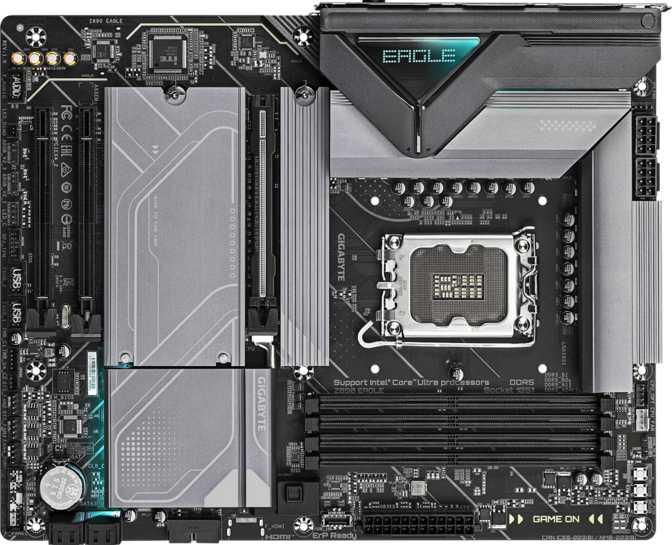
Gigabyte Z890 Eagle Review: A Capable Mid-Range Z890 Board
MotherboardsEditor's Score
Quick Verdict
A focused mid-range Z890 board that delivers where it counts — storage flexibility, PCIe 5.0 GPU bandwidth, and accessible overclocking — while making deliberate trade-offs on wireless connectivity and BIOS redundancy. Honest, capable, and purposeful.
Socket / Chipset
LGA 1851 / Z890
Total M.2 Slots
4 Slots
DDR5 OC Ceiling
8800 MHz
Key Omission
No Wi-Fi / Bluetooth
Who the Gigabyte Z890 Eagle Is Built For
The Z890 Eagle sits at a crossroads that matters to a very specific type of builder: someone who wants Intel's latest platform without paying flagship prices, but also refuses to compromise where performance counts. This is not a board for the builder who wants everything handled automatically. It rewards those who understand what they are paying for — and what they are knowingly leaving out.
Gigabyte's Eagle line has long occupied the middle tier of their stack, sitting above the budget-oriented entry-points but clearly below the high-end Aorus Master and Extreme boards. On the Z890, that positioning is more deliberate than ever.
Design and Build Quality
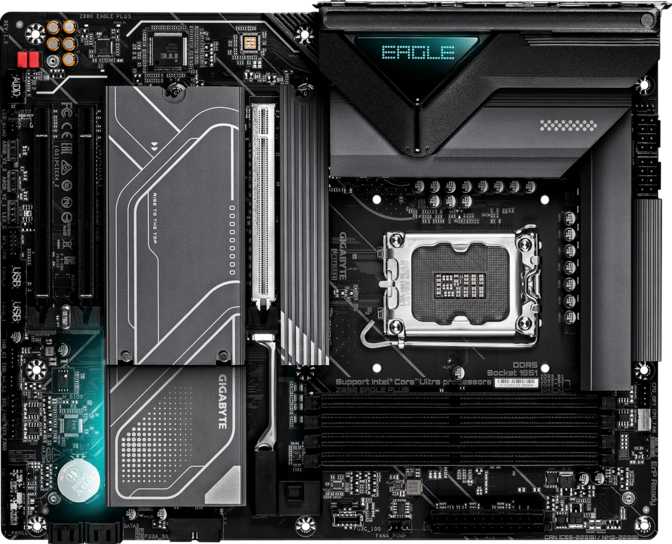
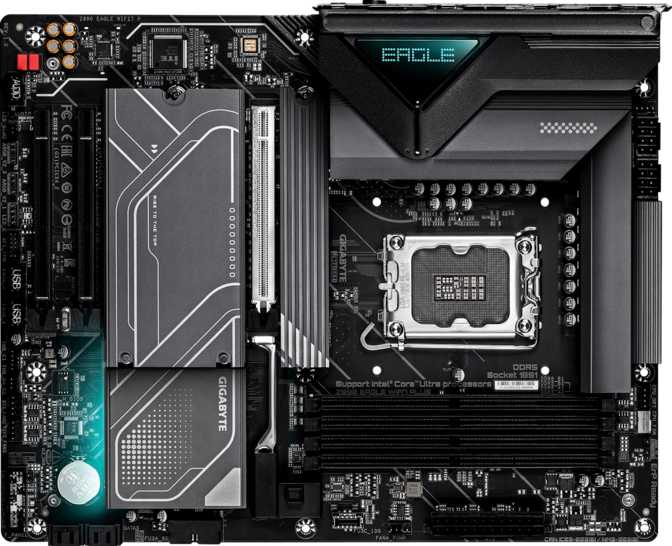
The Z890 Eagle follows Gigabyte's current visual language for mid-range ATX boards. The standard ATX footprint — 305 mm wide by 244 mm tall — fits cleanly into any full-size or mid-tower case without fitment concerns. Anyone upgrading from an older ATX platform will find the dimensions immediately familiar.
Form Factor
Standard ATX — 305 × 244 mm
Universal mid-tower and full-tower compatibility. No fitment surprises for existing cases.
RGB Lighting
Chipset heatsink and memory area
Integrates with Gigabyte RGB Fusion software. Fully software-controllable — can be disabled for clean, dark builds.
VRM Cooling
Appropriate for mid-range Arrow Lake
Handles realistic thermal demands at stock and moderate OC settings. Extreme sustained overclocking warrants a higher-tier board.
No Physical Clear CMOS Button
There is no clear CMOS button on the rear I/O panel. Resetting the BIOS requires using the onboard jumper header or physically removing the CMOS battery — an extra step that can catch newer builders off guard during troubleshooting or after a failed overclock profile.
Platform Foundation: What Z890 and LGA 1851 Actually Mean
The Z890 Eagle is built around Intel's Z890 chipset and the LGA 1851 socket — the home of Intel's Arrow Lake processor family. If you are coming from an older Intel platform such as LGA 1200 or LGA 1700, this is a full platform change. Your existing CPU, and potentially your cooler mounting hardware, will not carry over. That is the upfront investment context buyers need before comparing board prices in isolation.
CPU Compatibility — Read Before You Buy
This board uses the LGA 1851 socket and is physically incompatible with LGA 1700 processors from Intel's 12th, 13th, and 14th Gen families. Only Arrow Lake-series CPUs are supported. If you are upgrading from a previous Intel generation, budget for a new processor alongside this motherboard.
Overclocking Made Accessible
The Z890 chipset fully unlocks processor multiplier overclocking — something locked chipsets like B860 explicitly cannot offer. The Z890 Eagle builds on this with automated overclocking profiles in the BIOS, letting builders push CPU performance with a few menu selections rather than manual voltage-and-frequency spreadsheet work. For overclock beginners, this is a meaningful entry point. Full manual controls sit alongside the automated options for experienced tuners who want complete granularity.
Memory: DDR5 Performance With Headroom to Spare
The Z890 Eagle runs DDR5 exclusively — there is no DDR4 compatibility, which is consistent across the entire Arrow Lake platform. Your existing DDR4 kits are not transferable, but you gain access to a meaningfully more capable memory architecture as a direct trade-off.
4
Memory Slots
Dual Channel
256GB
Max Capacity
DDR5 Only
6400
MHz
Native Speed
JEDEC Rated
8800
MHz
OC Ceiling
High-Binned Kits
Four memory slots support up to 256 GB across two channels. For virtually every consumer workload — gaming, content creation, software development — this ceiling is theoretical rather than practical. Most users will install 32 or 64 GB and never approach the limit.
Native DDR5 operates comfortably up to 6400 MHz, within the range of affordable kits available today. For builders chasing memory-bandwidth-sensitive workloads — competitive gaming at high framerates or data-heavy production tasks — the 8800 MHz overclocking ceiling offers genuine headroom. That territory requires high-binned memory modules and careful tuning to reach reliably.
ECC memory is not supported. This is a non-issue for home desktop use. ECC is relevant only for server and workstation environments where guaranteed data integrity is critical.
Storage: Four M.2 Slots and Full RAID Flexibility
Storage is where the Z890 Eagle genuinely punches above its price tier. Four M.2 slots give builders the flexibility to run a pure SSD configuration without touching a single SATA cable — whether you're building a multi-drive creative workstation, a gaming rig with dedicated drives for OS and game libraries, or a high-capacity desktop with separated project storage.
Four dedicated M.2 sockets accommodate NVMe SSDs for fast OS, application, and project drives without consuming SATA ports or PCIe expansion slots.
Ideal for multi-drive SSD setups and content creation workflows requiring separate high-speed drives.
Four SATA 3 connectors serve 2.5-inch SSDs, large-capacity hard drives for bulk storage, and optical drives. SATA 2 hardware is backward compatible with these ports.
Suitable for backup drives, NAS-style mass storage, and legacy hardware.
RAID Support Overview
| RAID Level | Supported | Best For |
|---|---|---|
| RAID 0 — Striping | Maximum read/write speed; no drive redundancy | |
| RAID 1 — Mirroring | Pure redundancy; automatic backup to a second drive | |
| RAID 5 — Distributed Parity | Balance of speed, capacity, and drive protection | |
| RAID 10 — Mirrored Stripes | Maximum reliability and performance combined |
RAID 5 and RAID 10 support is not guaranteed on all mid-range Z890 boards. Their presence here adds real value for NAS-adjacent setups and builds requiring drive redundancy without a dedicated storage card.
Expansion Slots: PCIe 5.0 Where It Matters
The expansion layout prioritizes what matters most to a modern gaming or workstation build, without overbuilding for configurations the vast majority of users will never need.
PCIe 5.0 × 16
The primary GPU slot runs PCIe 5.0 — the current-generation standard for discrete graphics on Intel's latest platform. Any modern graphics card installs here at full bandwidth.
Quantity: 1PCIe × 4 Slots
Two x4 slots accommodate capture cards, high-speed networking adapters, additional NVMe controllers, and other add-in hardware.
Quantity: 2No PCIe × 1 Slots
PCIe x1 slots are absent — an increasingly common design choice as x1-form-factor cards have largely been displaced by USB-based alternatives for most consumer use cases.
Quantity: 0No Secondary Full-Width Slot
There is no secondary x16-width slot for multi-GPU or high-bandwidth expansion cards. For the overwhelming majority of users this is irrelevant — consumer multi-GPU is practically obsolete. For the small number of users requiring a second full-width slot for specific compute or capture hardware, this is worth noting before purchase.
Connectivity: A Capable Panel With One Major Caveat
No Built-In Wi-Fi or Bluetooth
This is a deliberate cost decision, not an oversight. Every builder evaluating this board must confirm they have a wired Ethernet run at their desk, or budget separately for a PCIe Wi-Fi card or USB wireless adapter. For systems that rely on wireless connectivity, this adds both cost and a separate hardware purchase to the build.
Rear I/O USB Breakdown
| Port Type | Speed | Count | Best Used For |
|---|---|---|---|
| USB 4 (Type-C) | 40 Gbps | 1 | High-speed external NVMe enclosures, docking stations, USB4 monitors |
| USB 3.2 Gen 2 (Type-A) | 10 Gbps | 2 | Fast external SSDs, high-bandwidth peripherals |
| USB 3.2 Gen 1 (Type-A) | 5 Gbps | 3 | Keyboards, mice, USB hubs, mid-range external drives |
| USB 2.0 (Type-A) | 480 Mbps | 4 | Low-demand devices, audio headsets, legacy hardware |
One gap worth flagging beyond port count: there is no additional USB-C on the rear panel beyond the USB 4 port itself. Builders assembling a content creation workstation with USB-C external drives and monitors may reach for adapters more often than expected. The single RJ45 Ethernet port handles wired networking — buyers should verify the exact controller speed in Gigabyte's official documentation for their specific requirements.
Internal Headers
Where the rear I/O has limitations, the internal connector situation is genuinely solid and well-suited for fully-featured case builds without requiring additional hubs.
- 6 fan and pump headers — full coverage for typical cooling arrays without a separate fan hub
- 1 USB-C 3.2 Gen 2 front panel header — supports modern cases with a front-facing USB-C port
- 2 USB 3.2 Gen 1 headers for front panel USB-A ports
- 4 USB 2.0 headers for additional front panel and internal device connections
- TPM connector included — satisfies Windows 11 hardware security requirements
- DisplayPort output on rear I/O — active when using a CPU with integrated graphics enabled
Audio: Functional 7.1 Without Optical Out
The onboard audio solution delivers 7.1 surround sound across three 3.5 mm jacks through shared-jack functionality. This configuration covers stereo headsets, 2.1 desktop speaker setups, and analog 5.1 or 7.1 speaker arrays via multi-channel breakout cables.
For gaming headsets, stereo music listening, and typical desktop audio use, the onboard solution handles daily demands without issue. Dedicated audiophile-grade listening or professional audio work warrants an external USB audio interface or discrete sound card regardless of what any board provides at this tier.
- 7.1 surround sound support
- 3 x 3.5 mm analog audio jacks
- Suitable for gaming and everyday listening
- No S/PDIF optical output
Is the Z890 Eagle Right for You?
- Desktop builders moving to Arrow Lake who prioritize wired connectivity and do not need wireless
- Gamers who want PCIe 5.0 GPU bandwidth and DDR5 performance without paying for premium VRM excess
- Creators and power users who benefit from four M.2 slots and full RAID storage flexibility
- Builders who want accessible overclocking tools without committing to manual tuning from scratch
- Budget-conscious builders who can accept the no-Wi-Fi trade-off in exchange for a lower board cost
- Anyone who needs Wi-Fi or Bluetooth without adding an expansion card — the omission is absolute
- Users who want dual BIOS protection during BIOS updates or overclock experiments that fail to boot
- Builders who rely on S/PDIF optical audio output for a home theater system or external DAC
- Professional workstation use requiring ECC memory for guaranteed data integrity
- Extreme overclockers who need flagship-grade VRM capacity for heavy sustained loads
How It Stacks Up Against the Alternatives
Two natural comparisons exist for the Z890 Eagle: the more affordable B860 chipset boards in the same price range, and the step-up Z890 boards from Gigabyte's own Aorus Elite/Pro tier. Understanding where the Eagle wins and loses against each shapes the purchase decision clearly.
| Feature | Gigabyte Z890 Eagle | Typical B860 Board | Z890 Step-Up (Aorus Tier) |
|---|---|---|---|
| CPU Overclocking | |||
| Wi-Fi Included | Often | Often | |
| M.2 Slots | 4 | 3–4 | 4–5 |
| PCIe 5.0 × 16 | |||
| Dual BIOS | Varies | Often | |
| RAID 5 Support | |||
| USB 4 (40 Gbps) | 1 port | Rare | 1–2 ports |
| RGB Lighting | Varies |
The most pointed comparison is a B860 board in the same price band. B860 boards often include Wi-Fi — a genuine functional advantage. However, B860 locks out CPU overclocking entirely. If tuning clock speeds matters at any level, the Z890 Eagle's platform is justified. For users who will not overclock and need wireless, a Wi-Fi-equipped B860 board is the stronger recommendation.
Honest Assessment: Strengths and Weaknesses
Strengths
Generous M.2 Storage Allocation
Four M.2 slots punch above this price tier — many competing boards in this range stop at three.
USB 4 at 40 Gbps
A forward-looking rear-panel inclusion as USB4-native storage and docking solutions become more mainstream.
Accessible Overclocking
Automated BIOS tuning profiles lower the barrier for CPU performance gains without manual voltage work.
Full RAID Suite
RAID 5 and RAID 10 at mid-range pricing is uncommon. Genuine value for NAS-adjacent and storage-focused builds.
3-Year Warranty
Longer than many competing boards at this tier, providing meaningful long-term purchase confidence.
Weaknesses
No Wi-Fi or Bluetooth
The biggest barrier for most buyers. Comparable boards routinely include wireless at similar price points.
No Dual BIOS
A failed BIOS update or bad overclock profile has fewer recovery options here than on a board with a backup chip.
No Clear CMOS Button
A recurring nuisance during setup and troubleshooting, particularly for builders less familiar with jumper headers.
No S/PDIF Optical Output
Users with AV receivers or optical-input DACs will need an additional USB audio interface or PCIe sound card.
Limited Rear USB-C Options
Only the USB 4 port uses Type-C on the rear panel. Builders with multiple USB-C peripherals may need adapters.
Common Buyer Questions Answered
Final Verdict
The Gigabyte Z890 Eagle is a focused, capable mid-range motherboard that makes deliberate trade-offs — and whether those trade-offs work for you depends entirely on your specific build requirements.
If your desktop sits near a router with an Ethernet cable already run to it, and you value M.2 storage flexibility, PCIe 5.0 GPU support, and accessible overclocking above wireless convenience, this board delivers genuine value. The platform is current, the storage infrastructure is generous, and the three-year warranty reflects real confidence in the hardware.
If wireless connectivity is a requirement — not a preference — this is the wrong board. Move toward a B860 board with integrated Wi-Fi if overclocking is not a priority, or toward the Aorus Elite/Pro tier if it is. For the builder who knows exactly what they need and does not want to pay for features they will never use, the Z890 Eagle is a rational, well-specified choice on Intel's current platform.
Socket
LGA 1851
Form Factor
Standard ATX
Warranty
3 Years
Wireless
None (Add-On Required)