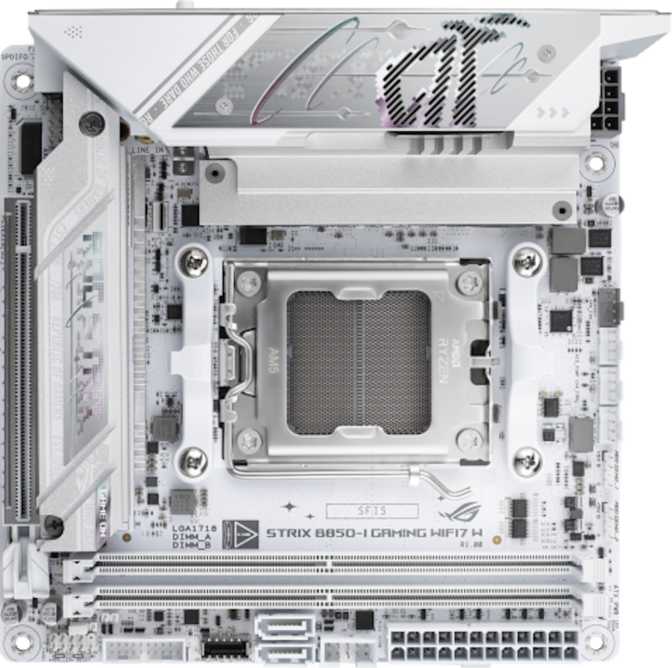
ROG Strix B850-I Gaming Wi-Fi 7: Full Review for Mini-ITX Builders
MotherboardsAM5 + B850
Socket & Chipset
Mini-ITX
170 × 170 mm
Wi-Fi 7 + BT 5.4
Fully Integrated
DDR5 / 128 GB
9,600 MHz OC Ceiling
Small form factor PC building has always demanded compromise. You squeeze components into a compact chassis and something gives — fewer M.2 slots, a weaker VRM, stripped-out connectivity, or wireless modules that feel like afterthoughts bolted on to hit a bullet point. The Asus ROG Strix B850-I Gaming Wi-Fi 7 is built around a different philosophy: put flagship-tier features on a board the size of a hardcover novel, and don't apologize for the price.
This Mini-ITX motherboard for AMD's AM5 platform targets enthusiasts who want a powerful, compact gaming machine without a watered-down experience. It sits on the B850 chipset — AMD's current-generation sweet spot that delivers everything a gaming build actually needs, without the X870E platform tax. Whether the overall value proposition works for your specific build is what this review covers in full.
GPU Interface
PCIe 5.0
Warranty
3 Years
Audio SNR
120 dB
USB-A at 10 Gbps
4 Ports
Editorial Score Breakdown
Six-category assessment based on specifications and real-world implications.
Design and Build Quality
Small board, serious hardware — what the physical experience tells you about this board's intentions.
Physical Footprint
Mini-ITX boards measure 170 mm × 170 mm — roughly the footprint of a large smartphone laid flat. This is a standardized form factor, so the B850-I fits any case marketed as Mini-ITX compatible. The constraint also means every square millimeter is load-bearing real estate, and the component density will immediately impress builders upgrading from larger boards.
The ROG Strix branding reflects genuine engineering differences. The VRM design and heatsink coverage are measurably more substantial than budget Mini-ITX alternatives — a distinction that matters in compact cases where restricted airflow significantly tightens thermal headroom.
Aesthetics and RGB Lighting
Addressable RGB lighting integrates with Asus's Aura Sync ecosystem and is configurable through the Armoury Crate software suite. For builds in cases with tempered glass panels, the lighting creates a polished, themed presentation. If you find RGB distracting or irrelevant, it disables entirely without any functional trade-off.
The visual design sits squarely in the ROG Strix aesthetic — assertive enough for themed builds, controlled enough that disabling the lighting leaves a clean, professional-looking board.
B850 Chipset: What You Get vs. X870E
Understanding where B850 sits in AMD's lineup helps avoid overpaying — or under-buying.
| Feature | B850 This Board | X870E |
|---|---|---|
| PCIe 5.0 GPU Support | ||
| CPU Overclocking | ||
| PCIe 5.0 M.2 Support | ||
| Native USB4 40 Gbps | Not available | |
| Platform Cost Premium | More Affordable | Significantly Higher |
CPU and DDR5 Memory Performance
The AM5 platform, what it supports today, and how memory configuration affects real gaming performance.
AM5 Platform and Upgrade Headroom
The AM5 socket supports the full Ryzen 7000 and Ryzen 9000 processor families. AMD has publicly committed to long-term socket support, meaning this board retains genuine upgrade headroom without a platform replacement. A BIOS update may be required for newer processors — the dual-BIOS system on this board makes that process safe and fully recoverable.
DDR5 Speed, Capacity, and Dual-Channel
Two DDR5 slots support up to 128 GB total. For gaming, 32 GB — two 16 GB sticks — is the practical sweet spot that keeps both memory channels active simultaneously. On AMD's AM5 architecture, which is meaningfully more sensitive to memory bandwidth than prior generations, running both slots filled and matched directly impacts frame rates.
DDR5 Base Speed
4,800 MHz
Enthusiast EXPO
6,000–6,400 MHz
The 9,600 MHz OC ceiling targets extreme benchmark scenarios. Most users will never approach it.
GPU Slot, M.2 Storage, and RAID
Two drives, one GPU, and data protection capabilities that are rare at the B-series tier.
PCIe 5.0 GPU Slot
The primary GPU slot runs at PCIe 5.0 x16 — the fastest available interface for graphics cards, delivering full bandwidth to every current and upcoming GPU. A second PCIe 4.0 x16 slot handles add-in cards in builds that require them.
Dual M.2 + SATA
Two M.2 slots handle NVMe drives; the primary supports PCIe 5.0 for the current generation of high-throughput storage. Two SATA 3 connectors remain available for 2.5-inch or 3.5-inch drives and archive storage.
Full RAID Support
Uncommon at the B-series tier. Available RAID configurations across SATA drives:
- RAID 0 — Performance striping
- RAID 1 — Data mirroring & redundancy
- RAID 5 — Performance + fault tolerance
- RAID 10 — Combined mirror + stripe
Connectivity: Where This Board Earns Its Premium
The rear panel is generous enough to run a complete desk setup without supplemental hubs — unusual at this form factor and chipset tier.
Rear I/O Breakdown
Mouse, keyboard, headset, and external drive simultaneously at full speed
Modern accessories and smartphone charging and data transfer
Fast external SSDs and high-bandwidth peripherals
Wireless receivers and other low-demand peripherals
Outpaces standard gigabit — saturates multi-gig internet connections and NAS links
Direct display output via CPU integrated graphics on supported Ryzen processors
Clean bitstream output to external AV receivers and digital-to-analog converters
Internal Headers
- USB 3.2 Gen 1 headers × 2Front panel USB-A ports
- USB 3.2 Gen 2 header × 110 Gbps front panel port
- USB 2.0 headers × 2Low-speed front panel
- Fan headers × 3CPU cooler + 2 chassis fans
Wi-Fi 7 and Bluetooth 5.4
The wireless module is current-generation — not a cost-reduction checkbox bolted on to hit a spec sheet bullet point.
What Wi-Fi 7 Actually Means for Gaming
The integrated module supports Wi-Fi 7 (802.11be) — the most current wireless standard available — with full backward compatibility reaching back to Wi-Fi 4, so your existing router is fully supported on day one.
Wi-Fi 7's practical gaming advantage comes from multi-link operation: the adapter transmits and receives across multiple frequency bands simultaneously, reducing the latency spikes that have traditionally made wireless feel unreliable compared to a cable. On a Wi-Fi 7 access point, this board's wireless can genuinely compete with Ethernet.
Supported wireless standards:
Bluetooth 5.4
Bluetooth 5.4 handles controllers, headsets, and speakers reliably without the dropout issues that affected older Bluetooth revisions in gaming environments.
Builders on Wi-Fi 5 or Wi-Fi 6 routers today still receive improved adapter performance. When your router eventually upgrades to Wi-Fi 7, the board will not become the bottleneck.
Onboard Audio: Genuinely Audiophile-Grade
A 120 dB signal-to-noise ratio puts this board's audio well above what most dedicated external USB DACs in the same budget bracket deliver.
DAC Signal-to-Noise Ratio
120 dB
Onboard DAC Output
What 120 dB SNR Means in Practice
Consumer audio equipment is considered excellent at 100 dB SNR, and studio-grade hardware begins around 115–120 dB. At 120 dB, the desired audio signal is dramatically stronger than the noise floor, which means what reaches your ears is clean and detailed — completely free from the hiss or static that plagued integrated audio on older boards.
The 7.1 surround setup uses three rear audio jacks for full speaker configurations, covering front, center and subwoofer, and surround channels. The S/PDIF optical output sends a clean digital bitstream to external receivers or DACs without electromagnetic interference from internal board components.
BIOS, Overclocking, and Safety Features
Designed for confident tinkering, and protected against the risks of tinkering gone wrong.
Dual BIOS Protection
Two separate firmware chips store the system BIOS. If a firmware update fails, a power outage interrupts the process, or a new version creates instability, the board automatically switches to its backup — or you switch manually. The update effectively becomes a risk-free routine rather than an anxiety-inducing procedure.
In a Mini-ITX build packed into a compact case, this matters more than it does on a full-size tower. A bricked BIOS when the board's header pins are buried under cables and a GPU requires genuine disassembly is a far more disruptive problem than on a board with easy physical access.
Overclocking and BIOS Reset
B850 supports full CPU overclocking on compatible Ryzen processors. Asus's Easy Overclock feature applies a tested, stable overclock through a single BIOS toggle — useful for those wanting performance gains without manual tuning. Full manual control over frequencies, voltages, and memory timings is available for those who want it.
EXPO memory profiles activate with a single BIOS toggle, running RAM at its advertised rated speed immediately. A dedicated CMOS reset button clears stored settings without opening the case or locating header pins buried under cabling — a quality-of-life feature that compact builds genuinely appreciate.
Who Should Buy This Board — and Who Shouldn't
Matching hardware to builder type prevents expensive regret at both ends of this purchase decision.
Built For These Builders
- Compact gaming PC buildersWho want flagship GPU performance and Wi-Fi 7 wireless without sacrificing either for the form factor
- AMD AM5 enthusiastsPlanning to run a current Ryzen processor with meaningful upgrade headroom inside the same socket
- Home office and gaming hybrid usersWhose build doubles as a workstation — 2.5G Ethernet, broad USB coverage, and premium audio serve this directly
- Builders who value longevityWi-Fi 7, PCIe 5.0 across GPU and M.2, and DDR5 ensure this board won't feel outdated when next-generation peripherals and drives arrive
Not the Right Fit For
- Budget-conscious buildersThe ROG Strix premium only makes sense when the rest of the build matches it — pairing it with entry-level components is financial misallocation
- Thunderbolt-dependent usersExternal GPU enclosures, Thunderbolt docks, and Apple-ecosystem accessories requiring Thunderbolt 3 or 4 are simply not supported
- Heavy storage usersTwo M.2 slots and two SATA connectors cover most builds, but large media library managers and content archivists may feel the constraint
- ATX or Micro-ATX buildersIf you're not specifically targeting a compact case, you're paying for density you don't need and giving up slots and headers without benefit
How It Compares to Logical Alternatives
Measured against real alternatives in the same purchase decision window. Category-typical specs, not marketing claims.
| Board | Form Factor | Chipset | Wi-Fi | PCIe 5.0 GPU | PCIe 5.0 M.2 | USB Gen 2×2 C | Audio SNR |
|---|---|---|---|---|---|---|---|
| ROG Strix B850-I This Board | Mini-ITX | B850 | Wi-Fi 7 | 120 dB | |||
| Typical B650I Competitor | Mini-ITX | B650 | Wi-Fi 6E | Limited | Rare | 108–113 dB | |
| Mid-range B850 Micro-ATX | Micro-ATX | B850 | Wi-Fi 6E | Sometimes | 110–115 dB | ||
| X870E Mini-ITX Alternative | Mini-ITX | X870E | Wi-Fi 7 | ~120 dB |
Answers to Questions Real Buyers Are Searching For
The questions buyers actually ask before committing to a Mini-ITX AM5 build at this tier.
The Best Mini-ITX Gaming Board for the AM5 Platform
A rare board that refuses to compromise across nearly every category simultaneously.
What This Board Gets Right
The wireless module is genuinely current-generation, not a specification footnote. The audio hardware outperforms competing boards across the price spectrum. The USB rear panel is comprehensive enough to service a full desk setup without a hub. Dual-BIOS protection makes every firmware update a risk-free routine. And PCIe 5.0 across both the GPU slot and the primary M.2 ensures this board will not become a bottleneck as storage and GPU technology advances.
Where It Has Real Limitations
Three fan headers are sufficient for a standard Mini-ITX thermal layout but leave no headroom for complex configurations — a fan hub becomes necessary in those cases. Thunderbolt 3 and 4 are absent, which is a genuine gap for specific workflows. Two M.2 slots are enough for most use cases but will feel constrained to heavy media storage users. And the premium price is only rational if your build needs Mini-ITX specifically — the constraint is a feature, not a bonus.
The ROG Strix B850-I Gaming Wi-Fi 7 earns its premium positioning. Buy this board if you are building a compact AM5 gaming PC and want a configuration that handles everything — from high-framerate gaming to wireless audio to fast external storage — without supplemental hardware. It is the board you install once and don't reconsider for years.
Don't buy it for a full-size tower build, a budget-constrained configuration, or any workflow where Thunderbolt connectivity is a requirement. For everyone else targeting Mini-ITX on AM5: this is the one to beat.