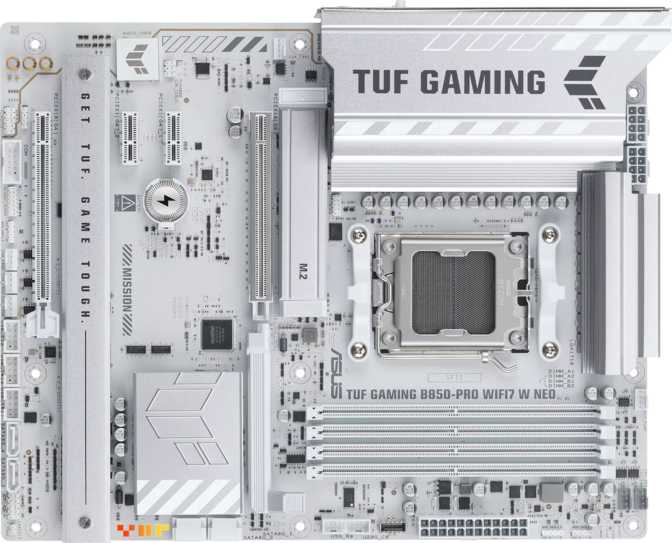
Asus TUF Gaming B850-Pro Wi-Fi 7 W Neo: Full AM5 Motherboard Review
MotherboardsThe B850 Sweet Spot: What Makes This Board Worth Your Attention
The AM5 platform has matured, and the mid-range motherboard segment is where the real purchasing decisions get complicated. The Asus TUF Gaming B850-Pro Wi-Fi 7 W Neo lands in a position that the market actually needed: a board that takes the best capabilities of AMD's current chipset architecture and pairs them with connectivity that won't feel dated in two or three years. Wi-Fi 7 onboard, DDR5 memory support tuned for serious overclocking, and a PCIe 5.0 primary slot — these are not premium-tier concessions. They're built into the foundation here.
This is a board for builders who want a durable, capable platform without climbing into flagship pricing territory. Whether you're assembling a high-performance gaming rig, a creative workstation, or a system that needs to last through several GPU and storage upgrades, the B850-Pro Wi-Fi 7 W Neo is worth understanding thoroughly before you commit.
TUF Gaming B850-Pro Wi-Fi 7 W Neo
Mid-Range AM5 Motherboard · ATX
Design and Build Quality
Form Factor and Physical Presence
The TUF Gaming B850-Pro Wi-Fi 7 W Neo ships in standard ATX sizing — 305 mm wide by 244 mm tall — which means it fits comfortably in any full-tower or mid-tower case designed for ATX builds. This is the most universally compatible form factor available, and Asus has used the available real estate purposefully rather than padding it with cosmetic excess.
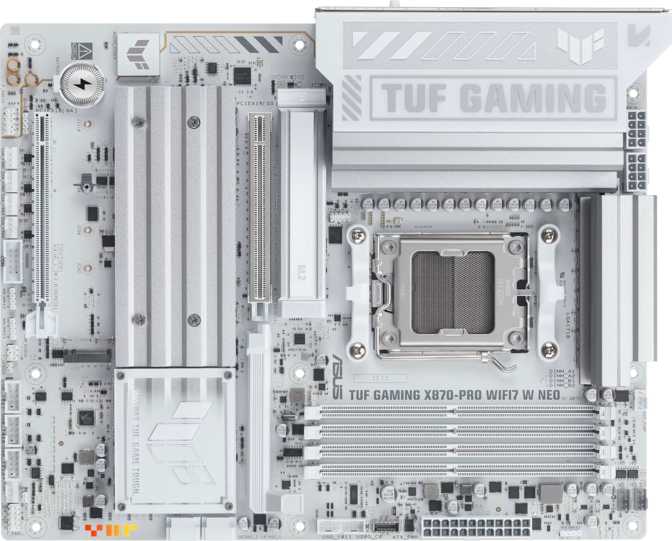
The TUF Gaming line has a distinct visual identity: angular heatsink covers, reinforced slot armor, and the kind of structural solidity you can feel when handling the board. The "W Neo" in the name signals a white color variant, which pairs cleanly with light-themed builds. RGB lighting is present across the board, and Asus's Aura Sync ecosystem lets you coordinate it with compatible peripherals and components — useful if aesthetic cohesion matters to your build, and easy to disable if it doesn't.
Build quality in the TUF line has historically prioritized longevity over flashiness, and this board continues that pattern. Reinforced PCIe slots reduce flex risk when heavy GPUs are installed, and the overall component layout reflects a design that expects sustained loads rather than occasional light use.
- Form Factor
- ATX
- Dimensions
- 305 × 244 mm
- CPU Socket
- AM5
- Chipset
- AMD B850
- CPU Sockets
- 1 (single)
- Color Variant
- White — W Neo
- RGB Lighting
- Yes, Aura Sync
- HDMI Output
- HDMI 2.1
- DisplayPort
- 1×
- Warranty
- 3 Years
Platform Performance: What the B850 Chipset Delivers
AM5 and the Ryzen Foundation
The B850 chipset sits firmly in AMD's mid-tier for AM5 — the socket used by current-generation Ryzen 7000 and 9000 series processors. The AM5 platform matters because it's AMD's long-term socket investment: unlike previous transitions, AMD has committed to AM5 longevity, meaning a board purchased today should remain compatible with future processor generations as they arrive. For builders who upgrade CPUs between full system refreshes, this is genuinely valuable forward-thinking.
The B850 chipset enables overclocking, which the X870 chipset also supports but at a higher price point. For enthusiasts who want to push their Ryzen processor or memory beyond stock settings, B850 removes the artificial ceiling that the entry-level A620 imposes. You get the tuning freedom without the premium cost of stepping up to X870.
Memory: DDR5 at Serious Speeds
Four DDR5 memory slots support up to 256 gigabytes of total capacity across two channels. That ceiling is far beyond what any gaming or creative workload realistically requires today, making it future-proof rather than a current necessity. More immediately practical is the overclocking headroom: this board can run memory at up to 9000 MHz with the right kit, which places it firmly in enthusiast territory.
For context, most DDR5 kits sold at retail run between 5600 and 7200 MHz. Reaching 9000 MHz requires high-binned memory modules and careful BIOS tuning, but the capability being present means builders who want to experiment with memory performance have a real ceiling to chase rather than a hard limit imposed by the chipset. Dual-channel operation is the standard configuration — using two or four sticks rather than one — and the board supports it fully.
ECC error-correcting memory is not supported — a chipset-level limitation expected at this tier and irrelevant for gaming or mainstream creative use.
Storage: Three M.2 Slots and Four SATA Ports
NVMe and Conventional Storage Together
Three M.2 sockets handle NVMe solid-state storage, and the primary slot connects through the PCIe 5.0 interface. PCIe 5.0 NVMe drives are the fastest consumer storage available currently, offering sequential read speeds that dwarf even the best PCIe 4.0 drives. Whether that raw speed translates into a noticeably faster everyday experience depends on the specific workload — video editors, 3D artists, and professionals moving large files constantly will feel it; general PC users and gamers less so. What matters is that the slot is there, so you're not artificially capped if you choose to invest in the fastest storage available.
The remaining two M.2 slots run at PCIe 4.0 speeds, which remain excellent and cover the vast majority of consumer NVMe drives on the market today. Having three M.2 slots total means a builder can run their operating system drive, a game library drive, and a work or backup drive without a single cable involved — a genuinely cleaner and faster setup than using traditional storage.
Four SATA III ports remain available for conventional hard drives or older SSDs. This matters for builders migrating storage from a previous system, running large-capacity HDDs for archival purposes, or using SATA SSDs that predate NVMe. Full RAID support across configurations 0, 1, 5, and 10 is available for both the SATA and M.2 ecosystem, giving technically inclined users options for redundancy, speed striping, or both.
- 1× M.2 PCIe 5.0Primary slot — fastest consumer NVMe
- 2× M.2 PCIe 4.0Excellent for all mainstream drives
- 4× SATA IIIHDDs, older SSDs, archive storage
- RAID 0, 1, 5, 10Full redundancy and performance options
Expansion Slots: PCIe 5.0 Primary and a Sensible Secondary
GPU and Add-In Card Support
The primary x16 slot operates at PCIe 5.0 — the current generation standard for discrete graphics cards. Today's top-tier GPUs from both AMD and Nvidia are designed with PCIe 5.0 compatibility in mind, and running them in a PCIe 5.0 slot ensures you're not creating any interface bottleneck, present or near-future.
A second x16 physical slot runs at PCIe 4.0 electrical speeds, which handles secondary GPUs, capture cards, networking cards, or other bandwidth-hungry expansion cards comfortably. Two additional x1 slots handle lower-bandwidth add-in cards — sound cards, USB expansion, additional storage controllers — without consuming the wider slots.
There are no legacy PCIe 3.0 or older slots, which is the right decision for a platform targeting current-generation performance.
| Slot | Interface | Primary Use |
|---|---|---|
| x16 Physical | PCIe 5.0 | Discrete GPU |
| x16 Physical | PCIe 4.0 | Secondary GPU / Capture |
| x1 | PCIe | Add-in cards |
| x1 | PCIe | Add-in cards |
Connectivity: Ports, Wireless, and Future-Readiness
Rear I/O Panel
The rear panel USB layout covers a meaningful spread of speeds and connector types. Two USB-A ports run at 10 Gbps — fast enough to fully saturate any consumer external SSD. Four USB-A ports run at 5 Gbps, suitable for mice, keyboards, external drives, and most peripherals. Two USB-C ports also operate at 10 Gbps, and two USB 2.0 ports round out the rear panel for wireless receivers, older peripherals, and low-priority connections.
No USB4 or Thunderbolt. This is the clearest connectivity compromise relative to higher-end platforms. Thunderbolt 4 and USB4 40 Gbps matter to users with external GPU enclosures, ultra-fast docking stations, or Thunderbolt storage arrays. If that describes your workflow, this absence is a genuine shortcoming to weigh carefully.
The rear panel includes HDMI 2.1 and one DisplayPort output, which are relevant only if your Ryzen processor has integrated graphics — pure gaming builds with a discrete GPU will bypass these entirely. One gigabit Ethernet port handles wired networking via a standard RJ45 connector.
- USB-A 10 Gbps2×
- USB-A 5 Gbps4×
- USB-C 10 Gbps2×
- USB 2.02×
- HDMI 2.11×
- DisplayPort1×
- LAN (RJ45)1 GbE
- USB4 / ThunderboltNone
Wi-Fi 7 and Bluetooth 5.4
Wi-Fi 7 (the 802.11be standard) is the headline wireless feature here. Wi-Fi 7 introduces multi-link operation, which allows a device to transmit and receive across multiple frequency bands simultaneously. This reduces latency and improves throughput consistency — particularly valuable in congested wireless environments and for gaming where connection stability matters more than peak download speed.
The board is also backward compatible with Wi-Fi 6E, 6, 5, and 4, meaning it works flawlessly with any modern router regardless of generation. Upgrading to a Wi-Fi 7 router in the future will unlock the full capability without requiring any hardware changes.
Bluetooth 5.4 is the accompanying wireless standard, improving connection reliability, range, and power efficiency compared to earlier versions. The board does not include aptX audio codec support for Bluetooth, which affects only users streaming audio directly from the board's Bluetooth transmitter to a headset — a niche use case in most PC audio setups.
Internal Headers and Expansion
Inside the case, six additional USB 2.0 ports are available through front-panel expansion headers — these feed the USB ports built into your case's front panel, typically where charging cables and USB drives get plugged in daily. Two USB 3.2 Gen 1 connectors add 5 Gbps front-panel ports, and one USB 3.2 Gen 2x2 header supports a 20 Gbps front-panel USB-C connection for cases that include one. For a B850-tier board, this internal USB provision is genuinely generous.
Six fan headers give builders fine-grained control over cooling across a full system — CPU cooler, multiple case fans, and potentially a watercooling pump. Asus's Fan Xpert software handles curve management and monitoring for all of them.
Audio Performance
The onboard audio solution delivers a 120 dB signal-to-noise ratio from its digital-to-analog converter. To put that in practical terms, this means background noise and electrical interference from the motherboard are largely inaudible, producing clean, clear output through connected speakers or headphones. Three audio jacks on the rear panel handle standard stereo and 7.1 surround configurations through a combination of analog outputs. Virtual 7.1 surround sound is supported for headphone users.
There is no S/PDIF digital optical output, which matters to users with AV receivers or DACs that accept optical input. If your audio setup requires optical connectivity, an external USB audio device would be the workaround.
For competitive gaming, music production at the hobbyist level, and high-fidelity audio playback, the onboard solution is genuinely capable. Only dedicated audiophiles or professional content creators who require studio-grade measurements would benefit from a separate dedicated sound card or external DAC.
- DAC Signal-to-Noise120 dB
- Surround Support7.1 Channels
- Rear Audio Jacks3×
- Bluetooth aptXNo
- S/PDIF OpticalNone
BIOS, Overclocking, and Reliability Features
Dual BIOS and Easy Recovery
Two separate BIOS chips are installed on this board. In practice, this means a failed BIOS update or a corrupted configuration doesn't turn the system into a paperweight — the board can fall back to the backup chip and resume operation. For builders who push BIOS updates regularly or enjoy experimenting with settings, this redundancy eliminates what would otherwise be a frustrating point of failure.
A dedicated CMOS reset mechanism allows the BIOS to be cleared to factory defaults without opening the case and locating a jumper. This is particularly useful during overclocking sessions where a misconfigured setting causes a failed boot — rather than requiring a screwdriver and good eyesight, the reset is straightforward and accessible.
Overclocking Support
The board explicitly supports CPU and memory overclocking. For AMD Ryzen processors with unlocked multipliers, this means the BIOS provides the tools to push clock speeds, adjust voltages, and tune memory timings. Combined with the 9000 MHz memory ceiling, this is a board for builders who enjoy squeezing performance out of their hardware rather than accepting stock settings as the final word.
Asus's AI Overclocking feature offers automated tuning for users who want improved performance without manual configuration — useful for beginners who want headroom but not the learning curve. For enthusiasts, full manual voltage and frequency controls are available through the BIOS.
Who Should Buy This Board — and Who Shouldn't
This Board Is Right For You If...
- You're building a high-performance gaming PC and want PCIe 5.0 GPU support, fast wireless connectivity, and a platform that absorbs future hardware upgrades without replacement.
- You're a content creator who needs multiple fast NVMe drives, ample USB connectivity, and the reliability of dual BIOS without paying flagship prices.
- You're an enthusiast who overclocks and want DDR5 tuning capability and BIOS tools that support serious CPU and memory configuration work.
- You're prioritizing longevity — AM5 socket compatibility with future Ryzen generations and Wi-Fi 7 mean this board ages well as your other components evolve.
- You're building a white-themed aesthetic system — the W Neo variant's coloring serves this design direction precisely.
Look Elsewhere If...
- Your workflow depends on Thunderbolt 4 or USB4 for external GPU enclosures, high-bandwidth docking stations, or specialized professional peripherals.
- You're building a server or NAS with ECC memory — error-correcting RAM is unsupported, a chipset-level limitation rather than an Asus-specific decision.
- Your audio setup requires an S/PDIF optical output to connect to an AV receiver or external DAC — it isn't present on this board.
- You need more than four SATA ports — heavy NAS-style configurations with many spinning drives will hit the ceiling quickly.
- Your budget comfortably reaches an X870E board — the higher-tier chipset offers additional PCIe lanes and stronger overclocking infrastructure for demanding configurations.
How It Stacks Up Against the Competition
| Feature | TUF B850-Pro Wi-Fi 7 W Neo | Typical B650 Competition | Typical X870 Competition |
|---|---|---|---|
| CPU Socket | AM5 | AM5 | AM5 |
| Primary PCIe Slot | PCIe 5.0 x16 | PCIe 4.0 or 5.0 (varies) | PCIe 5.0 x16 |
| Wireless Standard | Wi-Fi 7 | Wi-Fi 6E (common) | Wi-Fi 7 |
| Memory OC Ceiling | 9000 MHz | 6400–7200 MHz typical | 9000+ MHz |
| M.2 Slots | 3 | 2–3 | 3–4 |
| USB4 / Thunderbolt | None | None | Sometimes present |
| Dual BIOS | Yes | Varies by model | Yes (common) |
| RAID Support | Full (0, 1, 5, 10) | Partial | Full |
| Price Tier | Mid-Range | Budget–Mid | Upper-Mid–Premium |
The B850 chipset occupies genuine middle ground. It delivers most of what X870 offers at a measurably lower price point, while pulling clearly ahead of B650 boards in wireless capability and memory overclocking potential. The absence of USB4 is the most significant technical gap versus premium X870E boards, and buyers should honestly evaluate whether their workflow actually requires it.
Honest Assessment: Strengths and Where It Compromises
Genuine Strengths
The strongest aspects of this board come down to platform completeness at a mid-range price. Wi-Fi 7 onboard is not standard at this tier — many comparable boards ship with Wi-Fi 6E and charge similarly — so its presence here represents tangible value for wireless-first setups. The dual BIOS implementation and accessible CMOS reset are quality-of-life features that pay off exactly when you need them and cost nothing when you don't.
The overclocking capability is real, not token. Boards that support DDR5 at 9000 MHz have genuinely tuned trace routing and power delivery to handle that — it isn't just a BIOS checkbox. Three M.2 slots with a PCIe 5.0 primary drive slot and a generous internal USB provision make this board comfortable to build into and live with long-term.
The board carries a three-year warranty, which is above average for the motherboard category and reflects Asus's confidence in the TUF Gaming line's durability. Reinforced PCIe slots reduce flex risk when heavy GPUs are installed, and the overall build reflects a design that expects sustained loads rather than occasional light use.
Real Compromises
The weaknesses are fewer but real. No USB4 or Thunderbolt is the most concrete limitation, and it won't matter to most buyers until they encounter a specific peripheral or dock that requires it. For specific professionals — those with Thunderbolt storage arrays or eGPU enclosures — this is a meaningful gap, not a reason to walk away for most builders but one that deserves acknowledgment.
The three audio jacks on the rear panel are functional but minimal — the absence of optical S/PDIF output is the only genuine omission that might redirect certain buyers. And while four SATA ports are sufficient for most builds, heavy NAS-style configurations with many drives would find the ceiling quickly.
ECC memory support is absent, but this is a chipset-level constraint rather than an Asus-specific decision. Server and professional workstation builders who require error-correcting RAM need to look at an entirely different platform, not just a different board in this lineup.
Common Questions Before You Buy
Final Verdict
The Asus TUF Gaming B850-Pro Wi-Fi 7 W Neo earns a strong recommendation for the specific builder it targets, and it targets that builder accurately. This is a board for someone who wants a platform capable of running today's fastest hardware without architectural compromises — PCIe 5.0, Wi-Fi 7, DDR5 with real overclocking depth — at a price that doesn't require justifying flagship-level spending.
It won't satisfy everyone. USB4 and Thunderbolt users should look higher in the product stack. ECC memory requirements push you toward a different platform entirely. But for the gaming and content creation builds that represent the vast majority of AM5 system builds in this price range, the B850-Pro Wi-Fi 7 W Neo covers the bases that matter without unnecessary concessions.
The dual BIOS protection, the three M.2 slots, the comprehensive RAID support, and the three-year warranty all point to a board Asus expects you to use hard and keep for years.
If you're building an AM5 system and don't need Thunderbolt, this board is one of the cleaner decisions you can make at the mid-range tier.