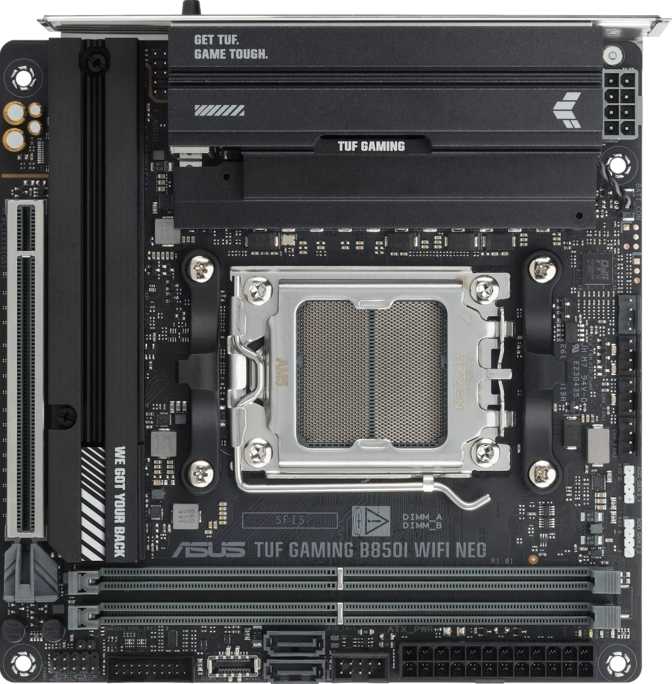
Asus TUF Gaming B850I Wi-Fi Neo: Full Mini-ITX AM5 Board Review
MotherboardsCompact Ambition: The Case for Mini-ITX in a High-Performance AMD Build
Small form factor PC building has always demanded compromise — or so the conventional wisdom goes. The Asus TUF Gaming B850I Wi-Fi Neo challenges that assumption directly. Built on AMD's current AM5 platform with the B850 chipset, this Mini-ITX motherboard is designed for builders who want a serious, upgrade-worthy gaming or productivity machine in the smallest chassis possible — without gutting the feature list to get there.
What makes this board interesting isn't just its size. It's the combination of next-generation connectivity, a credible memory ceiling, and TUF's reputation for thermal durability, all packed into a 170mm square footprint. If you're planning a compact Ryzen build and want to know whether this board earns its place as the foundation, the details here matter more than the marketing.
At a Glance
Design and Build Quality
Physical Footprint and Form Factor
Mini-ITX is the smallest standard desktop motherboard format, measuring exactly 170mm x 170mm — roughly the size of a hardcover novel. That's less than a third of the surface area of a full ATX board. This size enables extremely compact PC cases, which means quieter environments, cleaner desk setups, and the ability to carry a full gaming rig in a backpack-sized bag.
The TUF Gaming line has historically leaned into a military-grade aesthetic — subdued colorways, angular heatsink designs, and durable component choices. The B850I continues this with reinforced PCIe and memory slots, which matter more on a small board where physical stress during installation is harder to avoid. The overall build feels dense rather than cramped, which is a meaningful distinction when you're working in a tight chassis.
RGB and Visual Customization
RGB lighting is present on this board, manageable through Asus's Aura Sync ecosystem. For a TUF board, the lighting is tasteful rather than theatrical — accent illumination that complements case lighting rather than competing with it. If RGB isn't your priority, it's not intrusive. If it is, it's there and controllable.
BIOS Reset and Ease of Use
A physical Clear CMOS button is included — a small feature that earns disproportionate appreciation during an overclocking session gone wrong or a first boot troubleshooting scenario. For a Mini-ITX board where reaching internal jumpers can be genuinely awkward inside a compact case, having a dedicated reset mechanism on the board itself is a practical quality-of-life decision.
Platform and Processor Compatibility
AM5 Socket and B850 Chipset
The board uses AMD's AM5 socket, which is the current-generation platform for Ryzen 7000 and Ryzen 9000 series processors. AM5 is a significant long-term investment: AMD has publicly committed to the socket through at least the next several processor generations, meaning a board bought today has a credible upgrade path for years without requiring a motherboard replacement.
The B850 chipset sits in the middle of AMD's current stack — above the entry-level B650 and below the full-featured X870. In practical terms, B850 unlocks overclocking support for both CPU and memory, PCIe 5.0 for the primary slot, and expanded connectivity compared to its predecessor. For a Mini-ITX board where chipset lane limitations are already constrained by form factor, B850 hits the right balance between capability and cost.
Overclocking Support
This board is officially rated as overclock-friendly. On AM5, that means support for Expo memory profiles — AMD's equivalent of XMP for DDR5 — as well as manual CPU overclocking headroom. Given the Mini-ITX size, thermal management during sustained overclocks depends heavily on case airflow and cooler selection. The board supports overclocking fully; the builder's chassis choices determine the practical ceiling.
Memory: Speed, Capacity, and Future-Proofing
DDR5 with High-Frequency Headroom
The B850I Wi-Fi Neo runs DDR5 memory exclusively — the current standard for AMD's AM5 platform. DDR5 brings meaningfully higher bandwidth than its predecessor, which benefits both gaming (particularly in CPU-limited scenarios) and content creation workloads.
Two memory slots are available. This is standard for Mini-ITX and not a criticism — it's a geometric inevitability of the form factor. It does mean you populate both slots to reach maximum capacity or run dual-channel, so planning your kit upfront matters more than on a board with four slots.
Memory overclocking support extends to 9600 MHz. DDR5 kits shipping at 6000–6400 MHz are already considered fast for everyday builds. Reaching 9600 MHz requires carefully selected kits and favors lower-capacity modules. For most users, running a 6000–6400 MHz kit with Expo enabled is the practical sweet spot — the headroom above that is for enthusiasts who want to push the platform.
Maximum Capacity
Up to 128 GB of total RAM is supported across both slots — 64 GB per slot, the ceiling for current standard DDR5 modules. For gaming, even 32 GB is well beyond typical requirements. The 128 GB ceiling matters primarily for video editors, 3D artists, and virtual machine users who want a compact workstation rather than a dedicated gaming rig. That this board accommodates both use cases without compromise is genuinely useful.
Storage Options: Speed and Flexibility
M.2 Drives and PCIe Bandwidth
Two M.2 slots are available for NVMe SSDs. One connects via PCIe 5.0 lanes from the processor, enabling the fastest consumer SSDs currently available. The second slot runs PCIe 4.0 — still exceptionally fast by any practical measure. For a Mini-ITX build, two M.2 slots is a strong allocation; with modern NVMe drives offering capacities up to 4 TB and beyond per slot, two slots provide ample storage without touching a SATA cable.
SATA and RAID Support
Two SATA 3 ports handle traditional hard drives or older SATA SSDs for bulk storage or repurposing existing hardware. Full RAID support spans all four standard configurations:
This level of RAID coverage is atypically complete for a consumer Mini-ITX board and gives it genuine credibility as a compact workstation or home server foundation.
Expansion Slots: GPU and Beyond
PCIe 5.0 Primary Slot
The single full-length expansion slot runs PCIe 5.0 at x16 electrical bandwidth — the fastest interface available to consumer graphics cards. Every current and near-future GPU will saturate PCIe 4.0 well before PCIe 5.0, so the practical benefit today is future-proofing. The slot is reinforced, which matters when mounting heavy modern graphics cards in a chassis that may be oriented in non-standard configurations.
A second PCIe 4.0 x16 physical slot is also present. On a Mini-ITX board, this slot almost certainly runs at reduced electrical width — making it suitable for capture cards, networking adapters, or NVMe expansion, not a second GPU.
There are no legacy PCI or PCIe x1 slots, which is appropriate for this class of board. The focus is on a single high-bandwidth GPU connection done properly, rather than a spread of lower-speed slots that would never be populated in a compact build.
Connectivity: Ports, Wireless, and Audio
Rear I/O Port Breakdown
| Connection Type | Count | Real-World Speed and Use |
|---|---|---|
| USB 3.2 Gen 2 Type-A | 2 | Up to 10 Gbps each — fast peripherals and external drives |
| USB 3.2 Gen 2x2 Type-C | 1 | Up to 20 Gbps — docking stations and ultra-fast external SSDs |
| USB 3.2 Gen 1 Type-A | 1 | Up to 5 Gbps — mid-speed accessories |
| USB 2.0 Type-A | 2 | Up to 480 Mbps — keyboards, mice, wireless receivers |
| HDMI 2.1 | 1 | 4K/144Hz or 8K/30Hz capable — APU builds only |
| DisplayPort | 1 | High-refresh display support — APU builds only |
| Ethernet (RJ45) | 1 | Wired LAN — stable and low-latency network connection |
Internal Connectors for Case Expansion
For front panel I/O, the board provides two USB 3.2 Gen 1 headers, one USB-C Gen 2 header, and two USB 2.0 headers — covering essentially every current case front-panel configuration. Three fan headers handle CPU and system cooling, sufficient for most standard Mini-ITX builds. Builders running multi-fan radiators should budget for a fan hub.
Wireless: Wi-Fi 6E and Bluetooth 5.4
Wi-Fi 6E extends the improvements of Wi-Fi 6 — higher throughput, lower latency, better handling of congested wireless environments — into the 6 GHz frequency band, significantly less crowded than the bands older standards occupy. In a home with many wireless devices, 6 GHz connectivity makes a measurable difference in consistency. The board also supports legacy Wi-Fi 4 and Wi-Fi 5, so it works with older routers out of the box and upgrades naturally as your network does.
Bluetooth 5.4 is the current-generation standard, delivering reliable connections for wireless headsets, controllers, keyboards, and mice — and the version that matters for low-latency audio accessories and modern game controllers.
Audio Output
A 7.1-channel audio setup is supported through the rear audio jacks via an onboard codec. For gaming headsets and stereo speakers connected directly to the board, this is more than adequate. Audiophiles running dedicated DAC/amp setups will bypass onboard audio entirely. S/PDIF optical output is not included, which may matter to those with specific AV receiver or home theater configurations.
Who This Board Is For — and Who Should Look Elsewhere
- Compact gaming PC builders who want a full-power AMD platform in a small footprint without stripped-down connectivity.
- Space-conscious professionals — video editors, 3D artists, or developers — who need high memory capacity and fast storage in a workstation-sized chassis.
- Living room and LAN party builders where portability and case size matter as much as performance.
- Long-term platform investors who want an AM5 board that won't be obsolete when the next Ryzen generation arrives.
- Builders who need more than two memory slots or plan to expand RAM in stages — the two-slot design requires committing to a final RAM configuration relatively early.
- Multi-GPU or dual-slot expansion card users — this is a single-GPU platform by design.
- Anyone needing Thunderbolt 4 or USB4 40 Gbps connectivity for professional peripherals or ultra-fast external storage arrays.
- Budget-first builders — Mini-ITX boards carry a size premium, and the B850I Wi-Fi Neo is a feature-rich board priced accordingly.
How It Compares to Logical Alternatives
| Feature | Asus TUF B850I Wi-Fi Neo | Typical B650I Competitors | B850 ATX Alternatives |
|---|---|---|---|
| PCIe Slot (Primary) | 5.0 x16 | 4.0 x16 | 5.0 x16 |
| Max Memory OC Speed | 9600 MHz | 6400–7200 MHz | 8000–9600 MHz |
| Wi-Fi Standard | Wi-Fi 6E | Wi-Fi 6 or 6E | Wi-Fi 6E |
| Memory Slots | 2 | 2 | 4 |
| Fan Headers | 3 | 2–3 | 4–6 |
| M.2 Slots | 2 | 2 | 3–5 |
| USB 3.2 Gen 2x2 | Yes (20 Gbps) | Rarely | Often |
| Form Factor | 170 x 170 mm | 170 x 170 mm | 305 x 244 mm |
| Bluetooth | 5.4 | 5.2–5.3 | 5.4 |
Against B850 ATX boards at similar prices, you trade more fan headers, more M.2 slots, and four memory slots for the compact footprint. For builders who have chosen Mini-ITX intentionally, that trade is the entire point.
Honest Assessment: Strengths and Limitations
What It Gets Right
The memory overclocking ceiling is genuinely impressive for a mid-range board — supporting aggressive DDR5 profiles well beyond what most users will ever need, meaning performance-oriented buyers have real headroom. The USB-C port at 20 Gbps on the rear I/O is a standout addition that many competing Mini-ITX boards omit.
The RAID 5 support is unusual for a consumer board at this tier and adds real value for the subset of users who need it. The three-year warranty, applied to a platform with a long official lifespan roadmap, makes this a credible long-term investment.
Clear CMOS button placement is thoughtfully done for a compact board. PCIe 5.0 on the primary slot and Wi-Fi 6E together mean this board won't need replacing as standards advance.
Where It Falls Short
The absence of dual BIOS is a reasonable gripe for overclockers. It doesn't make the board fragile, but it removes a safety net that enthusiasts appreciate when pushing aggressive firmware changes.
Three fan headers is workable but not comfortable if you're building a thermally demanding system with a multi-fan radiator — budget for a fan hub in those scenarios.
No Thunderbolt or USB4 40 Gbps connectivity means those with professional external device requirements will need to look at premium alternatives. The dual display outputs — HDMI and DisplayPort — are practically limited to APU builds, invisible to anyone pairing this with a standard Ryzen chip and a discrete GPU.
The price reflects the feature density. Budget builders should explore B650I alternatives before committing.
Common Questions Before Buying
Final Verdict
Our purchase recommendation for the Asus TUF Gaming B850I Wi-Fi Neo
The Asus TUF Gaming B850I Wi-Fi Neo is a well-executed Mini-ITX board that takes the compact gaming PC seriously rather than treating it as a compromise product. PCIe 5.0 support, genuine memory overclocking headroom, Wi-Fi 6E, a 20 Gbps USB-C rear port, and a memory ceiling that extends comfortably into workstation territory — all at 170mm x 170mm — make a strong case for builders who have chosen compact as their priority.
It isn't a perfect board. The absence of dual BIOS is a reasonable gripe for overclockers, and three fan headers is tight for complex thermal configurations. But for the buyer who wants a compact Ryzen system that doesn't require revisiting a parts list in two years, this board delivers exactly that. It's a Mini-ITX platform built for people who don't want to think of "small" as a synonym for "lesser."