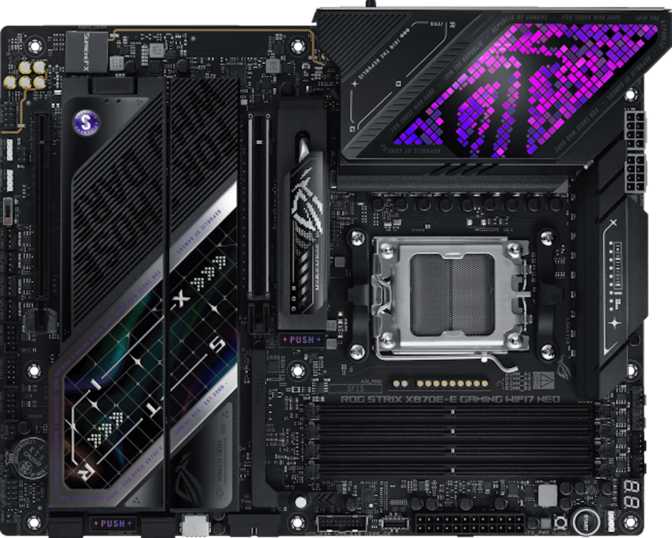
Asus ROG Strix X870E-E Gaming Wi-Fi 7 Neo: Full Review
MotherboardsThe Asus ROG Strix X870E-E Gaming Wi-Fi 7 Neo occupies the top tier of AMD's current platform ecosystem. Built around the AM5 socket and X870E chipset, it targets builders who refuse to compromise — those pairing a flagship Ryzen processor with hardware that matches the investment at every turn. What separates this board isn't one standout feature; it's the concentration of premium capabilities that would each justify a premium board on their own, delivered together in a single ATX package.
Design and Build Quality
Physical construction, aesthetics, and hands-on build considerations
Physical Dimensions and Form Factor
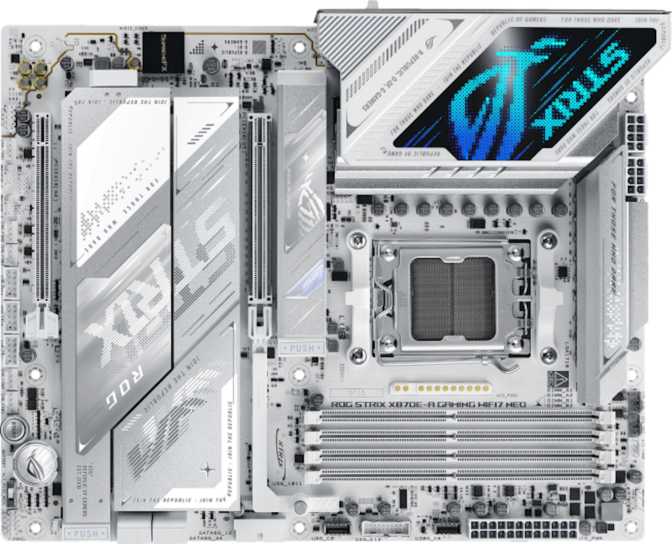
The ROG Strix X870E-E follows the standard ATX footprint — 304mm wide and 244mm tall — fitting comfortably in any full-tower or mid-tower case with ATX support. This is not a compact build solution; it's designed for cases with room to breathe and display their components proudly.
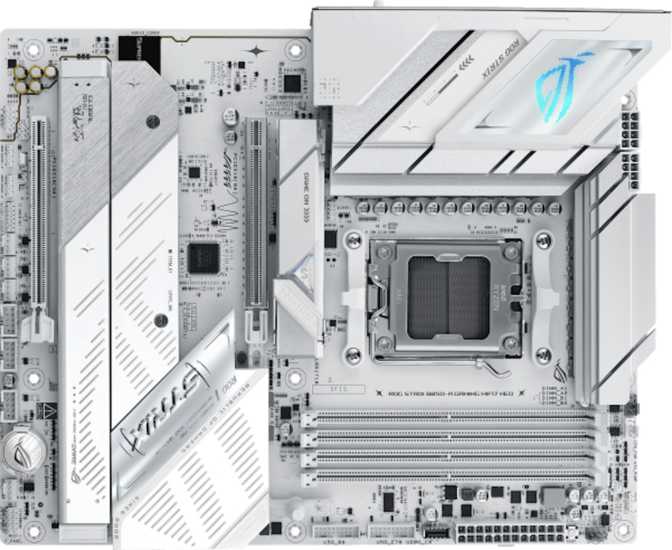
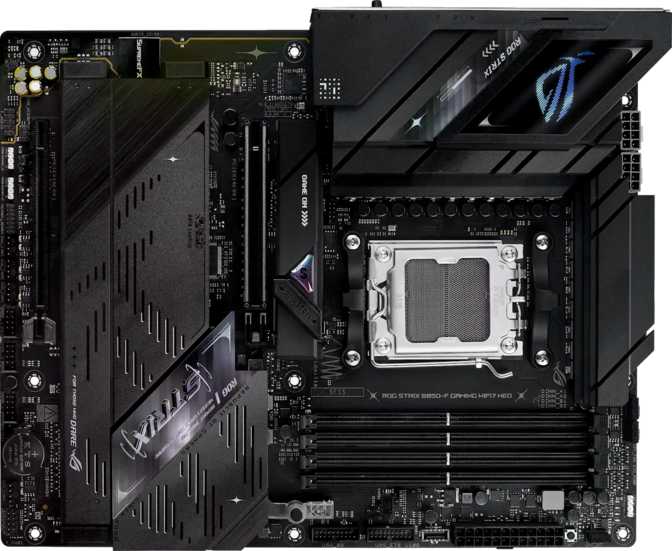
Asus has maintained the ROG Strix visual identity throughout: angular heatsink shrouds, armor plating over VRM and chipset zones, and multi-zone RGB lighting controlled via the Aura Sync ecosystem. Lighting synchronizes with other Aura-compatible components for a cohesive look, and can be disabled entirely through the BIOS or software for a cleaner aesthetic.
Practical Build Considerations
A dedicated Clear CMOS button is a detail that earns real appreciation during an overclocking session. Instead of locating a header on a cramped board or pulling the CMOS battery, resetting after a failed high-speed memory profile is a single button press. It's unglamorous but meaningfully useful when you're iterating through memory profiles at late hours.
304 x 244mm — fits full-tower and most mid-tower cases
Multi-zone lighting, fully disableable through BIOS
Appropriate coverage for a flagship-tier investment
Platform and Processor Compatibility
AM5 socket longevity, X870E chipset advantages, and upgrade planning
The AM5 socket is AMD's current desktop platform, and AMD has publicly committed to multi-generational processor support. All Ryzen 7000, 8000, and 9000-series desktop processors use AM5, and current roadmaps point to continued compatibility for the foreseeable future — a meaningful consideration for builders who want to upgrade their CPU without replacing the entire board.
The X870E chipset — the "E" standing for the enhanced variant — sits above standard X870 in PCIe lane allocation and connectivity provisions. This directly enables the richer expansion and storage configuration seen on this board. Compared to previous-generation X670E boards, X870E brings native USB4 support and the full PCIe 5.0 lane budget without splitting resources between platform slots.
Memory: Capacity, Speed, and Overclocking Headroom
DDR5 support, 256GB maximum capacity, and a 9,600MHz overclocking ceiling
Capacity and Dual-Channel Configuration
Four DDR5 memory slots support a maximum of 256GB of total RAM. For context: a current high-end gaming build typically uses 32GB, a demanding content creation workstation might push 64GB, and professional workloads such as large-scale video editing or virtual machine hosting might approach 128GB. The 256GB ceiling here is a statement — this board will not become a memory bottleneck for any realistic workload, now or years from now.
The platform operates in dual-channel mode, delivering the best results when two or four matching sticks are installed in the correct paired slots. A four-stick, high-speed kit unlocks the full memory bandwidth that AMD's Ryzen architecture is designed to exploit.
Overclocked Memory Speed
The board supports DDR5 memory at speeds up to 9,600MHz through overclocking — significantly beyond the rated speed of even aggressive factory kits. The X870E-E's memory subsystem is purpose-built to extract performance from premium high-frequency DDR5 as faster modules continue arriving on the market. Everyday users are not expected to push these limits; the capability is there for enthusiasts who choose to invest in top-tier kits and tune them.
Storage: One of This Board's Strongest Arguments
Five M.2 NVMe slots, four SATA connectors, and full RAID 0/1/5/10 support
5 M.2 NVMe Slots
An unusually generous count even at this price tier. One slot for a primary OS drive, one for a scratch disk, a third for bulk media storage, and two remaining for future expansion — without a single data cable anywhere in the chain.
4 SATA Connectors
Accommodates high-capacity HDDs for archival storage or existing SATA SSDs from a previous build. In storage-intensive workstations, these four ports add meaningful flexibility alongside the M.2 array.
Full RAID Support
RAID 0, 1, 5, and 10 configurations are all supported. Content creators and small studio operators who need both speed and data redundancy will find RAID 5 and RAID 10 particularly practical — without needing a separate NAS device.
RAID Modes at a Glance
| RAID Mode | Primary Benefit | Supported |
|---|---|---|
| RAID 0 | Maximum speed — data striped across drives | |
| RAID 1 | Redundancy — drives mirror each other exactly | |
| RAID 5 | Speed plus redundancy — requires minimum three drives | |
| RAID 10 | Combined mirror and stripe — fastest redundant configuration | |
| RAID 0+1 | Alternative mirror-plus-stripe arrangement |
Expansion Slots: PCIe 5.0 and Future-Readiness
Primary and secondary PCIe slots, and what their generations mean for longevity
The board provides two primary PCIe expansion slots: one PCIe 5.0 x16 and one PCIe 4.0 x16. The PCIe 5.0 primary slot represents the current leading edge of graphics card connectivity. Current discrete GPUs do not yet saturate PCIe 4.0 bandwidth in gaming scenarios — the PCIe 5.0 primary slot is a forward-looking feature ensuring this board won't create a bottleneck for next-generation graphics cards as PCIe 5.0 GPU adoption grows over the coming years.
The main graphics card slot. PCIe 5.0 doubles available bandwidth over PCIe 4.0 — future-proofing the board for graphics cards released over the next hardware generation cycle. Install your discrete GPU here.
Best applied to a secondary compute card, high-speed network adapter, or capture card for streaming. AMD no longer supports multi-GPU gaming, so this slot earns its value in workstation-type configurations rather than gaming multi-GPU setups.
Connectivity: The Real Story of This Board
Rear panel USB, Thunderbolt 4, USB4, Wi-Fi 7, Bluetooth 5.4, and internal expansion headers
Rear Panel USB — Genuinely Exceptional
The rear I/O USB configuration is one of the most comprehensive available on any consumer motherboard. Thirteen physical ports appear on the rear panel, and every single one operates at 10 Gbps or faster — there is no slow USB 2.0 port anywhere in sight.
| Port Type | Count | Max Speed | Best Use Case |
|---|---|---|---|
| USB-A (3.2 Gen 2) | 9 | 10 Gbps | External drives, hubs, high-speed peripherals |
| USB-C (3.2 Gen 2) | 2 | 10 Gbps | Modern cables, fast charging, compact devices |
| USB-C (USB4 40 Gbps / Thunderbolt 4) | 2 | 40 Gbps | External GPUs, dual 4K monitors, eGPU enclosures |
What Thunderbolt 4 Actually Enables
The two Thunderbolt 4 ports are certified for the full Thunderbolt ecosystem. Each port individually can drive two 4K monitors from a single cable, connect an external GPU enclosure for desktop-class graphics, charge a connected laptop while simultaneously handling full-speed data transfer, or interface with professional audio and video hardware requiring certified connections. At 40 Gbps, working directly from an NVMe drive housed in an external enclosure incurs no meaningful performance penalty compared to an internal drive — a workflow that content creators and editors will immediately value.
Internal Expansion Headers
The board provides headers to expand USB availability through the case front panel or aftermarket brackets. Four 5 Gbps connections, two 20 Gbps Gen 2x2 connections, and six USB 2.0 connections are available for front panels and peripheral hubs. The USB 2.0 headers are reserved for low-bandwidth devices like keyboards, mice, and fan controllers — not for high-speed storage.
Wi-Fi 7 and Bluetooth 5.4
The onboard wireless adapter spans Wi-Fi 4 through Wi-Fi 7 (802.11be). Wi-Fi 7 introduces multi-link operation — the ability to simultaneously use multiple frequency bands for a single connection — delivering lower latency and greater stability in congested wireless environments. This matters for competitive online gaming and for large file transfers over a home network. Full backward compatibility means the card operates at Wi-Fi 6E or lower if your router hasn't yet been upgraded; no hardware change is needed when you do upgrade.
Bluetooth 5.4 handles wireless controllers, headsets, and keyboards with range and reliability that exceeds the requirements of all current consumer peripherals.
Wired Networking
One RJ-45 Ethernet port handles wired networking. Buyers who require guaranteed multi-gigabit wired throughput should verify the exact controller speed against Asus's full product page, as the available specification data confirms only port count. The secondary PCIe 4.0 x16 slot can readily accommodate a 10 GbE expansion card if ultra-fast wired connectivity is a firm requirement.
Audio Quality
7.1-channel onboard audio with a 120 dB signal-to-noise ratio and S/PDIF output
Consumer audio is generally considered good above 100 dB SNR, and premium audiophile hardware typically falls in the 110–120 dB range. The 120 dB figure here matches the ceiling of what onboard audio can deliver — performing better than many standalone external DACs sold for general use. In practice, headphones up to several hundred dollars will be driven cleanly, and the noise floor is low enough that sensitive in-ear monitors won't exhibit audible hiss at normal listening volumes.
S/PDIF optical output is included for connection to external receivers, AV processors, or dedicated DAC and amplifier units that accept digital input. Dedicated music producers working with professional interfaces will likely bypass onboard audio entirely — it isn't designed to replace a studio interface. For everyone else, this is the best onboard audio most users will encounter at any price point.
Thermal Management and Overclocking
Seven fan headers with independent curves, and a BIOS built for enthusiast tuning
Fan Control
Seven fan headers provide fine-grained control over case airflow and CPU cooling. Running individual temperature-based fan curves per header allows the system to stay near-silent during light desktop use and ramp up aggressively under sustained load. Seven headers comfortably accommodate: a large air cooler or AIO pump, a full radiator fan array, front intake fans, rear and top exhaust fans, and dedicated chipset or VRM cooling fans — all operating independently. Liquid cooling setups with multiple radiator fans and a pump will find the header count entirely sufficient.
Overclocking
The X870E chipset unlocks full CPU and memory overclocking when paired with AMD's X-series Ryzen processors. The UEFI BIOS provides granular voltage, frequency, and timing controls for both the processor and memory subsystems. The Clear CMOS button is integral to this workflow — push a memory profile, observe instability, press the button, and iterate without interrupting the session. Automated one-click overclocking profiles in the BIOS also deliver meaningful performance gains for those who prefer not to tune manually.
Who Is This Motherboard For?
Target buyers, ideal use cases, and who should consider a more affordable alternative
- High-end gaming builders pairing this with a flagship Ryzen processor and top-tier GPU — the platform will not be the limiting factor, now or in the near future.
- Content creators and video editors who need multiple fast storage drives, Thunderbolt 4 peripherals, and the memory bandwidth to handle large media files without waiting.
- Enthusiast overclockers who want to push DDR5 memory toward its practical limits and fine-tune CPU performance — this board is purpose-built for exactly that workflow.
- Workstation-adjacent power users running virtual machines, large developer environments, or data-intensive applications that benefit from generous memory capacity and a deep storage array.
- Future-focused builders investing in hardware for five or more years, who want AM5 socket longevity, PCIe 5.0 readiness, Wi-Fi 7, and Thunderbolt 4 all under one roof.
- Budget-conscious builders or those pairing this with a mid-range CPU — a B650 or X670 board delivers everything a mainstream Ryzen build needs for significantly less money.
- Small form factor builders working with ITX or Micro-ATX cases — the X870E-E is ATX only and physically will not fit smaller enclosures.
- Mission-critical server operators requiring ECC memory for data integrity — AMD's EPYC or Threadripper platforms are the appropriate choice for those workloads.
- Minimalist or value-focused users who will never use more than two M.2 slots, basic wireless, and a handful of USB ports — the premium paid covers capabilities they'll never use.
Competitive Positioning
How the ROG Strix X870E-E compares to logical alternatives at similar and lower price points
The ROG Strix X870E-E distinguishes itself primarily through its USB ecosystem — no competing X670E board at a lower price point offers both Thunderbolt 4 and this rear panel USB density simultaneously. The memory overclocking ceiling and M.2 count are secondary differentiators. Buyers comparing this to high-end X670E boards should focus specifically on whether Thunderbolt 4 and Wi-Fi 7 matter for their use case; if neither does, a premium X670E board offers competitive performance at a lower price.
| Feature | ROG Strix X870E-E | Typical X670E | Typical B650E |
|---|---|---|---|
| PCIe 5.0 x16 Slot | Yes | Yes | Yes (most) |
| M.2 NVMe Slots | 5 | 3–4 | 2–3 |
| Thunderbolt 4 | 2 ports | Varies (0–2) | Rarely included |
| USB4 40 Gbps | 2 ports | 0–2 | Typically absent |
| Rear USB-A Count | 9 (all 10 Gbps) | 4–8 | 4–6 |
| Wi-Fi Generation | Wi-Fi 7 | Wi-Fi 6E (typical) | Wi-Fi 6E (typical) |
| Memory OC Ceiling | ~9,600 MHz | ~6,800–7,800 MHz | ~6,400–7,200 MHz |
| Audio SNR | 120 dB | 108–115 dB | 100–108 dB |
| Fan Headers | 7 | 6–7 | 4–6 |
| RAID 5 Support | Yes | Varies | Rarely |
Honest Assessment: Strengths and Weaknesses
Where this board excels, and where it genuinely falls short
- The rear I/O combining nine 10 Gbps USB-A ports, two Thunderbolt 4 ports, USB4, and Wi-Fi 7 is genuinely unmatched at this tier. No competing board brings all of these together at the same price point.
- Five M.2 slots and comprehensive RAID support push this into workstation territory for storage-heavy workflows — a level of flexibility typically associated with professional hardware, not consumer boards.
- The 120 dB onboard audio is among the best implementations found anywhere and outperforms many mid-range dedicated sound cards for everyday headphone and speaker listening.
- Memory overclocking headroom reaching toward 9,600 MHz gives enthusiasts years of room to exploit as faster DDR5 kits become available at more accessible price points.
- AM5 socket longevity combined with PCIe 5.0 readiness and Wi-Fi 7 means this board has a credible argument as the last motherboard you'll need for this processor generation.
- The absence of a dual BIOS is the most legitimate criticism at this price. A backup BIOS chip is inexpensive to include and prevents a bad firmware flash from turning a premium board into an expensive paperweight.
- No PCIe x1 slot is present. Only buyers needing legacy or low-bandwidth expansion cards are directly affected, but the omission feels unnecessary at flagship pricing where every extra header counts.
- The premium price only makes sense if you'll actually use what you're paying for. Builders whose requirements stop at two M.2 slots and basic wireless are funding features they'll never touch.
- The wired Ethernet controller speed is not explicitly detailed in the available specification data — buyers requiring guaranteed 2.5 GbE or 10 GbE wired throughput should confirm the controller with Asus's product page before purchasing.
Frequently Asked Questions
Answers to the questions real buyers search for before purchasing
Final Verdict
A thoroughly capable, future-resistant build platform
Recommended for high-end gaming, content creation, and workstation-adjacent builds on AMD AM5
The Asus ROG Strix X870E-E Gaming Wi-Fi 7 Neo earns its flagship positioning not through marketing language but through a genuinely differentiated feature set. The rear I/O alone — combining Thunderbolt 4, USB4, and thirteen ports that are all 10 Gbps or faster — sets a bar most competing boards simply do not meet. Add five M.2 slots, full RAID flexibility, Wi-Fi 7, a memory platform capable of extraordinary overclocked speeds, and audio that holds its own against external hardware, and the picture of a thoroughly capable platform becomes clear.
The missing dual BIOS is a real shortcoming worth naming plainly — at the price this board commands, a backup BIOS chip should be standard. For builders whose build demands Thunderbolt 4, extensive fast storage, or a motherboard that will remain relevant for the entire AM5 platform lifecycle, the ROG Strix X870E-E delivers on every dimension that matters. If your requirements stop at two M.2 drives and basic wireless, a well-specified B650E or X670E board will serve you better per dollar.