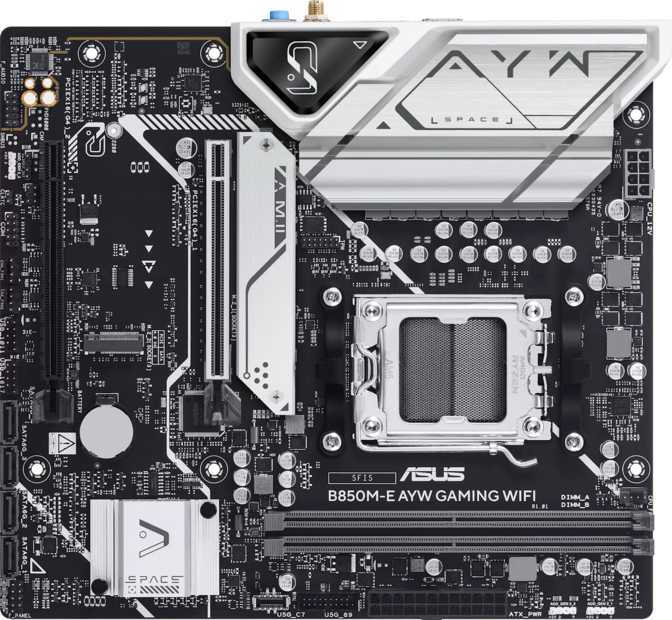
Asus B850M-E AYW Gaming Wi-Fi Review: Compact AM5 Performance Tested
MotherboardsThe Asus B850M-E AYW Gaming Wi-Fi brings AMD's current-generation AM5 platform into a compact Micro-ATX footprint without stripping out the features that matter. With DDR5 support reaching 8000MHz, Wi-Fi 6, full RAID capability, and a three-year warranty, it punches above its chipset tier — with a few deliberate trade-offs that informed buyers should understand before committing.
Design and Build Quality
Form Factor and Physical Dimensions
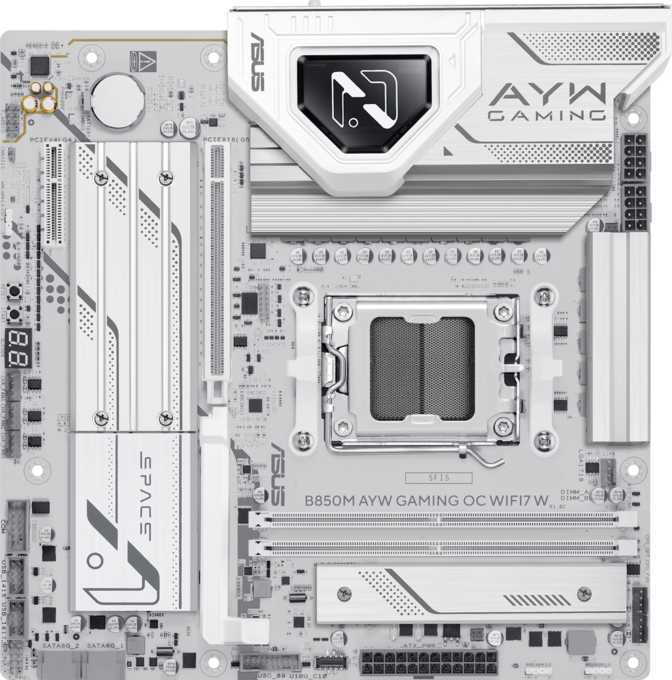
At 244mm wide and 221mm tall, the B850M-E fits the standard Micro-ATX profile, dropping cleanly into any case that supports that form factor — including mid-towers that also accept full ATX boards. You gain the thermal and cable-management benefits of a more spacious build environment without being confined to cramped small-form-factor enclosures.
The RGB lighting is integrated rather than bolted on as an afterthought. It complements a styled build without demanding attention and can be fully controlled or disabled through Asus's BIOS and software utilities — so light-averse builders aren't penalized.
Build quality follows Asus's established standard at this tier: reinforced PCIe and memory slots, a solid VRM area designed to support the power demands of modern Ryzen processors, and a layout that prioritizes cable routing over purely aesthetic symmetry.
What You Won't Find on the Board
As a Micro-ATX design, some omissions are architectural rather than cost-cutting decisions — but two deserve explicit attention before you commit to a purchase.
-
No Dual BIOS
There is no physical failsafe chip. A failed BIOS update requires BIOS FlashBack or a manual recovery process rather than a simple switch to a backup chip.
-
No Rear Clear CMOS Button
Resetting BIOS settings after an unstable overclock requires using a jumper or short on the board's CMOS header — a minor but real inconvenience during active tuning sessions.
Platform and Performance Potential
The AM5 and B850 Combination
The B850M-E is built for AMD's AM5 socket, the current-generation platform for Ryzen 7000 and 9000 series processors. AM5 uses the LGA1718 contact array and supports PCIe 5.0 at the CPU level — though this specific board routes its primary expansion slot at PCIe 4.0, a point worth understanding clearly before purchase.
The B850 chipset sits above the mainstream B650 in AMD's lineup, bringing expanded connectivity and more headroom for memory overclocking. The practical difference between B850 and the higher-end X870 chipset comes down to two things: PCIe 5.0 on the GPU slot (which this board doesn't provide) and USB 4 ports (also absent). What B850 does deliver is solid DDR5 support with meaningful overclocking latitude, full RAID capability, and enough I/O for a complete system without requiring an X-series premium.
Memory Configuration
The board provides two DDR5 memory slots in a dual-channel configuration. You install RAM in pairs to access the full bandwidth DDR5 delivers — a single stick runs in single-channel mode at meaningfully reduced throughput.
Maximum capacity reaches 128GB, a ceiling that no gaming or consumer workload will realistically approach. The more meaningful figure is the overclocking ceiling: memory can be pushed to 8000MHz via XMP or AMD's EXPO profile system. DDR5-6000 and DDR5-6400 kits — the practical sweet spot for Ryzen AM5 performance — run well within spec and leave room to tune further if the kit quality supports it.
This is the core Micro-ATX memory trade-off. There is no room to add more sticks later without replacing your existing kit entirely. Decide on your target capacity — 32GB for gaming, 64GB if your workload warrants it — and buy it upfront.
- StandardDDR5
- Slots2 (Dual Channel)
- Maximum128 GB
- OC Ceiling8000 MHz
- ECC SupportNo
Expansion Slots and Storage
PCIe Slots: What You Get and What's Missing
Two PCIe 4.0 x16 physical slots occupy the board. The primary slot runs at full x16 electrical bandwidth — this is where your graphics card belongs. The secondary slot operates at x4 electrical bandwidth, sufficient for a capture card, NVMe expansion controller, or a network card, but not a second discrete GPU in any meaningful configuration.
Ryzen 7000 and 9000 series CPUs support PCIe 5.0 lanes, but B850 routes the primary slot at Gen 4. For any current consumer GPU, this makes zero real-world performance difference — no graphics card on the market saturates PCIe 4.0 bandwidth. For buyers planning to hold this board across two or three GPU generations, it is a ceiling worth knowing about.
Storage Connectivity
NVMe Fast Storage
Two M.2 sockets accommodate PCIe 4.0 NVMe drives at full rated speeds. One for your primary system drive, a second for a game library or secondary fast storage volume. Current high-speed NVMe SSDs install and perform without bottleneck — PCIe 4.0 bandwidth exceeds what any single consumer SSD can sustain continuously.
SATA and RAID Support
Four SATA 3 ports extend your options for traditional 2.5-inch SSDs or hard drives. A standard gaming build will likely use just two — but having four means more elaborate storage setups are fully supported.
Full RAID support across all four major configurations — a genuine advantage over many B650M competitors that offer only partial or no RAID capability.
Connectivity: Ports and Wireless
Rear Panel I/O
| Port Type | Count | Speed / Notes |
|---|---|---|
| USB 3.2 Gen 2 Type-A | 2 | Up to 10 Gbps — ideal for external SSDs and fast peripherals |
| USB 3.2 Gen 1 Type-A | 2 | Up to 5 Gbps — general peripherals and storage |
| USB 2.0 | 4 | Up to 480 Mbps — keyboards, mice, low-bandwidth dongles |
| USB Type-C | 0 | Not present — most significant connectivity gap on this board |
| HDMI 2.1 | 1 | For Ryzen APU builds; unused if CPU has no integrated graphics |
| DisplayPort | 0 | Not present |
| Ethernet (RJ45) | 1 | Gigabit — stable, low-latency wired networking |
| 3.5mm Audio Jacks | 3 | 7.1 surround configuration — no optical S/PDIF output |
External SSDs, smartphones, monitors, and audio interfaces increasingly default to USB-C. Having none at the back of the machine means relying on a hub or a front-panel cable for those devices every day. It's the single area where the board feels most behind contemporary expectations and should factor directly into your purchase decision.
Wireless: Wi-Fi 6 and Bluetooth 5.3
Wi-Fi 6 (802.11ax)
The onboard wireless covers Wi-Fi 4, 5, and 6 standards. Wi-Fi 6 is what matters most: it supports multi-antenna operation, improved performance in environments crowded with competing networks, and real-world throughput comfortable enough for 4K streaming, competitive gaming, and large file transfers running simultaneously without degradation.
This is Wi-Fi 6, not Wi-Fi 7. Buyers who want the latest wireless standard will find it on X870M boards, which typically include Wi-Fi 7 at a higher price point.
Bluetooth 5.3
Bluetooth 5.3 handles wireless peripherals — controllers, headsets, and accessories — at the current mainstream standard. The board does not support aptX audio codec extensions, so enhanced audio codec quality through the native Bluetooth connection isn't available for audiophile-grade wireless headphones.
For most users — wireless game controllers, headsets, and general peripherals — Bluetooth 5.3 is entirely sufficient and requires no additional hardware.
Internal Headers and System Audio
Internal Connectors Reference
| Connector | Count | Purpose |
|---|---|---|
| M.2 Sockets | 2 | NVMe SSD — PCIe 4.0 |
| SATA 3 Ports | 4 | Traditional SSDs and HDDs |
| USB 3.2 Gen 1 Headers | 2 | Front-panel USB-A (5 Gbps) |
| USB 2.0 Headers | 4 | Front-panel USB 2.0 |
| Fan / Pump Headers | 3 | CPU cooler and case fans |
| TPM Header | 1 | Discrete security module |
Three fan headers cover a straightforward single-cooler, two-exhaust-fan build comfortably. Three or more case fans will require a fan hub or splitter cable — something to account for when planning a thermally ambitious build.
Onboard Audio
The audio system supports 7.1 surround-channel output through three rear analog jacks. For gaming headsets connected directly to the rear panel or through the front-panel audio header, the onboard implementation is standard and functional for everyday use.
No S/PDIF optical output. Users who connect audio to a receiver or external DAC via optical cable will need a separate USB audio device as an alternative.
Who This Board Is For — and Who Should Look Elsewhere
Ideal Use Cases
Compact gaming builds — Micro-ATX case preference with a complete B850 platform and headroom to run fast DDR5 kits without compromise.
Ryzen APU systems — the HDMI 2.1 output enables direct display connection for Ryzen chips with integrated graphics, no discrete GPU required.
Budget-conscious AM5 builds — DDR5 headroom, Wi-Fi 6, and Bluetooth 5.3 without paying the X870 price premium.
Small office or workstation builds — full RAID storage support, Gigabit Ethernet, and Bluetooth make it genuinely functional beyond gaming contexts.
Not the Right Choice If...
You need rear USB-C — the complete absence of Type-C will affect daily workflows for anyone whose device ecosystem has moved to that connector standard.
You're future-proofing for PCIe 5.0 GPUs — the Gen 4 ceiling on the primary slot may become relevant across two or more upgrade cycles.
Your cooling setup needs more than three fan headers — a fan hub is required for complex configurations, which adds cost and cable management overhead.
You want dual BIOS protection — there is no backup chip to fall back on if a BIOS update fails, which requires more deliberate recovery steps.
Competitive Positioning
The B850M-E occupies a deliberate middle position in AMD's Micro-ATX stack — above B650M in memory support and RAID capability, below X870M in PCIe generation and wireless standards. The table below maps out those trade-offs at a glance so you can calibrate where this board sits relative to its logical alternatives.
| Feature | Asus B850M-E AYW | Typical B650M | Typical X870M |
|---|---|---|---|
| Chipset | B850 | B650 | X870 |
| Primary PCIe Slot | Gen 4 x16 | Gen 4 x16 | Gen 5 x16 |
| DDR5 OC Ceiling | 8000 MHz | ~6400–7200 MHz | 8000+ MHz |
| Rear USB-C | None | Varies by model | Usually present |
| Wi-Fi Standard | Wi-Fi 6 | Wi-Fi 5 or 6 | Wi-Fi 7 (typical) |
| RAID Support | Full (0/1/5/10) | Partial or none | Full |
| Dual BIOS | No | Varies by model | Common |
Competitor specifications reflect typical values for each chipset tier and will vary by specific model and manufacturer.
Strengths and Honest Weaknesses
Strengths
Generous DDR5 overclocking ceiling. An 8000MHz maximum puts aggressive kits firmly within operating range. The board won't be the bottleneck when tuning memory for Ryzen AM5 performance.
Complete RAID support across all four configurations. RAID 0, 1, 5, and 10 are all present — a genuine step above many B650M competitors that omit or limit RAID entirely.
Wi-Fi 6 and Bluetooth 5.3 onboard. No separate wireless card required, and the standard is current enough to handle demanding wireless workloads without compromise.
HDMI 2.1 video output. A practical inclusion for Ryzen APU-based builds, enabling direct display output without a discrete graphics card at no additional cost.
Three-year warranty coverage. Asus's commitment here reflects confidence in the product's longevity and provides meaningful buyer protection compared to the one-year coverage common in the category.
Weaknesses
No rear USB-C whatsoever. The complete absence of Type-C is the most pressing issue for daily use, given how rapidly the broader device ecosystem has shifted to that connector.
PCIe 4.0 on the primary GPU slot. Not a present-day performance problem, but a long-term ceiling for buyers who plan to hold this board across multiple GPU upgrade cycles.
Only three fan headers. Enough for a straightforward build, but complex cooling configurations require a fan hub — additional hardware and cost not reflected in the board's price.
No dual BIOS chip. The absence of a physical failsafe makes BIOS recovery more involved — a minor but real consideration for anyone who updates firmware actively.
No optical audio output. Users relying on S/PDIF to feed a receiver or external DAC will need a separate USB audio device, adding cost and complexity to audio-centric setups.
Common Questions Before You Buy
Final Recommendation
A Confident Buy for the Right Builder
The Asus B850M-E AYW Gaming Wi-Fi is a competent, well-featured Micro-ATX motherboard that earns its place in the AM5 ecosystem. The DDR5 memory ceiling is generous for its class. Full RAID support, Wi-Fi 6, Bluetooth 5.3, and HDMI 2.1 make it a functionally complete platform for a wide range of builds — and the three-year warranty signals genuine confidence in the product's durability.
The weaknesses are real and should be understood before committing. The absence of rear USB-C is the most immediate concern for day-to-day use. The PCIe 4.0 ceiling on the GPU slot is not a problem today but becomes a consideration for long-term platform holders. The lack of dual BIOS means more care is needed around BIOS update procedures.
For the buyer building a compact gaming PC, a Ryzen APU system, or a small workstation — and for whom rear USB-C is not a daily necessity — this board delivers focused value at its tier without paying for features that won't get used. If USB-C connectivity or PCIe 5.0 future-proofing are genuine priorities, the additional spend on an X870M board is the sounder long-term investment.
BEST SUITED FOR
Focused AM5 builds where a compact form and strong DDR5 headroom matter more than USB-C or PCIe 5.0
RECOMMENDED