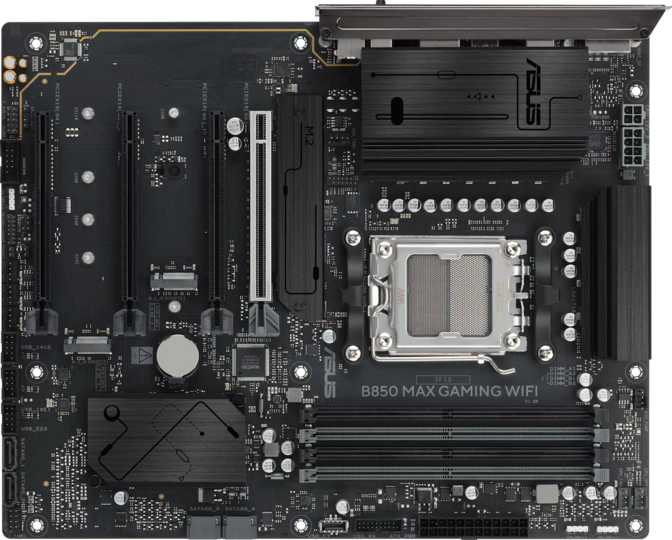
Asus B850 Max Gaming Wi-Fi Review: The AM5 Enthusiast Board Explained
MotherboardsThe B850 chipset sits in a genuinely interesting position in AMD's platform hierarchy. It rises above the entry-level B650, picking up connectivity that once required an X-series board, while keeping its footing well within the enthusiast mid-range. The Asus B850 Max Gaming Wi-Fi takes that foundation and builds a board with real platform longevity — one that handles current-generation Ryzen processors today and leaves the upgrade door meaningfully open for what comes next.
This is not a budget board dressed in gaming cosmetics. PCIe 5.0 on the primary GPU slot, DDR5 memory support reaching to the outer edge of current frequency specifications, and Wi-Fi 6E built in from the factory — these are characteristics of a board built for users who are serious about their hardware. The feature set is curated rather than exhaustive, and a few deliberate omissions are worth understanding clearly before committing to this platform.
- Chipset
- B850
- Socket
- AM5
- Form
- ATX
- Memory
- DDR5 Only
- Wi-Fi
- 6E (802.11ax)
- Bluetooth
- 5.4
Design, Build Quality, and Physical Presence
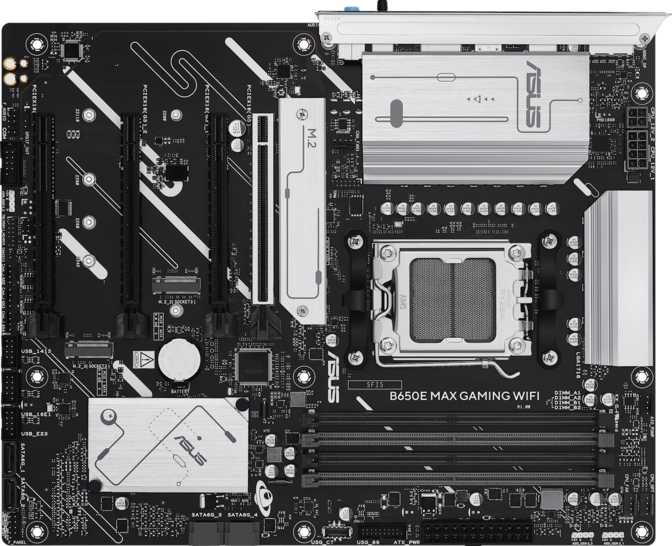
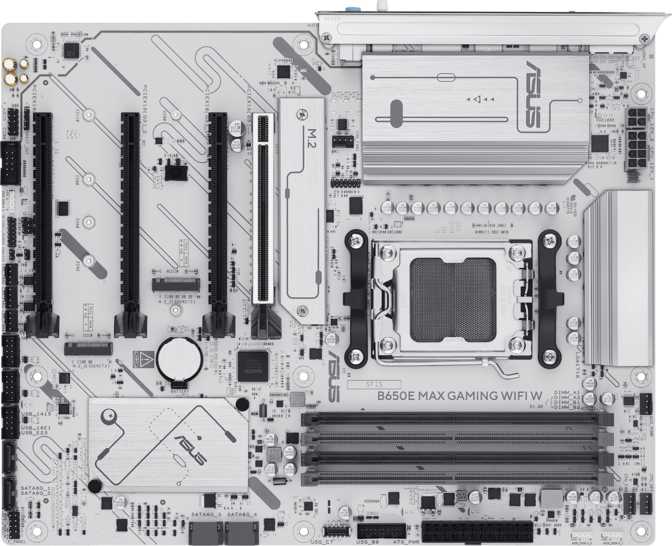
The B850 Max Gaming Wi-Fi arrives in the standard ATX format at 305 x 244 mm — dimensions that fit comfortably in any mid-tower or full-tower case built for ATX boards. This covers the overwhelming majority of enthusiast enclosures available today. Compact case builders — micro-ATX or mini-ITX — will need to look elsewhere; the ATX form factor is both an asset for expandability and a constraint for cabinet choice.
The board carries RGB lighting throughout, consistent with the Max Gaming product line positioning. Asus integrates Aura Sync lighting control across its gaming product ecosystem, making coordination with other Aura-compatible components straightforward through software. For builders who prefer an understated aesthetic, the lighting can be disabled via BIOS or Asus's Armory Crate software — though the board's visual character is clearly aimed at illuminated builds.
Platform and Processor Compatibility
The B850 Max Gaming Wi-Fi uses AMD's AM5 socket — the current-generation processor platform supporting Ryzen 7000, Ryzen 9000, and Ryzen AI 300 series chips. AMD has made public commitments to AM5 longevity, with additional processor generations expected to use the same socket. For anyone building with a current mid-range chip and anticipating a CPU upgrade in a few years, this is a meaningful platform consideration that adds long-term value to the investment.
Integrated Graphics: Know Your CPU Before You Build
This board has no integrated GPU of its own. Video output — via the HDMI 2.1 or DisplayPort connector on the rear I/O — only functions when using an AMD Ryzen processor that includes integrated graphics, typically AMD's "G" suffix models such as the Ryzen 7 8700G. Standard Ryzen CPUs without an integrated GPU require a discrete graphics card for any display output whatsoever. For dedicated gaming builds with a discrete card, this is entirely irrelevant. For a temporary headless setup or a gradual build, verify your processor includes an iGPU before powering on.
Memory: DDR5 with Serious Headroom
Four DDR5 memory slots in a dual-channel configuration give this board a maximum total capacity of 256 GB — a ceiling so far from typical use cases that expansion concerns effectively disappear. Whether you are building a gaming rig with 32 GB or a creative workstation with 96 GB, the headroom is there without compromise.
The more consequential figure for daily performance is the memory overclocking ceiling. This board supports EXPO and XMP profiles up to 9000 MHz. On AMD Ryzen platforms, memory frequency directly influences the processor's Infinity Fabric — the internal bus connecting CPU cores to the memory controller. Running well-tuned high-frequency DDR5 translates measurably to lower latency and better performance in frame-rate-sensitive scenarios, not just on synthetic benchmarks. It is a real-world difference that shows up in competitive gaming titles where CPU throughput is the limiting factor.
In practical terms, most builders will find the sweet spot between 6000 MHz and 7200 MHz for the best stability-to-performance ratio using mainstream DDR5 kits. The 9000 MHz ceiling exists for enthusiasts willing to invest in premium memory and the time to tune it properly — the board does not constrain that ambition.
Graphics and PCIe Expansion
The expansion slot layout is one of the most consequential specifications in any gaming motherboard, and the B850 Max Gaming Wi-Fi is well-positioned. The primary graphics card slot operates at PCIe 5.0 x16 — the current interface standard delivering twice the theoretical bandwidth of PCIe 4.0. Today's highest-end GPUs from both AMD and Nvidia do not saturate even PCIe 4.0 bandwidth in gaming workloads. PCIe 5.0 in the primary slot is therefore a forward-looking insurance policy, ensuring this board will not become an interface bottleneck when the next generation of graphics hardware arrives.
| Slot | Interface | Bandwidth | Primary Use |
|---|---|---|---|
| Primary x16 | PCIe 5.0 | 128 GB/s | Dedicated GPU — current and next-generation |
| Secondary x16 | PCIe 4.0 | 64 GB/s | Second GPU, capture card, NVMe expansion |
| Slot 3 x16 | PCIe 3.0 | 32 GB/s | Legacy cards, networking, low-bandwidth add-ins |
| Slot 4 x16 | PCIe 3.0 | 32 GB/s | Additional expansion cards |
Storage: Three M.2 Slots and a Clean SATA Foundation
M.2 NVMe Storage
Three M.2 sockets provide the core of a fast, cable-free storage layout. The primary M.2 slot supports PCIe 5.0 speeds, enabling the latest generation of NVMe drives now reaching mainstream availability. Additional slots operate at PCIe 4.0, covering the vast majority of current high-performance NVMe options on the market. Three slots means a typical build can run a dedicated OS drive, a game library drive, and a working or scratch drive entirely without a single SATA cable — a genuine quality-of-life advantage for clean, organized builds.
SATA and RAID
Four SATA 3 connectors handle traditional 2.5-inch SSDs, budget SATA drives, or spinning-platter hard drives for bulk and archival storage. If you are migrating from an older system with existing SATA SSDs, those drives have a home here. The board supports all four major RAID configurations — RAID 0, 1, 5, and 10 — useful for builders who want to introduce redundancy or performance striping into their storage pool without a dedicated controller card.
USB Connectivity: Rear Panel and Front-Panel Headers
Rear I/O Ports
Eight USB ports on the rear I/O cover the majority of real-world peripheral needs. Three 10 Gbps Type-A ports handle external SSDs and high-bandwidth accessories comfortably. Two mid-tier 5 Gbps ports suit standard peripherals such as gaming mice and keyboards. One Type-C port at 10 Gbps addresses modern accessories and smartphones. Two legacy USB 2.0 ports keep older hardware and wireless receivers connected without consuming high-speed resources.
| Port Type | Count | Max Speed | Best For |
|---|---|---|---|
| USB 3.2 Gen 2 Type-A | 3 | 10 Gbps | External SSDs, high-speed peripherals |
| USB 3.2 Gen 1 Type-A | 2 | 5 Gbps | Mice, keyboards, standard devices |
| USB 3.2 Gen 2 Type-C | 1 | 10 Gbps | Modern accessories, smartphones |
| USB 2.0 Type-A | 2 | 480 Mbps | Legacy peripherals, wireless receivers |
Front-Panel Expansion Headers
Internal headers extend the USB count considerably for a fully populated build. Two USB 3.2 Gen 1 headers enable front-panel ports at 5 Gbps each. Six USB 2.0 positions cover CPU cooler USB connections, RGB controller hubs, and any front-panel port breakouts — a generous count that prevents the quiet competition between internal devices seen on boards with fewer headers. One important caveat: the front-panel USB-C header operates at Gen 1 speeds of 5 Gbps, not the faster 10 Gbps Gen 2 that premium cases sometimes support. If quick front-panel transfers are a priority, verify whether this limit matters for your specific case before purchasing.
Networking: Wi-Fi 6E and Wired Ethernet
Wireless: Wi-Fi 6E
The integrated wireless card covers Wi-Fi 4, 5, 6, and 6E — backward compatible with any router you already own, and ready to take full advantage of a Wi-Fi 6E router's 6 GHz band. That 6 GHz band is the key differentiator: it operates in a spectrum that is far less congested than the 2.4 GHz and 5 GHz frequencies shared by most devices in a typical home or apartment building. For online gaming in a busy wireless environment, the difference in consistency and latency is tangible rather than theoretical.
Bluetooth 5.4 handles wireless peripherals. This version improves on earlier Bluetooth 5.x releases with better multi-device management, enhanced connection stability, and reduced power overhead — all relevant for wireless headsets, controllers, and keyboards where dropouts or input lag are unacceptable.
Supported Wireless Standards
- Wi-Fi 4 — 802.11n
- Wi-Fi 5 — 802.11ac
- Wi-Fi 6 — 802.11ax (2.4 & 5 GHz)
- Wi-Fi 6E — 802.11ax (6 GHz)
- Bluetooth 5.4
Wired: One RJ45 Ethernet port for a stable, low-latency wired connection. For competitive online gaming, a direct wired connection delivers the most consistent ping and the least interference of any option available.
Onboard Audio
The onboard audio delivers full 7.1-channel surround output through three analog connectors on the rear panel — covering front, center, side, rear, and subwoofer positions for a complete surround configuration. For gaming, content consumption, and music listening through a quality headset or desktop speakers, onboard audio at this tier performs well in practice.
One notable absence is an S/PDIF optical output. Users who rely on a digital optical connection to an AV receiver, soundbar, or external DAC for bit-perfect audio will not find that path here. A USB audio interface is the practical alternative for those specific workflows, and for most users this absence will not come up at all.
Thermal and Fan Management
Six fan headers give this board sufficient control points for a well-configured full-tower build. A typical layout with three intake fans, two exhaust fans, and a CPU cooler or AIO pump occupies all six headers cleanly, with no spare in that configuration — but covering the standard layout completely. Each header supports independent per-curve fan speed control through the BIOS, allowing noise-versus-cooling balance to be configured by zone rather than through a single system-wide setting.
Who Should Buy This Board — and Who Shouldn't
This Board Makes Sense If You:
- Are building a Ryzen 7000 or Ryzen 9000 series system with a discrete GPU and want a solid long-term AM5 platform without paying flagship prices.
- Want PCIe 5.0 in the primary GPU slot so your board stays current when the next generation of graphics hardware arrives.
- Plan to experiment with high-frequency DDR5 memory tuning and want overhead to do so without hitting a board-level ceiling.
- Need Wi-Fi 6E built in and prefer not to add a separate wireless expansion card later.
- Are running two or three NVMe drives and want a fully cable-free storage layout without compromise.
This Board Is Not the Right Fit If You:
- Need Thunderbolt or USB4 for external GPU enclosures, high-speed docking stations, or professional peripherals that depend on those interfaces.
- Rely on dual BIOS for aggressive overclocking safety — manual CMOS recovery is the only fallback after a failed flash or bad OC.
- Want a front-panel USB-C port running at full 10 Gbps — the front-panel USB-C header is limited to 5 Gbps on this board.
- Are building in a compact case — this board is ATX only and will not fit micro-ATX or mini-ITX enclosures.
- Need an S/PDIF optical output for a home theater receiver or external DAC that lacks a USB audio input.
Competitive Positioning: How It Compares
The B850 faces natural comparison against B650 boards below it and X870 / X870E boards above it. The table below captures the differences that actually drive buying decisions — not every specification, but the ones that determine which tier a builder genuinely needs.
| Feature | B650Lower Tier | B850 Max Gaming Wi-FiThis Product | X870EHigher Tier |
|---|---|---|---|
| PCIe 5.0 GPU Slot | Sometimes | Yes — 1 Slot | Yes — 1–2 Slots |
| PCIe 5.0 M.2 | Rarely | Likely 1 Slot | Yes — Multiple |
| Wi-Fi 6E | Varies | Yes | Yes |
| OC Support | Limited | Full | Full |
| Dual BIOS | Varies | No | Common |
| USB4 / Thunderbolt | No | No | Sometimes |
| Price Tier | Budget–Mid | Mid–Enthusiast | Enthusiast–Premium |
Honest Assessment: What Works and What Doesn't
The B850 Max Gaming Wi-Fi is a well-judged product that hits its target clearly. Its strengths reflect a board designed for long-term platform value rather than headline specification padding. Its weaknesses are real but predictable for the price category — they are informed trade-offs that define where this product sits in the market rather than flaws that were overlooked.
Where It Excels
- PCIe 5.0 on the primary GPU slot ensures this board will not become an interface bottleneck when next-generation graphics hardware arrives.
- A DDR5 frequency ceiling in the upper range of what any B-series board currently supports gives genuine headroom for performance tuning.
- Wi-Fi 6E delivers real-world benefit in congested wireless environments — particularly for latency-sensitive gaming where network consistency matters.
- Three M.2 slots cover a complete cable-free storage layout without compromise — OS, game library, and working drive all accommodated cleanly.
- Six fan headers provide enough control points for a full-tower build including radiators, multiple intake fans, and independent exhaust channels.
- A three-year warranty is more generous than several competing brands at this price tier and reflects confidence in long-term build reliability.
Where It Falls Short
- No Clear CMOS button and no dual BIOS means recovering from a failed overclocking attempt requires manual board intervention — an inconvenience for aggressive memory overclockers.
- The absence of USB4 and Thunderbolt eliminates professional workflows involving external GPU enclosures, Thunderbolt docking, and high-speed external storage beyond 10 Gbps.
- The front-panel USB-C header is limited to 5 Gbps (Gen 1), which may frustrate owners of premium cases advertising faster front-panel USB-C performance.
- No S/PDIF optical output limits users who want digital audio routing to an AV receiver or optical-input DAC — a USB audio interface becomes the only alternative.
- ATX is the only form factor option — there is no smaller variant for compact case builders who want the same B850 feature set in a tighter footprint.
Frequently Asked Questions
Final Verdict
Asus B850 Max Gaming Wi-FiThe Asus B850 Max Gaming Wi-Fi is a well-constructed AM5 platform that gets its priorities right for gaming and enthusiast builds. PCIe 5.0 on the primary GPU slot, DDR5 memory support with genuine overclocking headroom, Wi-Fi 6E from the factory, and three M.2 slots for a clean high-performance storage layout — these are the specifications that translate into real build quality and long-term platform value.
The gaps are real but narrowly scoped. No Thunderbolt or USB4, no dual BIOS, and a front-panel USB-C header that maxes out at 5 Gbps are trade-offs that define where this board sits in the market hierarchy — not hidden flaws. A builder whose workflows do not intersect with those specific limitations will find nothing missing that affects daily use in any meaningful way.
If Thunderbolt or USB4 requirements are non-negotiable for your workflow, spend more for an X870E board. If they are not — and for the overwhelming majority of gaming-focused builds, they simply are not — the B850 Max Gaming Wi-Fi is where meaningful performance-per-dollar lives in the AM5 ecosystem today.