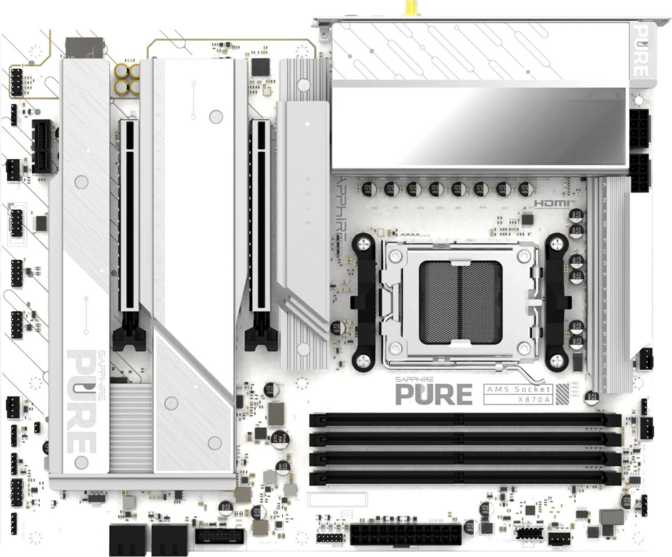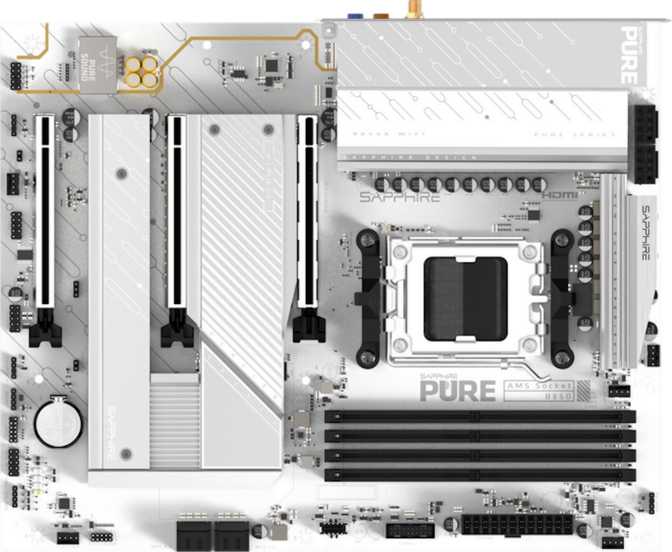
Sapphire Pure B850A Wi-Fi 7 Motherboard: Full Review and Real-World Analysis
MotherboardsSapphire is a name most PC builders associate with graphics cards, but the company has steadily expanded into motherboards with its Pure lineup. The B850A Wi-Fi 7 represents their push into AMD's mid-range platform — a board built around the AM5 socket and B850 chipset that arrives fully equipped for Wi-Fi 7 connectivity and DDR5 memory. At this tier, the competition is fierce and the margin for compromise is thin. The real question isn't whether this board checks boxes — it's whether it makes the right trade-offs for the right buyer.
At a Glance
Design, Build Quality, and Physical Experience
The Pure B850A ships in a standard ATX format, measuring 305mm wide by 244mm tall. That's the full-size ATX footprint, which means it fits comfortably in any mid-tower or full-tower case designed for ATX builds — but it won't squeeze into a compact mATX or ITX enclosure. If you're planning a small-form-factor build, this isn't the board.
Sapphire carries over the "Pure" aesthetic philosophy from their GPU line: clean layouts, purposeful RGB accents rather than excessive light shows. The RGB lighting is present but restrained by enthusiast standards — enough to contribute to a themed build without dominating it. This isn't a board designed to turn your case into a nightclub; it's aimed at builders who want some visual personality without going overboard.
The physical layout follows modern ATX conventions with reinforced M.2 slots and a primary PCIe slot that has retention support — practical decisions that matter when you're handling heavy graphics cards or regularly swapping NVMe drives.
BIOS Reset Note
There is no dedicated CMOS reset button on the rear I/O panel. Resetting the BIOS requires the traditional jumper method on the board itself, which means opening your case if something goes wrong mid-overclock. For beginners, this is worth knowing before you commit.
Platform Fundamentals: AM5 and the B850 Chipset
The AM5 socket is AMD's current-generation platform, designed to support Ryzen 7000 and Ryzen 9000 series processors. This is an important distinction — AM5 uses DDR5 exclusively, meaning there's no DDR4 compatibility. If you're migrating from an older build with DDR4 memory, that RAM doesn't come with you.
B850 Advantages
PCIe 5.0 for the primary GPU slot and at least one M.2 drive. Ryzen overclocking is available without requiring a premium X-series board. For gaming and content creation workloads, performance is essentially identical to X870E when running the same processor.
Trade-offs vs X870E
Fewer PCIe lanes than X870E. The gap shows up in multi-GPU scenarios and workstation configurations demanding maximum PCIe lane availability — neither of which applies to mainstream gaming builds.
No integrated graphics: This board requires either a discrete GPU or a Ryzen G-series processor with built-in graphics. The rear I/O HDMI and DisplayPort outputs only activate when integrated graphics are present in the CPU.
Memory Configuration and What It Enables
Four DDR5 memory slots support up to 256GB total capacity — a ceiling that's meaningful for video editors, 3D artists, and developers running large virtual machines, but effectively unlimited for gaming and everyday use. Standard builders running 32GB or 64GB kits will never approach that ceiling.
The dual-channel architecture means you should always install memory in matched pairs — two sticks or four sticks — to unlock the full memory bandwidth available to Ryzen processors. A single stick, or mismatched pairs in the wrong slots, cuts memory bandwidth in half and measurably impacts performance across CPU-intensive workloads.
ECC memory is not supported. This is standard for consumer B-series boards and only relevant if you're building a workstation requiring data integrity guarantees — typically a scenario where you'd be looking at a different platform entirely.
- Up to 256 GB across 4 slots
- Dual-channel bandwidth
- EXPO profile support
Storage Options: Fast Enough for Demanding Builds
Three M.2 slots give this board a storage advantage over many boards in its class. At least one slot connects via PCIe 5.0 bandwidth — the current-generation standard supporting the fastest consumer NVMe drives available. The remaining slots operate at PCIe 4.0 speeds, which are still faster than any mechanical drive and more than sufficient for secondary storage or game libraries.
Three slots means a primary OS drive, a fast secondary drive, and a third for overflow — all without a single SATA cable for a clean, cable-free layout.
Four SATA 3 ports handle traditional 2.5" SSDs and 3.5" hard drives. Four ports is adequate for most builds — enough for a pair of large HDDs alongside a couple of SATA SSDs if needed.
RAID not supported. Builders who need software RAID arrays for redundancy should factor this in before purchasing.
Expansion Slots: Focused, Not Flexible
The slot configuration tells a clear story: one PCIe 5.0 x16 slot for your GPU, and one PCIe x4 slot for everything else. There are no PCIe x1 slots, no legacy slots.
PCIe 5.0 x16 — Primary Slot
This is where your GPU connects. PCIe 5.0's bandwidth headroom is large enough that no consumer GPU today fully saturates even PCIe 4.0 — so you're building with significant forward margin for future graphics cards.
PCIe x4 — Secondary Slot
The single secondary slot handles one add-in card — a 10GbE network card, USB expansion card, or capture card. With only one slot, builders running multiple expansion cards will find this limiting, but it covers every realistic use case for a single-GPU build.
Connectivity: Wi-Fi 7 as a Standard Expectation
The headline connectivity feature is built-in Wi-Fi 7 (802.11be), and it's the right direction for a board at this tier. Wi-Fi 7 introduces multi-link operation — the ability to simultaneously transmit data across the 2.4GHz, 5GHz, and 6GHz frequency bands — which meaningfully reduces latency and improves throughput stability in congested wireless environments. The board also maintains backward compatibility with Wi-Fi 6E, Wi-Fi 6, Wi-Fi 5, and Wi-Fi 4, so it works with any router you currently own.
Wi-Fi 7 (802.11be)
Multi-link operation across 2.4, 5, and 6 GHz. Backward-compatible with Wi-Fi 6E, 6, 5, and 4 — works with any existing router today.
Bluetooth 5.4
Current-generation Bluetooth with improved connection stability, lower power draw for peripherals, and better handling of multiple simultaneous connections.
2.5 GbE Ethernet
Single RJ45 port at 2.5 Gbps — the expected standard at this tier, noticeably faster than legacy gigabit and compatible with modern 2.5GbE routers and switches.
Rear I/O Port Breakdown
| Port Type | Count | Max Speed | Best Used For |
|---|---|---|---|
| USB 3.2 Gen 2 Type-A | 3 | 10 Gbps each | Fast external SSDs, docking stations |
| USB 3.2 Gen 2 Type-C | 1 | 10 Gbps | Modern high-speed peripherals |
| USB 2.0 Type-A | 4 | 480 Mbps each | Keyboards, mice, low-bandwidth devices |
| HDMI Output | 1 | — | iGPU display only (requires CPU with iGPU) |
| DisplayPort Output | 1 | — | iGPU display only (requires CPU with iGPU) |
| RJ45 Ethernet | 1 | 2.5 Gbps | Wired network connection |
| Analog Audio Jacks | 6 | — | 7.1 surround analog audio output |
No USB 4.0 or Thunderbolt. If 40 Gbps external storage or Thunderbolt device compatibility is a requirement, this board does not deliver it. That is a genuine limitation compared to higher-tier boards and worth confirming against your peripheral setup before purchasing.
Internal Headers for Case Connectivity
Beyond the rear panel, the board provides internal headers that expand connectivity through your case's front panel. A well-equipped case can surface a meaningful number of front-panel ports, which compensates somewhat for the rear I/O count. When selecting a case, check that its front-panel USB connectors match these header types.
Audio: Capable Without Being Exceptional
The onboard audio supports 7.1 surround sound output across six analog jacks. For most users — gaming headsets, stereo speakers, 5.1 home speaker setups — this coverage is complete. The audio hardware is suitable for casual listening, gaming audio, and voice communication.
Audiophiles and producers who demand high-fidelity analog output will almost certainly use an external audio interface regardless of what's built into the motherboard. For everyone else, the onboard audio performs its job without demanding attention.
Audio Summary
- 7.1 surround via 6 analog jacks
- Gaming and communication ready
- No S/PDIF optical output
- External DAC recommended for audiophile use
Overclocking: Accessible, Not Extreme
The B850A is designed for easy overclocking, and the memory ceiling reinforces that positioning. AMD's Ryzen processors support overclocking on B-series boards — a relatively recent policy change from AMD — so CPU performance tuning is available without requiring a premium X-series board.
AMD's EXPO memory profiles load automatically from compatible memory kits, pushing DDR5 to its rated speeds with a single BIOS toggle rather than manual tuning. For CPU performance, PBO (Precision Boost Overdrive) adjustments are accessible in the BIOS and allow meaningful performance uplift without requiring deep knowledge of voltage and frequency curves.
Without a backup firmware copy, a failed BIOS flash or aggressive overclock corrupting the primary firmware requires either the manufacturer's recovery process or sending the board for service. Aggressive overclockers who frequently push BIOS updates should factor this in. For conservative users who update BIOS infrequently, it is a non-issue.
Who This Board Is For — and Who Should Look Elsewhere
- Building a mid-to-high-end AMD gaming PC on AM5 without needing workstation-class connectivity
- Upgrading to Wi-Fi 7 without buying a separate wireless adapter
- Running a single GPU, fast NVMe drives, and standard peripherals
- Interested in DDR5 memory overclocking on the Ryzen platform
- Working within a budget that doesn't justify X870E premiums
- Need USB 4.0 or Thunderbolt for external storage or displays
- Run multiple PCIe expansion cards simultaneously
- Require S/PDIF optical audio output for an AV receiver
- Prioritize dual BIOS safety for aggressive overclocking or frequent firmware updates
- Plan to build in a compact mATX or ITX form factor
How It Compares to the Obvious Alternatives
Against B650E boards, the B850A offers a clear generational connectivity improvement — faster memory support, Wi-Fi 7 as standard, and the B850 chipset's broader PCIe 5.0 distribution. The gap versus X870E is more about peripheral connectivity (USB 4.0, dual BIOS, more M.2 slots on some models) than raw CPU performance, which is essentially identical between chipset tiers when running the same processor.
| Feature | Sapphire Pure B850A Wi-Fi 7 | Typical B650E Competitor | Typical X870E Entry Board |
|---|---|---|---|
| PCIe Gen for GPU | PCIe 5.0 x16 | PCIe 4.0 or 5.0 x16 | PCIe 5.0 x16 |
| Wi-Fi Generation | Wi-Fi 7 | Wi-Fi 6E (often) | Wi-Fi 7 |
| M.2 Slots | 3 | 2–3 | 3–4 |
| USB 4.0 / Thunderbolt | No | No | Sometimes |
| Dual BIOS | No | Varies | Often yes |
| Max Memory Frequency | 8000 MHz | 6400–7200 MHz typical | 8000 MHz+ |
| SATA RAID | No | No | No |
Honest Assessment: Strengths and Weaknesses
The Pure B850A's strengths read like a checklist for the mainstream performance builder. Three M.2 slots at a tier where two is still common, Wi-Fi 7 as a built-in standard rather than an add-on cost, and DDR5 memory support reaching enthusiast-grade frequencies all give it a genuine feature edge over much of the B650E generation it competes against on price.
Sapphire's three-year warranty — longer than many competitors in this space — signals genuine confidence in the hardware's durability. Combine that with a clean layout, accessible overclocking via EXPO and PBO, and a form factor that fits any standard ATX case, and the value case becomes clear for the right buyer.
The weaknesses are real. The absence of a CMOS reset button is a convenience that costs almost nothing to include, and its omission is puzzling. The USB rear I/O is competent but not generous — four high-speed ports will satisfy most users but frustrate anyone who regularly connects multiple high-bandwidth devices simultaneously.
The dual BIOS omission is the most debatable call. At a price point where some competing boards include this safety net, its absence is noticeable. The single secondary PCIe slot limits flexibility for builders who layer in multiple expansion cards, and the complete absence of USB 4.0 or Thunderbolt is a real gap versus pricier alternatives.
Common Questions Before You Buy
Final Verdict
A well-positioned entry into the AM5 ecosystem for builders who want a capable, modern foundation without X870E prices.
The Sapphire Pure B850A Wi-Fi 7 delivers where it counts for mainstream performance builders: three M.2 slots, Wi-Fi 7 as a standard inclusion, DDR5 memory support reaching enthusiast frequencies, and a three-year warranty that adds long-term confidence. The compromises — no CMOS reset button, no dual BIOS, a single secondary PCIe slot, no USB 4.0 — are real, but they represent the correct trade-offs for the target buyer.
If your build profile is single high-end GPU, fast NVMe storage, and primarily wireless connectivity, the Pure B850A Wi-Fi 7 deserves serious consideration. If you regularly chain multiple high-bandwidth external devices or need dual BIOS as a safety net, spend the additional cost to step up to an X870E alternative.