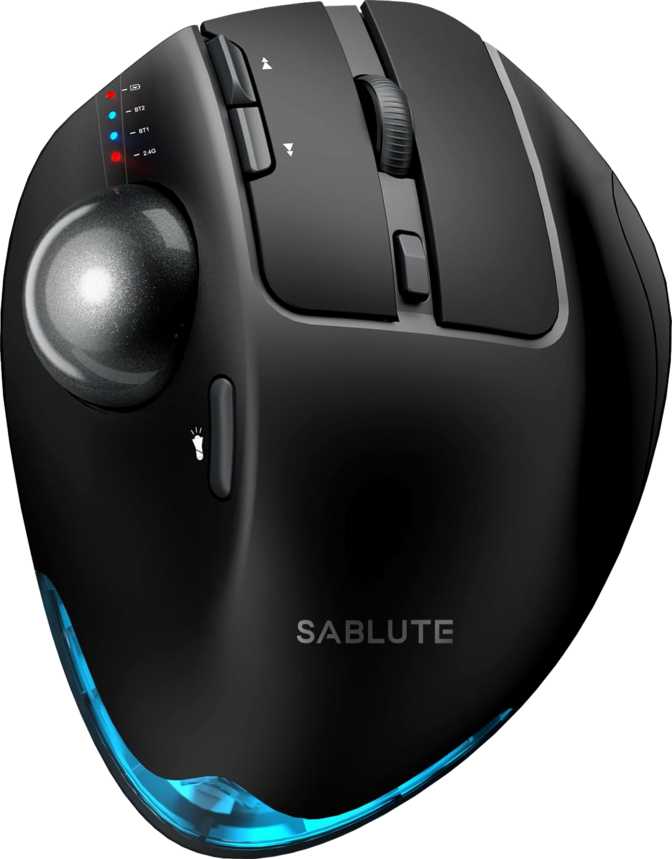
Sablute Wireless Trackball Mouse: Full Review and Real-World Test
MiceMost desk workers have used a conventional mouse their entire careers without questioning the fundamental motion it demands: pick up, slide, drag, repeat — thousands of times each day, across the wrist, the forearm, and the shoulder. For a growing number of people, that repetition catches up with them. The Sablute Wireless Trackball Mouse is built around a simple but consequential premise: what if the mouse never moved at all?
A trackball keeps the device stationary on your desk. You control the cursor by rolling a ball on the unit's surface rather than gliding the whole mouse across a pad. Your arm stays still. The sweep zone disappears. And the strain that accumulates from lateral mousing movement — the kind that quietly becomes tendinitis or a chronically sore shoulder — largely stops happening.
Whether the Sablute executes this concept well, where it genuinely succeeds, and where it asks you to compromise, is what this review covers.
Review at a Glance
Performance Ratings
Recommended
for right-handed desk professionals
Design and Physical Experience
The Sablute is built exclusively for right-handed use. Its asymmetric ergonomic shape is designed around the anatomy of a right hand at rest, which means left-handed users have a hard stop before any further consideration.
In hand, the device is notably substantial. The weight places it well above a typical compact wireless mouse, and intentionally so. A trackball does not move during use — it lives in one spot on your desk — so that density works in your favor. The mouse doesn't shift when you rest your palm against it, and it doesn't creep after multiple sessions of resting your hand on the same side. Stability at rest is exactly the right design goal for a stationary device.
The physical dimensions put this comfortably in the large-mouse category — it occupies meaningful desk real estate, which is worth knowing if space is already tight. That said, unlike a conventional mouse, you don't need any additional clear area around it for movement. Its footprint is exactly its footprint, nothing more.
The absence of RGB lighting is the correct call for a productivity device. The Sablute reads as a work tool: clean, purposeful, and free of cosmetic embellishment. The scroll wheel handles vertical scrolling only — there is no tilt function for horizontal navigation, and no secondary lateral scroll control. Horizontal scrolling, if needed, requires assigning that function to one of the programmable buttons.
Design Attributes
-
Right-Hand ErgonomicPalm-contoured shell shaped exclusively for right-hand operation
-
Stability-Weighted BuildSubstantial mass keeps the unit firmly anchored — never shifts during use
-
Palm-Filling Form FactorLarge proportions designed for full palm contact and long-session comfort
-
No RGB LightingClean, professional aesthetic appropriate for any office environment
-
Standard Vertical Scroll OnlyNo tilt wheel or lateral scroll; horizontal nav requires button assignment
Triple Connectivity: Three Modes, One Device
Connection flexibility is one of the Sablute's clearest practical strengths. Three distinct modes are available, and the right choice depends entirely on your specific desk setup.
2.4 GHz Wireless
Using the included USB receiver occupies one port in exchange for the most stable, lowest-latency wireless performance. At desk distances, interference is rarely a practical concern. Best for primary workstations where USB availability is not constrained.
Bluetooth 5
Pairs without occupying a USB port at all. Bluetooth 5 is the current reliable generation of the standard — its stability improvements over earlier iterations make it practical for daily professional use across laptops, tablets, and port-limited setups.
USB Wired
The included cable — long enough to reach comfortably from a floor-positioned desktop tower to the mouse on your desk — converts the Sablute into a fully functional wired device. The mouse continues operating normally while charging, eliminating any forced interruption.
Performance: Sensitivity and Responsiveness
The Sablute's sensitivity range covers a wide span — from a slow, deliberate setting suited to fine-detail precision, up to a fast-sweep setting that covers large screen distances with a modest roll of the ball. A dedicated button on the device cycles through the available sensitivity levels without requiring you to open any software. That hardware accessibility matters: adjusting on the fly between a detailed editing task and broad-canvas navigation is a real workflow benefit.
DPI Range Visualized
At the lower sensitivity extreme, cursor movement is measured and controlled. This suits precision work: detailed image editing, spreadsheet navigation where a small movement should produce a small cursor shift, or any task where accuracy outweighs speed. At the upper end, covering the full width of a large or dual-monitor setup requires only a moderate roll of the trackball.
The device's position-reporting speed — how frequently it communicates cursor location to the computer — is calibrated at a level that exceeds the demands of any productivity application. The engineering tradeoff between reporting speed and power consumption leans appropriately toward battery longevity here, which aligns with the Sablute's identity as a long-duration wireless device.
Performance Specs
- Minimum Sensitivity
- 800 DPI
- Fine control — precision editing and spreadsheet work
- Maximum Sensitivity
- 4,800 DPI
- Speed coverage — multi-monitor and large-canvas navigation
- DPI Adjustment
- Hardware button on device
- No software interruption required
- Reporting Rate
- 500 Hz
- Exceeds the demands of every productivity application
Battery Life: A Fundamentally Different Experience
The built-in rechargeable battery is rated for a number of continuous operating hours that translates, under standard professional use of eight hours a day, five days a week, to roughly a full calendar year between charges.
That figure deserves a moment to sink in: twelve months of daily work before you reach for the cable. Even under heavier use — extended hours, intensive sessions — most users would measure their charging frequency in seasons rather than weeks.
This shifts the psychological experience of wireless mousing. The background awareness that accompanies most wireless peripherals — the habit of checking battery status, the mild anxiety when power starts dropping — does not apply here. The Sablute functions as if it were wired, without being wired.
Who Should Buy This Mouse
Built For You If...
- You work right-handed at a fixed desk and want to eliminate wrist and shoulder fatigue from conventional mousing
- Your desk is tight or cluttered — a trackball's operational footprint equals its physical size, nothing more
- You work across two or three devices at the same desk and want a single mouse that handles all of them
- You resent wireless charging overhead and want a mouse that demands that attention roughly once a year
- You use application-specific shortcuts and want seven buttons you can assign to your exact workflow
Look Elsewhere If...
- You are left-handed — the Sablute is shaped exclusively for right-hand use with no variant available
- You need fast-reflex gaming performance — sensor and format are calibrated for productivity, not competitive gaming
- You need identical button behavior across multiple machines without installing software on each — no onboard memory means no config portability
- Your workflow depends on horizontal scroll controls — no tilt wheel is available without remapping a button
- You rely on two side buttons daily — the Sablute offers one, and retraining muscle memory takes time
How the Sablute Compares
The trackball market is considerably smaller than the conventional mouse market. The comparisons below reflect category norms — not specific models — to give an honest sense of where the Sablute sits relative to its alternatives.
| Feature | Sablute Wireless Trackball | Typical Premium Trackball | Typical Wireless Office Mouse |
|---|---|---|---|
| Battery Endurance | Approaches a year of typical daily use | Weeks to a few months | Weeks to a few months |
| Wireless Modes | 2.4 GHz + Bluetooth 5 + USB wired | Usually two | Often one or two |
| Onboard Memory Profiles | None | Commonly 1–3 profiles | Common at mid-to-premium tier |
| Device-Switching Button | No | Often available | Often available |
| Side Buttons | One | Typically two or more | Typically two |
| Ergonomic Format | Arm-stationary operation | Arm-stationary operation | Arm moves with the device |
| RGB Lighting | No — clean professional look | Rare | Rare at this tier |
Honest Assessment
What Works
The Sablute's strengths are real and durable. Battery endurance approaching annual intervals is not an incremental improvement — it fundamentally changes the daily experience of wireless mousing. Triple connectivity is a practical inclusion that a significant share of modern desk setups will use fully. Seven programmable buttons represent genuine configurability. And the build density communicates stability and purposefulness rather than budget corner-cutting.
What the Sablute doesn't pursue — gaming-tier sensor specs, RGB, ultra-low weight, haptic gesture zones — it was never trying to achieve. Held against its stated purpose as a productivity trackball with excellent battery life and flexible connectivity, it meets its objectives squarely.
Where It Falls Short
The absence of onboard memory is the most meaningful functional limitation. It's the kind of constraint that affects daily life invisibly until the day you connect to a second computer and find your carefully configured layout reset to factory defaults. For a single-machine user, it's a non-issue. For anyone else, it's a persistent limitation.
The single side button is a compromise — workable, but one fewer programmable input than the two-button norm most desk workers expect. The right-handed-only design is a design decision, not a flaw, but it ends the conversation immediately for a meaningful share of potential buyers.
Viewed as a whole, the Sablute is an honest product that doesn't pretend to be a premium enterprise peripheral — and that honesty is itself a form of quality.
Questions Real Buyers Ask
Final Verdict
The Sablute Wireless Trackball Mouse serves its intended user clearly and honestly. If you are right-handed, work at a fixed desk, want the ergonomic relief of a stationary mousing format, and value wireless performance that demands almost no maintenance attention, this device delivers on all of those fronts with meaningful quality.
The battery endurance is the quiet headline: a device that charges approximately once a year requires a fundamental revision of what "wireless" means in your daily working life. The triple connectivity and seven programmable inputs round out a package that is practically well-considered for the desk-bound professional.
The device is not right for you if you need button configurations to follow the mouse between computers, work left-handed, or depend on hardware device-switching. For everyone this mouse suits — it suits very well.