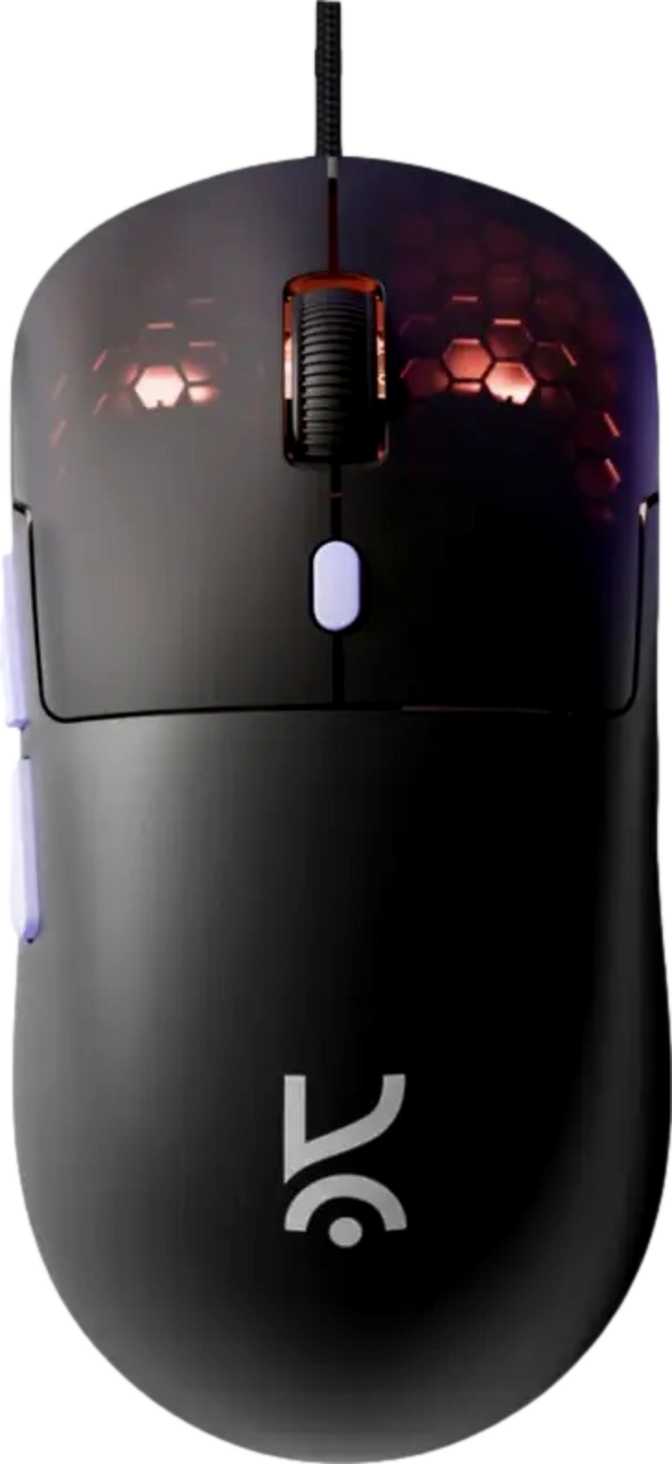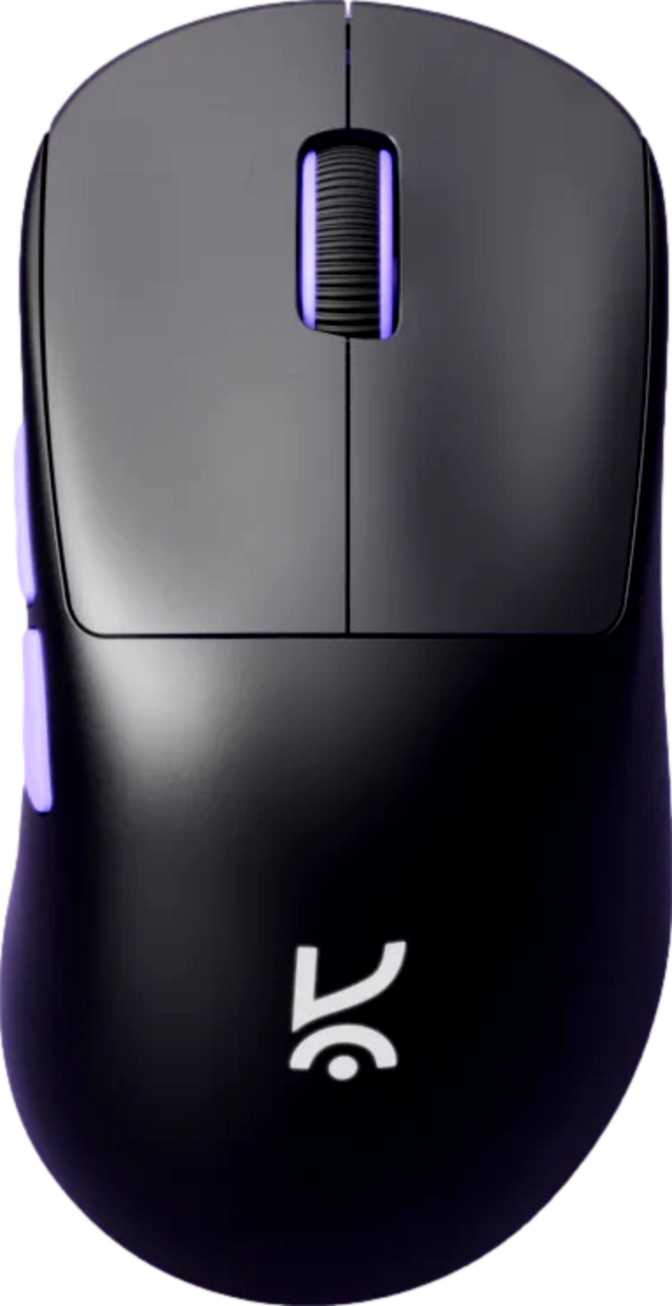
Kreo Anzu Review: A Lightweight Wireless Mouse Built for Versatility
MiceGaming mice have split into two very different camps: heavy, feature-loaded flagships that justify triple-digit price tags, and lean, versatile options that prioritize movement freedom and multi-device flexibility. The Kreo Anzu lands firmly in the second camp — and it makes a compelling argument for itself. At just 52 grams with three distinct connectivity modes, all-button programmability, and a battery that outlasts most competitors on a single charge, this ambidextrous mouse targets gamers who want wireless capability without the premium tax that usually accompanies it.
The more important question is not what the Anzu offers on paper. It is whether those offerings translate into a mouse worth buying when alternatives crowd every price tier. That is what this review settles.
Design and Physical Experience
Weight and Dimensions: Genuinely Lightweight
At 52 grams, the Kreo Anzu occupies the lower end of the weight spectrum for gaming mice. This is not marketing language — it is a real, tactile difference you notice within minutes of picking it up. Many popular gaming mice weigh between 70 and 100 grams; the Anzu sits well below that range.
Why does weight matter? Every gram you move with your wrist and arm accumulates over a long session. Lighter mice allow faster direction changes and reduce fatigue — especially relevant for low-DPI players who use large sweeping movements across wide mousepads. Even for players who do not consider themselves precision-focused, a featherlight mouse simply feels less tiring after a few hours of play.
Length
122 mm
Width
63 mm
Height
39.5 mm
These proportions place the Anzu in medium-small territory. Players with larger hands may find the length slightly compact for a relaxed palm grip, but average to smaller hand sizes should find the fit natural. The low profile keeps the mouse close to the surface — a quality claw and fingertip grip users often prefer.
Ambidextrous Design: More Than a Marketing Checkbox
The Anzu is built symmetrically, with no assumption about which hand will hold it. Left-handed players have historically been underserved by gaming peripherals — most mice are sculpted exclusively for right-hand use. A genuine ambidextrous design with two accessible side buttons means left-handed users get the same full-featured experience without resorting to specialty products.
For right-handed players, the neutral shell works best with claw and fingertip grip styles. Those who rely on full palm contact with an ergonomic sculpt may find the symmetrical shape less accommodating over extended sessions — something worth considering before purchasing.
RGB Lighting
The Kreo Anzu includes RGB lighting, customizable through companion software. It adds visual personality to a setup without meaningfully affecting weight or battery endurance. If it matters to you, it is well-placed; if it does not, it is simply not a burden.
Connectivity: Three Modes, One Mouse
The Anzu's most distinctive feature is its ability to connect in three different ways. Each mode serves a different purpose, and choosing the right one for the right situation is how you get the full value from this mouse.
| Mode | Best Used For | Input Rate | Key Notes |
|---|---|---|---|
| 2.4GHz Wireless | Gaming & competitive use | 1,000 updates/sec | Requires USB dongle; lowest practical latency for gaming |
| Bluetooth 5 | Laptops, tablets, productivity | Standard Bluetooth | No dongle needed; slightly higher latency than 2.4GHz |
| Wired USB | Charging & battery-free play | 1,000 updates/sec | 1.5m cable included; fully usable while charging |
2.4GHz Wireless: The Mode Built for Gaming
For competitive play, 2.4GHz is the correct choice. This connection delivers 1,000 position updates per second — the industry-standard rate for gaming peripherals — meaning the gap between moving the mouse and seeing that movement on screen is roughly one millisecond per update cycle. In practice, a well-implemented 2.4GHz wireless connection is indistinguishable from a cable during actual gameplay. The trade-off is a USB dongle occupying one port, which most desktop setups absorb without issue.
Bluetooth 5: The Multi-Device Mode
Bluetooth 5 removes the dongle entirely, making the Anzu compatible with laptops, tablets, and shared machines that lack spare USB ports. Bluetooth 5 is the most power-efficient and stable iteration of the standard, contributing directly to the Anzu's extended battery runtime. One clear note: Bluetooth introduces slightly more latency than 2.4GHz. For office tasks or casual use, that difference is imperceptible. For reaction-intensive gaming, 2.4GHz is the right pick.
Wired USB: The No-Compromise Fallback
The included 1.5-meter cable provides a third option requiring no wireless signal at all. Since the Anzu remains fully functional while the cable is connected, you never have to set the mouse down and wait. Low battery mid-session? Plug in and continue — no interruption, no change in responsiveness.
Sensor Performance: The PixArt PAW3311 Explained
The Kreo Anzu uses the PixArt PAW3311 optical sensor. PixArt is one of the two dominant sensor manufacturers in the gaming peripheral market, and the PAW3311 is a capable entry-level to mid-tier option — reliable for consistent everyday performance, but not the company's flagship offering.
300 IPS
Max Tracking Speed
30G
Max Acceleration
200 – 12,000
DPI Range
Tracking Speed and Acceleration: Real-World Ceilings
The PAW3311 can accurately track movement up to 300 inches per second before precision begins to degrade. Even aggressive, fast-flicking competitive players rarely exceed 100–150 IPS in real gameplay — meaning you would have to deliberately drag the mouse across your entire desk in a single, violent sweep to approach this sensor's limit. For the overwhelming majority of gaming scenarios, the tracking ceiling is well out of reach. The 30G acceleration handling follows the same logic: human wrist and arm movements during play simply do not approach this threshold in practice.
DPI Range: From Precision Sniping to Wide-Sweep Sensitivity
DPI — dots per inch — controls how far your cursor travels relative to physical mouse movement. The Anzu's range spans from 200 at the lowest (useful for sniper-scope precision in shooters or detailed work in creative software) to 12,000 at the highest (relevant for high-resolution displays or specific RTS workflows). Most competitive FPS players perform best between 400 and 1,600 DPI; the Anzu covers this with room in both directions. The dedicated DPI cycling button lets you switch between saved steps mid-game without opening any software.
Honest Sensor Placement
The PAW3311 is not a flagship sensor. High-end gaming mice feature newer-generation sensors with higher tracking speed ceilings and more granular control options. For serious competitive players who want every possible technical edge, those sensors exist — typically at a higher price. For the vast majority of gamers, the PAW3311 performs well beyond what typical use cases demand, and the gap between entry-level and flagship sensors has narrowed considerably over successive hardware generations.
Battery Life: How Long Between Charges?
The Anzu's built-in rechargeable battery delivers up to 50 hours per charge — well above many wireless gaming mice in the same category, which typically offer between 20 and 40 hours.
Runtime Comparison
Light Gamer — 3 hours/day
Charge approximately once every 16–17 days. Battery management becomes a non-issue.
Heavy User — 8 hours/day
Charge approximately once every 6 days. A modest rhythm that rarely disrupts any workflow.
One Limitation to Know
The Anzu does not support wireless charging. There is no Qi pad compatibility, no proprietary charging dock, and no charge plate. Charging happens through the USB cable — functional and reliable, but not as frictionless as dock-based systems some competing mice have started to offer.
The upside: the mouse stays fully functional while plugged in. If battery is running low mid-session, connecting the cable instantly shifts to wired mode with no interruption and no waiting. The internal battery is non-removable, which is standard for this product type; the 50-hour runtime makes battery swapping an irrelevant concern for most users.
Who the Kreo Anzu Is Built For
- You are a casual to mid-level gamer who wants wireless performance without paying flagship prices. The 2.4GHz connection eliminates cable drag, the sensor handles everyday gaming reliably, and the battery cadence is genuinely unobtrusive.
- You are left-handed. The ambidextrous design is a core structural decision, not an afterthought. Side buttons are fully accessible in either hand orientation.
- You switch between device types — a gaming PC at night and a work laptop or tablet during the day. One mouse, multiple connection modes, no extra hardware required.
- You are upgrading from a basic wired mouse and want wireless capability without the software complexity of higher-end alternatives.
- You compete at a high level and need the most capable sensor available. The PAW3311 is reliable but sits below the tier found in purpose-built esports hardware.
- You regularly move between multiple PCs. Without onboard memory, your configured settings stay on the machine where the software is installed — not in the mouse itself.
- You have large hands and prefer full palm grip. The compact shell suits medium to smaller hand sizes more naturally for long sessions.
- Wireless charging is a priority. The Anzu charges via cable only — no Qi pad compatibility, no dock charging option.
Competitive Context: Where the Anzu Positions Itself
The market for lightweight wireless gaming mice has grown considerably, and the Anzu enters with a profile that stands out on connectivity breadth. Offering 2.4GHz wireless, Bluetooth 5, and wired USB in a package under 55 grams is genuinely uncommon — most ultralight mice commit to one wireless standard plus a wired option and nothing more.
Triple Connectivity
Uncommon at this weight — most rivals offer one wireless mode plus wired
Above-Average Battery
50 hours meaningfully outpaces the 20–40h typical of comparable wireless mice
Ultralight Frame
52g sits well below the 70–100g range common among mainstream gaming mice
Where the Anzu concedes ground is in sensor pedigree and profile storage. Mice optimized for competitive performance tend to feature higher-grade sensors and at least some onboard memory, typically at a moderately higher price. The Anzu trades those capabilities for lower weight and broader connectivity — a reasonable exchange for its target audience, a notable compromise for dedicated competitive players.
Honest Assessment
The Anzu gets several things right that its price point does not necessarily guarantee — and its shortcomings are concentrated, specific, and predictable.
Where It Excels
- Genuinely featherlight at 52g — a noticeable, real-world difference over category averages
- Triple connectivity is a true differentiator — 2.4GHz, Bluetooth 5, and wired in one sub-55g package
- 50-hour battery runtime meaningfully outpaces most wireless gaming mice in this class
- All 6 buttons fully programmable — no partial or locked mappings
- Ambidextrous design is thoughtfully executed — left-handed users are first-class, not an afterthought
- Fully usable while charging — no forced downtime at any point
Where It Falls Short
- PixArt PAW3311 is an entry-level sensor — a performance ceiling exists for demanding competitive players
- No onboard memory limits portability — settings do not follow the mouse between machines
- No wireless charging support — Qi pad or dock charging is entirely absent
- Compact dimensions may not suit large-hand palm grip users for extended sessions
- One-year warranty is shorter than what some comparable alternatives provide
Frequently Asked Questions
Final Verdict
The Kreo Anzu earns a clear recommendation — for a clearly defined buyer.
If you want a lightweight wireless gaming mouse that connects via 2.4GHz for gaming, switches to Bluetooth for your laptop or tablet, and can always fall back to wired, the Anzu delivers all of that in a 52-gram shell with battery endurance that outlasts most of its competition. That combination is genuinely uncommon at this weight class, and the Anzu executes it without major compromises in the areas that matter most to casual and mid-level gamers.
It is not the right mouse for competitive players who need a flagship-grade sensor, and it is not the right choice for anyone who moves between multiple machines and needs their settings to travel with them. Those buyers should look at alternatives with premium sensors and onboard memory storage.
For everyone else — the left-handed player tired of compromise, the casual gamer who wants wireless done right at a sensible price, the multi-device user who wants one mouse to span both their gaming rig and their work laptop — the Kreo Anzu delivers more genuine flexibility than its weight class typically offers.