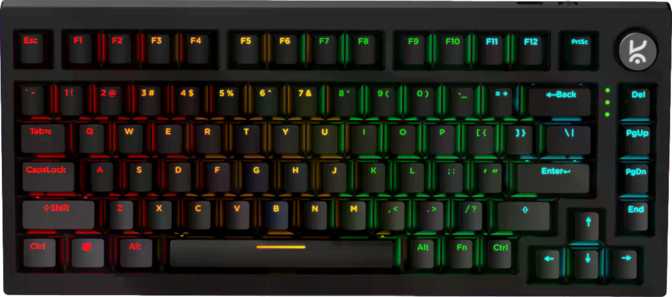
Kreo Swarm X Review: A Wireless Mechanical Keyboard Worth Buying?
KeyboardsAt a Glance
4.0
Overall Score
RecommendedDesign and Build: Compact Footprint, Familiar Feel
A 75% layout that reclaims desk space without sacrificing the keys you actually use.
Size and Layout
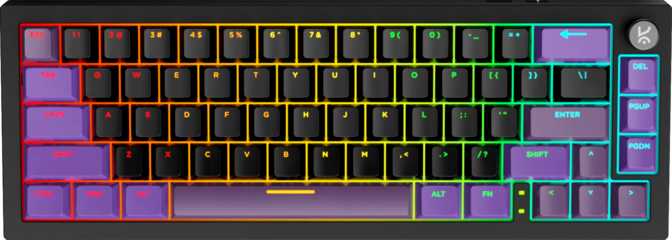
The Kreo Swarm X adopts the 75% keyboard format — a layout that sits in a sweet spot many users only discover after years on a full-size board. The numpad is gone and the navigation cluster is condensed, but every key you rely on during gaming or writing remains present and often within easier reach than before.
The physical dimensions — roughly the length of a standard sheet of paper and the width of a typical hardcover novel — translate to noticeably more mouse room on your desk. For FPS gaming especially, that recovered surface area makes a tangible difference.
At 780 grams, this board sits on the heavier end for a 75% wireless keyboard. That weight signals a chassis built to stay planted rather than slide around mid-session. Travelers should factor this into their carry decisions.
Materials and Construction
The outer case is plastic — an honest reality at this price tier, not an apology. The internal plate uses polycarbonate, a material with a slight natural flex that becomes meaningful when combined with the gasket mounting system. Rather than returning keystroke energy directly into your fingertips, the plate absorbs it. Long sessions feel noticeably less fatiguing than on rigidly mounted boards.
Adjustable Feet
Choose between flat and raised typing angles.
Detachable Cable
A worn cord never kills the board — replacements are standard.
No Wrist Rest
Common omission at this tier — budget for one separately.
Physical Specifications
- Layout
- 75% Compact — ANSI
- Width
- 331 mm
- Height
- 145 mm
- Thickness
- 38.5 mm
- Weight
- 780 g
- Mount Type
- Gasket Mount
- Case Material
- Plastic
- Plate Material
- Polycarbonate
- Color Options
- Black only
The Gasket Mount: Why It Matters More Than Any Switch
Most entry-level keyboards bolt the switch plate rigidly to the case — every keystroke vibration travels straight through the board and back into your fingertips. This is the source of the harsh, clacky fatigue common in budget mechanicals, and it has nothing to do with the switches themselves.
The Swarm X uses gasket mounting, where the switch plate is suspended on silicone gaskets rather than hard-screwed in place. The plate floats slightly, absorbing keystroke energy before it can return through your fingers. The result is a softer, quieter experience with a satisfying give when you bottom out — what enthusiasts call "bounce."
At this price tier, gasket mounting is genuinely uncommon. Combined with the polycarbonate plate's natural flex, this is the single most impactful design decision in the Swarm X — more so than the switch choice or the RGB implementation.
Switch Analysis: Huano Red Linears Explained
What the switch specifications actually mean for your gaming and typing experience.
What Linear Switches Feel Like
The Swarm X ships with Huano Red switches — linear mechanicals. Linear means the switch travels straight down with no tactile bump or audible click midway through the keystroke. Resistance is smooth and consistent from top to bottom. For gaming, this is the preferred profile: inputs register the moment the switch crosses its actuation threshold, without requiring you to push through a bump first.
The actuation point sits at exactly 2mm of travel — the midpoint of the 3.5mm total stroke. Keystrokes register before you fully bottom out, which is what you want for fast, repeated game inputs. The 50-gram actuation force is light enough for long sessions without finger fatigue and firm enough to resist accidental ghost presses. Most consumer gaming linears fall between 45 and 60 grams — the Swarm X lands in a forgiving, well-balanced middle.
Hot-Swap: The Feature That Extends the Board's Life
Every switch can be pulled out and replaced without soldering equipment. If the Huano Reds are not to your taste after a few weeks, the board accepts standard 3-pin and 5-pin switches from the aftermarket — covering virtually every available option. You can try the board as shipped and revisit the switch character later without purchasing a new keyboard.
| Type | Linear Mechanical |
| Actuation Distance | 2 mm |
| Actuation Force | 50 g |
| Total Travel | 3.5 mm |
| Hot-Swappable | Yes — 3 & 5 pin |
Missing Switch Features
- No rapid trigger — actuation reset is fixed, not dynamic.
- No adjustable actuation — the 2mm point cannot be changed.
- No analog input support.
Connectivity: Three Modes, One Board
Switch between 2.4 GHz wireless, Bluetooth, and wired USB without changing hardware.
2.4 GHz Wireless
The mode most gamers will use daily. A dedicated USB dongle creates a connection that reports input state 1,000 times per second — identical to a wired gaming keyboard. Going wireless costs you nothing in responsiveness.
Best for GamingBluetooth 5.0
Connect to phones, tablets, laptops, and smart TVs without occupying a USB port. Bluetooth latency is marginally higher than 2.4 GHz — unsuitable for competitive play, perfectly adequate for typing and multi-device switching.
Best for Multi-DeviceWired USB
The most reliable connection for crowded RF environments or low-battery situations. The detachable cable means a fraying cord never renders the board unusable — standard replacements are inexpensive and widely available.
Best for ReliabilityBattery Life: The Number That Stands Out
An endurance figure that puts most gaming keyboards in a different conversation.
270
Hours Rated
Measured with RGB at minimum
Most wireless gaming keyboards offer somewhere between 40 and 100 hours with RGB active. Even keyboards considered strong in battery performance rarely push past 200 hours. The Swarm X's 270-hour rating places it in a different tier entirely at this price point.
The industry convention for measuring battery life — RGB off or minimized — applies here. With RGB running at full brightness continuously, real-world endurance will drop. Even so, this board realistically lasts most users several weeks between charges under moderate daily use.
For someone who finds dead-battery interruptions genuinely frustrating, this endurance advantage is practical — not a number on a box.
Weeks
Between Charges — Typical Use
1000 Hz
Wireless Polling Rate
BT 5.0
Bluetooth Version
RGB Lighting and Keycap Quality
How the lighting is implemented and what the keycaps deliver long-term.
North-Facing LED Placement
The backlighting uses north-facing LEDs — positioned on the top edge of each switch housing rather than centered beneath the keycap stem. This orientation produces brighter, more dramatic RGB glow around keycap legends, especially vivid at wider viewing angles. The trade-off is a slight unevenness in how light distributes across the keycap surface compared to south-facing setups.
Switch swap note: North-facing LEDs can conflict with certain south-facing aftermarket switch housings. Verify compatibility with your intended replacement switches before purchasing.
Double-Shot ABS Keycaps
The keycaps use ABS plastic with double-shot legends — the characters are formed from a second layer of plastic molded into the cap body rather than printed onto the surface. Regardless of typing volume or duration, the legends will not fade or wear away. This is a meaningful quality call at this price point.
The OEM profile will be immediately familiar to anyone transitioning from a standard consumer keyboard. The fully standard ANSI layout means any commercially available keycap set fits without compatibility research or unusual key sizing.
Features Worth Calling Out
The built-in extras that meaningfully improve the daily experience.
N-Key Rollover
Every key registers independently regardless of how many are held simultaneously. No input will be dropped during complex multi-key gaming combinations — movement keys, shift, and action keys pressed together all register cleanly. A baseline gaming requirement, fully present here.
Rotary Dial & Media Keys
A physical rotary dial handles volume adjustment without navigating on-screen sliders or function-layer shortcuts. Dedicated media keys for playback sit alongside it — pause, skip, and mute are all single-press actions. Small details that compound into a noticeably more fluid daily experience.
Standard Key Layout
Every key follows standard ANSI sizing across all rows. Any aftermarket keycap set — from budget replacements to premium custom group buys — fits without compatibility research. Personalizing the board requires no planning around unusual key sizes.
What the Swarm X Does Not Support
For keyboard enthusiasts, the absence of QMK, ZMK, and VIA firmware support is worth stating plainly. QMK and ZMK are open-source firmwares that enable deep per-key remapping, macros, layer programming, and tap-dance inputs — all without proprietary software. VIA provides live, browser-based remapping for boards that support it. Together these standards offer essentially unlimited configuration flexibility and large community backing.
The Swarm X supports none of these. Customization is limited to the manufacturer's own software. For casual users and most gamers, this is a non-issue. For anyone who considers QMK or VIA non-negotiable, this board is not the right choice — full stop.
Who This Keyboard Is For
The Swarm X has a clear intended audience — and a clear list of buyers it will disappoint.
- Gamers who want wireless freedom with no measurable latency cost over a wired connection.
- Multi-device users who move between a PC, laptop, and tablet throughout the day.
- First-time mechanical keyboard buyers who want room to explore via hot-swap switching.
- Productivity users who benefit from gasket-mount ergonomics during long writing sessions.
- Setup builders who want RGB but prioritize weeks of battery life over maximum brightness.
- Competitive FPS players who specifically need rapid trigger or adjustable actuation depth.
- Firmware enthusiasts who require QMK, ZMK, or VIA support for deep customization.
- Buyers who want a white, translucent, or any alternative colorway — black is the only option.
- Mac-primary users — no dedicated Mac keys, modifier layout follows Windows conventions.
- Frequent travelers who prioritize minimum carry weight — 780 grams is substantial.
How It Compares to the Competition
Where the Swarm X leads its price tier — and where it concedes ground.
| Feature | Kreo Swarm X | Typical Budget Competition |
|---|---|---|
| Mounting System | Gasket Mount | Tray or Top Mount |
| Wireless Options | Tri-mode — 2.4 GHz, BT, USB | Often wired-only or BT + USB |
| Switch Replacement | Hot-Swappable | Often Soldered |
| Battery Endurance | 270 hours rated | 40–100 hours typical |
| Wireless Polling Rate | 1,000 Hz | 125–500 Hz common |
| Firmware Support | Proprietary Only | Proprietary Only |
| N-Key Rollover | Yes | Varies |
| Plate Material | Polycarbonate | ABS or Aluminum |
| Rapid Trigger | No | Rarely at this tier |
The combination of gasket mounting, hot-swap, and tri-mode wireless at 1,000 Hz is genuinely uncommon at the Swarm X's price tier. Firmware openness is where it falls short — some competing boards include VIA support at comparable or lower prices.
Honest Assessment: Strengths and Weaknesses
A balanced look at what the Swarm X delivers and where it asks you to accept limits.
Where It Earns Its Place
The Swarm X makes a credible case on the fundamentals. Gasket mounting at this price is not something most competitors offer, and the acoustic and ergonomic benefits are real — not marketing language. The 270-hour battery claim, even heavily discounted for RGB use, points to a wireless system built for genuine reliability rather than specification theater.
Tri-mode connectivity at full 1,000 Hz polling in 2.4 GHz mode puts this keyboard on equal wireless footing with boards that cost considerably more. Hot-swap support means you can grow with the Swarm X — buy it today with Huano Reds and revisit the switch character a year from now without replacing the whole board.
Where It Asks You to Compromise
Firmware openness is genuinely absent, and for a growing segment of buyers, that matters. The lack of rapid trigger is a real limitation for the subset of gaming users who have come to treat it as essential. The plastic case — while honest and functional at this price — will not satisfy buyers who want a premium material feel.
Black-only availability is a meaningful aesthetic constraint in a market where desk color schemes increasingly drive purchasing decisions. The Huano Red switches are competent but not especially distinguished — many buyers will likely use the hot-swap socket fairly quickly after developing clearer preferences. This validates the feature's inclusion, but it also signals the stock switch experience is a starting point rather than a finished product.
Common Buyer Questions Answered
Straight answers to what real buyers search before committing.
A Clear Recommendation With Clear Limits
4.0 out of 5
The Kreo Swarm X is a mechanical keyboard that punches meaningfully above its price class in the areas that define long-term user experience: mount quality, connectivity flexibility, battery endurance, and switch upgradeability. For anyone stepping up from a membrane board or a basic wired mechanical, it delivers a tangible improvement in build sophistication that is not immediately obvious from price alone.
The trade-offs are real but clearly bounded. If you need rapid trigger, open firmware, or a non-black colorway, this board is not for you. If you want a gasket-mounted, hot-swappable, tri-mode wireless 75% keyboard with gaming-grade polling rates and weeks of battery life, the Swarm X is a credible, well-reasoned choice at its price.
Recommended For
First-time mechanical buyers, multi-device users, gamers seeking wireless without sacrificing polling rate, and anyone who values long battery life over maximum feature depth.
Not Recommended For
QMK/VIA enthusiasts, rapid trigger seekers, Mac-primary users, or anyone committed to a non-black desk aesthetic.
Warranty Coverage
1-Year Manufacturer Warranty