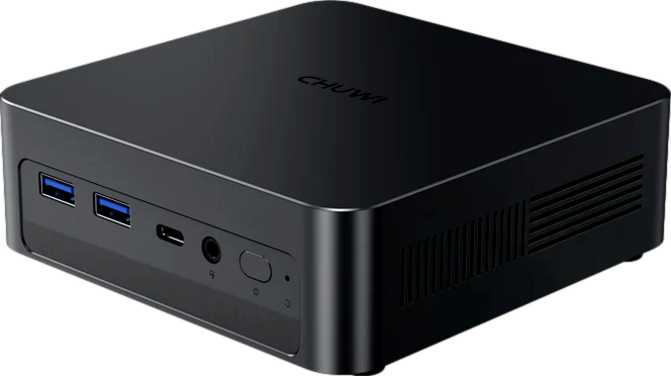
Chuwi AuBox X Review: A Compact Mini PC That Earns Its Place
Mini PCsThe Chuwi AuBox X sits at a compelling intersection of compact size and capable hardware. Measuring just 128mm square and weighing 580 grams, it houses a modern mobile-class processor, 32GB of fast DDR5 memory, a 1TB NVMe drive, and one of the most comprehensive port selections available on any mini PC at this tier. This is not a machine that requires you to manage expectations — it is genuinely fast for everyday and semi-professional work, and it arrives configured rather than crippled.
4.5 / 5
Editor's Rating
Design and Build: Small Form Factor, Considered Layout
The AuBox X occupies a category sometimes called the "palm mini PC" — a machine small enough to mount behind a monitor, tuck behind a television, or slip into a bag alongside a laptop. At 128.4 × 128.4 × 40.5mm, the chassis is nearly cubic, a shape that allows heat to escape from multiple surfaces rather than stacking components vertically in a way that traps warmth.
The weight of 580 grams signals a metal-dominant construction, which matters for thermal performance as much as for durability. Aluminum chassis designs act as passive heat sinks in addition to whatever active cooling the machine uses internally, and at a 17-watt thermal envelope, there is not an enormous amount of heat to manage in the first place.
The overall internal volume sits at approximately 668 cubic centimeters — genuinely compact, and a meaningful engineering achievement when you consider the hardware density involved.
Physical Specifications
- Width × Depth
- 128.4 × 128.4 mm
- Height
- 40.5 mm
- Weight
- 580 g
- Volume
- ~668 cm³
- Form Factor
- Micro-ATX Mini PC
The Processor: Mobile Silicon in a Desktop Role
The heart of the AuBox X is an eight-core processor operating at a 17-watt thermal design power. That 17W figure is the key to understanding the entire machine: this is a chip designed originally for ultra-thin laptops, transplanted into a mini PC chassis where it benefits from better sustained airflow and no battery-life compromise.
The processor uses a heterogeneous core design — four performance-oriented cores paired with four efficiency-oriented cores, all clocked at 2.2GHz at their base. The architecture does not rely on simultaneous multithreading. Instead, it leans on core specialisation to handle mixed workloads efficiently.
Under peak demand, the processor accelerates to 4.8GHz — a substantial jump that reflects how aggressively modern mobile chips can boost when thermal headroom exists. In a mini PC with active cooling and no battery constraints, that headroom is consistently available.
The 12MB of L3 cache is generous for this class of processor. Cache size directly affects how quickly the processor can access frequently used data without reaching out to slower main memory — a larger cache smooths performance in tasks like browser-heavy multitasking, code compilation, and media editing.
The big.LITTLE architecture means light tasks draw minimal power while demanding bursts get full performance cores, keeping the machine quiet and efficient during routine use.
Benchmark Results in Context
In standardised testing, this processor configuration delivers results that place it comfortably ahead of mid-range desktop processors from just a few years ago. Single-core performance handles the day-to-day tasks that determine perceived snappiness, while multi-core throughput covers demanding parallel workloads.
19,629
PassMark Multi-Core
Handles 4K editing & dev environments
4,031
PassMark Single-Core
Snappy UI, fast app launches
9,668
Geekbench 6 Multi
Strong parallel task throughput
2,418
Geekbench 6 Single
Competitive single-thread speed
Graphics: Integrated, But Not an Afterthought
The AuBox X uses integrated graphics — specifically the Intel Arc Graphics 140V. For buyers conditioned to think "integrated graphics means weak graphics," this chip deserves a closer look.
Architecture and Capability
- Built on a 3-nanometer manufacturing process
- GPU boost clock reaches 1,950MHz
- Full DirectX 12 Ultimate support
- OpenGL 4.6 and OpenCL 3.0 for creative & compute software
- PCIe 5.0 interconnect — highest bandwidth available
- Drives up to 3 simultaneous displays
Practical Graphics Performance
For productivity: Driving three monitors simultaneously is a genuine productivity advantage — primary work display, secondary reference screen, and a presentation or communication screen, all without adapters on a well-configured desk.
For gaming: The Arc 140V handles older and less demanding titles at 1080p without issue. It is not a replacement for a discrete GPU, but it is meaningfully ahead of previous-generation integrated graphics.
For video professionals: Hardware acceleration supports efficient encode and decode for common formats, reducing rendering times compared to software-only processing.
Memory and Storage: Provisioned for Real Work
32GB DDR5 RAM
The AuBox X ships with 32GB of DDR5 memory running in a dual-channel configuration, capable of speeds up to approximately 8,533MHz. That speed figure particularly benefits the integrated graphics — since the Arc 140V shares system memory rather than having its own dedicated pool, faster memory translates directly into better GPU throughput.
32GB covers demanding browser sessions with dozens of tabs open, virtual machine usage, photo editing in applications like Lightroom, and video editing at 1080p or moderate 4K timelines — simultaneously. Users who run developer environments with multiple services will appreciate this headroom rather than managing memory pressure from day one.
1TB NVMe SSD
The NVMe solid-state drive delivers the kind of storage performance that makes the entire system feel fast beyond just the processor speed. Boot times, application launches, and file operations all benefit from NVMe throughput, which runs several times faster than older SATA-based storage.
A terabyte of usable space is sufficient for a primary work machine, though users with large media libraries will want to supplement it with external storage connected via the USB4 or Thunderbolt ports — both fast enough to make external NVMe enclosures practically seamless.
Connectivity: Where the AuBox X Genuinely Stands Out
This is arguably the most compelling part of the AuBox X specification. Its port selection is exceptional for a machine this size and reflects thoughtful product design rather than cost-cutting.
USB-A Ports
Four USB-A ports running at 10Gbps each. Transferring a 4K video file that would take minutes over USB 2.0 completes in seconds. No slow legacy USB 2.0 ports included — a deliberate and correct omission.
USB-C Ports
Two USB-C ports at 10Gbps for modern peripherals, plus one USB4 port running at 40Gbps — fast enough for external NVMe drives or high-resolution display output through a single cable connection.
Thunderbolt
Both a Thunderbolt 4 and Thunderbolt 3 port are included. Thunderbolt 4 supports PCIe tunnelling, DisplayPort output, and 100W USB Power Delivery — a single cable can simultaneously charge a device, drive a display, and transfer data at full speed.
Dual Ethernet
Two RJ45 ports is an unusual and practical inclusion. Options include two-subnet routing, network bridging, or home-lab configurations. For standard use, one handles connectivity while the second provides redundancy or a dedicated local network segment.
Wi-Fi 6E + Bluetooth 5.3
Wi-Fi 6E connects to the 6GHz band — less congested than 2.4GHz or 5GHz, offering lower latency in environments with many wireless devices. Bluetooth 5.3 handles peripherals with reduced pairing delays and better range than older standards.
Display Outputs
A dedicated DisplayPort output plus additional display-capable Thunderbolt and USB4 connections enable the full three-screen maximum. An HDMI 2.1-capable output is also available, and a 3.5mm audio jack handles headphones and microphones directly.
Complete Port Reference
| Port / Interface | Count | Speed / Standard | Best Used For |
|---|---|---|---|
| USB-A | 4 | USB 3.2 Gen 2 — 10Gbps each | High-speed peripherals, external drives |
| USB-C | 2 | USB 3.2 Gen 2 — 10Gbps each | Modern accessories, hubs |
| USB4 | 1 | 40Gbps | External NVMe, high-res displays |
| Thunderbolt 4 | 1 | 40Gbps + Power Delivery | Docking station, single-cable desk setup |
| Thunderbolt 3 | 1 | 40Gbps | High-bandwidth peripherals, displays |
| DisplayPort | 1 | Latest DP standard | Primary monitor connection |
| Ethernet (RJ45) | 2 | Gigabit | Wired network, dual-subnet, home lab |
| Wi-Fi | Built-in | Wi-Fi 6E (802.11ax) | 6GHz wireless, low-latency environments |
| Bluetooth | Built-in | v5.3 | Keyboard, mouse, audio peripherals |
| Audio Jack | 1 | 3.5mm | Headphones, microphones |
Real-World Usage: Who This Machine Is Built For
An Excellent Fit For
- Home office professionals who need a capable, quiet machine that disappears behind a monitor or sits invisibly on a desk
- Developers and technical users who benefit from 32GB of RAM for running local development environments, containers, or virtual machines
- Content creators working primarily in photography or 1080p/moderate 4K video who want NVMe-speed storage and capable integrated graphics
- Home lab and network enthusiasts who will make direct use of the dual Ethernet ports
- Living room media centre builds where the machine needs to drive a television quietly without being visible
- Users replacing aging mid-range desktops who want meaningfully more performance without a large tower footprint
Not the Right Choice For
- Dedicated gamers expecting to play demanding modern titles at high settings — the Arc 140V is capable but not comparable to a discrete GPU
- Heavy video professionals working with 4K or 6K RAW footage regularly, where a dedicated GPU and more cores would reduce render times significantly
- Users who plan to upgrade later — the compact form factor and likely soldered components mean what you buy is what you have
- Workstation-grade data integrity applications that require ECC memory support — this platform does not offer it
Competitive Positioning
The AuBox X competes against products from Intel, Beelink, Minisforum, and ASUS at this specification level. The differentiating factors come down to processor choice, port selection, and configuration value at the base price. The table below shows how the AuBox X typically stacks up against same-tier rivals.
| Feature | Chuwi AuBox X | Typical Competitor |
|---|---|---|
| RAM (base config) | 32GB DDR5 | Often 16GB DDR5 |
| Storage (base config) | 1TB NVMe | Often 512GB |
| USB-A Ports | 4× Gen 2 (10Gbps) | Often 2× Gen 2 + 2× Gen 1 |
| Thunderbolt | TB4 + TB3 | Usually TB4 only, or none |
| USB4 40Gbps | 1 port included | Less common at this tier |
| Ethernet | Dual RJ45 | Typically single RJ45 |
| Wi-Fi | Wi-Fi 6E | Wi-Fi 6E (parity) |
| Weight | 580g | 400–700g (comparable) |
Honest Assessment: Strengths and Real Limitations
What the AuBox X Gets Right
The port selection is among the most comprehensive available on any mini PC, regardless of price. Having eight USB ports — all at 10Gbps or faster — plus Thunderbolt 4, Thunderbolt 3, and USB4 means peripheral congestion is unlikely to ever be a real-world problem. Dual Ethernet is a practical advantage that most competitors simply do not offer.
The 32GB DDR5 configuration is future-proofed for several years of typical workload growth. DDR5 at this platform's speeds directly benefits the integrated graphics, making the Arc 140V perform noticeably better than it would with slower DDR4 — a design decision with real-world consequences.
The choice of a mobile-class processor at 17 watts is a deliberate engineering trade-off that pays off in a mini PC context: lower heat output, near-silent operation under typical loads, and a power draw that makes the machine genuinely inexpensive to run continuously.
Where Honest Caveats Apply
The 17-watt thermal ceiling means sustained all-core workloads like video transcoding or 3D rendering will eventually reveal a performance ceiling relative to a full-power desktop chip. For the vast majority of use cases this trade is the correct one — but it bears stating clearly for buyers with those specific needs.
The absence of discrete graphics is the only specification that will genuinely disappoint a specific buyer. The Arc 140V is capable as it is for its class, but for GPU-accelerated professional work or serious gaming, it is a ceiling rather than a starting point.
Worth Verifying Before Purchase
The memory architecture should be confirmed with Chuwi directly — specifically whether RAM is soldered (fixed) or socketed (upgradeable). Based on the compact form factor and mobile-class processor, soldered RAM is the more likely scenario, meaning the installed configuration is permanent. Prospective buyers should verify this before purchase.
Answers to Common Buyer Questions
Final Verdict: Should You Buy the Chuwi AuBox X?
The Chuwi AuBox X is a well-considered mini PC that earns its place among the better-specified compact machines currently available. It is not trying to replace a gaming desktop or a workstation-class tower, and it does not need to — it targets the far larger group of users who need a fast, quiet, capable daily machine that takes up minimal space and connects to everything without a hub collection.
The port selection alone differentiates it from most competitors. Eight high-speed USB ports, Thunderbolt 4, Thunderbolt 3, USB4 at 40Gbps, and dual Ethernet in a 580-gram enclosure represents genuinely useful hardware density. Pair that with 32GB of fast DDR5 memory and a terabyte of NVMe storage, and the AuBox X arrives configured rather than crippled — a common complaint with mini PCs that ship 8GB and 256GB as cost-cutting defaults.
The processor's mobile-class thermal design power is the honest caveat. If your workload is computation-heavy in a sustained, all-core sense, the thermal ceiling will eventually be apparent. For everyone else — and that is most people considering a machine in this category — the AuBox X is a strong, practical choice that avoids the most common compromises of compact PC design.
Purchase Verdict
Buy It If
You want a capable, space-efficient daily machine with exceptional connectivity and a configuration that will not require upgrades immediately after purchase.
Look Elsewhere If
Discrete graphics performance or raw sustained multi-core throughput is a primary requirement for your workload.
4.5 / 5
Recommended