Kreo Hive 98 V2 Review: A Budget Gasket-Mount Keyboard That Delivers
KeyboardsThe full-size keyboard market is littered with plasticky, rattly boards that feel exactly as cheap as they cost. The Kreo Hive 98 V2 is trying to change that conversation — offering a gasket-mounted mechanical keyboard with hot-swappable switches and per-key RGB at a price point where those features are far from guaranteed. For anyone who has been wondering whether a sub-premium board can actually feel good to type on, this one deserves a closer look.
Key Specifications at a Glance
Design and Build Quality
Size and Layout: Almost Full-Size, No Compromises
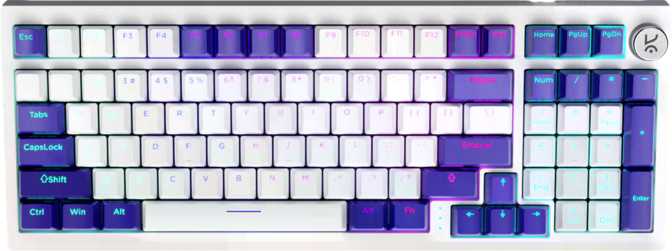
The Hive 98 V2 uses a "98%" layout — every key you'd find on a traditional full-size keyboard, including the numpad, but with the dead space between key clusters trimmed away. The result is a keyboard that's functionally identical to a full-size layout while sitting noticeably smaller on your desk.
For anyone switching from a tenkeyless board who misses numpad access, or upgrading from a cluttered office keyboard, the 98% form factor is one of the most practical available. The overall footprint sits at roughly 385mm wide by 146mm deep — compact enough to leave room for comfortable mouse movement even on a mid-sized desk pad.
Materials and Construction
The case is built from plastic — standard at this price tier. What matters more than the material label is how that case is engineered. Here, the Hive 98 V2 makes a meaningful choice with a polycarbonate plate. Unlike the stiffer aluminum or brass plates found on higher-end boards, polycarbonate flex-bends slightly under keystroke impact, directly softening each press and reducing typing fatigue over long sessions.
The board comes in black and white — both clean, desk-agnostic finishes. At 808 grams it has enough mass to stay planted during fast typing without feeling like dead weight. Adjustable feet let you dial in your preferred typing angle. No wrist rest is included; if you rest your wrists on the desk surface while typing, budget for one separately.
Why the Gasket Mount Changes Everything
Most budget keyboards use a tray mount or top mount design — the PCB and plate screwed rigidly into the case. Every keystroke impact travels directly to your fingertips, producing the harsh clack and vibration that defines "cheap keyboard" feel.
A gasket mount suspends the internal assembly using silicone or foam gaskets at the case perimeter, giving the structure a small amount of controlled flex. The feel becomes noticeably softer, quieter, and more comfortable — especially over hours of continuous use. This construction method is typically reserved for keyboards costing significantly more. Finding it here is the single most important reason the Hive 98 V2 stands out at its price point.
Switches: KTT Content Red — What to Expect
Linear Feel at a Light Touch
The KTT Content Red switches are linear — keystrokes travel straight down without any tactile bump or audible click along the way. If you're coming from a membrane keyboard or new to mechanical keyboards entirely, linear switches are often the easiest transition: consistent, smooth, and fast under the fingers.
The actuation point sits at 1.9mm — fractionally earlier than the 2.0mm common among competing linear switches, meaning the board responds slightly faster to lighter touches. Total travel from the surface to full bottom-out is 3.9mm, standard for a full-travel mechanical switch.
The 45-gram actuation force sits in the middle of the linear spectrum: light enough to type quickly without finger fatigue during long sessions, firm enough that resting fingers on the home row won't accidentally trigger keystrokes. KTT (Kailh Trading Technology) is a recognized switch manufacturer, and the Content Red has a reputation for smoothness out of the box — not boutique-grade, but a meaningful step above generic house-brand switches.
Hot-Swap: Change Your Switches Without Soldering
Every switch in the Hive 98 V2 can be removed and replaced without a soldering iron. Hot-swap sockets grip each switch mechanically — pull out the KTT Content Reds with a switch puller and install virtually any standard 5-pin or 3-pin MX-compatible switch in seconds.
For anyone new to mechanical keyboards who isn't sure what switch feel they prefer, this flexibility is genuinely valuable. It transforms a single purchase into a long-term platform for experimentation. Tactile switches, heavier linears, or specialized silent switches — all are possible with no tools beyond a switch puller and a spare afternoon.
Typing Feel and RGB Lighting
How It Actually Feels to Type On
Combine the gasket mount's controlled flex, the polycarbonate plate's slight give, and the smooth KTT linear switches — and the Hive 98 V2 delivers a typing experience that feels softer and more cushioned than any rigid-mount budget board. Keystrokes don't bottom out with a harsh clack; there's a subtle thock quality that's noticeably more pleasant over hours of use.
The north-facing RGB LEDs sit above each switch, pointing toward you rather than beneath the keycap. This maximizes the RGB spread visible across the top of each key and through the legends when looking at the board head-on. For enthusiasts planning to install aftermarket shine-through keycaps, be aware that north-facing LEDs can cause minor visual interference with certain OEM-profile keycap sets. With the stock keycaps installed, this is not a practical concern.
Keycaps: PBT Double-Shot OEM Profile
The included keycaps use PBT plastic in a double-shot construction. PBT is a denser, harder plastic than the ABS common on most entry-level keyboards — it resists the greasy, worn shine that ABS keycaps develop after months of heavy use. The keyboard will look newer for longer.
Double-shot keycaps are molded from two plastic layers — one for the key body, one for the legend. The characters cannot wear off because they're structurally part of the keycap, not printed on top. Combined with PBT's inherent durability, these legends will remain sharp and legible for years of daily use.
The OEM keycap profile is a gently curved shape that has been an industry standard for decades — comfortable for most hand sizes and familiar to anyone who has typed on a standard keyboard before. The fully standard ANSI key layout means the enormous variety of aftermarket keycap sets available from third-party vendors will be fully compatible without adapter keys or workarounds.
Connectivity, Features, and Software
Wired, 1000Hz, Detachable: The Reliable Setup
The Hive 98 V2 connects via a detachable USB cable. If the cable wears out, gets damaged, or you want to swap in a coiled cable for aesthetics, replacement requires no tools and no specialist knowledge. The detachable connection also makes the board more portable for anyone moving it between desks or setups.
At 1000Hz polling, the keyboard reports every keypress 1000 times per second — a 1ms latency floor that is imperceptible under any real-world condition and matches the ceiling of virtually every competing wired gaming keyboard. Full N-Key Rollover (NKRO) ensures every simultaneous keypress is registered correctly, regardless of how many keys are held at once. For gaming, this eliminates dropped inputs no matter how complex the key combination.
- Full N-Key Rollover (NKRO)
- Hot-swappable switches (MX-compatible)
- Per-key RGB backlight
- Detachable USB cable
- 1000Hz polling rate
- Adjustable tilt feet
- PBT double-shot keycaps
- Mac compatibility (plug-and-play)
- Standard ANSI layout (aftermarket-friendly)
- VIA / QMK / ZMK firmware support
- Rapid trigger or analog input
- Adjustable actuation point
- Wireless or Bluetooth connectivity
- USB passthrough port
- Wrist rest
- Rotary encoder or volume dial
- Dedicated media keys or display
- Dual actuation
Mac Compatibility
The Hive 98 V2 works plug-and-play on macOS without a driver install. The standard ANSI layout and detachable USB connection handle the handoff cleanly. Mac users stepping up from Apple's Magic Keyboard will find the transition straightforward, with the board behaving correctly across both macOS and Windows without any configuration required.
Who Should Buy the Kreo Hive 98 V2
- You want a premium typing feel at a budget price
- You need a numpad but want to reclaim desk space
- You're new to mechanicals and want room to experiment with switches
- You play games casually to moderately (not competitive FPS)
- You type for long sessions and want comfortable keystrokes
- You switch between Windows and Mac regularly
- You want aftermarket keycap compatibility right out of the box
- You need VIA, QMK, or ZMK for deep key remapping
- You compete in FPS games and depend on rapid trigger
- You require wireless or Bluetooth connectivity
- You want a dedicated hardware media knob or display
- You plan to use shine-through keycaps and expect south-facing LEDs
- You need analog input or adjustable actuation for specialized gaming
How the Hive 98 V2 Compares to the Competition
The Hive 98 V2's main competitive advantage is delivering multiple premium-associated features simultaneously at a single budget price point. Boards at this tier with only one or two of these features are common; getting gasket mount, hot-swap, and PBT double-shot keycaps together is where this board earns its value argument.
| Feature | Kreo Hive 98 V2 | Budget Tray-Mount | Mid-Range Custom Entry |
|---|---|---|---|
| Mount Type | Gasket | Tray / Top | Gasket / Top |
| Plate Material | Polycarbonate | Aluminum / Steel | Varies |
| Hot-Swap | Often No | ||
| NKRO | Sometimes | ||
| VIA / QMK Support | Rarely | Often | |
| Rapid Trigger | Sometimes | ||
| Keycap Quality | PBT Double-Shot | ABS Single-Shot | PBT or Better |
| Cable | Detachable | Usually Fixed | Detachable |
Honest Assessment: Strengths and Weaknesses
Performance Ratings
Where It Wins
The Kreo Hive 98 V2 is strongest as a feel-first board. The construction philosophy — gasket mount, polycarbonate plate, balanced linear switches — is coherently aimed at comfortable, enjoyable typing. That coherence is rare at budget price points, where keyboards often mix premium and cheap components inconsistently.
The keycap and switch choices reinforce that the board is built to last and adapt. PBT legends won't fade; hot-swap sockets won't lock you into switches you end up disliking. For the price, the feature-to-quality ratio is difficult to beat in the current market.
Where It Falls Short
The board draws a firm line at software depth. There is no VIA, no QMK, and no firmware-level remapping for the customization community. It also doesn't reach the advanced gaming feature ceiling — no rapid trigger, no analog input. These are deliberate scope decisions, not manufacturing shortcuts, but they disqualify the board for buyers who need those capabilities.
The one-year warranty period is adequate but shorter than what some competitors offer at this tier. For a board built with quality materials, that figure is slightly conservative and worth factoring into a long-term ownership decision.
Frequently Asked Questions
Final Verdict
A budget board that genuinely earns the premium label where it counts
The Kreo Hive 98 V2 makes a compelling case for itself in one specific way: it gives you a typing experience that is typically reserved for keyboards at a much higher price. Gasket mounting, polycarbonate plate, hot-swap sockets, and durable PBT double-shot keycaps — individually available on cheap boards, but rarely all four together, coherently designed, in a 98% layout that genuinely works for both work and play.
For a first-time mechanical keyboard buyer, this board delivers quality you can feel immediately and the flexibility to evolve your switch preferences over time. For an enthusiast buying a secondary board or a budget daily driver, the construction fundamentals here are solid enough to take seriously. Accept the board's scope — no VIA, no rapid trigger, no wireless — and if those features aren't on your list, the Hive 98 V2 is a genuine value at its price.
Recommended For
- First-time mechanical keyboard buyers
- Casual-to-moderate gamers who also type for long sessions
- Daily typists who prioritize comfort over deep customization
- Anyone wanting a 98% layout with real build quality on a budget
Not Recommended For
- Power users who need VIA, QMK, or firmware-level remapping
- Competitive players who depend on rapid trigger
- Anyone who requires wireless or Bluetooth connectivity