AULA F87Pro V2 Review: The Wireless TKL That Overdelivers on Hardware
KeyboardsThe budget-to-mid-range mechanical keyboard market has become genuinely crowded. For every brand that earns its place, a dozen others release products that look impressive on paper but disappoint the moment your fingers hit the keys. The AULA F87Pro V2 arrives with a spec sheet that reads like a checklist of features usually reserved for keyboards costing considerably more — triple connectivity, gasket mounting, hot-swap support, and an 8000 Hz polling rate. The question worth asking before spending your money is simple: do all those features cohere into a genuinely good keyboard, or are they just marketing boxes being ticked? This review answers that question directly.
At a Glance
How the AULA F87Pro V2 scores across key performance categories
Overall Score
Key Features That Matter
The hardware highlights that define this keyboard's character
Triple Wireless
2.4GHz · Bluetooth · USB
8000 Hz Polling
Gaming-grade wireless
600 Hr Battery
Months between charges
Gasket Mount
Cushioned keystroke feel
Hot-Swap
No soldering needed
PBT Double-Shot
Legends that never fade
Design and Build Quality
First Impressions and Physical Presence
The F87Pro V2 is not a lightweight board. At just over a kilogram, it has a heft that immediately signals quality — even before you flip it over. For desk use, that weight is an advantage: the board stays exactly where you place it. For anyone who carries their keyboard in a bag regularly, it is a practical consideration worth factoring in before purchasing.
The chassis pairs a plastic frame with an aluminum top plate and aluminum structural elements — the right material split for this price tier. Full aluminum enclosures push cost up significantly; full plastic feels hollow and sounds cheap. This hybrid approach delivers a solid typing surface and satisfying rigidity without inflating the price. Flex is minimal, and the board does not creak under pressure.
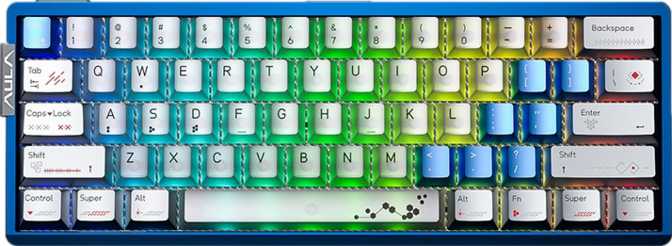
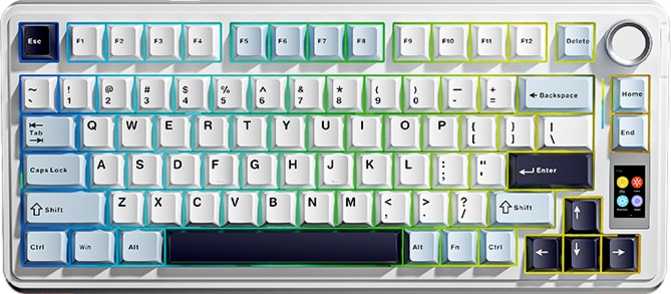
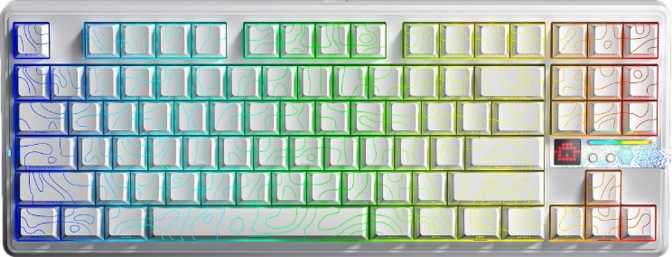
It ships in two colorways — black and white — both clean, professional, and adaptable to any desk environment. The standard profile keeps the board at a conventional height that most typists will find immediately comfortable. Adjustable feet let you set your preferred tilt angle. No wrist rest is included, so plan for one separately if your setup requires it.
South-Facing RGB and Keycap Compatibility
The backlighting LEDs are positioned south-facing — light shines toward the bottom of each keycap legend rather than the top. This works perfectly with the included keycaps. If you plan to install third-party keycaps, verify that your chosen profile is compatible with south-facing LEDs to avoid visible hot spots or uneven legend glow.
| Form Factor | 80% Tenkeyless |
| Case Material | Aluminum + Plastic |
| Plate Material | Full Aluminum |
| Mount Type | Gasket |
| Dimensions | 362 × 138 × 42 mm |
| Weight | 1,089 g |
| Colors | Black, White |
| Cable | Detachable USB-C |
| RGB Backlight | South-Facing |
| Adjustable Tilt | Yes |
| Wrist Rest | Not Included |
| Layout | ANSI (US Standard) |
The Typing Experience: What Gasket Mount Really Means
Gasket mounting is the structural detail that separates the F87Pro V2 most clearly from keyboards at lower price points. In a standard tray-mounted or top-mounted keyboard, the plate — the metal sheet holding your switches — is rigidly fixed to the case. Every keystroke's impact transfers directly into the desk, producing a firm, sometimes harsh feel that becomes fatiguing over a full workday.
In the F87Pro V2's gasket design, the plate assembly sits on soft bumpers around the perimeter, giving the entire switch plate a small amount of flex when you type. That subtle give absorbs impact, producing a softer, bouncier feel and noticeably reducing harshness over extended sessions. Once you've typed on a gasket board, going back to a rigid mount is immediately noticeable.
Paired with a full aluminum plate — which adds structural stiffness and a crisp, decisive sound character — the result is well-balanced: cushioned at the structural level but precise and firm in actual keystroke feel. This is a meaningful quality-of-life inclusion at any price point, and it is particularly notable at this one.
Mount Type Comparison
Tray / Top Mount
Plate rigidly fixed to the case. No flex, harsh keystroke impact, fatigue-inducing over long sessions. Common on budget boards.
Gasket Mount F87Pro V2
Plate floats on silicone bumpers. Cushioned flex, reduced impact fatigue, more comfortable for extended typing sessions.
Connectivity: Three Modes, One Keyboard
The F87Pro V2 supports three distinct connection modes, each designed for a specific purpose and use case.
2.4 GHz Wireless
Best for GamingThe gaming mode. At 8000 Hz polling, the keyboard reports its input state to your PC 8,000 times per second — eight times more than most wired keyboards. Latency is effectively theoretical at this rate. In competitive gaming, this board delivers wired-equivalent responsiveness over a wireless connection.
Bluetooth
Best for Multi-DeviceUniversal compatibility mode. Connect to a tablet, secondary laptop, or phone without a spare USB port. Bluetooth polls at a lower rate than 2.4 GHz — it is the right choice for productivity and device-switching workflows, not competitive gaming.
USB-C Wired
Always-Available FallbackThe cable is detachable — a practical long-term benefit. A failed fixed cable means a broken keyboard; a detachable USB-C cable is a cheap replacement. The board also includes a USB passthrough port so you can connect a mouse or drive without reaching behind your machine.
Which mode should you choose?
Use 2.4 GHz for gaming — it delivers 8000 Hz polling with no wireless penalty. Switch to Bluetooth for casual multi-device productivity. Keep USB-C as a charge-and-play fallback. All three modes are genuinely useful; none is redundant.
Battery Life That Changes How You Think About Wireless
600
Hours
Quoted wireless battery life
To put 600 hours in concrete terms: if you use this keyboard for eight hours every workday, that figure represents over three months of continuous use between charges. Even accounting for real-world variance — heavier RGB use, frequent 2.4 GHz gaming sessions, ambient temperature effects on battery efficiency — most users will charge this keyboard roughly once a season.
This matters psychologically as much as practically. One of the persistent frustrations with wireless peripherals is the low-grade anxiety about whether the battery will die mid-session. At 600 hours, that concern simply evaporates. You plug in a cable roughly as often as you replace the batteries in a smoke detector.
75+
Work days per charge
~4×
Vs. typical mid-range board
USB-C
Charges while in use
8000Hz
Even at peak polling
Switches: The StarArrow Linear Explained
What 40 Grams Actually Feels Like to Type On
The F87Pro V2 ships with AULA's proprietary StarArrow Linear switches. Linear switches activate smoothly from top to bottom — no tactile bump, no audible click. The keystroke is a consistent, even downstroke throughout its travel distance.
At 40 grams of actuation force, the StarArrow sits at the lighter end of the linear spectrum. Keys respond to light touches, reducing finger fatigue during long sessions and enabling rapid repeated keypresses in fast-paced gaming. The trade-off: lighter switches offer less margin before accidental activation. If you are used to heavier options in the 45–55 g range, the first hour of adjustment is noticeable.
Hot-Swap: Your Switches Are Not a Permanent Commitment
The board is fully hot-swappable with any MX-style compatible switch. No soldering required — pull the switch out of its socket, press the new one in. Prefer a tactile bump, a heavier force, or a clicky response? Swap them in an afternoon. A worn switch is a thirty-second fix rather than a repair bill, and it extends the functional lifespan of the board considerably.
Adjustable Actuation Point
The F87Pro V2 supports adjustable actuation via software — you can change the registration depth to suit your preference or use case. This falls short of rapid trigger (which dynamically resets the actuation point with each keystroke cycle), but still provides meaningful responsiveness tuning for different gaming genres and typing styles.
| Switch Type | Linear |
| Actuation Point | 1.8 mm |
| Total Travel | 3.5 mm |
| Actuation Force | 40 g Light |
| Sound Profile | Smooth, no click |
| Hot-Swap | MX-Compatible |
| Adj. Actuation | Via Software |
| Rapid Trigger | Not Supported |
| Dual Actuation | Not Supported |
Keycaps: PBT Double-Shot Quality Explained
The included keycaps are PBT double-shot in an OEM profile. Both properties make a meaningful difference to long-term ownership and daily feel — they are not minor spec footnotes.
PBT (polybutylene terephthalate) is a harder, denser plastic than the ABS found on most budget keyboards. ABS surfaces develop a characteristic greasy shine over months of use — PBT resists it. The legends stay crisp, and the textured surface feels noticeably better under the fingers for most typists over extended use.
Double-shot construction means the keycap legend and the keycap body are two separately molded plastic pieces fused together during manufacturing. Because there is no printing or coating to wear through, the legends simply cannot fade. After years of heavy daily use, the characters remain as sharp as they were on day one.
The OEM profile is a familiar, stepped, slightly curved shape that suits the widest range of users without any adjustment period. The standard ANSI key layout ensures third-party keycap replacement is entirely straightforward — no unusual bottom row spacings or non-standard keycap sizes to navigate around.
PBT Material
Resists the surface shine and wear that degrades ABS keycaps within months
Double-Shot
Legends never fade
Standard Layout
Easy to upgrade
Who Should Buy This Keyboard — and Who Should Not
-
Competitive and enthusiast gamers who want wireless freedom without surrendering polling rate. The 8000 Hz 2.4 GHz mode competes on latency with premium wired keyboards.
-
Work-from-home professionals who want a wireless desk setup with less cable clutter. The 80% TKL form factor reclaims meaningful desk space while retaining every standard typing key.
-
Customization enthusiasts seeking a modifiable platform. The hot-swap socket, standard ANSI layout, and aluminum plate give this board strong foundations for switch and keycap upgrades over time.
-
Multi-device users who switch between a desktop and a laptop or tablet, and want Bluetooth flexibility alongside gaming-grade wireless performance.
-
Firmware-level customizers who depend on QMK, ZMK, or VIA. None of these open-source platforms are supported — all remapping and macro programming is limited to AULA's proprietary software.
-
Mac users seeking a native layout — the board uses Windows-standard ANSI labeling. It functions with macOS via key remapping, but no Mac-specific labeled keycaps are included.
-
Regular travelers who carry their keyboard in a bag. At over a kilogram, the F87Pro V2 is a desk board by character — the weight is an asset at home and a burden in transit.
-
Numpad-dependent users — the tenkeyless format omits the numpad entirely. Data entry workflows that rely on it will require a different form factor.
How the F87Pro V2 Stacks Up Against the Competition
The F87Pro V2 positions itself as a board that over-delivers on hardware and connectivity relative to its price bracket. The 8000 Hz wireless polling rate in particular is a feature that appears rarely even at significantly higher price points. Where it concedes ground is software flexibility — a trade-off worth understanding clearly before you buy.
| Feature | AULA F87Pro V2 | Typical Budget TKL | Typical Mid-Range TKL |
|---|---|---|---|
| Mount System | Gasket | Tray or Top | Gasket or Top |
| Wireless Modes | 3 — 2.4G + BT + USB | Often wired only | 1–2 modes |
| Polling Rate | 8000 Hz wireless | N/A or 1000 Hz | 1000 Hz |
| Hot-Swap | Yes | Rarely | Often |
| Keycap Material | PBT Double-Shot | ABS Printed | PBT (varies) |
| QMK / VIA Support | No | No | Sometimes |
| Battery Life | ~600 hours | 40–80 hours | 100–300 hours |
| Warranty | 1 Year | 1 Year | 1–2 Years |
Honest Assessment: Where It Shines and Where It Falls Short
-
8000 Hz wireless without compromise. Gaming-grade polling in a wireless keyboard at this price tier is genuinely exceptional — a differentiating feature most competitors simply cannot match.
-
Feature coherence at the price point. Gasket mount, hot-swap, PBT double-shot keycaps, and triple connectivity form a logical, well-matched package — not a random assembly of marketing terms.
-
Battery life that removes anxiety. Quarterly charging is a transformative quality-of-life improvement over keyboards that demand weekly attention. You simply stop thinking about it.
-
A platform for future customization. The hot-swap socket and standard keycap layout mean this board can evolve alongside your preferences without requiring a new purchase.
-
No QMK, VIA, or ZMK support. For enthusiasts who depend on open-source firmware, this is a fundamental limitation — not a footnote. Full layer control and hardware-level programmability are simply unavailable.
-
Proprietary software dependency. All customization relies on AULA's application. Its quality and long-term maintenance remain open questions — and proprietary keyboard software in this category has an inconsistent track record.
-
Significant weight for a TKL. 1,089 g is appropriate for a permanent desk board but limits portability in a real way for anyone who moves their keyboard between locations.
-
One-year warranty only. Adequate but below the 2-year standard several competitors now provide at comparable price points in this segment.
Questions Real Buyers Ask
Answers to the most common questions before purchasing the AULA F87Pro V2
Final Verdict
The AULA F87Pro V2 is a well-conceived keyboard that delivers genuine value for a specific kind of buyer. If you want a wireless board that does not compromise on gaming-grade latency, types with the cushioned feel of a gasket mount, accepts switch swaps without a soldering iron, and lasts months between charges, this board checks every one of those boxes competently — and at a price that undercuts many competitors with shorter feature lists.
The absence of VIA or QMK support is a real constraint for enthusiasts who need full firmware control. If open-source programmability is non-negotiable for your workflow, look elsewhere. For everyone else — gamers, desk professionals, and hardware-first enthusiasts who want a well-built wireless TKL — the F87Pro V2 earns a confident recommendation.