AULA AG60 Review: Hall Effect Performance in a 60% Form Factor
KeyboardsCompact keyboards are everywhere. The 60% form factor has become the default choice for desk-space-conscious gamers and typists who want clean setups without sacrificing their primary keys. But most 60% boards competing at this price tier still ship with traditional mechanical switches — springs, contacts, the same core technology that has been around for decades.
The AULA AG60 takes a different approach. It pairs the stripped-down footprint of a 60% layout with Hall effect magnetic switches, a polling rate that outpaces virtually every competitor in its class, and a gasket-mounted construction that punches well above its size. That combination is worth examining closely — the trade-offs are deliberate, and the features included are genuinely consequential for competitive gaming.
Build Quality and Physical Experience
Construction, materials, and what the AG60 communicates before the first keystroke.
A Compact Board That Doesn't Feel Like One
Picking up the AG60 for the first time, the weight is the first thing you notice. At just under a kilogram, this is a dense board. For a 60% keyboard — a category often associated with lightweight, travel-friendly designs — that heft communicates something important: the materials here are not being cut thin.
The case combines plastic and aluminum construction, with a full aluminum plate beneath the switches. That plate is doing real structural work. It gives the board a rigid foundation that eliminates flex or wobble when typing at speed, and it contributes directly to that satisfying, grounded feel under your palms. The aluminum is not merely decorative trim.
Adjustable feet are included for dialing in your preferred typing angle. The detachable cable makes transport and cable management cleaner, and if the cable is ever damaged, it is replaceable without sending the board in for service.
Color Options and Keycap Quality
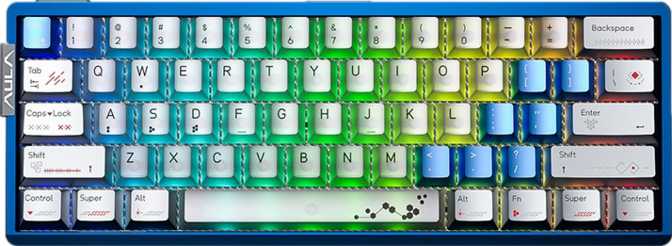
The AG60 ships in five colorways — black, white, red, blue, and pink — covering conservative and expressive desk setups alike. The south-facing RGB LEDs sit below the keycap legends rather than directly beneath them, producing a pronounced shine-through effect and strong underglow. The lighting is bright and even across the board.
The OEM-profile PBT keycaps are double-shot, meaning the legends are formed by molding two layers of plastic together rather than printing or laser-etching them. The practical result: legends that cannot fade, scratch, or wear off regardless of how many hours you log. PBT plastic also resists the greasy, shiny texture that cheaper ABS keycaps develop over time.
The Aether Magnetic Switch: Why Hall Effect Changes the Conversation
Understanding what magnetic switches actually do — and why the difference is measurable, not just marketing.
What Hall Effect Actually Means
Traditional mechanical switches — even premium ones — rely on physical metal contacts completing a circuit when a key is pressed. That contact point is a wear surface. Over millions of keystrokes, contacts can bounce, oxidize, or drift in behavior. Hall effect switches replace those metal contacts entirely with a magnet and a position sensor. There is no physical contact in the switching mechanism.
The sensor detects the position of the magnet as the key travels, turning a physical press into a magnetic field measurement. The consequences are significant: the switches are immune to contact bounce and debounce delays that traditional switches require, the sensing is continuous — the keyboard knows exactly where the key is in its travel at any given moment — and without contact surfaces, the wear profile is fundamentally different.
The AG60 uses AULA's own Aether Magnetic Switch in a linear feel — no tactile bump or audible click, just smooth, consistent resistance from top to bottom. The actuation force sits at a light 40 grams, making it one of the easier switches to use without fatigue during long sessions. Total switch travel is 3mm.
The AG60 lets you set your actuation point anywhere across the full key travel — from an almost imperceptible tap to a deliberate full press.
Performance Features: What They Do in Practice
The technical capabilities of the AG60 — explained in terms of what actually changes in real use.
Rapid Trigger
Standard keyboards have a fixed reset point — you must release past a set threshold before the key can register again. Rapid trigger replaces this with dynamic detection: the key registers a press when it moves downward past your set distance, and reregisters a release as soon as it starts moving upward — from anywhere in its travel.
Dual Actuation
Dual actuation allows a single keypress to register two different actions at two different depths within the same key travel. A light tap triggers one function; pressing further triggers another. This is a niche capability with real applications for players who want depth-based input differentiation on a single key.
8000 Hz Polling
At 8000 Hz, the keyboard reports its state to your computer 8,000 times per second — reducing the delay between a physical keypress and the system input to under 0.125 milliseconds. Standard keyboards operate at 1000 Hz. The AG60 reports eight times more frequently, placing it at the current ceiling of consumer keyboard technology.
N-Key Rollover
N-Key Rollover (NKRO) means every key on the board can be held simultaneously and registered accurately. There is no limit on simultaneous inputs and no key blocking — regardless of how complex your input combinations become, every press is tracked and reported correctly without ghosting.
Layout and Daily Usability
Living with a 60% form factor — the trade-offs, keycap compatibility, and switch flexibility.
Living With a 60% Form Factor
The 60% layout removes the function row, navigation cluster, and numpad found on full-size boards. What remains is the alphanumeric keys, modifiers, and secondary functions accessible through the Fn layer. Media controls are available through Fn key combinations — there are no dedicated media keys.
This is a deliberate trade-off. Desk space recovered is substantial. Mouse range increases. The overall setup looks and feels cleaner. But the missing keys are real, and if your workflow depends on dedicated arrow keys, a numpad, or frequent function row use, a 60% board requires genuine adjustment.
The AG60 uses a standard ANSI key layout with standard keycap sizing throughout. This means the vast majority of aftermarket OEM-profile keycap sets fit without compatibility problems — important for anyone wanting to customize beyond the stock options.
Hot-Swap Switch Sockets
The switch sockets on the AG60 are hot-swappable, meaning you can pull out and replace switches without soldering. This has two direct implications: if a switch fails or feels wrong over time, you can replace it individually without professional repair; and if you want to experiment with different switch characteristics, the board supports that without any permanent commitment.
Combined with the adjustable actuation range of the Aether Magnetic Switches, the hot-swap sockets give the AG60 genuine configurability at the hardware level — an unusual degree of flexibility for a board in this category.
Full Specifications
Complete technical reference for the AULA AG60.
| Specification | Value |
|---|---|
| General | |
| Keyboard Type | Gaming, Mechanical |
| Form Factor | 60% Compact |
| Profile | Standard |
| Connectivity | Wired USB |
| Polling Rate | 8000 Hz |
| Mount Type | Gasket |
| Detachable Cable | Yes |
| Mac Compatible | No |
| Dimensions (W × D × H) | 298 × 110 × 41 mm |
| Weight | 972 g |
| Warranty | 1 Year |
| Design | |
| RGB Lighting | Yes |
| Backlight Direction | South-facing |
| Case Material | Plastic & Aluminum |
| Plate Material | Aluminum |
| Available Colors | Black, White, Red, Blue, Pink |
| Adjustable Feet | Yes |
| Wrist Rest | Not included |
| Switches | |
| Switch Name | Aether Magnetic Switch |
| Switch Type | Hall Effect |
| Switch Feel | Linear |
| Hot-Swappable | Yes |
| Actuation Distance Range | 0.1 mm – 4.0 mm (adjustable) |
| Actuation Force | 40 g |
| Total Travel Distance | 3 mm |
| Features | |
| Rapid Trigger | Yes |
| Dual Actuation | Yes |
| Adjustable Actuation | Yes |
| N-Key Rollover (NKRO) | Yes |
| Analog Input | No |
| USB Passthrough | No |
| QMK / VIA / ZMK Support | No |
| Keys & Layout | |
| Keyboard Layout | ANSI (United States) |
| Keycap Type | PBT, Double-shot |
| Keycap Profile | OEM |
| Standard Key Layout | Yes (standard sizing) |
| Media Keys | Via Fn key combination |
| Rotary Dial | No |
Who the AULA AG60 Is For — and Who Should Look Elsewhere
Matching the hardware to the right buyer prevents regret and wasted budget.
The Right Buyer
The AG60 is built for competitive gamers who want Hall effect switch technology, rapid trigger functionality, and high-frequency polling in a format that leaves maximum desk space for mouse movement. If your gaming demands precise, fast, repeated inputs — particularly in FPS or rhythm games — and you have been watching Hall effect keyboards become increasingly accessible without wanting to pay premium prices, the AG60 addresses that intersection directly.
It also suits buyers who value configurability at the switch level. The adjustable actuation range, rapid trigger, and hot-swap sockets together create a keyboard that can be tuned and re-tuned as preferences evolve — without buying a new board each time.
Who Should Consider Alternatives
The AG60 does not support QMK, ZMK, or VIA firmware. These open-source keyboard configuration ecosystems allow deep, community-supported remapping, macro programming, and layer configuration. For keyboard enthusiasts whose ideal workflow involves complex custom layers, per-app profiles, or community firmware features, the AG60's closed ecosystem is a genuine limitation that AULA's proprietary software cannot fully compensate for.
The board also lacks a wrist rest, USB passthrough port, rotary dial, and display. Buyers who type heavily for extended sessions and prioritize ergonomic feel over gaming performance may find the 60% layout's missing keys and the light 40g actuation force more challenging than a tenkeyless or full-size board.
Competitive Positioning
How the AG60 stands against the broader 60% gaming keyboard market across key decision factors.
| Feature | This ProductAULA AG60 | Typical Traditional 60% | Typical Hall Effect Competitor |
|---|---|---|---|
| Switch Technology | Hall effect (magnetic) | Contact-based mechanical | Hall effect (magnetic) |
| Polling Rate | 8000 Hz | 1000 Hz | 1000–4000 Hz (typical) |
| Rapid Trigger | Yes | Rare | Yes (on most) |
| Adjustable Actuation | 0.1 mm – 4.0 mm | Fixed point only | Varies by model |
| Mount Type | Gasket | Plate or tray (typical) | Varies by model |
| QMK / VIA Support | No | Often yes | Rarely |
| Keycap Material | PBT Double-shot | ABS common at this tier | Varies |
| Hot-Swap Sockets | Yes | Not always | Usually yes |
Competitive comparisons reflect general market observations and serve as category context, not specific product claims.
Honest Assessment
A balanced look at where the AG60 excels and where it falls short — no marketing spin.
Where It Excels
The AG60's strengths are concentrated and meaningful. The combination of Hall effect switches with a 0.1mm actuation floor, rapid trigger, and 8000 Hz polling represents a genuinely high-performance input package — one you typically encounter at higher price tiers.
Gasket mounting at this form factor and price tier is an unusual inclusion that benefits both gaming and typing feel. The sound and feel of a gasket-mounted board is noticeably different from a plate-mount design — more cushioned, with less sharp rebound after each keypress.
PBT double-shot keycaps are the right material choice and will outlast the keyboard's functional life without looking worn. The hot-swap sockets future-proof the switch investment. The five-color lineup means the board fits a range of setups aesthetically.
Standard ANSI keycap sizing ensures broad aftermarket compatibility for anyone who wants to customize beyond the stock options without compatibility research.
Where It Falls Short
The weaknesses are real and should not be minimized. No VIA or QMK support is the biggest limitation for anyone who takes keyboard configuration seriously. The open-source ecosystem has years of community tools, documentation, and shared configurations that AULA's proprietary software cannot match.
The 1-year warranty is standard but not generous for a keyboard with this hardware density. While the weight communicates quality, a nearly 1kg 60% board is not something you will comfortably drop in a bag without a dedicated case.
The absence of analog input — despite Hall effect switches that theoretically support it — is a notable omission for buyers who specifically want joystick-style analog key behavior in compatible games. The AG60's Hall effect implementation is tuned for rapid trigger and actuation adjustment, not for analog axis inputs.
No USB passthrough, no rotary dial, and no display round out the list of absent features that competing options in the segment sometimes include.
Common Questions Before You Buy
The questions real buyers search for — answered directly.
Final Verdict
The AULA AG60 is a focused competitive gaming keyboard. It does not try to be everything — no display, no rotary dial, no wireless option, and no open firmware ecosystem. What it offers instead is a specific hardware capability set: Hall effect switches with rapid trigger and a 0.1mm actuation floor, an 8000 Hz polling rate, gasket mounting, and hot-swap sockets, packaged in a 60% form factor with durable PBT keycaps and a genuinely solid build.
If those features match what you are actually looking for — particularly if rapid trigger in a compact board is your primary objective — the AG60 delivers that package with hardware specifications that compete at higher price tiers. The lack of VIA/QMK support is the line in the sand: enthusiasts who need open firmware flexibility should look elsewhere, but competitive players who want plug-in performance without the configuration overhead of community firmware will find the AG60 a direct and well-executed option.
Buy It If
- You want Hall effect rapid trigger in a 60% gasket-mount board
- Polling rate and input precision matter for competitive play
- You're comfortable with proprietary configuration software
Skip It If
- Open firmware support (VIA, QMK) is a hard requirement
- You need analog key input for compatible games
- The 60% layout's missing keys would disrupt your workflow