AULA S75 Pro Review: A Compact Wireless Keyboard That Overdelivers
KeyboardsFew keyboard categories have grown as competitive as the compact wireless gasket-mount segment. Buyers here know precisely what they want — a board small enough to reclaim desk space, wireless enough to eliminate cable clutter, and refined enough in typing feel to justify the upgrade from a basic office keyboard. Most accessible-price options force a compromise: budget boards skip gasket mounting, while boards with gasket mounting tend to carry premium price tags.
The AULA S75 Pro enters with a striking combination of specifications for its tier: a true gasket mount, triple-mode wireless connectivity, hot-swappable switches, an 80-hour battery, a built-in status display, PBT double-shot keycaps, and a rotary control dial. On paper, this reads like a checklist pulled from a more expensive product. The question is always whether execution holds up. This review answers exactly that.
At a Glance
Six specifications that define the S75 Pro's position and daily character
Design and Build Quality
Form Factor and Physical Footprint
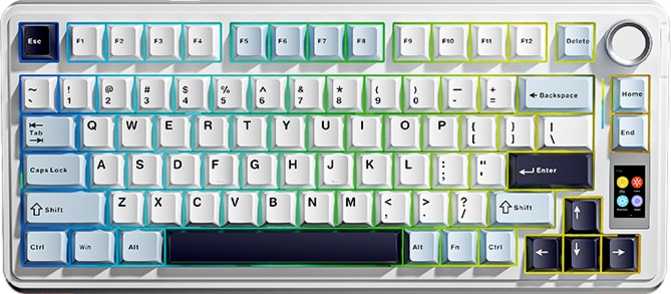
The 75% layout is one of the most practical compact formats available. Unlike a 65% or 60% board, the 75% retains a dedicated function key row across the top and a full vertical arrow cluster — the two things most users miss first when they downsize. You lose the numpad and the far-right navigation column of a full-size or tenkeyless board, and very little else. The result fits a smaller desk area without feeling crippled by missing keys.
When you lift this keyboard, the weight registers immediately. At just under a kilogram, the S75 Pro is substantially heavier than you'd expect from a compact plastic-chassis board. This is the gasket hardware, the battery, and the internal structure doing exactly what they should: keeping the keyboard planted, stable, and resistant to movement under aggressive typing or gaming. It does not shift on the desk.
The case ships in four colorways — black, white, pink, and silver. The styling is restrained and clean, with no aggressive geometry or gaming-brand iconography that tends to age poorly. Adjustable feet let you dial in your preferred typing angle, and the profile height puts it in comfortable territory for most wrist positions.
The Built-In Status Display
A small screen sits on the keyboard's face and provides immediate visual feedback on the board's operational state — connection mode and battery level are always one glance away. This solves a genuine daily frustration common to multi-mode wireless keyboards: the guesswork of figuring out which Bluetooth profile is active or how much charge remains based on a blinking LED pattern you've already forgotten. It is a small inclusion that accumulates in value over time.
RGB Backlighting
Per-key RGB backlighting covers the board, with LEDs positioned on the south side of each switch housing. South-facing LEDs cast light beautifully across the desk surface and create an excellent ambient glow. The directional trade-off is that light traveling through the keycap at this angle does not saturate the legends quite as intensely as north-facing configurations do in direct comparison. For desk aesthetics and ambient atmosphere, the result looks genuinely impressive. For maximum legend readability in completely dark rooms, it is a subtle consideration worth knowing about.
Three-Mode Wireless Connectivity
Each connection mode serves a distinct use case. Understanding the differences helps you use the right one at the right time.
2.4GHz Wireless
Uses a USB dongle receiver and delivers the most consistent gaming experience. At 1,000 reports per second, inputs reach the computer with timing precision effectively indistinguishable from a physically wired connection.
Best for GamingBluetooth 5.0
Enables connection to laptops, tablets, and secondary machines without occupying a USB port. The fifth-generation Bluetooth standard is efficient enough to extend battery life and stable enough for all-day typing and casual gaming.
Best for Multi-DeviceWired USB
A detachable cable means you're not locked to a proprietary connector — replacements and upgrades are straightforward. Wired mode works immediately while the battery charges and is a reliable fallback at any time.
Reliable FallbackThe Switch Experience
Star Vector Linear Switches
Linear switches produce no tactile bump and no audible click at the actuation point. The keystroke is a smooth, continuous motion from first contact to bottom-out, without any event mid-press. This makes linears the preferred choice for gamers who want uninterrupted, consistent input registration, and for typists who prefer a quieter key feel.
What distinguishes the Star Vector Linear most is the force required to trigger it. At 40 grams, it is notably lighter than standard office membrane keys and lighter than many well-known gaming switches. The total keystroke depth is also slightly shorter than the common 4mm standard, giving the switch a marginally snappier, more responsive character from first touch to actuation.
For gaming, the lighter force means less fatigue over extended sessions and minimal resistance between intent and registered input. For typing, the light actuation requires a brief adjustment period for users arriving from stiffer keyboards — fingers accustomed to resting lightly without accidentally firing keys will need brief recalibration. Most users adapt quickly and often find the lighter touch preferable for long sessions.
A Limitation Worth Knowing Before You Buy
These switches do not support variable sensing. The actuation point is mechanically fixed — the switch registers at the same depth every time, without reading how quickly the key is moving or resetting mid-stroke. Keyboards with rapid-trigger capability rely on magnetically sensed Hall Effect switches and dedicated firmware processing, neither of which is present in the S75 Pro. For competitive FPS players whose strategy depends on that specific edge, this board cannot deliver it. This is a hardware limitation, not a software gap.
Hot-Swap: The Long-Term Flexibility Argument
Every switch position on the board accepts replacement switches without soldering. A basic switch puller and a set of compatible switches are all it takes to completely change the keyboard's feel in under an hour.
For buyers new to mechanical keyboards, this removes significant risk from the purchase. The Star Vector Linears are a thoughtful starting point, not a permanent commitment. If you decide later that you want a tactile bump, a heavier press, or a different sound character, you change the switches — no new keyboard required. Standard MX-compatible switches in both 3-pin and 5-pin configurations fit the sockets without modification.
PBT Double-Shot Keycaps: Why the Material Matters
The included keycaps are made from PBT plastic via double-shot molding, and both of those characteristics matter more than they might appear at first.
PBT Plastic Durability
PBT is a denser, harder plastic than the ABS material found on most budget keyboards. ABS develops a shiny, worn appearance on the most-used keys after months of regular use. PBT resists this effect significantly longer and retains its texture through heavy daily use. The surface stays consistent for years, not months.
Double-Shot Legends
Double-shot molding forms the legends from a physically separate layer of plastic injected into the keycap mold, rather than printing or engraving them after the fact. Legends produced this way cannot fade or wear off under any normal use conditions. There is no coating to chip, no print to erode.
Gasket Mount: The Most Important Specification
Mount type is one of the most consequential specifications on a mechanical keyboard, and one of the most commonly overlooked. Most keyboards at accessible price points use a tray or top-mounted design — this is what makes gasket mounting at this price tier unusual and worth understanding.
Standard Tray or Top Mount
The PCB and switch plate bolt directly to a rigid case. Every keypress transfers its energy straight into the hard chassis. The result is a sharp, high-pitched sound and a stiff, unforgiving feel underfoot — functional for many users, but not particularly satisfying for extended sessions or enthusiasts who care about typing feel.
Gasket Mount (AULA S75 Pro)
The internal assembly is suspended on flexible pads placed around the perimeter of the plate. When you press a key, the assembly absorbs some of the impact by flexing very slightly before returning. The typing experience becomes noticeably softer and more cushioned, and the sound shifts toward a deeper, more controlled thud that most users find immediately preferable.
Why this matters at this price: Gasket mounting is typically reserved for products that cost considerably more. That the S75 Pro includes a real gasket-mount system is its most significant structural differentiator, and the one that most directly affects daily satisfaction. Typing on a gasket-mounted keyboard for the first time after only tray-mount experience is a genuine revelation — the difference is apparent within the first minute of use.
Battery Life: Charge It Once, Forget About It
The approximately 80-hour rated endurance is the headline figure. What it means in practice — in terms of how often you actually plug in — matters more than the raw number.
Battery Endurance vs. Category
Figures are rated endurance at moderate use without lighting. Individual results vary.
How Lighting Affects Runtime
RGB lighting is the single largest variable in battery consumption. The practical impact is manageable — but the trade-offs are real.
- Full RGB, max brightness: Noticeably reduced endurance — charge more frequently
- Dimmed or static color: Considerably extended runtime — the practical daily sweet spot
- Lighting disabled: Maximum endurance — ideal for travel or extended trips
The combination of Bluetooth 5.0's inherent power efficiency and this battery capacity makes the S75 Pro a genuinely low-maintenance wireless device rather than one you need to think about charging every few days.
Gaming Performance
Two specifications define the S75 Pro's gaming capability: polling rate and N-Key Rollover. Both are present at the level that defines gaming-grade peripherals.
1000 Hz Polling Rate
The board reports its input state to the host system 1,000 times per second. This keeps keypress timing consistent and precise — the standard for gaming keyboards and fast enough that no perceptible gap exists between pressing a key and the system registering it. In 2.4GHz wireless mode, this rate is fully maintained without any reduction.
Full N-Key Rollover
NKRO means every key pressed simultaneously is registered without limit or priority ordering. Holding a movement key, a sprint modifier, and multiple ability bindings at the same time produces no dropped or blocked inputs. Full simultaneous registration is guaranteed across every key on the board.
Rotary Dial Control
Media control runs through a function-layer key combination rather than dedicated standalone keys — standard practice for a 75% layout. The physical rotary dial partially compensates: a knob on the board gives direct access to volume adjustment and common media functions without any key combination required. It is a tactile, immediate control that earns its place quickly.
No Rapid-Trigger Support
The S75 Pro does not support rapid-trigger or adjustable actuation. These features require magnetically sensed Hall Effect switches and dedicated firmware processing — hardware this board does not include. For competitive FPS players who rely on the ability to re-register a key the instant it begins moving upward, this is a hard hardware limitation without a workaround.
Software and Customization
QMK, ZMK, and VIA are open-source firmware and configuration platforms that give keyboard users full control over every key assignment, macro, layer, and lighting behavior — without proprietary software and with a large community of shared resources. The AULA S75 Pro supports none of them. Customization runs through AULA's own companion software.
What the AULA Software Covers
- Basic key remapping across all layers
- RGB effect selection and brightness control
- Macro recording for common sequences
- Connection mode management and display configuration
What Is Not Available
- QMK, ZMK, or VIA firmware support of any kind
- Cross-platform or portable configuration files
- Community keyboard layout editor (KLE) support
- Custom firmware flashing capability
Who This Keyboard Is Built For
The S75 Pro has a clear profile for who will love it and who should look at different options. Being honest about this boundary is more useful than pretending a keyboard works for everyone.
The S75 Pro Is Right For
- Wireless-first users who want to eliminate desk cables without sacrificing gaming-grade response performance
- Multi-device users who switch between a gaming PC, a laptop, and a tablet as part of their daily workflow
- Buyers entering the mechanical keyboard hobby who want real upgrade headroom — gasket mount and hot-swap — at an accessible starting price
- Anyone who values extended battery life and wants to charge as infrequently as possible
- Users who appreciate a status display and physical volume dial for daily convenience
- macOS users needing cross-platform compatibility across Apple and Windows devices
Look Elsewhere If You Need
- Rapid-trigger or adjustable actuation-point technology as a core part of a competitive FPS play strategy
- QMK or VIA support for granular key remapping, community firmware, or portable config files
- An aluminum chassis for its structural rigidity and premium tactile feel underhand
- A wrist rest included in the box — the S75 Pro does not provide one
How the S75 Pro Compares
Positioned against the two most logical alternative categories a buyer in this segment would consider before committing.
| Feature | AULA S75 Pro | Premium Gasket 75% | Budget Wireless 75% |
|---|---|---|---|
| Chassis Material | Plastic | Aluminum (typical) | Plastic |
| Mount Type | Gasket | Gasket | Tray / Top (typical) |
| Wireless Modes | USB · BT 5.0 · 2.4GHz | Comparable | Comparable |
| Hot-Swap Switches | Yes | Yes (typical) | Varies by model |
| Keycap Material | PBT Double-shot | PBT (typical) | ABS (typical) |
| Open-Source Firmware | No | Yes (typical) | No |
| Built-In Status Display | Yes | No (typical) | No |
| Rotary Dial | Yes | Varies | Typically absent |
| Battery Endurance | ~80 hours | Comparable | 20–50 hours (typical) |
The S75 Pro wins on mount quality, keycap material, battery endurance, display, and rotary dial versus budget alternatives. Against premium competitors, it trades chassis material and open-source firmware for a lower price — while offering a status display no comparable competitor typically includes.
Honest Assessment
No product at this price tier is without compromise. These are the real strengths and the real trade-offs — stated clearly so your purchase decision is fully informed.
What It Gets Right
- Gasket mounting is genuine and immediately felt — actual suspension that changes the sound and feel of every keypress, not a foam-pad approximation
- Battery life of approximately 80 hours puts this board in a different league from most wireless competitors at any comparable price
- Hot-swappable switches and PBT double-shot keycaps at this price point represent real value that typically requires spending considerably more to access
- Three-mode wireless covers all use cases: gaming precision in 2.4GHz, multi-device convenience via Bluetooth, wired reliability as a fallback
- Status display and rotary dial are daily conveniences that prove their worth quickly and consistently — practical, not gimmicky
Where It Pulls Back
- Plastic case serves the price point well but cannot deliver the structural solidity and premium feel of an aluminum chassis
- South-facing LEDs produce beautiful ambient desk glow but sacrifice some of the legend brilliance that north-facing configurations achieve
- No QMK, ZMK, or VIA support is a genuine ceiling for enthusiasts invested in open-source firmware — a hardware architecture choice, not a gap that updates can fix
- No rapid-trigger capability closes the door on competitive FPS use cases where that specific technology is a meaningful differentiator
- Wrist rest not included; one-year warranty is shorter than some competitors offer in adjacent segments
Common Questions Before You Buy
Answers to the questions buyers search for before purchasing the AULA S75 Pro.
Final Verdict
RecommendedThe AULA S75 Pro builds its strongest case in the areas that matter most to daily satisfaction — and it is a case worth taking seriously.
Gasket mounting is genuine and immediately felt — not a soft foam pad approximating plate flex, but actual suspension that changes the sound and feel of every keypress. The battery life is exceptional and puts this board in a different league from most wireless competitors. Hot-swappable switches and quality PBT double-shot keycaps at this price represent real value that typically requires spending considerably more to access. The rotary dial and status display are conveniences that prove their worth quickly and consistently every single day.
The trade-offs are real: a plastic chassis, proprietary-software-only customization, and no rapid-trigger capability. None of these are hidden surprises — they are the deliberate choices of a keyboard engineered to concentrate value where daily users will notice it most.
The bottom line:
For the large group of buyers who want a wireless 75% keyboard that feels genuinely premium underhand, lasts weeks between charges, offers room to experiment with different switches, and connects cleanly across multiple devices — the AULA S75 Pro is a confident recommendation with few meaningful competitors at its price point. If open-source firmware support or rapid-trigger functionality are non-negotiable requirements, look to different hardware. Everyone else: this board earns its asking price.