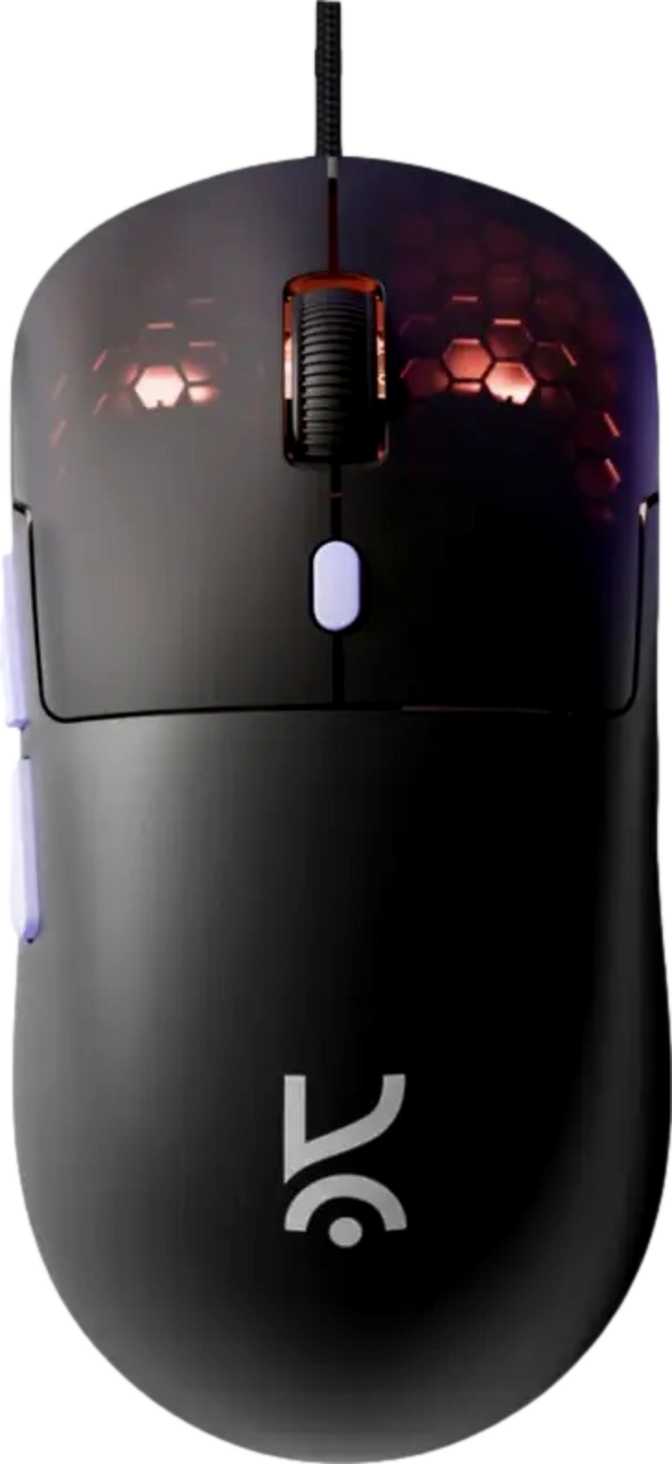
Kreo Harpy Gaming Mouse Review: Full Performance and Value Analysis
MiceOverall Score
out of 5.0 — Budget Gaming Mouse
Performance Breakdown
The budget gaming mouse market has a persistent problem: most options either cut corners on tracking quality or skimp on build quality to hit a low price. The Kreo Harpy attempts to sidestep this trap by leading with one exceptional physical attribute — a remarkably low body weight — while packing a full complement of gaming-grade features. Whether it succeeds depends on where you place your priorities, and that is exactly what this review unpacks.
Who This Review Is Written For
This review balances plain-language guidance for first-time buyers with technical depth for experienced enthusiasts. Specifications are translated into real-world impact, and the final verdict delivers a direct, unambiguous purchase recommendation.
Design, Build Quality, and Physical Experience
Shape and Orientation
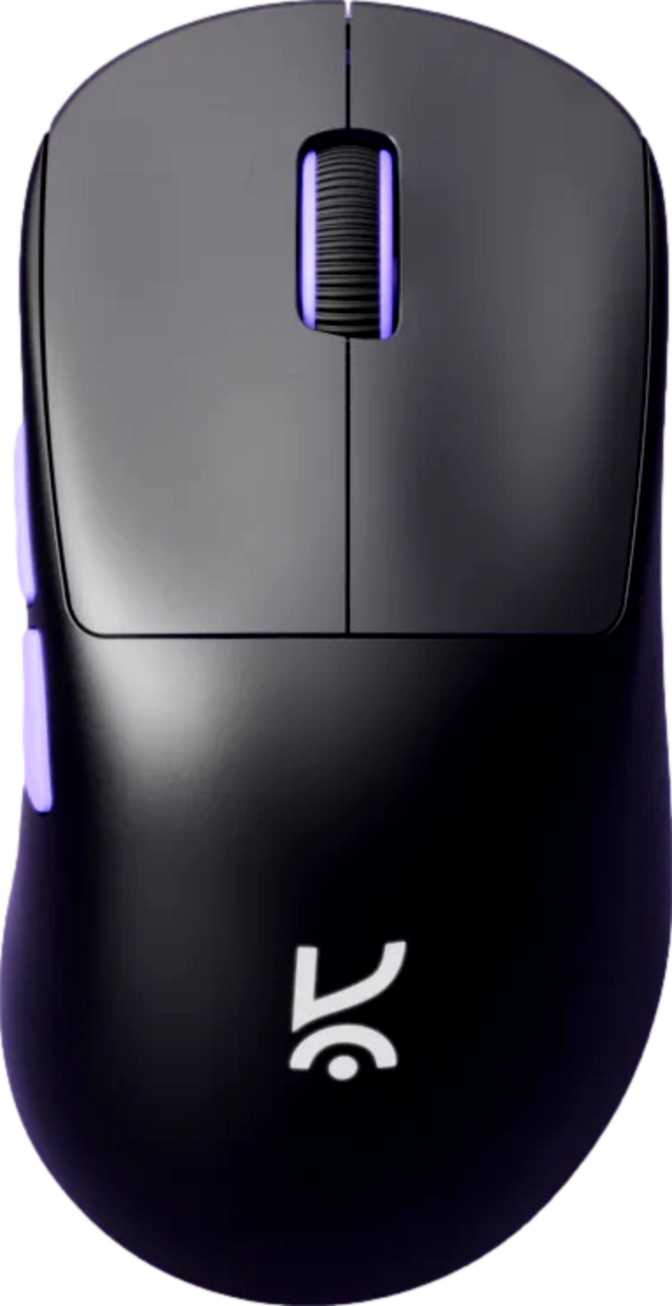
The Harpy is built exclusively for right-handed use, with an ergonomic contour that guides your thumb naturally to the left flank while following the curve of the right palm. Its footprint places it firmly in the medium-small size category — compact enough for controlled, precise movement without feeling cramped in the hand.
The relatively shallow profile height makes it most naturally suited to claw grip and fingertip grip users — those whose fingers curl over the body rather than laying flat. Palm grip users with small to medium hands will be comfortable. Those with large hands who prefer full palm contact may find the arch doesn't fill their hand the way a taller, longer body would.
RGB Lighting
RGB lighting is present on the Harpy, contributing to its visual identity within a gaming setup without affecting tracking performance in any direction. For those assembling a visually coordinated desk, it is a legitimate bonus. For those who find ambient lighting distracting or irrelevant, it can typically be disabled through the accompanying software without any impact on how the mouse functions.
Weight Spotlight
55 Grams
At 55 grams, the Harpy is genuinely light — not just "light for a budget mouse" but light by any current market standard. Many mid-range and enthusiast gaming mice target the 70–80g range, and several widely used options sit above 90g.
- Noticeably reduced wrist fatigue during extended sessions
- Flick shots and rapid directional changes feel less effortful
- Weight is fixed — no user-adjustable weights are included
Physical Dimensions
- Length (front to back)
- 121 mm
- Width (at widest point)
- 63 mm
- Height (peak arch)
- 37.6 mm
- Orientation
- Right-hand only
Tracking Performance: What the Sensor Actually Delivers
The Instant A825 Sensor
The Harpy uses the Instant A825 optical sensor — a dedicated gaming component rather than a repurposed office-grade part. Its performance envelope is defined by a maximum tracking speed and an acceleration ceiling that together cover the practical range of how most gamers actually move their mouse.
The sensor tracks very fast, aggressive swipes without losing positional accuracy, and handles sudden, snapping directional changes cleanly — without spinning out or registering phantom movement.
For casual to intermediate gamers, the A825 will feel entirely capable. Hardcore competitive players running ultra-low sensitivity with high-speed broad arm movements may find the tracking ceiling, but this is a demanding edge case rather than an everyday concern.
Sensor Performance At a Glance
Handles rapid, aggressive mouse movement without losing positional accuracy — sufficient for the vast majority of gaming scenarios
Sharp, snapping directional changes register cleanly without phantom input or positional drift
DPI Range
The sensitivity spans from a precise 200 DPI floor to a 12,800 DPI ceiling — broader than most users will ever actively utilize. Most gamers settle between 400 and 3,200 DPI depending on play style and screen size.
The 200 DPI Floor Is Useful For
- Pixel-level design and editing work
- Slow-scope sniping in tactical shooters
- Minimal cursor travel per physical movement
Polling Rate
The mouse reports its position to your PC one thousand times per second. At this rate, inputs register within a single millisecond of physical movement — cursor response feels immediate and tightly coupled to your hand.
For enthusiasts: This is not a compromise. 1,000 Hz matches the polling standard in mice costing several times more. Only the niche of 4,000–8,000 Hz high-polling products designed for the absolute competitive ceiling operate above this threshold.
Cable and Connectivity
The Harpy connects via USB cable — a deliberate choice that eliminates latency, battery concerns, and the ongoing cost of charging hardware. For competitive gaming, wired remains the gold standard for input reliability and consistency across sessions.
The cable extends to 1.8 meters, which accommodates most desk-to-tower distances with slack to spare. This is a practical specification: too-short cables force awkward desk arrangements, and this length avoids that problem entirely.
Cable drag — the resistance a stiffer cable creates against mouse movement — is worth monitoring once you have the Harpy in hand. A mouse this light benefits most from a flexible, low-drag cable; a stiffer conventional cable can meaningfully undercut the feel advantage that 55 grams provides. A mouse bungee eliminates drag entirely if this becomes a concern.
Wired USB
No battery. No wireless interference. No charging cycles.
Who Should Buy the Kreo Harpy?
The Harpy's strengths make it an excellent choice for some buyers and the wrong tool for others. Here is a direct, honest assessment of both sides.
Well Suited For
First-time gaming mouse buyers
Upgrading from a basic office mouse who want an immediate, tangible improvement in feel and control without a large financial commitment.
FPS and MOBA players
Who benefit most directly from a lightweight body, adjustable DPI, and a fully programmable button set for rapid in-game actions and keybind flexibility.
Budget-conscious and student gamers
Who need a feature-complete gaming peripheral and cannot justify mid-range pricing for a product that won't fundamentally change their gameplay.
Secondary setup owners
Who need a capable mouse for a second desk or travel kit, where the lack of onboard profile portability is irrelevant.
Less Suitable For
Large-handed palm grip users
The low arch and compact footprint may feel insufficient for a full palm contact grip across extended gaming sessions.
Left-handed users
The right-hand-specific ergonomic shape makes this a non-starter in a natural left-hand grip. There is no ambidextrous version of this body.
Multi-computer users
The absence of onboard memory means custom configurations do not travel with the mouse. Reinstalling software and reconfiguring on each machine adds real friction.
Ultra-competitive players
Chasing the absolute ceiling of tracking technology — at that level, sensor pedigree and precision matter in ways this product does not address.
How It Stands Against the Competition
The Harpy competes in the entry-level to lower-mid gaming mouse segment. Here is how its specification profile compares to what you typically encounter at this price range.
| Specification | Kreo Harpy | Typical Entry-Level Competitor |
|---|---|---|
| Body Weight | 55g — Very Light | Usually 80–110g |
| Max Tracking Speed | 60 IPS | Often 50–80 IPS |
| Polling Rate | 1,000 Hz | 1,000 Hz (segment standard) |
| Programmable Buttons | All 6 | Typically 4–6, not always all |
| Onboard Memory | None | None to 1 profile |
| Wireless Option | Wired only | Occasionally available |
| RGB Lighting | Common at this tier | |
| Cable Length | 1.8 m | Usually 1.5–1.8 m |
The weight advantage stands out as the Harpy's most concrete differentiator in its segment. Where it cedes ground is brand recognition and ecosystem maturity — established names carry wider software support, larger user communities, and more documented long-term reliability data. Kreo is building that track record, and while the specifications compete credibly, the brand confidence that comes with years of user data is still developing.
Honest Assessment: Where It Shines and Where It Falls Short
Where It Shines
The Harpy's strongest suit is physical and immediate: the 55g weight paired with a medium-small form factor and a full set of programmable buttons represents genuine value for entry-level buyers. For anyone who has struggled with wrist fatigue from a heavier mouse during extended sessions, the difference is felt from the first minute of use.
Full programmability across all six buttons outperforms many competing products at this tier, where fixed-function buttons are common. The 1,000 Hz polling rate matches the responsiveness standard of mice costing significantly more — it is not a compromise, it is the established baseline.
The 1.8-meter cable handles any typical desk configuration without limitation, and the RGB lighting adds cosmetic polish without contributing to body weight — a detail that requires genuine engineering consideration at this price point.
Where It Falls Short
The Instant A825 sensor is adequate rather than exceptional. It handles real-world gaming conditions without complaint, but it doesn't carry the prestige or documented tracking accuracy of sensors from premium tiers. For most users, this distinction will never surface in actual gameplay — for the most technically discerning buyer, it is worth acknowledging honestly.
The absence of onboard memory is the most practical limitation for daily use. It isn't a dealbreaker for single-machine setups, but it is a genuine constraint — one the specification sheet doesn't highlight for you.
The one-year warranty reflects where this product sits in the market. More established brands often back their products for two to three years, and that coverage frequently correlates with confidence in long-term component durability. For a budget purchase, one year sets a reasonable expectation without being an alarm signal.
Common Questions from Buyers
Real questions that buyers search for before purchasing — answered directly and without filler.
Editorial Verdict
Final Recommendation
The Kreo Harpy makes a compelling case for buyers who want a genuinely lightweight gaming mouse without spending mid-range money. The 55g body is the headline, and it delivers — this mouse feels fast and low-effort in a way that heavier alternatives simply don't, regardless of their other specifications.
The supporting package holds up: 1,000 Hz polling, an adequate gaming sensor, fully programmable buttons, and a generous cable length cover the functional checklist without gaps. The RGB lighting adds cosmetic polish without contributing to body weight.
The trade-offs are real but predictable: no onboard memory limits portability, the sensor doesn't compete with premium optical components, and the brand's long-term reliability record is still maturing. The one-year warranty reflects these realities accurately.
out of 5.0
RecommendedBest for budget-conscious FPS gamers and first-time gaming mouse buyers seeking genuine lightweight performance.
Purchase Verdict
If lightweight feel, full programmability, and budget accessibility are your priorities — and you game primarily on a single machine — the Kreo Harpy earns a clear recommendation. If you need onboard profile storage, left-hand compatibility, or a larger ergonomic shell for a full palm grip, look to a different category entirely. The weight advantage does not compensate for a shape that simply doesn't fit.