Philips SPK7628 Review: A Wireless Mouse That Works for a Full Year
MiceMost wireless mice ask something of you. A charging cable twice a week. A reminder to keep the dongle somewhere safe. An evening re-pairing after a system update. The Philips SPK7628 takes a different position: what if a mouse simply worked, consistently and without ceremony, for roughly the next twelve months — and the only thing you ever had to think about was swapping a single battery at the end of that stretch?
That premise shapes every decision in this product. The trade-offs are real, and they matter. But for the right user, this is a mouse that genuinely recedes into the background of a workday — which is the highest compliment you can pay to a productivity peripheral.
This is a 2.4GHz wireless productivity mouse for right-handed users — nothing more, nothing less. That clarity of purpose is either exactly what you're looking for, or a signal that you should keep reading until the Who This Is NOT For section.
Design and Build: Purposeful, Palm-Filling, Professionally Plain
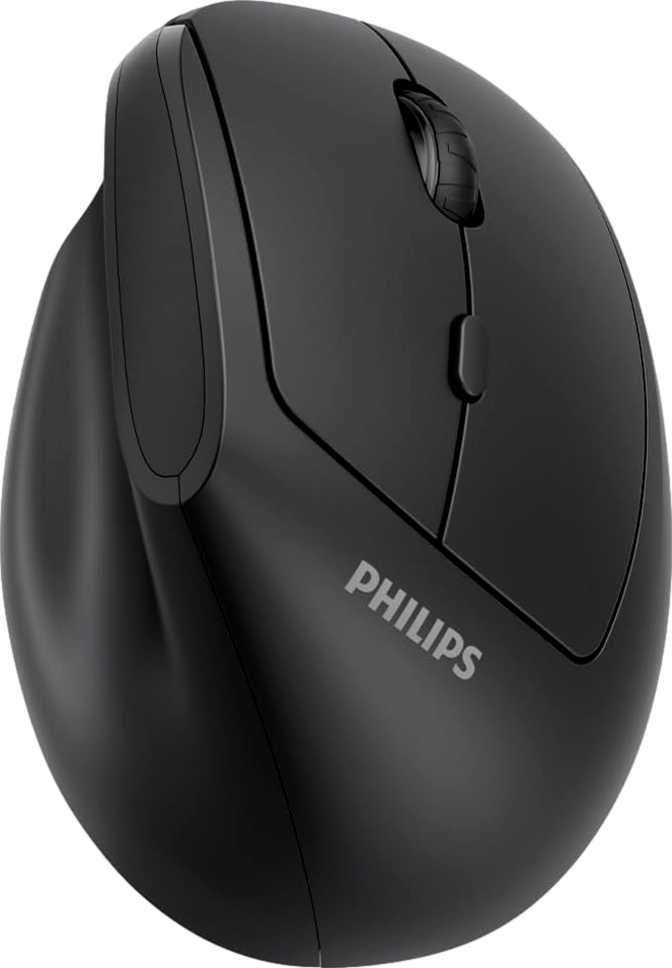
Shape & Fit
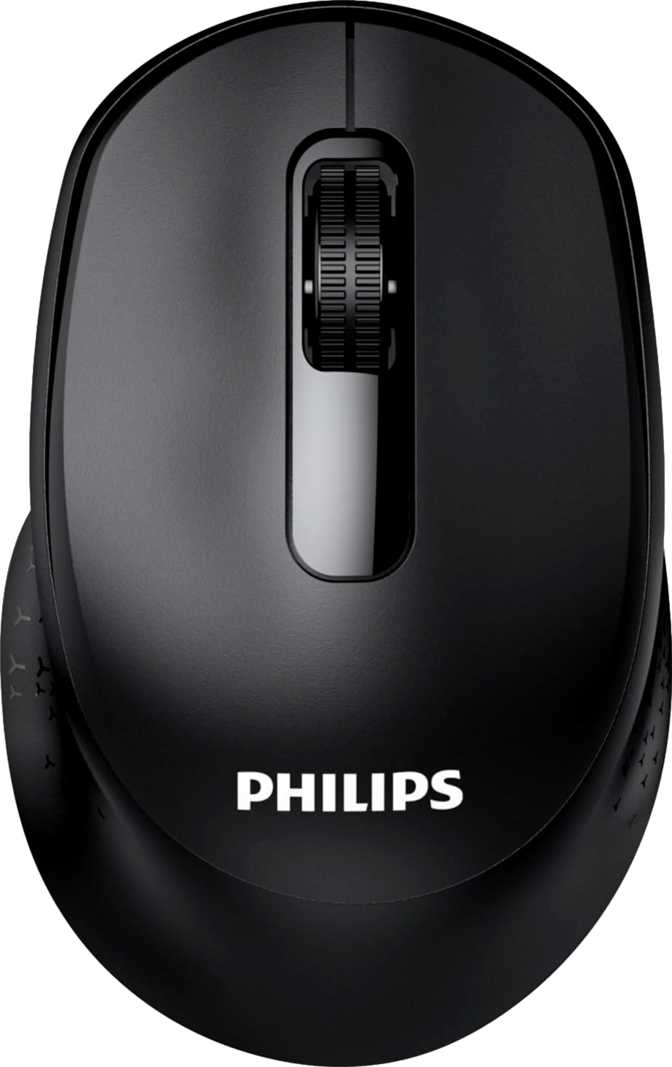
The SPK7628 is a full-size mouse — over 15 cm long and nearly 9 cm across — built for medium-to-large hands in a relaxed palm grip. The arched body distributes pressure evenly, reducing strain through long desk sessions.
The contoured shape, grip taper, and thumb button placement are tuned to the right hand. Left-handed users have no version of this design that works for them — that's a hard stop, not a caveat.
Weight
At 159 grams, this mouse is at the heavier end of the wireless productivity category. The extra mass comes primarily from the replaceable alkaline battery and generous chassis, not premium metal components.
Look & Finish
No RGB. No glossy accents. No visual noise. The SPK7628 is built to sit on a desk and work — clean and professional, in no way trying to look like gaming hardware.
Removing all lighting isn't a compromise — it's an engineering decision that feeds directly into the year-long battery life this mouse is built around. Every saved milliamp-hour goes toward longevity, not aesthetics.
Performance: What the Specifications Actually Mean
Sensitivity and Cursor Control
The SPK7628 offers two selectable sensitivity settings toggled by a dedicated button on top of the mouse. The lower setting handles precise, controlled cursor positioning; the higher covers the range most office users set and forget on a standard monitor.
This range handles every standard productivity task — email, documents, spreadsheets, browser navigation — without friction. Where it cannot follow you is into workflows that demand extended sensitivity: multi-monitor ultra-high-DPI setups, detailed photo editing at 100% zoom, or digital illustration.
Connection Quality: 2.4GHz via Dongle
The 2.4GHz wireless connection operates on its own dedicated radio channel, independent of Bluetooth traffic and system wireless negotiation. In practice it is indistinguishable from a wired mouse — no perceptible lag, no reconnection events, no handshake delays.
The reporting frequency is calibrated for desk work rather than gaming reflexes. This is a design decision, not a cost-cut — it's one of the three factors that make the year-long battery figure possible.
No Onboard Memory
The SPK7628 stores no settings on the mouse itself. Move to a different machine and it reverts to factory defaults. Single-workstation users: invisible limitation. Multi-machine users: this affects you every time you switch.
2.4GHz vs. Bluetooth
- Dedicated channel — no Bluetooth signal competition
- Plug-and-play — no OS-level pairing required
- Consistent latency unaffected by wireless load
- Requires one USB-A port for the receiver dongle
Battery Life: The Specification That Changes Everything
Under standard office conditions — daily use with natural rest periods — a single alkaline battery lasts approximately one full calendar year before needing replacement.
How Is This Achievable?
Three engineering decisions converge here. No RGB lighting — eliminated entirely, not dimmed or scheduled. A 2.4GHz radio tuned for efficiency over maximum throughput. And a reporting rate calibrated for desk work, not competitive gaming. Together, they reduce current draw to a level where a single alkaline cell sustains a full year of typical office use.
Replaceable vs. Rechargeable: Both Sides
Why It Works
- Dead battery — swap in seconds, keep working
- No cable ever required at any point
- No capacity degradation over time
- One spare in a desk drawer = zero downtime
Where It Frustrates
- Cannot use during "charging" — only replacement
- Requires keeping spare batteries on hand
- Conflicts with rechargeable-only device setups
- Single-use batteries aren't for everyone
Who This Mouse Is For
The SPK7628 was built for a specific type of user. Read both columns honestly before deciding.
This mouse works best when its limitations are invisible to your daily workflow.
- Office workers and remote professionals using a single dedicated workstation
- Users frustrated by wireless mice that interrupt work with low-battery warnings
- Right-handed users with medium-to-large hands who find compact mice uncomfortable over long sessions
- Anyone upgrading from a basic wired mouse who wants wireless without complexity
- Productivity-first workflows: documents, spreadsheets, email, browser navigation
Be honest about whether this mouse matches your actual workflow before purchasing.
- Left-handed users — no ergonomic accommodation exists for the left hand
- Gamers and creatives needing extended sensitivity range or high-speed response
- Multi-machine users who need settings to travel between computers
- Users committed to rechargeable-only devices who avoid single-use batteries
- Those with wrist concerns who need the lightest possible mouse to reduce fatigue
How the SPK7628 Compares
Positioned against typical alternatives in the same price and use-case range.
| Feature | Philips SPK7628 | Budget Wireless Mouse | Mid-Range Productivity |
|---|---|---|---|
| Battery Type | Replaceable | Replaceable or Rechargeable | Built-in Rechargeable |
| Battery Duration | ~1 Year | 2 – 6 Months | 40 – 70 Days |
| Sensitivity Range | Standard Office | Standard Office | Extended (4000+ DPI) |
| Total Buttons | 6 | 3 – 5 | 6 – 8 |
| Full Programmability | Partial only | ||
| Onboard Memory | 1 – 5 Profiles | ||
| RGB Lighting | Occasionally | Occasionally | |
| Weight | 159 g | 80 – 130 g | 95 – 145 g |
| Multi-Device Pairing | Rarely | Sometimes | |
| Connection Options | 2.4GHz only | 2.4GHz or Bluetooth | 2.4GHz & Bluetooth |
Comparison represents typical category characteristics, not any specific named product.
Honest Assessment
What It Does Well
The SPK7628's central achievement is removing a category of friction from your daily work life and then stopping requiring attention. Engineering out the RGB, tuning the wireless for efficiency, and calibrating the reporting rate for productivity creates a coherent power management system that delivers results a buyer can actually feel across an entire year of use.
Full programmability across all six buttons is stronger than the category norm. Without onboard storage it cannot travel between machines, but for a fixed workstation the customization depth here exceeds what you'd typically find at this positioning.
The product is also honest about what it is — Philips hasn't tried to paper over structural constraints with partial features. It works exactly as described, every time. That consistency is its own form of quality.
Where It Falls Short
At 159 grams, the SPK7628 is measurably heavier than most wireless mice in this category, which have collectively moved toward lighter designs. Coming from a modern sub-120g wireless mouse, you'll feel the difference. It's not painful — but it's noticeable, and for users with wrist sensitivities, it deserves honest consideration before purchase.
The single-device, no-memory architecture limits this mouse to one machine, one setup. No Bluetooth fallback. No portable settings. In a modern workplace where workers move between a home desk, an office, and shared spaces, this rigidity stands out against mid-range competitors that handle multi-device switching natively.
The non-rechargeable battery will either be a complete non-issue or a genuine frustration — depending entirely on how you feel about disposable batteries. There is no middle ground. That philosophical mismatch, if it exists, won't improve with excellent battery life.
Questions Buyers Ask Before Purchasing
Answers to what people actually search for — not what the box says.
Final Verdict
A Focused Tool for the Right Hands
The Philips SPK7628 makes a confident choice to be excellent at one thing rather than mediocre at many. For a right-handed office worker who wants a wireless mouse that works, stays out of the way, and removes battery management from their day entirely, it delivers on that promise convincingly.
The year-long battery isn't marketing inflation — it's the product of coherent engineering decisions: no RGB, efficient wireless protocol, calibrated power management. That's not a feature list; it's a design philosophy, and this mouse executes it well.
- You work at a dedicated desk on a single machine
- You are right-handed with medium-to-large hands
- Battery anxiety is a genuine pain point in your current workflow
- You want wireless freedom without ever reaching for a charging cable
- You are left-handed
- You need your settings accessible across multiple machines
- Low weight for ergonomics is your primary purchasing criterion
- Disposable batteries don't fit your setup, workflow, or values