Philips 32PFL6446/F7 32-Inch Smart TV: An Honest Full Review
TVsQuick Overview
The Philips 32PFL6446/F7 is not trying to be a flagship television. That is not a criticism — it is the most important thing to understand before reading anything else here. This is a compact smart TV built for specific situations: a bedroom, a dorm room, a kitchen counter, or a modest living space where a 55-inch screen would be physically absurd.
The moment you evaluate it as a primary lounge TV competing with 4K panels twice its size, you will be disappointed. Evaluate it as a do-everything secondary screen in a smaller space, and the picture changes considerably.
Our Rating
Secondary-Room Smart TV
Who Should — and Shouldn't — Buy This TV
The most critical factor in evaluating this television is context. It earns its place in some situations and falls short in others — often depending entirely on where and how it will be used.
A Good Fit For
- Bedroom or guest room setups where screen real estate matters less than a complete smart feature set
- Kitchens and small dining areas — wide viewing angles and an anti-glare coating handle variable lighting well
- Students and renters who need a fully capable smart TV in a compact, easy-to-move form factor
- Apple users who want AirPlay mirroring without a streaming stick or any additional hardware
- Cord-cutters who want built-in DVR recording from an antenna — no separate DVR box required
Not the Right Choice If
- You need a primary living room television — this screen is too small and too low-resolution for that role
- HDR content is a priority — no HDR10, HDR10+, or Dolby Vision support of any kind
- You plan to use it as a primary PC monitor for daily productivity work or reading dense text
- Your smart home ecosystem runs on Amazon Alexa — native voice integration is not available here
- Maximum image sharpness is your top priority — 1080p 32-inch alternatives exist and are worth comparing
Screen and Picture Quality: What 720p Means at 32 Inches
Resolution and Real-World Sharpness
This TV uses an HD resolution — 1,366 by 768 pixels — rather than the Full HD panels increasingly common at this size. At 31.5 inches, the trade-off becomes meaningful primarily at close viewing distances. Pixel density sits at around 50 pixels per inch, which means seated more than five or six feet away, individual pixels are not discernible during normal content.
Where the limitation shows up is in fine detail: text-heavy interfaces, sports broadcasts with dense scorecard overlays, and close-up scenes with intricate textures all look noticeably softer than they would on a Full HD panel of the same size. That is a real trade-off buyers should weigh before committing.
LED Panel Technology
The LED-backlit LCD panel delivers workable brightness for a room with controlled lighting. It is not an OLED — blacks are lit rather than absolute, and in a very dark room you may notice a faint glow behind shadowed scenes. In a normally lit bedroom or kitchen, this is a non-issue that most viewers will never notice.
The panel renders 16.7 million colors at 8-bit depth, covering standard dynamic range content completely. However, the 32PFL6446/F7 does not support HDR10, HDR10+, or Dolby Vision. Content mastered for high dynamic range will be tone-mapped to standard range — the TV will display it, but without the elevated brightness and expanded color volume that HDR-capable panels deliver.
Viewing Angles and Glare Handling
The viewing angles extend to 178 degrees both horizontally and vertically — genuinely wide, meaning the image holds its color accuracy when watched from the side or from below. This matters for a TV positioned on a kitchen counter or mounted high on a bedroom wall. The anti-reflection coating and ambient light sensor work in tandem: the coating cuts window glare while the sensor adjusts brightness automatically as room lighting changes. These are underrated practical features that make a real difference in daily use.
| Panel Type | LED-Backlit LCD |
|---|---|
| Resolution | 1366 × 768 (720p) |
| Pixel Density | ~50 ppi |
| Color Depth | 8-bit / 16.7M colors |
| Refresh Rate | 60Hz |
| Viewing Angle H/V | 178° / 178° |
| Anti-Reflection | Yes |
| Ambient Light Sensor | Yes |
| HDR Support | None |
| Adaptive Sync | None |
This TV does not support HDR10, HDR10+, or Dolby Vision. Streaming services that serve HDR content will display it at standard dynamic range. If HDR is important to you, this is a hard blocker — not a minor omission.
Smart Features: A Surprisingly Complete Platform
For a secondary-room television, the built-in smart platform here is more complete than most buyers at this price point would expect.
AirPlay Built-In
Mirror or cast directly from iPhones and iPads without a streaming stick, adapter, or extra app setup.
Google Assistant
Full voice control for search, volume, and smart home commands — built into the TV itself.
USB Recording
Record live broadcast TV to a USB drive — a built-in DVR that eliminates the need for any separate box.
Miracast Support
Android device screen mirroring is built in, covering the opposite ecosystem from AirPlay without extra hardware.
The Smart Platform in Detail
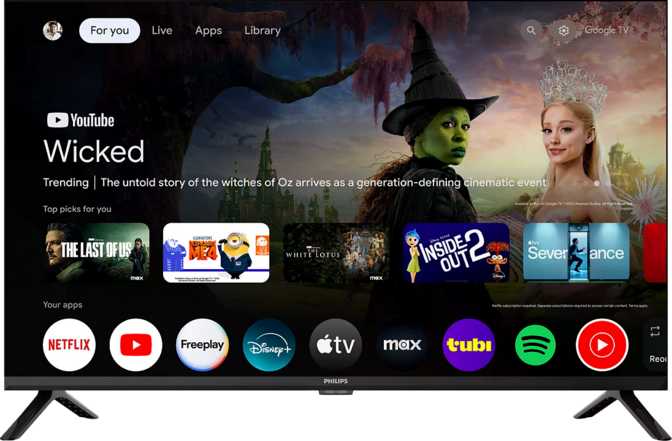
The 32PFL6446/F7 includes a full smart TV platform with a built-in web browser, voice command support, and a streaming app ecosystem. This is not a stripped-down smart interface — you get app access, search functionality, and a usable browsing experience on a compact screen.
The smartphone remote app allows a phone to function as a complete replacement for the physical remote. Useful for households where the remote has a habit of disappearing, and a practical fallback for anyone who prefers typing search queries on a phone keyboard rather than navigating an on-screen layout.
Google Assistant integration enables voice-controlled search, playback, volume adjustment, and smart home device control — provided your home ecosystem runs on Google's platform. One gap worth flagging: Amazon Alexa compatibility is absent. If your household relies on Alexa, the TV will not respond to it. Apple HomeKit and Siri are similarly unsupported, so voice integration runs through Google only.
The USB recording feature deserves a specific callout. Connect a USB storage drive and the TV records live broadcast television directly — no DVR or set-top box needed. For cord-cutters running an antenna for local channels, this is a built-in recording solution. One caveat: the single USB port cannot simultaneously record and serve media playback from a different drive.
- Built-In Smart TV Platform
- AirPlay (Apple Devices)
- Miracast (Android Mirroring)
- Google Assistant
- Voice Commands
- Smartphone Remote App
- USB Live Recording
- Built-In Web Browser
- Sleep Timer
- Child Lock
- Amazon Alexa
- Apple HomeKit / Siri
- Rechargeable Remote
Connectivity: Better Than Expected, With One Constraint
The port selection and wireless capabilities here exceed the category average — largely thanks to HDMI 2.1 at this size and price bracket.
HDMI 2.1
2 ports with ARC and eARC — high-quality audio return to soundbars over a single cable
Wi-Fi 5
Dual-band support (2.4GHz + 5GHz) for stable streaming on modern routers
Wired Ethernet
RJ45 port for a stable, low-latency connection — always preferred over Wi-Fi for consistent streaming
3.5mm Jack
Headphone output for private listening — especially relevant on a bedroom TV used late at night
HDMI 2.1 and eARC: Why It Actually Matters
Two HDMI 2.1 ports on a 720p television might seem like infrastructure overkill, but the meaningful benefit here is not bandwidth — it is eARC, the Enhanced Audio Return Channel. eARC allows uncompressed or lossless audio to travel from the TV back to a soundbar or AV receiver over a single HDMI cable, something standard ARC cannot do.
In practical terms: if you add a soundbar to this setup — which is advisable given the built-in speakers — the eARC connection handles it at a higher audio quality level than most TVs in this size range support. Both ARC and eARC are available. A Digital Optical Out port is also present as an alternative for older audio equipment.
The single USB port is the tightest bottleneck in the layout. When it is occupied by a recording drive, USB media playback becomes unavailable simultaneously. This is a minor inconvenience for most use cases, but it is worth planning around before finalizing your setup.
| Connection | Qty | Notes |
|---|---|---|
| HDMI 2.1 | 2 | ARC + eARC included |
| USB-A | 1 | Media & recording |
| Ethernet (RJ45) | 1 | Wired internet |
| Digital Optical Out | 1 | External audio |
| 3.5mm Headphone Jack | 1 | Private listening |
| Wi-Fi (2.4 + 5GHz) | Built-In | Wi-Fi 4 + Wi-Fi 5 |
| Bluetooth | Built-In | Wireless peripherals |
Audio Performance: Functional, Not Impressive
The built-in speakers handle casual viewing adequately. For anything beyond that, external audio is a strong recommendation.
The built-in stereo speakers apply Dolby Audio processing, which handles dynamic range adjustments and boosts dialogue clarity on standard content. For news, background streaming, and daytime television, this is workable without complaint.
The audio chain stops there. No Dolby Atmos, no DTS processing of any kind, no dedicated subwoofer. Low-frequency response — bass — will be thin in absolute terms. This is not a character flaw specific to Philips; it is a physical consequence of fitting speakers into a cabinet that weighs under four kilograms. Physics applies to all manufacturers equally at this form factor.
The practical path forward is a soundbar. The eARC-enabled HDMI port makes adding one clean and straightforward — a single cable handles both picture input and audio return at high quality. The TV's infrastructure is genuinely well-suited for this upgrade, and a basic soundbar alongside this TV dramatically changes the audio experience for everyday viewing.
The HDMI eARC port delivers uncompressed audio to a connected soundbar over a single cable — a level of audio infrastructure rarely found at this screen size and price.
- Stereo Speakers
- Dolby Audio Processing
- Digital Optical Out
- HDMI ARC + eARC
- Dolby Atmos
- DTS (any format)
- Built-In Subwoofer
Build, Design, and Physical Footprint
Compact and light enough for a single person to handle, with VESA support for permanent wall installation in any orientation.
Dimensions and Handling
At approximately 71 centimeters wide and 42 centimeters tall, this TV fits comfortably on a dresser, nightstand, or kitchen shelf. The weight of under 3.5 kilograms means a single person can reposition or wall-mount it without assistance — a practical advantage in secondary spaces where installations often happen without help.
The cabinet runs around 71mm deep, which is on the thicker side for a modern LED television. On a surface, that extra depth is invisible. On a wall mount, it means the TV sits slightly further from the wall than ultra-thin flagship panels — cosmetically irrelevant for any secondary-room installation.
VESA mounting compatibility opens up kitchen-wall, bedroom-wall, and under-cabinet placement options. Standard third-party VESA mounts work with this TV, and at this weight, hardware requirements are minimal.
Everyday Living Details
The child lock allows parents to restrict channel access, inputs, or settings — useful for a TV placed in a child's bedroom. The sleep timer powers the TV off automatically after a set duration, a genuinely practical feature on a bedroom television where falling asleep mid-stream is a nightly reality for many users.
Standby power draw is impressively economical at 0.5 watts. Left plugged in around the clock for a full year, it consumes less than 5 kilowatt-hours in standby mode — essentially invisible on any energy bill.
| Width | 718.8 mm (71.9 cm) |
|---|---|
| Height | 421.6 mm (42.2 cm) |
| Depth | 71.1 mm (7.1 cm) |
| Weight | 3,493 g (~3.5 kg) |
| VESA Mount | Supported |
| Standby Power | 0.5W |
| Operating Temp | 5°C — 40°C |
| Child Lock | Included |
| Sleep Timer | Included |
How It Compares to the Alternatives
Understanding what you gain and what you give up relative to the closest alternatives is essential before committing to any television in this category.
| Feature | Philips 32PFL6446/F7 | Budget 32” Rival | Mid-Range 40” Step-Up |
|---|---|---|---|
| Resolution | 720p HD | 720p or 1080p | 1080p Full HD |
| HDR Support | None | None or HDR10 | HDR10 common |
| HDMI Version | 2.1 + eARC | 1.4 or 2.0 | 2.0 typical |
| AirPlay | Yes | Rarely included | Sometimes |
| USB Recording | Yes | Uncommon | More common |
| Wi-Fi | Dual-Band Wi-Fi 5 | Single-band often | Dual-band |
| Screen Size | 31.5” | 32” | 40–43” |
HDMI 2.1 with eARC and built-in AirPlay are genuine technical advantages over most budget 32-inch rivals. These are not marginal differences — they represent real, practical upgrade pathways for both audio and device integration that competitors at this size often skip.
The 720p resolution is where certain competitors draw level or overtake — a 1080p 32-inch panel delivers noticeably sharper text and fine detail. That option exists at this screen size, and it is the primary reason to shop around before deciding.
Honest Assessment: Strengths and Weaknesses
A review's credibility rests on stating both sides clearly. Here is what the Philips 32PFL6446/F7 genuinely does well — and where it falls measurably short.
Where It Succeeds
The connectivity infrastructure is the strongest argument for this TV. HDMI 2.1 with full eARC support runs ahead of the peer group and future-proofs the audio chain in a way that standard ARC ports cannot. Adding a quality soundbar becomes clean and straightforward rather than a compromise of cables and adapters.
AirPlay integration at this size and price point is not a given — its presence meaningfully simplifies the Apple ecosystem experience. Casting from an iPhone or mirroring an iPad works without a streaming stick or separate device plugged into a port.
USB live recording turns this TV into its own DVR — a cost-saving, practical feature for anyone using an over-the-air antenna for local channels. The sleep timer, child lock, and ambient light sensor combine into a set of everyday features that make the TV comfortable to actually live with in a secondary space, rather than just adequate on a spec sheet.
Dual-band Wi-Fi 5 keeps the wireless connection stable on modern routers, and the 178-degree viewing angles ensure consistent picture quality from the side — a meaningful benefit in kitchens and smaller rooms where everyone rarely sits in exactly the right spot.
Where It Falls Short
The 720p resolution is the most significant limitation, and it deserves plain language. A 1080p panel at 32 inches is achievable in this category, and Full HD delivers a noticeably crisper image — particularly for text, fine detail, and content viewed at closer range. If image sharpness ranks as the top priority, a competing 1080p set is worth investigating before committing here.
The complete absence of HDR support is the second hard limitation. Streaming platforms now serve HDR content routinely, and while the TV will display it — tone-mapped down to standard range — viewers accustomed to HDR on other devices will notice the gap in peak brightness and shadow depth.
The built-in audio needs external reinforcement for anything beyond casual background viewing. The speakers handle dialogue and light content adequately, but low-frequency response is thin and the soundstage is narrow. This is not unique to Philips at this form factor, but it is a consistent limitation buyers should budget around.
The single USB port creates a mild but real inconvenience — recording and media playback cannot run simultaneously. And Alexa users will find no native voice integration, which matters in households where Amazon's voice ecosystem is the ambient control layer throughout the home.
Questions Real Buyers Ask Before Purchasing
The most common questions searched before buying a compact smart TV in this category — answered directly and without padding.
Final Verdict
The Philips 32PFL6446/F7 earns a clear recommendation for buyers who genuinely need a compact smart TV for a secondary space — and an equally clear caution for anyone expecting living room performance from a secondary-room purchase.
Its strongest arguments are practical ones. HDMI 2.1 with eARC future-proofs the audio chain for a soundbar upgrade at high quality. AirPlay simplifies Apple device casting without extra hardware. USB recording adds DVR functionality at no additional cost. The anti-reflection coating and ambient light sensor handle real-room lighting conditions without asking anything of the user. These features do not appear on every sub-40-inch television, and they matter in the daily rhythms of a secondary room.
The 720p resolution is the one factor that may push certain buyers toward a competing 1080p 32-inch model. If the sharpest possible image at this screen size is the top priority, that comparison is worth making before committing. If connectivity quality, smart platform depth, AirPlay integration, and practical features like USB recording weigh more heavily in your decision — the Philips earns its place in a bedroom, dorm, or kitchen without reservation.
Buy It If
- You need a bedroom, kitchen, or dorm-room TV
- AirPlay or USB recording are features you will use regularly
- You plan to add a soundbar and want eARC quality from day one
- Your household ecosystem runs on Google or Apple
Skip It If
- This is your primary living room television
- HDR content or 1080p sharpness are non-negotiable
- Your smart home relies on Amazon Alexa for voice control