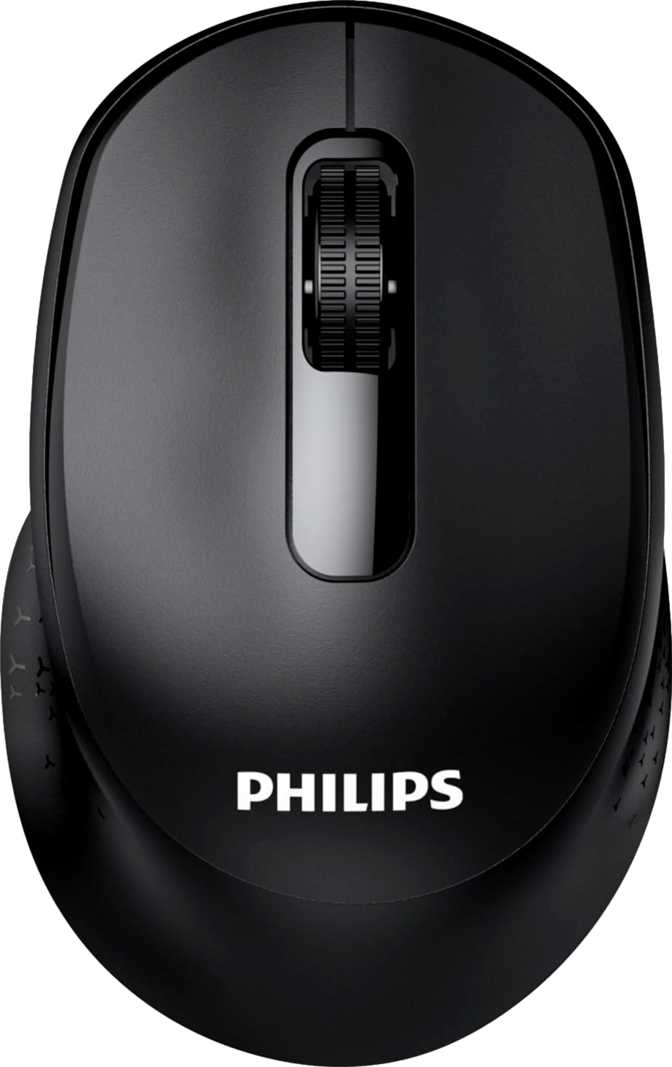
Philips SPK7448B Review: An Honest Look at This Wireless Mouse
MiceMost wireless mice ask you to think about them constantly — charge them overnight, pair them through a fiddly app, remember which of six buttons does what. The Philips SPK7448B takes the opposite approach. It strips the mouse down to the controls people actually use every day, then builds the rest of the design around lasting as long as possible without maintenance. Whether that trade-off works for you depends entirely on what you do at your desk, and that's exactly what this review breaks down.
Connectivity
2.4GHz & Bluetooth 5.2
Battery Life
Up to 1 Year
Buttons
3 Essential Controls
Sensitivity
1600 DPI, Fixed
Weight
109g, Compact
Design and Everyday Feel
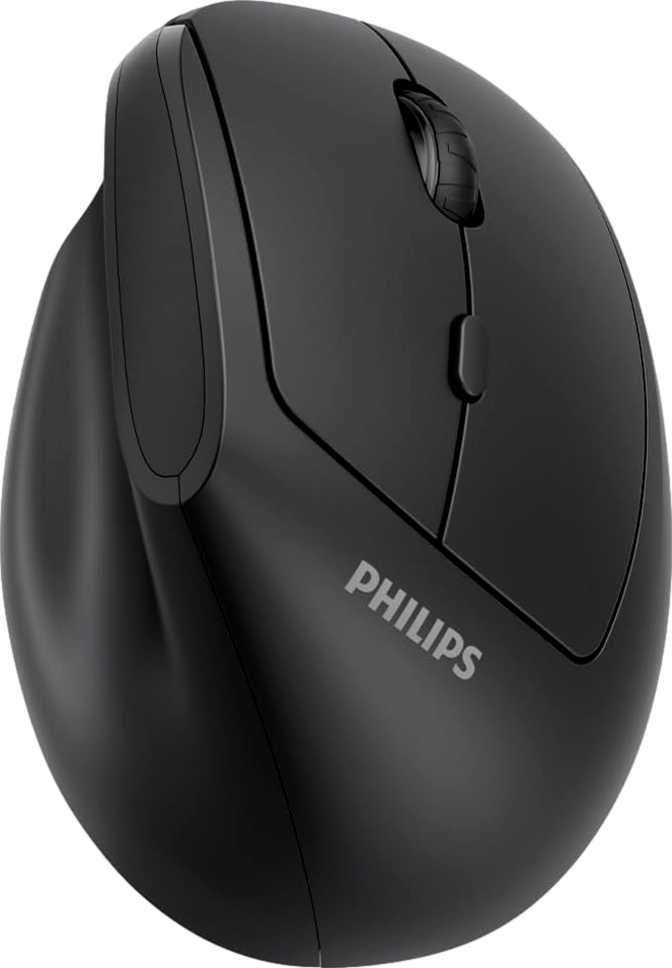
Pick this mouse up and the first thing you'll notice is how little space it takes up. At roughly 103mm long, 65mm wide, and 39mm tall, it sits closer to the compact end of the mouse spectrum than the full-size ergonomic mice many people are used to. That's a deliberate sizing choice, not a budget shortcut — a smaller footprint means it slides easily into a laptop bag or desk drawer, and it tends to suit smaller hands and fingertip or claw grips better than it suits a full palm grip. If you have larger hands and prefer a mouse that fills your whole palm for hours-long sessions, this compact shape will feel a little snug by comparison.
The body is molded specifically for right-handed use, with a contoured shape rather than a symmetrical one. That means better thumb support and a more natural resting position if you're right-handed, but there's no ambidextrous or mirrored option here — left-handed users should look elsewhere.
At 109 grams, it sits in a comfortable middle weight class: noticeably more substantial than the ultralight gaming mice that shave every gram possible, but nowhere near heavy enough to cause fatigue during normal use. Some of that weight comes from the removable battery compartment, which is the trade-off for not having a built-in rechargeable cell.
Visually, there's no RGB lighting anywhere on this mouse, and that's intentional rather than a missing feature. Lighting is one of the biggest battery drains in any wireless peripheral, and Philips clearly prioritized longevity over aesthetics here. The scroll wheel is also a simple vertical-only design — there's no tilting or thumb-operated horizontal scroll, so wide spreadsheets or timeline-heavy editing software won't get the side-to-side scrolling shortcut some users rely on.
Build Snapshot
- Orientation
- Right-handed only
- Length
- 103 mm
- Width
- 65 mm
- Height
- 39 mm
- Weight
- 109 g
- RGB Lighting
- None
- Scroll Wheel
- Vertical only
Sensor Performance: What the Numbers Actually Mean for You
Specification sheets throw around terms like DPI and polling rate without explaining why they matter, so let's translate them into real usage.
DPI: Cursor Sensitivity
DPI (dots per inch) controls how far your cursor travels across the screen relative to how far you physically move the mouse. The SPK7448B runs at a fixed 1600 DPI, which lands in a genuinely comfortable middle ground — precise enough for clicking small UI elements, navigating spreadsheets, and general browsing, without feeling overly twitchy or sluggish on standard monitor resolutions. The catch is that "fixed" means exactly that: there's no on-mouse button to bump sensitivity up or down on the fly. If 1600 DPI feels too fast or slow for your specific screen setup, you'll need to adjust pointer speed through your operating system's settings instead, and that adjustment will apply globally rather than letting you switch instantly between a fast setting for browsing and a slower one for detail work. For everyday productivity tasks, this rarely matters. For users who frequently move between multiple monitors with different resolutions, or who do precision work like photo retouching, it's a real limitation worth knowing about upfront.
Polling Rate: Response Timing
Polling rate determines how often per second the mouse reports its position to your computer — in this case, 125 times per second, or once every 8 milliseconds. Gaming mice often push this to 1000Hz (every 1 millisecond) because competitive shooters reward instant reaction time. For typing, clicking, scrolling, and browsing, the difference between 125Hz and 1000Hz is imperceptible to the vast majority of users. What 125Hz does buy you is meaningfully better battery efficiency, since a mouse polling less frequently draws less power — a detail that becomes very relevant once you see this mouse's battery numbers below.
Connectivity: Two Ways to Pair, Zero Software Required
The SPK7448B supports both 2.4GHz wireless and Bluetooth 5.2, and the combination is more useful in practice than it might sound on paper.
The 2.4GHz connection relies on a small USB receiver and offers a stable, low-latency link — the kind of connection that just works the moment you plug the receiver in, with no pairing menus to navigate. Bluetooth 5.2, on the other hand, connects directly to laptops, tablets, and ultrabooks without consuming a USB port at all, which matters more than ever on thin laptops that only have one or two ports to spare. Bluetooth 5.2 itself is a relatively current standard, meaning better power efficiency and more stable range than older Bluetooth versions you'll still find on cheaper mice.
Because the mouse supports both modes, it can stay paired to two devices at once — say, your desktop via the 2.4GHz receiver and your personal laptop via Bluetooth — and you switch between them without re-pairing each time. For anyone splitting time between a work machine and a personal one, that's a genuinely practical convenience rather than a spec-sheet checkbox.
There are zero onboard memory profiles, which confirms there's no companion software or driver layer to install. This is a true plug-and-forget mouse. That's a feature if you dislike bloated peripheral apps, and a limitation if you were hoping to customize button behavior or save settings — there simply isn't anything here to customize.
Battery Life: Built for People Who Forget Batteries Exist
~1 Year
Rated continuous battery life
This is where the SPK7448B genuinely stands apart. Its rated battery life works out to roughly a full year of continuous, nonstop operation — not a typical workday's use, but the mouse running around the clock without a single recharge. Translate that into realistic usage patterns — an 8-hour workday, five days a week — and you're looking at a battery that should comfortably outlast the warranty period of most other peripherals you own before it needs attention.
How does it get there? A combination of deliberate restraint: no RGB lighting draining power in the background, a modest 125Hz polling rate instead of an aggressive 1000Hz, and no extra buttons or sensors constantly being polled. Every design choice that might seem like a limitation elsewhere is actually working toward this one number.
The bigger structural decision is that this battery is removable but not rechargeable. When it eventually runs low, you swap in a fresh standard battery rather than plugging in a cable and waiting. There's no "use while charging" mode here for the simple reason that there's no charging involved at all. The upside is obvious: no charging cable to lose, no anxiety about remembering to plug it in, and a battery you can replace anywhere that sells batteries, even while traveling. The downside is just as real: over several years, you'll be buying replacement batteries rather than charging the same internal cell for free, and that's an ongoing cost — plus a disposal consideration — that rechargeable mice don't carry. If you've ever been frustrated mid-task by a mouse dying with no charger in sight, this trade-off is the entire point of the product.
Who This Mouse Is Actually For
You'll Be Happy With It If You
- Use a computer primarily for browsing, documents, spreadsheets, and everyday office or study tasks rather than gaming or creative work
- Split your time between two devices, like a desktop and a laptop, and want to switch between them without re-pairing
- Are tired of charging mice every few weeks and want something you can genuinely forget about for the better part of a year
- Prefer a mouse that works the instant you connect it, with no app, driver, or setup process
- Have smaller-to-average sized hands or simply prefer a more compact mouse
You Should Look Elsewhere If You
- Game competitively or casually and want adjustable DPI stages or a higher polling rate for faster response
- Rely on side buttons or programmable shortcuts for productivity or browser navigation
- Are left-handed and need a mouse shaped for your dominant hand
- Want RGB lighting or a more premium, feature-rich aesthetic
- Frequently work with wide spreadsheets or timelines and want horizontal scrolling
How It Stacks Up Against Other Wireless Productivity Mice
| What Matters | Typical Rechargeable Wireless Mouse | Philips SPK7448B |
|---|---|---|
| Battery approach | Built-in lithium cell, usually needs charging every few weeks to a couple of months | Removable, non-rechargeable battery rated for roughly a year of continuous use |
| Sensitivity | Often adjustable across multiple DPI stages via a button or software | Fixed at 1600 DPI, adjusted only through OS pointer settings |
| Button count | Frequently 5 or more, including side and programmable buttons | 3 essential buttons only — left, right, and scroll click |
| Connectivity | Usually offers one wireless mode, either 2.4GHz or Bluetooth | Offers both 2.4GHz and Bluetooth 5.2, switchable between two paired devices |
| Software requirement | Often needs a companion app for full customization | None required — fully plug and play |
The pattern here is consistent: this mouse trades flexibility and extra controls for reliability and low maintenance. Mice in the same price bracket that offer adjustable DPI and extra buttons typically ask you to recharge more often and, in many cases, install software to unlock their full feature set. Whether that trade is worth it comes down to how much you value not thinking about your mouse at all.
Strengths and Weaknesses, Honestly
What Stands Out
The standout strength here isn't a single spec — it's the coherence of the whole design. Every choice, from the absence of RGB lighting to the conservative polling rate, serves the same goal of long-term reliability without maintenance, and it succeeds at that goal convincingly. The dual connectivity is a genuine practical advantage for anyone who moves between two computers regularly, letting you keep one mouse paired to both without constantly re-pairing through a Bluetooth settings menu. The compact, lightweight build also makes it an easy mouse to toss in a bag for travel or hybrid work without a second thought.
Where It Falls Short
Three buttons with no programmability will frustrate anyone who has gotten used to side-button browser navigation or app-specific shortcuts, and there's no way to add that functionality later since it isn't a software limitation — it's a hardware one. The fixed 1600 DPI works fine for most people most of the time, but it removes a layer of control that even modestly priced mice in other categories often include. And while a removable battery avoids charging-cable anxiety entirely, it does shift the ongoing cost from free electricity to periodically buying batteries, which matters if you're trying to minimize long-term spending or environmental impact.
None of these are flaws so much as the direct cost of the simplicity this mouse is built around — but they're real, and a buyer should walk in knowing them.
Frequently Asked Questions
The Philips SPK7448B Is a Confident Pick for Low-Maintenance Productivity
The Philips SPK7448B isn't trying to be everything to everyone, and that focus is exactly what makes it work. If your daily computer use is browsing, documents, email, and general office tasks, and you're tired of recharging mice or dealing with peripheral software you never asked for, this is a genuinely smart, low-maintenance choice that will quietly do its job for the better part of a year without asking anything of you. The dual 2.4GHz and Bluetooth connectivity is a real, practical bonus for anyone juggling two devices, and the compact build travels well.
Where it falls short is just as clear: gamers, power users who lean on extra buttons, left-handed users, and anyone who wants adjustable sensitivity will find the feature set too limited. If that's you, this isn't the mouse to buy. But for the much larger group of everyday users who just want a mouse that works reliably, connects easily, and doesn't demand attention — this is a confident, well-reasoned recommendation.