Lenovo G701 Review: A Multi-Device Wireless Gaming Mouse That Delivers
MiceOverall Score
out of 10
In a market where gaming peripherals routinely compete on light shows and feature lists most users never fully exhaust, the Lenovo G701 makes a quieter argument: that consistent wireless performance, meaningful battery endurance, and the freedom to connect to whatever machine you happen to be at are worth more than specification maximalism. It is a mouse built for players who move between devices, multi-device professionals who also game, and the sizable community of left-handed users who find most gaming mice designed for one hand only.
The G701's proposition centers on tri-mode connectivity — 2.4GHz wireless, Bluetooth 5, and a wired USB option — packed into an ambidextrous body that weighs roughly 85 grams and carries no RGB lighting. That combination is less common in gaming mice than the headline feature list might suggest. Whether the execution makes it a genuinely practical daily driver, or simply a product that checks boxes on paper, is what this review settles.
Design and Physical Experience
Shape, Ergonomics, and Who It Fits
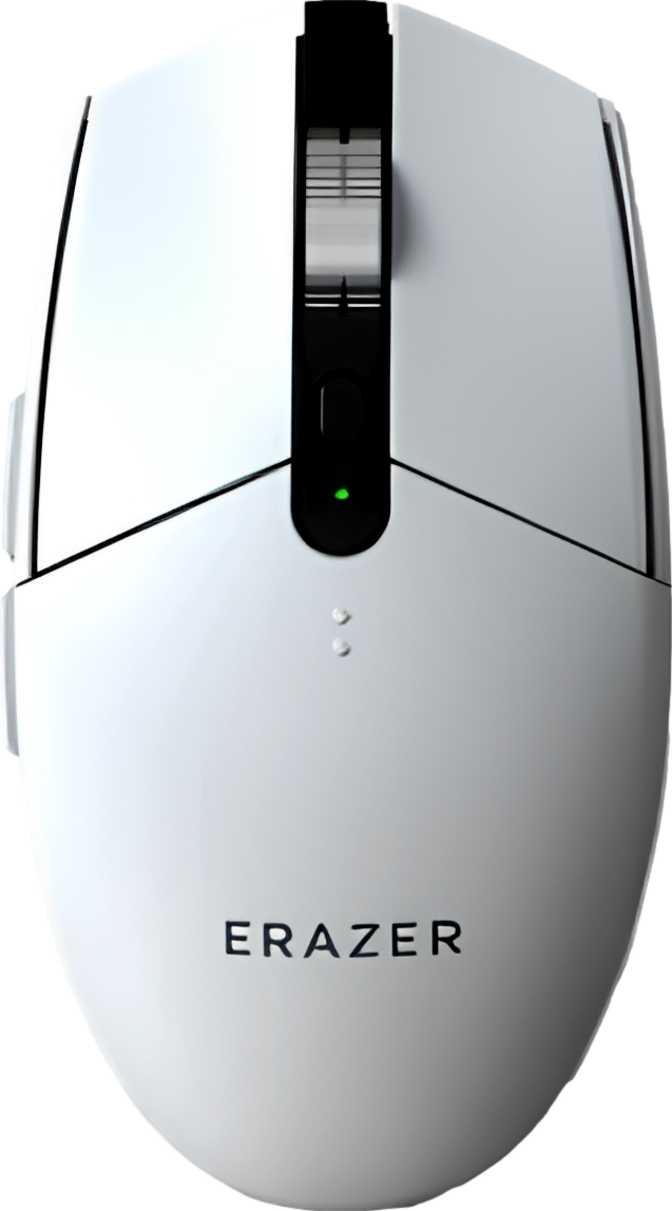
The G701 is built symmetrically — no pronounced thumb shelf, no flared right side, no ergonomic bias toward either hand. This ambidextrous form factor makes it one of the few gaming mice that treats left-handed users as a first-class consideration rather than an afterthought.
In terms of physical proportions, the G701 sits in the compact-to-medium category. It is shorter and narrower than the large-bodied ergonomic mice favored by palm-grip users with bigger hands, but substantial enough that it does not feel toy-like in the hand. Claw and fingertip grip users will feel most naturally at home — the shape encourages your fingers to arc over the buttons rather than flatten across the back of the body. Palm grip is workable for average to smaller hands; users with larger hands who prefer to rest their entire palm on the mouse may find the proportions slightly limiting.
Left-handed buyers: verify which side of the body the two thumb buttons sit on before purchasing. Some ambidextrous gaming mice place side buttons only along one flank, which would make the design less functional for left-hand use despite the symmetrical shape.
Weight and Handling Feel
At approximately 85 grams, the G701 occupies a comfortable middle ground. It is not in the ultra-lightweight category that certain competitive players pursue — mice engineered below 60 grams through honeycomb shells and minimal internals have their own dedicated following — but 85 grams carries a substantial, purposeful feel in the hand that many players genuinely prefer over lighter designs.
There is no system for adjusting that weight. No removable ballast compartment, no swappable panels. If 85 grams matches your preference, this is a non-issue. If you have a strong preference for something heavier or lighter, the G701 offers no accommodation.
Aesthetic and Build
The most immediately noticeable design choice is the complete absence of RGB lighting. For buyers who associate gaming hardware with glowing accents and zone-based color customization, the G701 will look understated to the point of plainness. For everyone else — office environments, laptop users who work across different settings, or anyone who prefers a professional desk aesthetic — this restraint is an asset.
The G701 fits on a work desk as naturally as a gaming setup and does not announce itself as a gaming peripheral in mixed-use contexts. That aesthetic decision is also an engineering one: the absence of onboard lighting directly contributes to the G701's battery endurance. The included cable runs long enough to cover most standard desk-to-PC distances and serves dual purpose — charging the mouse and providing a wired connection when needed.
Sensor Performance: What the Numbers Actually Mean
The PAW3311 in Context
The G701 is powered by the PixArt PAW3311, an optical sensor that positions this mouse firmly in the mid-range performance tier. This is not a flagship competitive sensor — those are found in mice priced considerably higher — but the PAW3311 is a stable, well-understood performer that handles the full range of everyday gaming scenarios without meaningful compromise.
For the overwhelming majority of gamers across casual shooters, strategy titles, action-RPGs, and productivity use, the PAW3311 delivers accurate, consistent tracking that simply works.
DPI Range and Sensitivity
The G701's sensitivity spans from a tight, precise end suited to sniper scopes and detailed editing, all the way to a high ceiling covering multi-monitor workflows and fast-panning strategy games. The full spectrum covers any conventional use case without artificial constraints.
A persistent misconception worth addressing: higher maximum DPI does not mean better performance. Professional esports players commonly use settings deep in the lower-to-middle portion of what their hardware offers — high sensitivity amplifies hand tremor as readily as intentional movement. The dedicated DPI switching button lets you cycle configurations mid-session.
Polling Rate and Responsiveness
The G701 reports its position to the computer every single millisecond — the current standard for gaming mice. Standard productivity mice report their position eight to twenty-four times less frequently, producing a noticeably less responsive cursor feel that becomes obvious the moment you switch back.
Ultra-premium competitive mice offer polling rates several times faster, though the real-world benefit remains genuinely contested. Most players cannot perceive the difference in actual gameplay. The G701's polling rate is well within the range where additional speed returns nothing perceptible under real conditions.
Connectivity: Three Modes, One Mouse
The G701's most distinctive practical feature is its tri-mode connectivity. Each mode serves a distinct situation rather than simply padding the feature count.
2.4GHz Wireless
The default choice for any active gaming session. Connecting via a USB dongle, this mode delivers low-latency performance functionally indistinguishable from a wired connection during gameplay. The 2.4GHz band provides a stable, interference-resistant signal across typical desk distances without dropout under normal conditions.
Best for serious gamingBluetooth 5
Trades absolute minimum latency for dongle-free convenience. Pair to a laptop in a meeting room, a secondary work machine without a free USB port, or any device where you want the mouse connected without a physical adapter. Bluetooth 5's improved range and reliability make it a genuinely usable option — not an emergency fallback.
Best for multi-device workWired USB
Covers two specific scenarios cleanly: charging the mouse without interrupting use, and environments where wireless peripherals are restricted or impractical. The ability to plug in and continue gaming without any interruption means the wireless experience has no hard stop — reach for the cable and keep going.
Best as a charging fallbackBattery Life and Charging
The G701 stretches past 85 hours on a single charge — a figure that holds up under real-world scrutiny once you translate it into actual usage patterns. For a player logging six to eight hours of gaming daily, that is well over a week of use before the battery asks for attention. For someone splitting time between gaming sessions and lighter productivity use — especially using Bluetooth for the latter — a single charge can realistically last two to three weeks.
This endurance is partly a consequence of deliberate design choices. Onboard RGB lighting is a consistent and significant battery drain in wireless gaming mice. By building the G701 without lighting, Lenovo converts what looks like a feature omission into a meaningful performance advantage.
The rechargeable battery is built in and not user-replaceable. The 85-plus-hour baseline makes unplanned battery death a genuinely rare scenario for any user who charges with even loose regularity, but the long-term service life of any built-in rechargeable battery depends on how it degrades over charge cycles — a consideration common to all non-replaceable wireless peripherals.
Battery at a Glance
-
Heavy Gamers (6–8 hrs/day)
Over a week per charge
-
Mixed Use (gaming + productivity)
Two to three weeks per charge
-
Use While Charging
Full functionality via cable — zero downtime
-
Battery Replacement
Internal, non-removable — plan for long-term ownership
Controls, Customization, and Onboard Memory
The G701 offers six buttons across the entire body, and every one of them is programmable — a complete set that covers the practical needs of most gamers and productivity users without overloading the physical layout.
6
Total Buttons
6
Fully Programmable
2
Side Buttons
1
Onboard Profile
What the Buttons Let You Do
The full button complement consists of the two primary click buttons, a scrollwheel press, a DPI cycling button, and two side buttons accessible by the thumb. Every one of these is assignable through software — macros, application shortcuts, media controls, or game-specific commands can be distributed across the full set. For users who split the G701 between gaming and creative or productivity work, this programmability extends the mouse well beyond a single-use peripheral.
The DPI switching button lets you cycle through your configured sensitivity levels directly on the mouse — being able to lower sensitivity for a precision shot or toggle to higher for panning across a strategy map is a real quality-of-life feature that disappears quickly into muscle memory.
What Single-Profile Onboard Memory Means
The onboard memory stores one saved configuration directly on the mouse hardware. When you connect the G701 to a different machine — a work laptop, a friend's PC, a secondary workstation — your button assignments and sensitivity settings travel with the mouse without needing to reinstall any software.
The limitation is the single-profile constraint. There is no button on the mouse body to cycle between different saved configurations. Users who maintain significantly different setups for different contexts will need to make manual software adjustments when switching. For the majority of users, one well-configured profile is entirely sufficient. For power users who want instant hardware-level profile switching, this is a genuine gap.
Real-World Usage: Who This Mouse Is For
This Mouse Is For
- Multi-device users — game on a desktop PC and work from a laptop without carrying separate mice or multiple dongles
- Left-handed gamers — a genuinely symmetrical shape that is both functional and wireless, a rare combination in this segment
- Travelers and remote workers — connects to hotel displays over Bluetooth, pairs to a work laptop, and switches to 2.4GHz for evening gaming sessions
- Casual and intermediate gamers — suits third-person action, strategy, MOBAs, RPGs, and casual shooters without friction
- Clean-desk professionals — no RGB, no visual noise, fits any environment from a boardroom to a bedroom setup
Look Elsewhere If You...
- Compete at the highest FPS level — the mid-range sensor and standard polling rate do not compete with the flagship components found in top-tier competitive mice
- Want RGB personalization — there is absolutely no lighting on the G701, and that will not change with any software setting
- Prefer a heavier feel — no weight-adjustment system exists; you cannot add ballast to increase the physical presence of the mouse
- Need instant multiple profiles — one onboard profile with no on-body switch means configuration changes require software access
- Plan very long-term ownership and prioritize repairability — the built-in battery is not user-replaceable and will degrade over time
How the G701 Positions Against Alternatives
Within the tier of mid-range ambidextrous wireless gaming mice, the G701's primary differentiator is its tri-mode connectivity. Understanding where it stands requires looking at what the trade-offs actually are, not just the headline specs.
| Feature Category | Lenovo G701 | 2.4GHz-Only Alternatives | Premium Competitive Mice |
|---|---|---|---|
| Connection Modes | 2.4GHz + Bluetooth + Wired | 2.4GHz + Wired only | Varies — often 2.4GHz + Wired |
| Battery Endurance | Exceptional (85+ hrs) | Often similar without RGB | Often lower due to RGB and hardware cost |
| Sensor Tier | Mid-range (PAW3311) | Mid-range typically | Flagship sensors |
| Hand Orientation | Ambidextrous | Often right-handed only | Mixed — many are right-handed |
| RGB Lighting | None | Often included | Typically full RGB |
| Multi-Device Use Case | Excellent | Dongle switching only | Rarely prioritized |
The G701's connection flexibility is a genuine differentiator rather than a marketing distinction. For buyers whose priority is cross-device use, honest battery life, and an ambidextrous shape that genuinely serves both hands, the G701 holds its ground well against everything at similar positioning. For buyers prioritizing raw tracking performance, those alternatives are ahead — and the price gap typically reflects that.
Honest Strengths and Genuine Weaknesses
What It Does Well
The G701's strongest attributes reinforce each other rather than existing in isolation. The long battery life, the tri-mode connectivity, and the no-lighting design work together to create a mouse that functions well across genuinely different use contexts without the friction of frequent charging or device-specific setup. Achieving Bluetooth flexibility alongside 85-plus hours of battery endurance in a single gaming mouse is a more difficult engineering balance than it appears — many competitors manage one or the other, not both.
The full programmability across all six buttons, combined with hardware profile storage, means the G701 carries its configuration with it — which compounds the multi-device use case nicely. The ambidextrous shape is executed with actual functional symmetry, making this a rare gaming mouse where left-handed recommendations are legitimate rather than reluctant.
Where It Falls Short
The PAW3311 sensor is honest about where it sits in the performance hierarchy. It serves the vast majority of users without any compromise they will notice, but it is a mid-range component, and the small fraction of buyers for whom sensor tier is a primary decision factor should know that upfront. The G701 is not a mouse built around the sensor; it is built around connectivity and endurance.
The single onboard memory profile can feel limiting for power users who want instant hardware-level profile changes without opening software. And the non-replaceable battery, while standard practice for this category, is a long-term ownership consideration worth acknowledging. Weight is fixed with no adjustment path — suitable for many, non-negotiable for a specific subset of players.
The complete absence of RGB will feel like a loss to buyers who want visual customization. This is not a subtle omission — it is a deliberate product decision that either aligns with your preferences or it does not.
Questions Real Buyers Ask Before Purchasing
Our Verdict
Recommended
Final Verdict
The Lenovo G701 is a well-conceived mouse for a specific, underserved buyer: someone who moves between devices and wants a single wireless peripheral that covers all of them; someone who does not need or want RGB lighting cluttering a clean desk; someone who is left-handed and frustrated by the right-hand bias of most gaming mice; or someone who has simply had enough of charging their wireless mouse every few days.
It makes honest trade-offs. The sensor is capable without being exceptional. The single onboard memory profile is sufficient for most users and limiting for a few. The weight is fixed and the battery is built in. None of these are hidden compromises — they are the natural result of prioritizing connectivity flexibility and battery endurance over raw performance hardware.
For multi-device gamers, remote workers who game, left-handed players, and anyone whose primary frustration with wireless mice has been the charging cycle rather than the tracking performance — the G701 earns a clear recommendation. For hardcore competitive players who need the best available tracking hardware, the right product lives in a different category entirely.