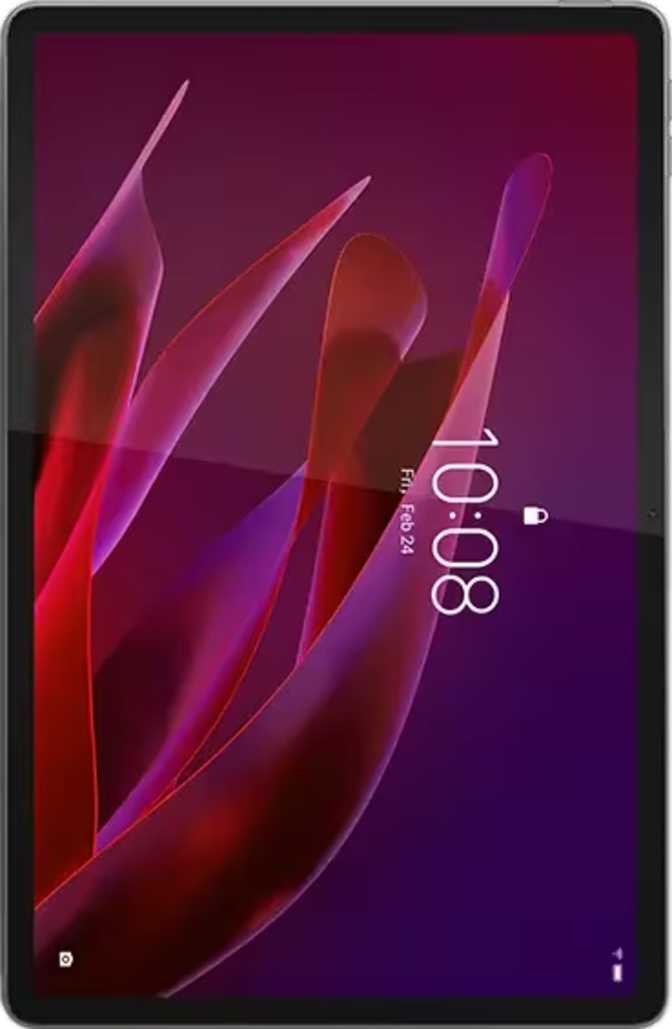
Lenovo Yoga Tab Review: The 144Hz Tablet That Bundles Everything
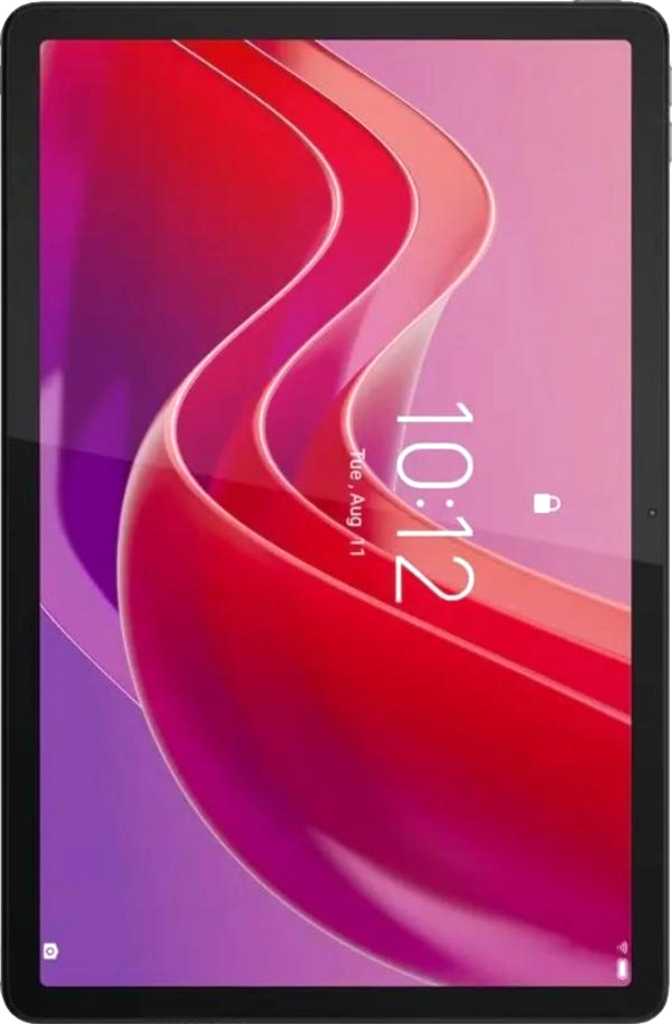
TabletsThe Android tablet market is crowded at every price tier, but most devices fall into one of two traps: they are either underpowered media consumption slabs or productivity-oriented machines that compromise on screen quality. The Lenovo Yoga Tab plants itself firmly between those extremes — and backs up that ambition with specifications that belong alongside devices costing considerably more. A 144Hz Dolby Vision display, a bundled stylus and keyboard, and a processor built on the same fabrication process as flagship smartphones together form a case that is genuinely difficult to dismiss. Whether those components translate into a coherent daily experience — and where the real trade-offs land — is exactly what this review unpacks.
Overall Rating
8.2
out of 10
- Display
- 9.0
- Performance
- 9.0
- Value
- 8.5
- Design
- 8.0
- Battery
- 7.0
- Cameras
- 6.5
Design and Build: Sleek, Light, and Ready to Work
At just over eight millimeters thin, the Yoga Tab feels noticeably slimmer than most tablets — roughly comparable to a stack of four credit cards. That thinness reads as premium the moment you pick it up, not as fragility. The weight sits just under 460 grams, placing it in comfortable one-handed-hold territory for shorter sessions. Sustained use while standing or lying down — bedtime reading, following along in the kitchen — stays fatigue-free for longer than thicker, heavier competitors.
What sets the physical package apart is what comes in the box. A stylus and a detachable keyboard are both included, making this a genuine three-in-one: tablet, creative tool, and light productivity companion. This combination is rare at any price, and it meaningfully changes how you think about the device before you have even switched it on. For students, note-takers, and remote workers, the immediate utility is real.
The display is protected by Gorilla Glass 7i — Corning's toughened glass designed to resist drops and surface scratches considerably better than standard glass or earlier Gorilla Glass generations. It provides meaningful peace of mind for a device you will pick up, put down, and occasionally knock against surfaces daily.
Physical Specifications
| Dimensions | 255.5 × 165.8 mm |
| Thickness | 8.3 mm |
| Weight | 458 g |
| Stylus | Included |
| Keyboard | Detachable |
| Backlit Keys | No |
| Water Resistance | None |
| Glass Protection | Gorilla Glass 7i |
| Stylus Tilt Sensitivity | No |
Display: A Screen That Earns Genuine Attention
Resolution and Sharpness
The 11.1-inch screen provides meaningful real estate without tipping into unwieldy territory. The resolution — which exceeds what most tablets in this category offer — translates into approximately 340 pixels per inch. At typical tablet viewing distances, this places the display comfortably above the threshold where individual pixels become visible. Text is sharp enough that extended reading feels natural rather than tiring, and interface elements stay crisp regardless of zoom level.
Why 144Hz Matters for Everyone
Most tablets, including premium ones, run at 60 frames per second. A significant number step up to 90Hz. The Yoga Tab's display cycles at 144 times per second — matching high-end gaming monitors. In practice, scrolling through long web pages or documents feels almost physical: silky smooth, with zero visual stutter. Animations throughout Android feel immediate in a way that, once experienced, makes returning to a 60Hz screen feel sluggish. Gamers benefit from reduced motion blur; everyone else simply enjoys a display that feels faster.
Dolby Vision and Brightness
Dolby Vision support means the tablet renders HDR content from compatible streaming services at its intended quality level — deeper blacks, more vibrant highlights, and expanded color gradation that makes a visible difference in dark cinematic content. Brightness peaks at 650 nits under typical conditions, adequate for indoor use and comfortable in bright ambient light, though direct sunlight will challenge visibility.
HDR10 and HDR10+ are absent, but Dolby Vision is actually the more widely licensed HDR format on streaming platforms, so this omission rarely matters in everyday use.
Performance: Built for More Than Browsing
The Processor
The chipset powering the Yoga Tab is built on a 4-nanometer manufacturing process — the same fabrication scale used in flagship smartphones. Four-nanometer silicon runs cooler and more efficiently than older process nodes, meaning the chip can sustain higher performance over longer sessions without throttling, while drawing less power doing so. The result is a tablet that handles demanding tasks without becoming uncomfortably warm under load.
The CPU uses an arrangement of cores tuned for different workload intensities — heavier cores for demanding tasks, lighter cores for background processes and idle states. Eight threads across multiple performance tiers means multitasking — multiple apps open simultaneously, files loading, content playing in the background — stays fluid without hesitation.
GPU and Gaming
The Adreno 750 is a capable graphics processor, supporting modern APIs including DirectX 12 and OpenGL 3.2. Demanding titles — high-fidelity racing games, 3D action games, strategy games with complex rendering — run well and look their best on that 144Hz display. The combination of a high-refresh panel and a GPU fast enough to sustain consistent frame rates into that refresh range is exactly the pairing you want for mobile gaming.
Geekbench 6 Performance
Standardized CPU benchmark scores. Higher is better. These results place the Yoga Tab among the top-performing Android tablets available.
App launch speed, UI responsiveness, single-task performance
Multitasking, parallel workloads, gaming and creative apps
RAM and Storage
Twelve gigabytes of DDR5 memory — the latest-generation specification for mobile — is more than generous for Android 15. Apps stay loaded in the background without being forcibly closed. Switching between a browser with many open tabs, a document editor, a photo app, and a streaming video stays smooth and fluid.
256GB of internal storage handles large app libraries, offline media, and creative projects without constant management. There is no microSD slot — plan your storage needs before purchasing.
Battery Life and Charging
All-Day Endurance
The Yoga Tab carries a large-capacity battery that sits above average for this class of device. Under mixed daily usage — browsing, streaming, document work, and light gaming — most users will comfortably reach a full day of active use before needing to charge. For lighter patterns like reading, video calls, and note-taking, stretching into a second day is realistic.
The 144Hz display is power-hungry, and it will reduce endurance compared to running at a lower refresh rate. Android 15 provides adaptive refresh options that dial down the panel during static or low-motion content, partially recovering that efficiency automatically.
The Charging Caveat — Read This First
This is the most significant functional limitation of the Yoga Tab: it does not support fast charging, and there is no wireless charging option. In a market where even mid-range devices routinely charge from empty to full in under an hour, the absence of fast charging means topping up this battery takes noticeably longer.
Users accustomed to grabbing fifteen minutes of charge before heading out will find this frustrating. You will need to build overnight or multi-hour charging windows into your routine rather than treating it as a quick top-up device. If fast charging is non-negotiable in your daily life, this is reason enough to consider alternatives before committing.
Audio Experience
Stereo speakers are present, immediately placing the Yoga Tab above single-speaker tablets for media consumption. Two-channel audio creates a sense of space and channel separation that mono setups cannot replicate — films and games sound noticeably more immersive as a result.
There is no 3.5mm headphone jack. Wired audio requires a USB-C to 3.5mm adapter, which is not included in the box. Bluetooth 5.4 delivers low-latency, stable wireless audio, but the premium Bluetooth audio codecs — aptX, LDAC, and their variants — are absent. Wireless headphones are limited to standard SBC or AAC transmission, which covers most everyday use cases but will matter to audiophiles with high-resolution wireless headphones.
- Stereo speakers for immersive media playback
- Bluetooth 5.4 with stable, low-latency wireless audio
- Dual microphones for video calls and voice commands
- No 3.5mm headphone jack
- No aptX, LDAC, or high-resolution Bluetooth codecs
Camera Capabilities
The rear camera system pairs a 13-megapixel primary lens with a 2-megapixel secondary sensor. Tablets are rarely used as serious photography tools — the ergonomics are inherently awkward — but the camera serves its functional purposes well. Document scanning, whiteboard capture, and video calls all benefit from the 13-megapixel sensor. Manual controls including ISO, white balance, exposure, and focus are available for photographers who want granular control.
The 13-megapixel front camera is arguably the more important sensor on a tablet — it handles the majority of video calls. Its resolution is genuinely capable, and the f/2.2 aperture lets in adequate light under well-lit room conditions. There is no optical image stabilization, slow-motion video, or timelapse mode. The camera setup covers everyday utility, not creative video production.
| Rear Camera | 13 MP + 2 MP |
| Front Camera | 13 MP · f/2.2 |
| Manual Controls | ISO, WB, Exposure, Focus |
| Optical Stabilization | None |
| Flash | Single LED (rear only) |
| Slow-Motion / Timelapse | Not available |
Connectivity: Wi-Fi 7 Is a Real Standout
Wi-Fi 7 (the 802.11be standard) is the most recent generation of wireless networking and a meaningful selling point here. On a compatible Wi-Fi 7 router, the Yoga Tab can achieve multi-gigabit wireless throughput with significantly lower latency and better performance in dense wireless environments than older standards. Even without a Wi-Fi 7 router, backward compatibility with Wi-Fi 6, 5, and 4 ensures universal coverage in any home or office.
Bluetooth 5.4 pairs reliably with modern peripherals — keyboards, earbuds, mice, and game controllers. USB-C 3.2 supports fast data transfer speeds and can handle display output to an external monitor with the right cable and adapter.
Connectivity Limitations
- No cellular connectivity — this is a Wi-Fi-only device. Away from Wi-Fi, you rely entirely on a smartphone hotspot.
- No GPS — navigation apps will not function without a network-based location fallback.
- No NFC — contactless payment and NFC-based features are unavailable.
- No fingerprint scanner — biometric authentication is limited to facial recognition via the front camera.
Connectivity at a Glance
| Wi-Fi | Wi-Fi 7 + 6, 5, 4 |
| Bluetooth | 5.4 |
| USB | Type-C 3.2 |
| Cellular / 5G | Not available |
| GPS | Not available |
| NFC | Not available |
| Gyroscope | Yes |
| Accelerometer | Yes |
Software: Android 15 and Productivity Features
The Yoga Tab runs Android 15, the current generation of Google's operating system, with a practical set of productivity and privacy-focused features. Split-screen multitasking lets you run two apps simultaneously side by side — useful when referencing a document while typing, or watching a video while browsing. Picture-in-Picture keeps a floating video window above other apps while you work, and the ability to download game data while actively playing saves meaningful time.
On-device machine learning enables Live Text (extracting written content from images and screenshots), offline voice recognition, and voice commands without needing a network connection. Multi-user support allows separate profiles for different people — relevant for shared household tablets or families managing screen time for children.
Key Software Features
- Split-screen multitasking
- Picture-in-Picture mode
- Live Text from images
- Offline voice recognition
- Multi-user profiles
- Child lock
- Dark mode + dynamic theming
- App tracking controls
- Camera & mic privacy options
- Extra dim mode
- Clipboard access warnings
- Widgets + notification control
Who Should Buy the Lenovo Yoga Tab
Two honest assessments — read both before deciding.
This tablet is the right choice if you...
- Want a high-refresh display for gaming or smooth general use without paying premium prices
- Need a bundled stylus and keyboard for creative work or productivity without extra purchases
- Prioritize all-day battery endurance over the convenience of fast charging
- Primarily use Wi-Fi and do not need cellular connectivity away from networks
- Want Dolby Vision HDR streaming support without paying flagship prices
- Are a student, note-taker, or remote worker who values a complete portable setup out of the box
This tablet is the wrong choice if you...
- Charge in short bursts and depend on fast top-ups to get through the day
- Need GPS for standalone navigation without a phone nearby
- Require cellular data for connectivity away from Wi-Fi networks
- Use high-quality Bluetooth audio codecs like LDAC or aptX HD with your headphones
- Type regularly in low-light conditions and depend on a backlit keyboard
- Want an outdoor-ready device with IP-rated water and dust resistance
How It Compares to the Alternatives
The Yoga Tab's position against typical competitors at the same and adjacent price points.
| Feature | Lenovo Yoga Tab | Mid-Range Android Tablet | Premium Android Tablet |
|---|---|---|---|
| Display Refresh Rate | 144Hz | 60 – 90Hz | 90 – 120Hz |
| Stylus Included | Yes | Rarely | Sometimes (often extra cost) |
| Keyboard Included | Yes | No | No |
| Wi-Fi Generation | Wi-Fi 7 | Wi-Fi 5 / 6 | Wi-Fi 6 / 6E |
| Fast Charging | No | Often yes | Yes |
| Cellular Option | No | Sometimes | Often available |
| GPS | No | Sometimes | Often yes |
| HDR Format | Dolby Vision | HDR10 | Dolby Vision / HDR10+ |
| RAM Tier | 12GB DDR5 | 4 – 8GB | 8 – 16GB |
Honest Assessment: Strengths and Weaknesses
Where It Wins
The Lenovo Yoga Tab makes a genuinely strong case on the display and performance fronts. The screen punches noticeably above its price class: 144Hz refresh, Dolby Vision, 340ppi sharpness, and Gorilla Glass 7i protection together form a display package that many tablets twice the price cannot fully match. Sharp text, smooth scrolling, and cinematic HDR playback are all present without compromise.
The processor is fast enough that nothing in everyday Android use — including demanding games — will ever feel sluggish. The DDR5 memory configuration ensures apps stay loaded and multitasking stays fluid in a way that budget and mid-range tablets cannot match.
The bundled accessories are a real and meaningful value inclusion. Getting a stylus and keyboard in the box transforms the Yoga Tab from a consumption device into a legitimate work tool without additional expense. For students, note-takers, and anyone needing a portable productivity companion, this matters far more than spec comparisons alone suggest.
Where It Falls Short
The charging situation is the most pressing limitation. No fast charging on a large battery means long recharge windows — a frustrating trait in a device that otherwise feels thoroughly modern. In a market where competitors charge in under an hour, planning around multi-hour charging cycles feels out of step.
The Wi-Fi-only nature and absence of GPS mean this tablet is tethered to connected environments in ways that limit standalone utility. Travelers, commuters who work offline, and users who depend on navigation apps will feel these gaps acutely.
The non-backlit keyboard is a specific irritation for dark-environment typists, and the absence of water resistance and premium Bluetooth audio codecs are small but genuine compromises that add up depending on how and where you work. These are real trade-offs, not theoretical ones — weigh them honestly against your usage patterns.
Final Verdict
Our recommendation for the Lenovo Yoga Tab
The Lenovo Yoga Tab earns a confident recommendation for users whose priorities center on screen quality, all-day battery endurance, and the need for productivity accessories without a premium markup. It delivers a display specification that few competitors at this price can match, a chipset fast enough to handle anything Android throws at it, and a complete accessory bundle that makes it immediately useful from first use.
Commit to overnight charging rather than quick top-ups, accept the Wi-Fi-only constraint, and verify whether a non-backlit keyboard covers your usage patterns. If those trade-offs fit your life, this is an outstanding tablet for its price class.
For media consumers, students, creative professionals working in connected environments, and gamers who want a high-refresh Android tablet with genuine productivity backup — this is a strong, well-rounded purchase. For frequent travelers who need cellular independence or anyone who lives by fast-charging convenience, explore alternatives before committing.
8.2
out of 10
Frequently Asked Questions
Answers to what real buyers search for before purchasing the Lenovo Yoga Tab.