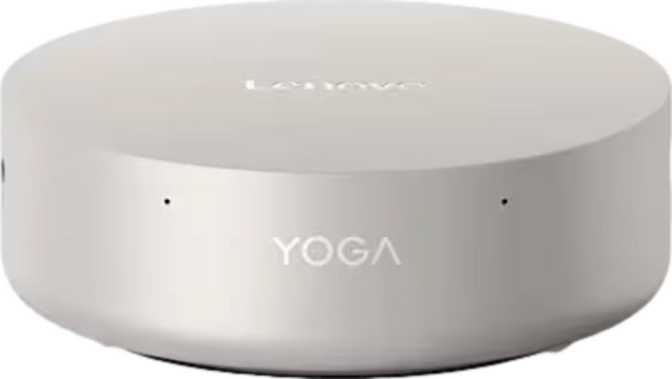
Lenovo Yoga Mini i Gen 11 Review: A Seriously Capable Compact Desktop
Mini PCsWhat the Yoga Mini i Gen 11 Actually Is — And Why It Matters
The desktop computer market has quietly split into two directions: tower PCs that prioritize raw power above all else, and a growing category of compact machines that ask a harder question — how much performance can you squeeze into something the size of a paperback novel?
The Lenovo Yoga Mini i Gen 11 answers that question aggressively. Sitting at just over 800 cubic centimetres in volume — roughly the size of a large hardcover book stood on its side — it packs a configuration that would have seemed implausible in this footprint just a few years ago.
This is not a budget office box or a glorified set-top player. It is a fully specified, multi-display-capable mini PC built for people who want a capable desktop without dedicating a third of their desk to it.
Design and Build: Small Enough to Disappear, Solid Enough to Last
The physical experience of the Yoga Mini i Gen 11 starts with genuine surprise at how compact it feels in person. At 130 mm square and under 50 mm tall, it sits comfortably behind a monitor on a VESA mount, on a bookshelf, or tucked beside a display without drawing any attention to itself. The Yoga branding carries through in the build quality — this does not feel like a budget compact PC.
The machine measures exactly the same in both horizontal dimensions, giving it a perfectly square footprint that makes placement flexible regardless of orientation. The modest height means it slides easily into shelving arrangements where a traditional tower would simply not fit.
- Footprint
- 130 × 130 mm
- Height
- 48.5 mm
- Total Volume
- ~820 cm³
- Shape
- Perfect Square Base
- Warranty
- 1 Year Standard
The Processor: Efficiency Architecture With Genuine Desktop Ambitions
25 W TDP • 16 Threads • 18 MB L3 Cache • Hybrid big.LITTLE Architecture • 4.8 GHz Turbo
The chip inside the Yoga Mini i Gen 11 is drawn from a laptop processor lineage — and that is actually the right engineering choice here. A purpose-designed efficiency processor running at a 25-watt thermal envelope keeps the chassis cool and quiet without a full desktop cooling system. What matters is that "laptop chip" no longer means "compromised chip."
The processor uses a hybrid core architecture, distributing work across three distinct groups of cores — performance cores handling demanding single-threaded tasks at the highest frequencies, and two sets of efficiency cores managing lighter workloads without burning unnecessary power. Across all 16 threads, the CPU can sustain demanding workloads while staying within thermal limits that a small chassis can actually manage.
The peak single-core turbo speed reaches 4.8 GHz — a frequency that matches or beats many conventional desktop processors. For the everyday tasks that determine how responsive a computer feels, single-core speed is the primary factor, and this processor delivers it.
The 18 MB of L3 cache is a practical performance multiplier that most spec pages gloss over. Cache acts as high-speed temporary memory located on the chip itself. A larger cache means the processor spends less time waiting on slower main memory — for professionals switching frequently between large files, editors scrubbing through project timelines, or developers with multiple services running simultaneously, this matters in the day-to-day feel of the machine.
PassMark Benchmark Context
Graphics: Intel Arc B390 — More Capable Than You Might Expect
3 nm Process • 2,500 MHz Boost Clock • DirectX 12 Ultimate • Hardware Ray Tracing • PCIe 5
The integrated graphics solution here is Intel's Arc B390, and it warrants a proper explanation rather than a dismissive footnote. Built on a 3-nanometre process — one of the most advanced manufacturing nodes available — the Arc B390 runs at boost clocks reaching 2,500 MHz and supports the full suite of modern graphics APIs: DirectX 12 Ultimate, OpenGL 4.6, and OpenCL 3. These are not compatibility check-boxes; they indicate that the GPU can handle hardware-accelerated video encoding, AI inference workloads, and contemporary gaming at moderate settings.
DirectX 12 Ultimate support means the GPU includes hardware-level ray tracing capability. This is meaningfully different from older integrated graphics that either lack it entirely or simulate it in software. Whether this translates into playable ray-traced gaming depends on your resolution and settings expectations, but for light gaming, everyday creative tools, and media workflows it represents a genuine step forward over previous-generation integrated solutions.
The machine supports up to four simultaneous displays — a capability that most desktop systems at this price tier cannot match without a discrete add-in card. The output configuration includes HDMI 2.1, DisplayPort, and two USB4 connections that carry DisplayPort signal. PCIe 5 underpinning the GPU connection ensures there is no bandwidth bottleneck at the interface level, even as storage and peripheral bandwidth demands grow.
Memory and Storage: Configured for Professionals, Not Just Enthusiasts
32 GB DDR5 Standard • Up to 9,600 MHz • Dual-Channel • Max 96 GB • 2 TB NVMe SSD
Thirty-two gigabytes of DDR5 RAM comes standard, running at speeds up to 9,600 MHz across a dual-channel configuration. For users arriving from DDR4 systems, the generational jump in memory bandwidth is noticeable in practice — large file operations, memory-intensive browser sessions with dozens of tabs, and creative applications that cache assets aggressively all benefit from the wider pipeline. Dual-channel configuration ensures that both memory modules contribute in parallel, rather than one doing all the work.
Critically, the Yoga Mini i Gen 11 supports memory expansion up to 96 GB — a headroom figure that places this machine in entirely different territory than sealed, soldered-memory compact PCs. If your workloads grow, the hardware can grow with them. This future-proofing matters especially in professional and prosumer contexts where RAM requirements tend to creep upward over a machine's lifespan.
The two-terabyte NVMe SSD is the appropriate storage scale for a primary professional machine in this era. Storing a full software development environment, a creative application suite with assets, and years of project files without running a secondary drive is entirely realistic. NVMe performance means file operations that would once require a spinning hard drive to grind away are completed in fractions of a second.
- Dual-channel for maximum memory bandwidth
- Up to 9,600 MHz — faster than DDR4 generation
- Non-soldered, fully upgradeable design
- 96 GB maximum — rare in compact form factor
- NVMe SSD for near-instant file access
Connectivity: A Port Layout That Matches Modern Workflows
Wi-Fi 7 • Bluetooth 6 • 2× USB4 40 Gbps (Thunderbolt 4) • HDMI 2.1 • Wired Ethernet
| Port Type | Count | Speed / Standard | Best Used For |
|---|---|---|---|
| USB4 / Thunderbolt 4 USB-C | ×2 | 40 Gbps | External drives, docks, displays, Thunderbolt peripherals |
| USB-C 3.2 Gen 2 | ×2 | 10 Gbps | Fast peripherals, charging, USB-C accessories |
| USB-A 3.2 Gen 2 | ×1 | 10 Gbps | Existing USB-A devices at full speed |
| HDMI | ×1 | HDMI 2.1 | 4K 144 Hz or 8K 30 Hz display output |
| DisplayPort | ×1 | Full DP | High-resolution second monitor |
| Ethernet (RJ45) | ×1 | Gigabit | Wired network for video calls and large transfers |
The latest wireless standard — fully backward compatible with older routers and ready for multi-gigabit speeds as your network upgrades. Also supports Wi-Fi 6E, 6, 5, and 4 for universal compatibility.
Among the most current Bluetooth versions available, delivering lower-latency audio and improved coexistence with Wi-Fi signals. Particularly relevant given the absence of a wired audio port on this machine.
Who Should Buy the Yoga Mini i Gen 11 — And Who Should Not
-
Remote & Hybrid ProfessionalsFull 32 GB RAM and multi-monitor support replace a traditional workstation tower for most knowledge-work roles, in a machine that fits behind your monitor.
-
Content CreatorsVideo editing, photo work, and light 3D workflows run comfortably on the GPU acceleration, RAM headroom, and fast NVMe storage — without the cost of a discrete GPU system.
-
Software DevelopersRunning local environments, containers, or virtual machines. The 16-thread CPU, fast DDR5 memory, and 2 TB SSD are exactly what this workload profile requires.
-
Home Power UsersMedia streaming, productivity software, and casual gaming all fit comfortably within its capabilities — in a machine quiet and small enough to live on a shelf.
-
Multi-Display Power UsersFour simultaneous monitor outputs without any graphics card upgrade — a genuine differentiator that almost no other compact PC at this tier can match.
-
Serious GamersHigh-frame-rate AAA gaming at 1440p or 4K is out of reach for integrated graphics, even modern Arc-class hardware. A system with a discrete GPU is the right tool for this use case.
-
Wired-Audio-Dependent UsersThe absence of a 3.5 mm jack is a real constraint in call-heavy or audio-monitoring workflows. A USB audio adapter or Bluetooth headset must be factored into the purchase.
-
Peak Sustained Compute UsersThe efficiency-focused processor prioritises thermal management over peak sustained output. It will not match a full desktop TDP chip in a prolonged compute sprint.
-
Workstation-Class GPU TasksLarge-scale 3D rendering, ML model training, and professional high-resolution video production need purpose-built workstations with discrete professional GPUs.
How the Yoga Mini i Gen 11 Compares to Its Closest Rivals
| Feature | Lenovo Yoga Mini i Gen 11 | Intel NUC-Class | Budget Mini PCs |
|---|---|---|---|
| Display Outputs | 4 Simultaneous | Typically 2–3 | Usually 2 |
| Maximum Memory | 96 GB DDR5 | 64 GB in most models | Often soldered, 16–32 GB |
| Wi-Fi Generation | Wi-Fi 7 | Wi-Fi 6E on most | Wi-Fi 6 typically |
| USB4 / Thunderbolt 4 | 2 Ports (40 Gbps) | 2 on premium NUC only | Rarely included |
| Warranty Period | 1 Year | 1–3 Years | 1 Year typical |
| 3.5 mm Audio Jack | Not Included | Yes on most | Yes |
| Brand Support | Lenovo Enterprise-Grade | Intel Direct | Varies Significantly |
Honest Assessment: Strengths and Limitations
The memory story is genuinely excellent. Starting at 32 GB of current-generation DDR5 with room to expand to 96 GB places this machine above most consumer compact PCs — including some considerably more expensive ones. For any buyer who has been burned by soldered, non-upgradable RAM in a previous mini PC or laptop, this is a meaningful quality-of-life difference.
The connectivity design shows real thoughtfulness. Two USB4 ports capable of 40 Gbps data transfer, Thunderbolt 4 compatibility, and a full four-display output setup — combined with Wi-Fi 7 and Bluetooth 6 — mean the Yoga Mini i Gen 11 will not become a connectivity bottleneck as peripheral standards advance over the next several years.
Intel Arc B390 integrated graphics represent a meaningful step forward for integrated solutions. For multi-display productivity, video work, and moderate gaming they perform well, with hardware ray tracing support setting this GPU clearly apart from previous-generation integrated graphics.
The missing headphone jack is a genuine omission worth repeating. In an otherwise well-considered port layout, it is the most common source of real-world friction for users who have not purchased Bluetooth headphones or a USB audio adapter. It is not a disqualifying flaw, but it is a cost and inconvenience that prospective buyers should budget for before unboxing.
The graphics capability requires honest framing. The Arc B390 ceiling is real. Users who have experienced discrete mid-range or high-end GPU systems and expect similar performance will be disappointed. The trade-off is the entire point of the machine — quiet, cool, compact, power-efficient — but it does not replace a dedicated card for gaming or GPU compute workloads.
The one-year warranty is shorter than what some competitors offer at this price bracket. For home users comfortable with standard consumer support, this is acceptable. For small business deployment, it warrants close attention and budgeting for extended warranty coverage.
Common Questions Buyers Ask Before Purchasing
The Verdict: A Worthy Compact Desktop for Focused Buyers
8.8 / 10 — Recommended
The Lenovo Yoga Mini i Gen 11 is a mature, well-considered compact desktop for professionals and power users who have decided that their workspace deserves as much attention as their workflow. It does not ask you to compromise on memory, storage, or connectivity to achieve its small footprint — it redesigns the trade-off from "big and powerful vs. small and weak" into something more honest: small and capable, with a defined ceiling.
If your work lives in productivity software, development environments, content creation tools, and multi-monitor setups, this machine handles all of it confidently. The 2 TB of fast storage, expandable DDR5 memory, four-display support, and Wi-Fi 7 connectivity make it a forward-looking purchase rather than a machine you will outgrow in two years.
You want a quiet, capable, multi-monitor-ready desktop that fits anywhere — and value future-proof memory, storage, and connectivity that most compact PCs simply do not offer at this level.
High-settings gaming or GPU-intensive rendering is central to your use case. Also budget for a Bluetooth headset or USB audio adapter to replace the missing 3.5 mm audio jack.
Warranty: 1 Year standard. For business deployment, factor in extended warranty coverage costs.