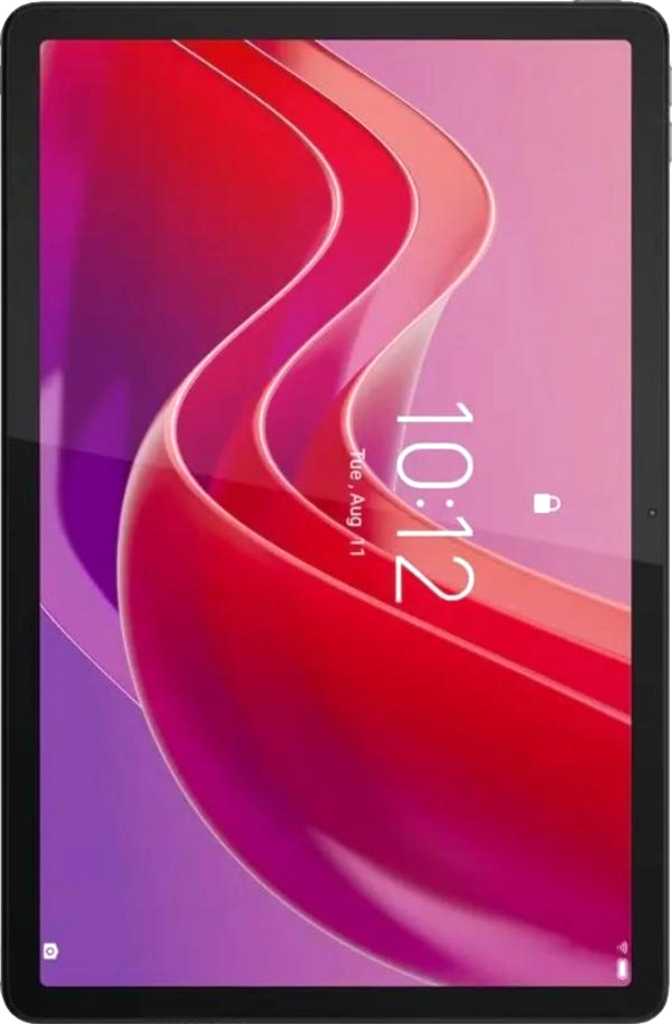
Lenovo Tab K12 Review: A Large-Screen Tablet That Earns Its Keep
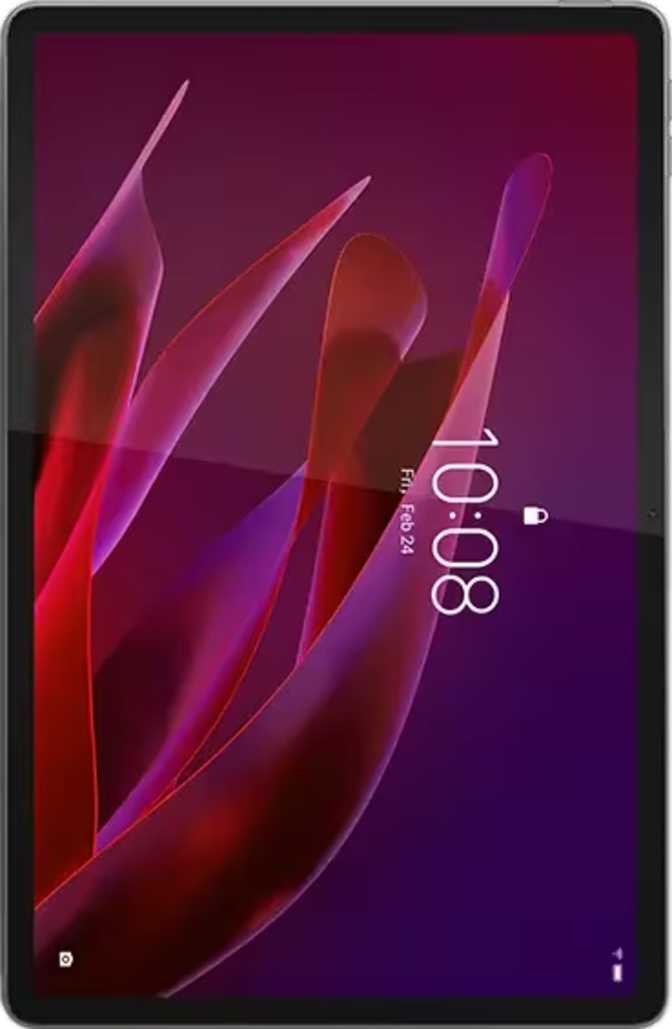
TabletsThe large-format Android tablet market is a strange place. Most products ask you to choose between a premium price with features you may never use, or a budget slab with a screen you will squint at. The Lenovo Tab K12 attempts something more deliberate — a 12.1-inch tablet built for productivity, media, and family life, priced to be accessible rather than aspirational. Whether that calculation works in your favor depends almost entirely on what you need it to do.
At a Glance
Six key specifications — everything you need before reading on
Display
12.1" IPS
2560×1600 · 90Hz
Processor
6nm 8-Core
8 GB RAM
Storage
256 GB
+ microSD Slot
Battery
10,200 mAh
Fast Charging
OS
Android 14
64-bit
Form Factor
530 g · 6.3 mm
No IP Rating
Design and Build: Thin, Light, and Meant to Be Held
For a tablet with a 12.1-inch footprint, the Tab K12 carries itself with surprising restraint. At 6.3mm thin — roughly the thickness of four credit cards stacked together — it slips comfortably under the arm or into a bag without the bulk you would expect from something this large.
The 530-gram weight sits on the lighter end for a tablet of this screen size. You will feel it after 30 minutes of holding it up in landscape mode, but it never crosses into genuinely uncomfortable territory.
The physical dimensions place it firmly in two-handed territory for most adults. At just under 279mm wide and 181mm tall, this is not a tablet you will casually scroll one-handed on the couch — it is built to be laid flat on a desk, propped on a stand, or held with both hands during a long reading or viewing session.
Build Specifications
- Thickness
- 6.3 mm
- Weight
- 530 g
- Width
- 278.8 mm
- Height
- 181 mm
- Water Resistance
- None
- Stylus Included
- No
- Detachable Keyboard
- No
The Display: Where the Tab K12 Makes Its Strongest Case
The 12.1-inch IPS LCD panel is the centerpiece of this tablet. The resolution produces a pixel density that keeps text sharp and images clean at normal viewing distances — comfortable for reading documents, browsing web pages with small print, and watching video without visible pixelation. The IPS panel technology means colors remain consistent across wide viewing angles, a practical win when sharing the screen with someone beside you.
Screen Size
12.1"
IPS LCD Panel
Pixel Density
264 ppi
2560 × 1600 px
Refresh Rate
90 Hz
50% smoother than 60Hz
Brightness
400 nits
1500:1 contrast ratio
Refresh Rate and Smoothness
Running at 90Hz, the display refreshes 50% more often per second than a standard 60Hz screen. In daily use, this translates to noticeably smoother scrolling through long web pages, more fluid transitions between apps, and a general feeling of responsiveness that budget tablets at 60Hz simply do not offer. It is not the 120Hz found on flagship devices, but the improvement over a standard screen is real and appreciated during long sessions.
Brightness, Contrast, and Viewing Conditions
At 400 nits of typical brightness, the Tab K12 is well-suited for indoor use — living rooms, offices, kitchens, and classrooms. A contrast ratio of 1500:1 gives the panel enough depth to make movies and photos feel rich rather than flat, even without the deep blacks an OLED display would produce.
HDR Support — Setting Expectations
The Tab K12 does not support HDR10, HDR10+, or Dolby Vision. Streaming platforms will serve standard dynamic range content. For most users, this is invisible in daily viewing — you will not miss what you cannot compare side by side. Those who specifically want to watch HDR-mastered content as intended should factor this limitation into their decision.
Performance: Capable for Daily Work, Not Built for Extremes
The Processor Architecture
The Tab K12 runs on a processor built on a 6-nanometer manufacturing process — a fabrication size that represents a competent mid-range design, balancing performance output against heat management. It uses an eight-core configuration divided into two tiers: two higher-performance cores clocking up to 2.5GHz for demanding tasks, and six efficiency-focused cores at 2GHz for lighter operations like notifications, background syncing, and everyday browsing.
Performance Cores — 2 × 2.5 GHz
Handle demanding tasks: video playback, heavy applications, simultaneous split-screen sessions, and gaming bursts
Efficiency Cores — 6 × 2 GHz
Handle background syncing, notifications, and light use while keeping the chip cool and extending battery endurance
Memory and Storage
Eight gigabytes of RAM gives the Tab K12 enough headroom to keep multiple apps suspended in memory simultaneously. Switching between a browser with several tabs open, a video call, and a document editor does not force the device to reload everything from scratch — a key test of real multitasking comfort.
The 256GB internal storage is genuinely generous at this price tier — enough for a large app library, thousands of photos, downloaded videos for travel, and still room to spare. The included microSD card slot allows further expansion, removing a common source of long-term frustration with fixed-storage tablets.
Graphics and Gaming
The integrated GPU handles casual gaming — puzzle games, card games, and lighter action titles — without issue. More demanding 3D games will run but expect reduced graphical settings to maintain smooth performance. This is not a gaming tablet; it is a tablet where gaming exists as one activity among many, not the defining purpose.
Software: Android 14
The Tab K12 ships with Android 14, bringing split-screen multitasking, picture-in-picture mode, granular notification controls, dynamic theming, dark mode, and strong privacy tools including per-app camera and microphone access controls, location privacy options, and app tracking blockers. Multiple user profiles make shared family or classroom use clean and properly separated.
Battery Life: Days Between Charges, Not Hours
The Tab K12 carries a battery large enough that daily charging becomes optional for many users. A typical day of mixed use — a few hours of video streaming, some web browsing, light document work, and a video call — will leave meaningful charge remaining by evening. Light users may find the tablet lasting two full days without a cable.
10,200 mAh
Substantial capacity — among the largest in its class of mid-range large-format tablets
Fast Charging
Reduces time tethered to a cable; wireless charging is not supported
Health Monitor
Built-in battery health check lets you track capacity degradation over time
The battery is not user-removable, which is standard for tablets in this category. Fast charging via USB-C reduces the downtime between uses. The built-in health monitoring tool is a practical addition for long-term ownership — useful for tracking capacity over months and years of daily use.
Cameras: Functional, Not Remarkable
Camera performance on a large-format tablet should be evaluated against a realistic benchmark: these are utility tools, not photography instruments. The Tab K12 meets that benchmark comfortably — and in a few specific areas, exceeds expectations for its price tier.
Rear Camera — 13 MP
The 13-megapixel rear camera with an f/2.2 aperture handles document scanning, whiteboard captures, and product reference shots with ease. Manual controls for ISO, focus, white balance, and exposure give users more creative flexibility than most tablets at this tier typically offer.
- 13 MP sensor · f/2.2 aperture
- Touch and continuous autofocus
- Manual ISO, focus, white balance, and exposure
- No optical image stabilization
- No flash of any kind
- No HDR mode
Front Camera — 8 MP
The 8-megapixel front camera with an f/2.0 aperture is the more practically important of the two. Video calls on Zoom, Google Meet, and Teams will look clean and well-lit in normal room lighting. The slightly wider aperture helps in dimmer environments compared to the rear camera.
- 8 MP · f/2.0 aperture
- Solid performance in normal indoor lighting
- CMOS sensor
- No front-facing flash
- No back-illuminated (BSI) sensor
Audio: A Genuine Strength
The Tab K12's audio setup is one of its clearest advantages over cheaper tablets in the same size bracket. Sound comes from two directions, creating actual stereo separation for movies and music rather than the single-channel output common on smaller or lower-cost devices.
Stereo Speakers
Dual-speaker setup produces proper stereo separation — a genuine advantage during long movie sessions or music playback that many similarly priced tablets do not match.
3.5mm Headphone Jack
Plug in any wired headphones or earbuds without an adapter — increasingly rare on modern tablets and genuinely practical for classrooms, offices, and travel.
Connectivity: Solid Fundamentals, Some Notable Gaps
The Tab K12 covers the connectivity essentials well but makes deliberate trade-offs that affect how and where you can use it. Understanding these gaps before buying matters more for this device than for most.
| Feature | Status | What It Means in Practice |
|---|---|---|
| Wi-Fi | Wi-Fi 5 (802.11ac) | Dual-band, fast enough for 4K streaming and video calls in most home networks |
| Bluetooth | 5.2 | Reliable, low-latency pairing with keyboards, speakers, and headphones |
| Cellular / SIM | None | Wi-Fi only — internet access depends entirely on available wireless networks |
| GPS | Included | Offline navigation apps work without Wi-Fi; live traffic and data do require a connection |
| USB Port | USB-C 2.0 | Charging and file transfer both work, but speeds are notably slower than USB 3.x devices |
| NFC | None | No contactless payments or NFC-based accessory pairing available |
| HDMI Output | None | Cannot output video directly to an external monitor or television |
| Biometrics | None | No fingerprint scanner; unlock via PIN, pattern, or basic camera-based face unlock only |
| Wi-Fi 6 | Not Supported | May show slightly lower consistency in very congested network environments |
Who This Tablet Is For — and Who Should Look Elsewhere
A Strong Fit For
-
Families who want a shared device for streaming, video calls, and homework, with multi-user profiles keeping each person's content separate
-
Students who need a large screen for reading PDFs, annotation, and virtual class attendance
-
Home office workers who want a dedicated screen for video calls, reference documents, and light productivity
-
Media enthusiasts who watch a lot of content at home and want a large, smooth display without flagship pricing
-
Travelers who pre-download content and need dependable battery life between charges
Not the Right Choice For
-
Mobile professionals who need cellular connectivity and internet access away from Wi-Fi networks
-
Creative users who depend on active stylus precision for drawing or detailed handwriting — no active pen ecosystem exists
-
Serious gamers who want to run demanding 3D titles at maximum visual and performance settings
-
Photography enthusiasts — the camera system is a document scanner and video call tool, not a creative instrument
-
Users who need fast biometric access — there is no fingerprint scanner or hardware-level face recognition
How It Compares to the Alternatives
The Tab K12's value proposition becomes clearest when set alongside the two most logical alternatives: a typical 10-inch mid-range tablet and a premium 12-inch device at a higher price point.
| Feature | Lenovo Tab K12 | Typical 10" Mid-Range | Typical 12" Premium |
|---|---|---|---|
| Screen Size | 12.1" | 10 – 10.9" | 12 – 13" |
| Resolution | 2560 × 1600 | 1920 × 1200 | 2560×1600 – 2960×1848 |
| Refresh Rate | 90 Hz | 60 Hz (typical) | 90 – 120 Hz |
| Base Storage | 256 GB + expandable | 64 – 128 GB (often expandable) | 128 – 256 GB (often locked) |
| RAM | 8 GB | 4 – 6 GB | 8 – 12 GB |
| Battery | Very Large | Moderate | Moderate to Large |
| Cellular Option | No | Sometimes | Usually |
| Headphone Jack | Yes | Sometimes | Rarely |
| HDR Display | No | No | Often Yes |
| Price Tier | Mid-Range | Budget – Mid-Range | Premium – Flagship |
Honest Strengths and Weaknesses
Where It Shines
The Tab K12 makes a compelling case on fundamentals. The combination of a large, smooth 90Hz display, 256GB of storage, expandable memory, impressive battery endurance, stereo speakers, and a headphone jack — all in a 6.3mm frame — represents genuine value at a mid-range price.
Android 14 delivers a mature software experience with real privacy controls, split-screen productivity, multi-user profiles, and a clean, customizable interface. For home, family, and everyday productivity users, these are the features that matter most — and the Tab K12 delivers them without compromise.
The battery is a particular standout. For a device this size, the endurance removes charging anxiety entirely for most usage patterns — that kind of dependability is harder to find than manufacturers make it sound.
Where It Asks for Compromise
The concessions all trend in the same direction: connectivity and security. No cellular, no NFC, no fingerprint scanner, no USB 3.0, no Wi-Fi 6, and no HDR. None of these individually is a dealbreaker for the target audience, but together they define a device designed for home environments — not the road, not the studio, and not the cutting edge.
The absence of water resistance is a practical concern for a device that will inevitably live near kitchens, bathrooms, and classrooms. This requires conscious daily care that IP-rated premium tablets do not demand from their owners.
The camera system is best treated as a scanner and video call tool. Approaching it with photographic ambitions will lead to disappointment every time.
Questions Real Buyers Ask
Answers to the most common questions from people seriously considering this tablet
Final Verdict
Lenovo Tab K12
The Lenovo Tab K12 is one of the more honest large-screen tablets on the market. It does not pretend to be a flagship. It does not pad its spec sheet with features that only exist on paper. Instead, it delivers the things that matter most for home use, family life, and everyday productivity — a big, smooth, sharp screen; a battery that rarely needs attention; real stereo sound; and software that respects your privacy — without asking you to pay for capabilities you do not need.
The concessions it makes are real: no cellular, no active stylus system, no HDR, no biometric scanner. If any of those are essential to how you work or live, there are better-suited options. For the majority of buyers who want a large-format Android tablet that handles streaming, studying, video calls, and everyday tasks with confidence and without drama, the Tab K12 delivers.
Buy It If...
You want a large-screen home or family tablet with standout battery life, a smooth sharp display, stereo audio, and genuine value at a mid-range price.
Look Elsewhere If...
You need cellular connectivity, an active stylus ecosystem, HDR display support, or hardware-level biometric security as part of your daily routine.