Rode XDM-100 Review: An Honest Look at This USB Microphone
MicrophonesA Microphone Built to Do One Job Extremely Well
Not every microphone needs to do everything. Some of the best-reviewed audio gear on the market succeeds precisely because it narrows its focus — and the Rode XDM-100 is a clear example of that philosophy in action. This is a USB condenser microphone built around a single, well-executed cardioid pickup pattern, hardware-based controls, and studio-grade audio conversion, rather than a feature checklist designed to look impressive on a box.
If you're comparing microphones for podcasting, voiceover work, streaming, or general desktop recording, the XDM-100 sits in a specific lane: plug-and-play simplicity for solo voice capture on a computer, with none of the multi-pattern flexibility, mobile compatibility, or gamer-aesthetic extras you'll find on some competing products. Whether that's a strength or a limitation depends entirely on what you're trying to record — and that's exactly what this review is here to help you figure out.
Design and Build: What It's Actually Like to Use
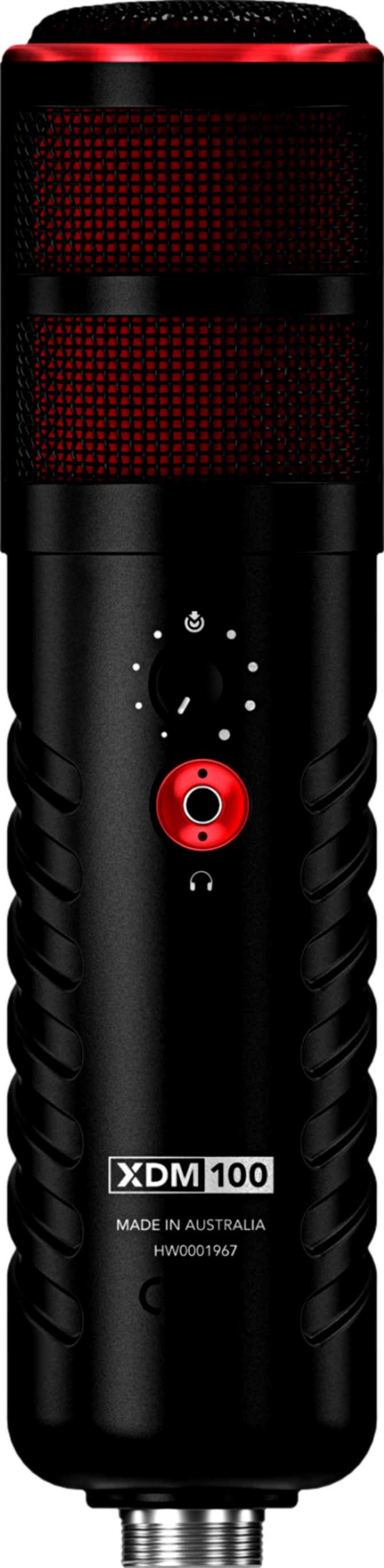
Pick up the XDM-100 and the first thing you notice is heft. At roughly 700 grams — about the same weight as a full 700ml water bottle — this is not a lightweight desk accessory. It has real mass, and that density typically signals two things to anyone who's used studio condenser microphones before: better resistance to handling vibration, and a body that won't wobble or tip on a flimsy stand.
Physically, the microphone stands about 213mm tall, roughly the height of a standard wine bottle though noticeably slimmer, with a width of 62mm and a thickness of 52mm. That's a side-address, desktop-style footprint rather than a slim handheld design — you'll want a proper desk arm or weighted stand, not a tripod that came free with a cheaper accessory bundle. Combined with the included shock mount, plan for a few extra inches of clearance on your desk, especially if you're also running a boom arm.
Hardware Controls, Not a Software Mixer
The XDM-100 places its control panel directly on the device itself, rather than pushing those adjustments into a companion desktop app. In practice, that means gain, monitoring, and any other physical adjustments happen with your hands on the microphone body — not buried three menus deep in a piece of bundled software you have to remember to open every session.
There's no touch-sensitive control surface here. The absence of a touchpad strongly suggests traditional physical knobs and switches, which has a real practical upside: tactile controls are easier to adjust by feel without looking away from your screen, and they don't suffer from the accidental double-triggers or missed inputs that touch panels occasionally produce — particularly useful mid-recording, when you don't want to second-guess whether a tap actually registered.
A Serious Look, Not a Gaming One
You won't find any RGB lighting on this microphone. For some buyers — particularly gaming streamers who want a colorful, illuminated setup on camera — that's a downgrade. For podcasters, voiceover artists, broadcasters, and remote professionals who want their on-camera gear to look credible and unobtrusive in a video call or recorded segment, it's exactly the right call. The XDM-100 reads as equipment, not as a peripheral, and that matters more than it sounds for anyone whose face is regularly on screen next to the mic.
Sound Quality: How the XDM-100 Actually Captures Your Voice
Understanding the Single Cardioid Pattern
The XDM-100 ships with exactly one polar pattern: cardioid. A polar pattern simply describes which direction a microphone "listens" in. Cardioid means the capsule is most sensitive to sound arriving from directly in front of it, while sound from the sides and especially the rear is significantly attenuated.
In real-world terms, this is the right pattern for the most common use case in this product category: one person, talking into a microphone, at a desk. It naturally rejects a meaningful amount of room noise, a noisy fan behind you, or someone else in the house several feet away — all without needing any software noise suppression.
The trade-off is flexibility. Because there's only one pattern available, you lose the versatility that multi-pattern microphones offer:
- No omnidirectional mode for capturing room ambience or a small group seated around the mic
- No bidirectional mode for face-to-face interviews with two people on opposite sides of the capsule
- No hyper-cardioid option for an even tighter, more isolated pickup zone in noisier environments
If your use case is genuinely one voice, one position, most of the time, this isn't a limitation you'll notice. If you're planning in-person co-hosted interviews or round-table recordings on a single mic, it is.
What 48kHz and 24-Bit Audio Actually Means for Your Recordings
The XDM-100's audio interface captures at 48kHz with 24-bit depth. Those two numbers translate into two very practical benefits.
Sample Rate: 48kHz
The sample rate determines how many "snapshots" of the sound wave are captured per second. 48kHz exceeds standard CD-quality audio (44.1kHz) and matches the rate most video editing software and broadcast workflows expect natively — meaning if your recordings end up paired with video, you won't need a conversion step.
Bit Depth: 24-Bit
The bit depth determines how much dynamic detail and headroom exists in each snapshot. At 24-bit, you get substantially more headroom than entry-level 16-bit recording — quieter passages stay cleaner, louder peaks are less likely to clip, and you have more flexibility to adjust levels after recording without introducing audible noise.
Frequency Range: Full Voice, Full Texture
The microphone's frequency response spans 20Hz up to 20,000Hz — which is, not coincidentally, the full range of human hearing. For voice work, this matters because it means the capsule isn't artificially rolling off the low-end warmth of a deeper voice or clipping the crispness of sibilant consonants at the high end. You're getting a full, natural vocal texture rather than a deliberately narrowed "telephone-style" pickup some budget mics use to mask weaker components.
Setup, Compatibility, and Where It Falls Short
Connectivity here is exclusively USB — there's no XLR option. For most buyers, that's actually the appeal: no audio interface, no mixer, no phantom power supply, no extra cables to source. Plug it into a Windows or Mac computer, and the operating system handles the rest. There's no battery to charge and no power adapter to misplace; it draws power directly over the same USB connection carrying your audio.
The flip side of USB-only connectivity is that this microphone has no path into a traditional analog signal chain. If you ever want to run it through an external mixer, into a PA system, or alongside XLR-based studio gear, you can't — it's built specifically for direct-to-computer use.
Device Compatibility At a Glance
Compatibility is confirmed for Windows and Mac OS X. It is explicitly not compatible with Android or iOS. This is the single most important thing for a specific kind of buyer to know before purchasing: if your plan was to record voice memos, mobile podcasts, or on-the-go content straight into a phone or tablet, this microphone will not do that job. It is a desktop and laptop tool, full stop. Anyone shopping for a hybrid mobile/desktop solution should look elsewhere.
Zero-Latency Monitoring: The Headphone Output Explained
The XDM-100 includes a built-in 3.5mm headphone jack directly on the microphone, allowing real-time monitoring of your own voice as it's being recorded — what's typically called "zero-latency monitoring" because you're hearing the analog signal directly, not a delayed version processed through your computer.
This matters more than beginners often expect. Without direct monitoring, you're either recording blind, hoping levels and clarity are right, or listening through your computer with a small but noticeable delay that makes your own voice sound distractingly out of sync in your ears — disruptive enough that many people just give up and remove their headphones entirely. Built-in monitoring solves that.
The headphone output itself shares the same 20Hz–20,000Hz range as the microphone, meaning your monitoring mix won't be a degraded, narrow-band preview — what you hear in your headphones reasonably represents what's actually being captured.
The Bundle Advantage: Shock Mount and Pop Filter Included
Two accessories that are frequently sold separately — and frequently skipped by beginners who don't realize they need them — come included with the XDM-100: a shock mount and a pop filter.
Shock Mount
Microphone capsules are sensitive to vibration. Without a shock mount, footsteps, desk bumps, even typing on a nearby keyboard can transmit as a low rumble into your recording. A shock mount isolates the capsule from that physical vibration mechanically, rather than relying on you to sit perfectly still.
Pop Filter
Plosive consonants like "P" and "B" produce a short burst of air that, at close mic range, causes an audible pop or thump on the recording. A pop filter is a simple mesh screen that diffuses that air burst before it reaches the capsule.
For a beginner, having both included out of the box removes a common early frustration: recording your first session, only to discover afterward that you need to track down and buy two more accessories before your audio is actually usable.
Real-World Use Cases: Who Should Buy the Rode XDM-100
| Great Fit For | Look Elsewhere If You Need |
|---|---|
| Solo podcast hosts and voiceover artists recording from a desktop or laptop | Mobile recording on a phone or tablet (Android/iOS not supported) |
| Streamers and remote professionals who want a clean, non-gamer aesthetic on camera | RGB lighting or a gaming-themed setup |
| Single-voice content creators recording from one fixed position | In-person co-hosted interviews needing a bidirectional pattern |
| Anyone who wants studio-relevant audio without a separate interface or mixer | Integration into an existing XLR-based studio or live sound rig |
| Buyers who want a shock mount and pop filter included, not purchased separately | Flexible multi-pattern recording (omni, hyper-cardioid, bidirectional) |
| Users who prefer physical knobs and buttons over touchscreens or apps | A companion software suite with saved presets or profiles |
How It Stacks Up Against Other USB Microphones
Rather than compare against unverified competitor specs, it's more useful to understand where a microphone like the XDM-100 sits within three broad categories of USB microphone design.
| Category | Polar Pattern Flexibility | Connectivity | Control Style | Best Suited For |
|---|---|---|---|---|
| Single-pattern, hardware-controlled USB mic XDM-100's category | One fixed pattern (cardioid) | USB only | Physical controls on the device | Solo voice recording with minimal setup complexity |
| Multi-pattern flagship USB mics | Multiple switchable patterns | USB only | Often hardware plus companion app | Interviews, group recording, varied environments |
| Hybrid USB/XLR mics | Varies by model | USB and XLR | Hardware-based | Users wanting a future upgrade path into a studio setup |
The XDM-100's positioning is clear: it trades pattern flexibility and analog expandability for simplicity and a lower learning curve. That's a deliberate, sensible trade-off for its target buyer — but it does mean that if your needs grow into multi-person recording or a mixer-based studio setup down the line, you'd be looking at a different microphone, not an upgrade path for this one.
Honest Strengths and Weaknesses
The Strengths
The XDM-100's biggest strength is coherence — every design decision points toward the same goal of fast, reliable, high-quality solo voice capture, with nothing half-implemented to pad a spec sheet. The included shock mount and pop filter alone solve two of the most common beginner mistakes before they happen, and the full-range frequency response paired with 24-bit/48kHz capture gives genuinely professional-grade audio quality for the price of "just" a USB microphone. The zero-latency headphone monitoring is a meaningful, often underappreciated feature that separates serious recording tools from toy-grade USB mics.
The Trade-Offs
The honest weaknesses are equally clear, and worth taking seriously before you buy. The single cardioid pattern is a real constraint if your content plans ever involve more than one voice in the room — there's no built-in flexibility to adapt. The complete absence of mobile device support rules this out instantly for anyone hoping to use it as a phone-based recording solution, which is an increasingly common use case for podcasters and content creators working on the go. And because it's USB-only with no XLR path, it has no future inside a traditional mixer-based or live-sound setup; what you buy is what you're locked into, connectivity-wise, for the life of the product.
Frequently Asked Questions
Final Verdict
The Rode XDM-100 is an easy recommendation for one specific, common buyer: someone recording solo voice content — podcasts, voiceovers, narration, remote work calls, or streaming commentary — from a fixed desktop or laptop position, who wants studio-relevant audio quality without the complexity of an audio interface, mixer, or multi-pattern learning curve. The included shock mount and pop filter, genuine full-range frequency response, 24-bit/48kHz capture, and real-time headphone monitoring add up to a microphone that punches well above a "basic USB mic" category, with hardware controls that stay out of your way rather than demanding a software app every session.
It is not the right purchase for two specific groups: anyone needing mobile Android or iOS recording capability, and anyone planning multi-person or flexible-pattern recording setups now or in the near future. For those buyers, the single fixed cardioid pattern and desktop-only compatibility are dealbreakers, not minor footnotes.
Buy It If
You record solo voice content from a desktop or laptop and want studio-grade audio without extra hardware.
Skip It If
You need mobile recording, multiple polar patterns, or an XLR path into a larger studio setup.