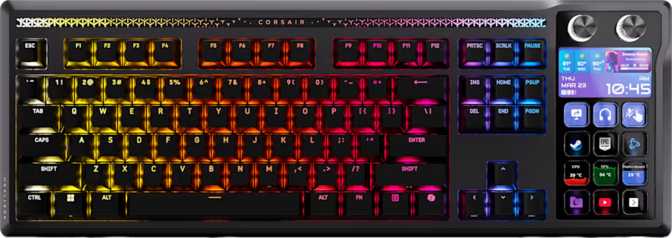
Corsair Galleon 100 SD Full Review: Premium Full-Size Gaming Keyboard
KeyboardsQuick Verdict
Key Specifications at a Glance
| Form Factor | Full 100% Layout |
|---|---|
| Mount Type | Gasket Mount |
| Switches | Corsair MLX Pulse Linear |
| Hot-Swap | Yes — No Soldering |
| Polling Rate | 8,000 Hz |
| Actuation Force | 45g (Light Linear) |
| Actuation Point | 2mm of 3.6mm Total |
| N-Key Rollover | Full NKRO |
| Keycaps | Double-Shot PBT, OEM Profile |
|---|---|
| Layout | ANSI US Standard |
| Plate / Case | Aluminum / Plastic + Al |
| Connectivity | Wired USB (Detachable) |
| Weight | 2,706g (inc. wrist rest) |
| Dimensions | 448 × 89 × 21mm |
| Lighting | Per-Key RGB |
| Warranty | 2 Years |
Who the Corsair Galleon 100 SD Is Built For
The full-size gaming keyboard market is crowded, and most boards at this tier compromise somewhere — either on build quality, switch feel, or the hardware-level performance features that competitive players actually care about. The Corsair Galleon 100 SD is an attempt to close that gap: a 100% layout board with a gasket mount, an exceptionally high polling rate, hot-swappable switches, and an integrated display, all wrapped in a premium aluminum-reinforced chassis.
It targets serious desktop gamers who refuse to give up their numpad and function row, but still want the typing feel and internal engineering typically reserved for boutique or tenkeyless boards. Whether it fully delivers on that promise depends heavily on what you need — and equally on what you're willing to live without.
Build Quality and Physical Design
Materials and Construction
The Galleon 100 SD uses a hybrid chassis: a plastic outer housing with aluminum reinforcement, paired with an aluminum switch plate inside. For buyers new to this distinction, the plate is the internal structure your switches sit on — aluminum plates produce a firmer, crisper keystroke feel with slightly more acoustic brightness compared to polycarbonate or brass alternatives.
The outer shell is available in black only, giving it a clean, uniform aesthetic without divisive two-tone styling. It reads professional and intentional rather than aggressive, which makes it easier to live with across different desk setups.
Dimensions, Weight, and Accessories
At approximately 2.7 kilograms, this is a heavy keyboard by any standard — most full-size gaming keyboards land between 900g and 1.5kg. The extra mass comes from the aluminum internals and the bundled wrist rest. That weight is a genuine advantage if you type hard and need a board that won't shift during intense sessions. It's a real disadvantage if you transport the keyboard or reposition your desk frequently.
A fixed cable is always a potential failure point. The detachable connection means you replace a cable — not the entire board — if something goes wrong over time.
A wrist rest ships in the box — a meaningful addition at this tier, since aftermarket wrist rests for full-size keyboards often cost $30–$50 separately.
Set your preferred typing angle with multi-position feet — a basic but essential feature that's easier to appreciate once you've used a keyboard without it.
Full per-key RGB across all 100% layout keys, customizable through Corsair's iCUE software with effects ranging from static colors to reactive animations.
The Gasket Mount: Why It Changes the Typing Experience
Most gaming keyboards use a traditional tray or top mount, where the switch plate is rigidly fixed to the case. A gasket mount places a layer of elastic material — typically silicone — between the plate and the case, allowing the internal assembly to flex very slightly under keystroke pressure. This absorbs the sharp impact feedback that makes cheaper keyboards feel harsh and loud.
The practical result is a typing experience with more cushion and resonance: keystrokes feel fuller and more satisfying, the sound profile is deeper and less clacky, and prolonged typing sessions are noticeably less fatiguing. Gasket mounts were until recently found primarily on custom keyboards costing significantly more. Seeing this construction on a mainstream gaming board is a genuine engineering feature — not a marketing checkbox.
Mount Type Comparison
-
Tray Mount
Plate screwed to the bottom — stiff, resonant, fatiguing over long sessions
-
Top Mount
Plate attached to top case — better than tray, but still rigid and acoustically harsh
-
Gasket Mount This Keyboard
Elastic layer isolates the plate — softer impact, deeper sound, less fatigue
The MLX Pulse Linear Switches: Feel, Speed, and Sound
The Corsair MLX Pulse linear switches deliver a straight-down keystroke without any tactile bump or audible click along the way. For first-time mechanical keyboard users: linear switches are the dominant choice for gaming because the smooth, consistent stroke allows for faster repeat inputs — and the feel is closest to what most membrane keyboard users already know.
Hot-Swap Support: Future-Proofing Your Investment
Every switch in this keyboard is hot-swappable — pull out any switch and replace it with a compatible alternative using only a switch puller tool, no soldering involved. This matters for two distinct reasons.
First, if a switch fails, you replace one switch, not the entire board. Second, if the MLX Pulse feel isn't to your taste down the line, you can install any compatible MX-footprint switch — tactile, clicky, heavier, lighter — without involving a technician. This considerably future-proofs your investment.
Performance Features: Polling Rate, NKRO, and the Rapid Trigger Question
What 8,000 Hz Polling Rate Actually Means
The polling rate describes how frequently the keyboard reports its status to your computer. A standard keyboard reports 1,000 times per second. The Galleon 100 SD reports 8,000 times per second — reducing the maximum possible input delay to approximately 0.125 milliseconds, compared to 1 millisecond at the standard rate.
For most tasks — word processing, web browsing, spreadsheets — you will not notice this difference at all. For competitive gaming where reaction time and input precision matter at millisecond scales, the hardware headroom is unambiguously present.
N-Key Rollover
The keyboard supports full N-Key Rollover (NKRO), meaning every single key on the board can be pressed simultaneously and registered correctly. This is the gold standard for gaming keyboards and eliminates any possibility of "ghosting" — where simultaneous keypresses cancel or miss each other. For fast typists and gamers who hold multiple keys at once, NKRO is a non-negotiable baseline.
Important: No Rapid Trigger or Adjustable Actuation
The Galleon 100 SD does not include rapid trigger, adjustable actuation points, analog input, or dual actuation — features increasingly found on competitor keyboards, particularly those using magnetic Hall Effect switches. Given the 8,000 Hz polling rate, the absence of rapid trigger is a notable gap. The high polling rate creates infrastructure for ultra-precise input timing, but without adjustable or rapid-trigger actuation, that infrastructure isn't fully utilized for the competitive scenarios where it matters most. Buyers seeking a rapid trigger keyboard should weigh this carefully before purchasing.
Display, Media Controls, and Rotary Dial
Integrated Display
A physical screen built into the keyboard body surfaces system information, media status, or other data through Corsair's iCUE software. Rare at this form factor and price tier — and genuinely useful for monitoring system load or track info without tabbing away from a game.
Dedicated Media Keys
Discrete, labeled media keys — not function-layer shortcuts requiring you to hold Fn first. For users who frequently pause, skip, or adjust volume without leaving their keyboard hand position, physical dedicated keys are noticeably more convenient than layer-based alternatives.
Rotary Volume Dial
An analog-style rotary dial handles volume control — and likely other assignable functions through iCUE. It feels more natural than tapping increment keys and allows precise adjustments mid-session without disrupting your workflow or losing game focus.
Keycaps: Material, Profile, and Customization Potential
Double-Shot PBT Construction
The keycaps are made from PBT plastic using a double-shot manufacturing process. PBT is harder, more resistant to oils and wear, and retains its texture significantly longer than the ABS plastic found on most budget gaming keyboards. ABS keycaps develop a shiny, worn appearance within months of regular use; PBT keycaps maintain their texture long-term under daily abuse.
Double-shot refers to the construction method: two layers of plastic are molded together, so the legend is literally a second layer of plastic inside the keycap. It cannot fade, wear, or rub off under any normal use condition. RGB backlighting shines through these legends cleanly and evenly.
OEM Profile
The keycaps use OEM profile — a slightly sculpted keycap shape with a medium height and forward-angled tops on each row. OEM is the dominant profile on prebuilt gaming keyboards and will feel immediately familiar to the vast majority of buyers. It sits between the lower DSA and Cherry profiles and the tall SA profile — a comfortable middle ground for most hand sizes and typing angles.
Standard Layout: An Underappreciated Advantage
The Galleon 100 SD uses a fully standard ANSI keycap layout, meaning virtually any aftermarket keycap set will fit correctly without compatibility issues. Many gaming keyboards use non-standard bottom rows or shifted key positions that make aftermarket upgrades impossible without custom sets. This one doesn't — and that detail matters significantly when you decide to personalize or refresh the look years down the road.
Keycap Spec Summary
- Material
- PBT Plastic
- Construction
- Double-Shot
- Profile
- OEM (Standard Height)
- Layout
- ANSI US Standard
- Backlighting
- Per-Key RGB
- Aftermarket Compatible
- Yes — Standard Layout
Software, Connectivity, and Customization
USB Passthrough Port
A USB passthrough port on the keyboard body provides an additional USB connection accessible directly from your desk surface rather than reaching around to your PC tower or hub. Most useful for connecting storage drives, charging cables, or peripherals temporarily — a controller, a headset dongle, a flash drive. It's a quality-of-life addition rather than a core performance feature, but one that a significant number of users find themselves relying on daily.
iCUE Software Ecosystem
The Galleon 100 SD operates within Corsair's iCUE software environment for RGB lighting customization, macro programming, display configuration, and polling rate adjustment. iCUE is a mature platform with broad capability, though it requires installation and periodic updates to remain fully functional. All meaningful customization on this keyboard is tied to iCUE — there is no offline, software-independent remapping option.
No QMK, ZMK, or VIA Support — and No Mac Optimization
This keyboard does not support open-source firmware platforms like QMK, ZMK, or VIA — loved in the enthusiast community for hardware-level remapping that works without background software. If fully offline, software-independent customization is a baseline requirement for you, this board isn't built for it. It's also worth noting: the Galleon 100 SD uses a Windows-native ANSI layout without dedicated Mac modifier keycaps or native macOS key mapping. Heavy Mac users would need to remap keys manually through iCUE or macOS system settings.
Real-World Usage Scenarios
This Keyboard Is a Strong Match For
- Desktop PC gamers who require a full numpad for macros, data entry, or work tasks between gaming sessions
- Users who type for extended periods and want the fatigue reduction that comes from a gasket-mounted board with quality linears
- Buyers who want to experiment with different switch feels over time without purchasing a new keyboard
- Content creators or streamers who actively use the integrated display, media controls, and rotary dial
- Anyone upgrading from a tray-mount or membrane keyboard who wants a noticeable improvement in both feel and engineering
This Keyboard Is Not Ideal For
- Competitive FPS or tactical shooter players specifically seeking rapid trigger functionality — the hardware doesn't support it
- Users who want full open-source firmware control via QMK or VIA as a non-negotiable baseline
- Mac users who want native macOS key labeling and key mapping configured out of the box
- Anyone who needs to travel with their keyboard or reposition it frequently — at nearly 2.7kg, portability is not this board's strength
- Buyers on tight desk space — 100% layout keyboards are wide, and the Galleon 100 SD is no exception at 448mm across
How It Stacks Up Against the Competition
| Feature | Corsair Galleon 100 SD | Typical Full-Size Gaming Keyboard | Enthusiast TKL Alternatives |
|---|---|---|---|
| Mount Type | Gasket | Tray / Top | Gasket (more common at TKL tier) |
| Polling Rate | 8,000 Hz | 1,000 Hz | 1,000 – 8,000 Hz |
| Switch Swappability | Hot-Swap | Often Soldered | Hot-Swap |
| Rapid Trigger | No | Varies | Available on select models |
| Layout | 100% Full (with Numpad) | 100% Full (with Numpad) | 80% TKL — No Numpad |
| Integrated Display | Yes | Rare | Rare |
| QMK / VIA Support | No | No | Varies by Model |
| Keycap Material | PBT Double-Shot | Often ABS | PBT Common |
| Wrist Rest Included | Yes | Rare | Rare |
The Galleon 100 SD's main competition comes from other premium full-size gaming boards. It wins on gasket mounting and polling rate, matches on switch quality, and loses specifically on the rapid trigger gap. Against TKL alternatives that do offer rapid trigger, the trade-off is layout — you keep your numpad and media cluster, but concede that one specific performance feature.
Honest Strengths and Limitations
Where It Excels
The Galleon 100 SD gets a remarkable amount right in one package. The combination of gasket mounting, aluminum construction, hot-swappable linears, double-shot PBT keycaps, a detachable cable, full N-Key Rollover, an included wrist rest, USB passthrough, and a built-in display represents genuine value stacking. Most keyboards at this tier compromise on at least two or three of these elements.
The 8,000 Hz polling rate is impressive hardware, and the MLX Pulse switches offer a smooth, well-calibrated linear feel that satisfies most buyers who haven't gone deep into the switch-swapping hobby yet — and for those who have, the hot-swap socket keeps that door wide open.
Where It Falls Short
The honest limitation is the missing rapid trigger feature. As that capability becomes a genuine competitive differentiator, a keyboard with an 8,000 Hz polling rate that doesn't pair it with adjustable actuation is going to draw comparisons it can't fully answer. The high polling rate is real hardware headroom — but without the software-side switch behavior to match, it's only partially utilized.
The lack of QMK/VIA support won't matter to most buyers, but for the specific subset of enthusiasts for whom that's a baseline requirement, it's a hard no regardless of build quality.
The weight is worth flagging plainly: nearly 2.7 kilograms is heavy even for a full-size board with a wrist rest. It's stable and planted — but it is not mobile.
Answers to Common Questions Before You Buy
Final Verdict
The Corsair Galleon 100 SD is a full-size gaming keyboard that takes the build quality and internal engineering of boutique-tier boards and packages them into a mainstream product. Gasket mounting, aluminum construction, PBT double-shot keycaps, hot-swap switches, an 8,000 Hz polling rate, a built-in display, dedicated media keys, a rotary dial, USB passthrough, and a wrist rest — this is a genuinely well-equipped board for serious desktop users, and most of its competitors at this tier don't match it on all these fronts simultaneously.
If you want the most comfortable full-size typing experience with premium build materials, a smooth linear switch feel, and practical desktop features, the Galleon 100 SD is a strong choice and a meaningful upgrade from the vast majority of gaming keyboards in its class.
If rapid trigger is non-negotiable for your competitive use case, or if QMK/VIA firmware control is part of your workflow, this is not the right board regardless of how well it performs everywhere else. For the majority of gaming-focused desktop users who want a full-size board that doesn't cut corners on feel or construction, the Corsair Galleon 100 SD earns a clear and confident recommendation.