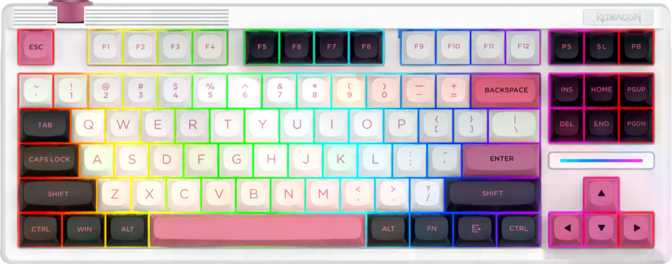
Redragon Otiim K729 Pro: Full Review of a Quiet Wireless TKL
KeyboardsMost keyboards in the budget-to-mid-range mechanical space make the same compromise: pick two or three attractive features, skimp on the rest, and hope buyers don't notice. The Redragon Otiim K729 Pro takes a different approach — stacking gasket construction, hot-swappable switches, triple wireless connectivity, and genuine PBT double-shot keycaps into one tenkeyless chassis. For quiet office use, multi-device setups, or anyone stepping into mechanical keyboards for the first time and wanting a board they won't immediately want to replace, that combination is worth paying close attention to.
Form Factor
Tenkeyless (80%)
Connectivity
USB · 2.4 GHz · BT 5
Switches
Silent Linear · Hot-Swap
Construction
Gasket Mount · Alu Plate
Design and Build Quality: Denser Than It Looks
The Gasket Mount: The Feature That Changes How Typing Feels
The single most important structural decision in the K729 Pro is also the least visible one. Inside the case, the keyboard's internal assembly rests on gaskets rather than screwing rigidly into the case walls. Each keystroke compresses slightly against a cushioned surface instead of bottoming out against hard plastic or metal.
The result is less finger rebound, a warmer and more satisfying sound, and noticeably reduced fatigue during long sessions — the same principle that makes a good chair feel different from a cheap one. Subtle but consistent.
Materials: Plastic Case, Aluminum Where It Counts
The outer shell is plastic — a considered choice, not a shortcut. Housing wireless electronics in a full-aluminum body would push weight into genuinely awkward territory. Where aluminum matters acoustically and structurally is the internal switch plate, and that's exactly where Redragon placed it. An aluminum plate is stiffer than polycarbonate alternatives, giving the board a firm, consistent feel. Combined with the gasket mount's cushioning, the K729 Pro lands in a comfortable middle ground: firm enough to feel precise, flexible enough to feel forgiving.
Size, Weight, and Everyday Stability
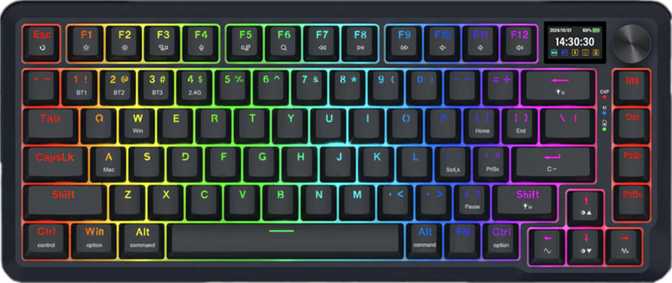
The tenkeyless format removes the number pad while retaining function keys, the full navigation cluster, and arrow keys — a practical middle ground that suits the majority of users. At just under a kilogram, the board barely moves under heavy use. Adjustable tilt feet let you dial in your preferred typing angle. One absence worth noting: no wrist rest is included in the box.
Physical Specifications
- Width367 mm
- Height146 mm
- Thickness40.8 mm
- Weight930 g
- Case MaterialPlastic / Aluminum
- Plate MaterialAluminum
- Mount TypeGasket
- ColorsBlack · White
Triple Wireless Connectivity: One Keyboard, Every Device
The K729 Pro supports three distinct connection modes — and unlike keyboards that advertise multi-mode wireless while delivering mediocre execution, each mode here is genuinely usable for its intended purpose.
Wired USB
Full SpeedThe included cable is detachable — replaceable if worn, stores cleanly when not in use. In wired mode, the keyboard reports its input state to the computer 1,000 times per second. That polling rate will never be the limiting factor in any typing or gaming scenario, competitive or otherwise.
2.4 GHz Wireless
RecommendedUses a USB dongle and maintains the full 1,000 Hz polling rate wirelessly. The round-trip input lag is low enough to be functionally indistinguishable from wired in all standard gaming and typing scenarios. Use this when you want a cable-free desk without any meaningful performance concession.
Bluetooth 5
Multi-DevicePairs to any Bluetooth-capable device without a dongle — laptop, tablet, phone. Bluetooth 5 offers better range stability and faster pairing than older versions. Honest note: there is more inherent latency than 2.4 GHz. Ideal for multi-device productivity; not the optimal choice for competitive gaming.
The Silent Peach Switch: What Quiet Linear Actually Means
Understanding Linear and Silent
Mechanical switches fall into three families: tactile (a physical bump mid-stroke), clicky (a bump plus audible click), and linear — a smooth, uninterrupted press with no bump. The K729 Pro ships with a silent linear variant.
The silence comes from small internal dampening pads within the switch body that absorb impact at both ends of the travel. Instead of a sharp mechanical clack, you get a soft, muted thud — still recognizably mechanical in feel, meaningfully quieter in output. This is the appropriate switch for shared workspaces, calls, and late-night sessions where keyboard noise creates real friction.
Hot-Swap: The Feature That Future-Proofs the Board
Every switch socket is hot-swappable — remove any switch using a basic switch-puller tool and press a replacement in without soldering. This transforms the K729 Pro from a fixed product into an adaptable platform. Change switch types as your preferences evolve, replace a single failing switch years down the line, or experiment without the pressure of a permanent decision.
Adjustment note: The light 40 g actuation weight may cause accidental keypresses when resting fingers for anyone coming from heavier switches. This typically resolves within a few days as muscle memory adapts — and hot-swap means you can change switches entirely if the weight genuinely doesn't suit your style.
Silent Peach Switch Specs
- Switch Type
- Silent Linear
- Actuation Force
- 40 g Light
- Actuation Distance
- 2.0 mm
- Total Travel
- 3.3 mm
- Hot-Swappable
- Yes
- Internal Dampening
- Yes
- Polling Rate (all modes)
- 1,000 Hz
- Rapid Trigger
- No
Keycaps and Layout: Material Quality You Can Feel After a Year
Why PBT Double-Shot Keycaps Are a Meaningful Upgrade
Most keyboards in this price range ship with ABS plastic keycaps that develop a distinctive greasy shine within weeks to months of use, and whose printed legends fade with sustained contact. The K729 Pro ships with PBT keycaps — a harder, denser plastic. The legends are double-shot molded, formed from a second layer of plastic integrated into the cap structure. They cannot fade, because they're not a surface treatment. They're part of the cap itself.
| PBT Double-Shot (K729 Pro) | ABS (Typical Budget Keyboards) | |
|---|---|---|
| Surface Over Time | Stays textured; resists shine indefinitely | Develops greasy shine within weeks to months |
| Legend Durability | Cannot fade — formed in a second plastic layer | Laser-etched or pad-printed; fades with sustained use |
| Feel | Slightly textured; maintains grip over time | Smoother initially; becomes slick as it wears |
| Aftermarket Compatibility | OEM profile — widest keycap set compatibility available | Varies by profile |
The 80% Layout in Practice
The tenkeyless format keeps everything a typical user touches daily: the full function row, navigation keys (Insert, Delete, Home, End, Page Up, Page Down), arrow keys, and all standard alphanumerics. The only loss is the dedicated numpad, which for most users amounts to no loss at all. The layout follows standard ANSI US sizing throughout — every key is replaceable with standard aftermarket keycap sets without modification.
Media controls use function-layer combinations. The rotary dial handles volume directly — turn it to adjust with no key combination and no software processing lag. For anyone who changes volume frequently during calls, content switching, or gaming with voice chat, the dial is faster and more satisfying than any keyboard shortcut. It works immediately and requires no configuration.
Feature Set: What's Here, What's Deliberately Absent
What's Included
- N-Key Rollover (NKRO)Every simultaneous keypress registered independently — no input limit in any mode.
- RGB BacklightingSouth-facing LEDs with consistent illumination through OEM-profile legend windows.
- Hot-Swappable SwitchesChange any switch without soldering. A basic switch-puller is all the tooling needed.
- Detachable USB CableReplaceable if worn; the board stores cleanly without a fixed cable attached.
- Adjustable Tilt FeetSet your preferred typing angle; holds position reliably under heavy use.
- Rotary Volume DialInstant volume adjustment — no key combinations, no software configuration needed.
What's Not Included
- QMK / VIA / ZMK FirmwareNo open-source firmware. Customization is bounded by Redragon's proprietary software.
- Rapid TriggerThe switch does not re-arm early in travel. Meaningful for a narrow tier of competitive players.
- USB PassthroughThe keyboard does not function as a USB hub for other devices.
- Adjustable Actuation PointActuation depth is fixed at 2.0 mm and cannot be tuned in software.
- Analog InputStandard digital switch behavior only; no variable pressure sensitivity.
- Wrist RestNot in the box — a separate purchase for ergonomics-focused buyers.
Wireless Endurance
Battery runtime figures vary meaningfully based on usage conditions and should always be verified against the current product listing before purchasing — firmware updates can also revise these numbers over time.
The key variables that affect wireless session length:
- Connection mode: Bluetooth draws less power than 2.4 GHz wireless operation.
- RGB lighting: Full-brightness animated effects are the single largest battery drain. Disabling or minimizing RGB extends sessions considerably.
- Usage intensity: Active typing versus idle time affects consumption differently across users.
Battery specifications are sensitive to firmware updates and individual usage patterns. Confirm runtime claims directly from the product listing.
Who This Keyboard Is For — and Who It Isn't
Buy the K729 Pro If You...
- Need a quiet mechanical keyboard for a shared office, open workspace, or home setup where keyboard noise is a friction point for the people around you
- Use multiple devices — desktop, laptop, tablet — and want a single keyboard that switches between them without cable swapping or dongle juggling
- Are buying your first mechanical keyboard and want a genuine quality baseline: gasket mount, PBT caps, and hot-swap support all in one package
- Play games wirelessly and need a polling rate that doesn't concede any performance versus a wired connection
- Want to experiment with switch types over time without committing to a new keyboard each time your preferences shift
Look Elsewhere If You...
- Require rapid trigger specifically — competitive FPS players and rhythm game enthusiasts who have benchmarked the difference should look at boards built explicitly around that feature
- Use macOS as your primary platform — Bluetooth pairing works, but layout, key labels, and configuration software all assume Windows
- Need deep firmware customization via QMK or VIA as part of your workflow — this board supports neither
- Type hard and prefer a heavier, stiffer switch feel — the light 40 g actuation weight with gasket flex may feel imprecise until switches are swapped
Competitive Positioning: Where the K729 Pro Sits
The K729 Pro's competitive advantage is concentration of value — bundling construction features that budget keyboards typically skip, paired with multi-mode wireless that many enthusiast boards still don't offer. The trade-off is the absence of open firmware and advanced gaming features like rapid trigger.
| Feature | Redragon K729 Pro | Typical Budget TKL | Mid-Range Enthusiast TKL |
|---|---|---|---|
| Mount Type | Gasket | Tray (rigid) | Gasket or Top |
| Switch Plate | Aluminum | Plastic | Aluminum / Polycarbonate / Brass |
| Wireless Modes | 3 — USB, 2.4 GHz, Bluetooth 5 | Wired only (usually) | 1–3, varies by model |
| Hot-Swap Switches | Yes | Rarely | Standard |
| Keycap Material | PBT Double-Shot | ABS (typically) | PBT |
| Polling Rate | 1,000 Hz | 1,000 Hz | 1,000 Hz |
| QMK / VIA Support | No | No | Often yes |
| Rapid Trigger | No | No | Increasingly common |
| Silent Switch Option | Yes — included as standard | Varies | Yes, often optional |
Honest Strengths and Weaknesses
What It Gets Right
The K729 Pro's most significant strength is structural integrity. Gasket mounting at this price is genuinely unusual — most manufacturers reserve it for boards positioned a tier or two higher. Combined with the aluminum plate, it creates a typing surface that feels more expensive than its price suggests. The sound signature is warm and muted rather than hollow.
The triple wireless implementation is thoughtfully executed rather than tacked on. The 2.4 GHz mode maintains full polling rate performance, making wireless a genuine option rather than a concession. Bluetooth 5 adds device flexibility that wired-only keyboards simply can't offer, and the detachable cable ensures the wired mode isn't an afterthought either.
PBT double-shot keycaps and a hot-swap PCB on the same board removes two of the most common reasons people eventually replace a keyboard — keycap degradation and switch dissatisfaction. These are longevity decisions that compound over years of ownership, not spec-sheet checkboxes.
Where It Falls Short
No QMK or VIA support means the customization ceiling is defined by Redragon's software rather than the open-source community. For buyers who rely on complex macro layers or conditional key behavior, this is a real constraint — not a theoretical one.
The absence of rapid trigger will close the door for players in competitive contexts where that feature has become table stakes. The light actuation weight, while comfortable for most typists, requires genuine adjustment for anyone coming from stiffer switches or membrane keyboards with heavier resistance.
The weight — a stability advantage at a fixed desk — is worth acknowledging honestly. Close to a kilogram for a tenkeyless keyboard is on the higher end of the format, and it's a real consideration for anyone who commutes with their keyboard or hot-desks across locations.
Real Buyer Questions, Answered
Final Verdict
RecommendedThe Redragon Otiim K729 Pro is a well-constructed, honestly considered keyboard that makes a clear case for itself within a specific buyer profile. Gasket mounting, hot-swap support, PBT double-shot keycaps, and three wireless modes together create a package that outperforms its price in the areas that affect daily use most directly — how it feels to type on, how long it maintains its quality, and how flexibly it fits into a multi-device workflow.
The limitations are equally clear. No QMK or VIA support, no rapid trigger, Windows-centric design — these aren't flaws so much as scope decisions that will disqualify the K729 Pro for some buyers and matter not at all to others. If you want a quiet mechanical keyboard with genuine build quality and wireless flexibility, and you're not specifically shopping for open-source firmware or cutting-edge competitive gaming features, the K729 Pro delivers more than its price typically promises. The gasket mount alone sets it apart from most competition at this tier — and the hot-swap PCB means you're buying a platform that evolves with your preferences rather than one you'll need to replace when they change.
Buy it if
- Quiet wireless performance and build quality above price tier are priorities
- You use multiple devices and want one keyboard for all of them
- Switch flexibility over time matters to you
Skip it if
- QMK, VIA, or open-source firmware access is a requirement
- macOS optimization is essential for your daily workflow
- Rapid trigger is non-negotiable for competitive gaming