Redragon Flekact Pro Review: Gasket-Mounted Wireless 65% Mechanical
KeyboardsThe 65% wireless mechanical keyboard market has grown crowded with options that force you to choose between connectivity flexibility, build quality, and price. The Redragon Flekact Pro enters that space making a case that you should not have to compromise on any of those fronts. It pairs a gasket-mounted aluminum construction with three-mode wireless connectivity and hot-swappable switches, all in a footprint small enough to reclaim meaningful desk space. Whether it actually delivers on that promise depends entirely on who you are and what you ask of it.
At a Glance
Build Quality and Physical Design
Materials and Construction
The Flekact Pro's chassis combines a plastic outer shell with aluminum reinforcement, and the internal plate is full aluminum. A pure plastic keyboard at this size tends to flex noticeably under heavy typing; the aluminum plate stiffens the entire typing surface so the board feels planted and resolute rather than hollow. The outer plastic keeps overall weight sensible while allowing the bottom housing to absorb energy rather than transmit it straight back to your fingertips.
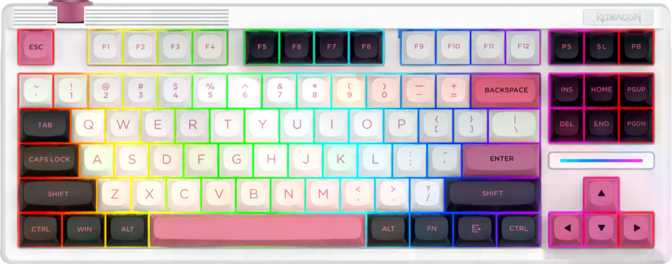
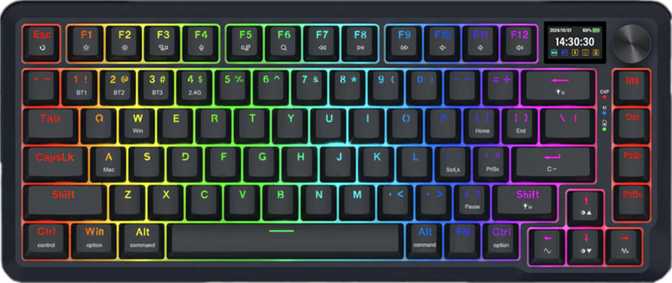
At 850 grams, this is a keyboard with genuine presence. It will not skid around your desk, and it does not feel like something assembled from budget parts. Compared to all-plastic competitors at similar price points, the Flekact Pro sits noticeably higher in perceived quality the moment you lift it. Two colorways are available — black and white — both clean and unbranded enough to fit into most desktop setups without demanding attention. Adjustable feet let you dial in a typing angle that suits your wrist position, and the south-facing RGB LED configuration positions the light source toward the front of each switch for pronounced key-face illumination.
- Weight850 g
- Width × Depth335 × 140 mm
- Thickness43 mm
- CasePlastic + Aluminum
- PlateFull Aluminum
- ColorsBlack / White
- Warranty1 Year
Why Gasket Mount Changes the Typing Experience
In a traditional tray-mounted or top-mounted keyboard, the plate is screwed rigidly to the case and every keystroke's energy travels straight into your desk. A gasket mount suspends the plate-switch-keycap assembly on silicone or foam gaskets around the perimeter, giving the internal assembly slight flex when you type. The result is a noticeably bouncier, more cushioned typing feel — often described as "poppy" — and significantly reduced sound transmission into the desk surface. For long sessions, this translates to less wrist fatigue. For sound-conscious users in shared spaces, it means a quieter, less desk-resonant experience. Gasket mounts were, until recently, found almost exclusively on keyboards costing significantly more. Seeing one here at this price tier is a meaningful inclusion.
Dimensions and Desk Footprint
At 335mm wide and 140mm deep, the Flekact Pro fits comfortably in setups where a tenkeyless board feels oversized. The 65% layout retains arrow keys and a row of navigation-adjacent keys on the right — a meaningful compromise over a 60% that strips those entirely — while still freeing enough desk space for a wider mouse range. A wrist rest is not included in the box, which is a notable omission for buyers who type for extended hours and do not already own one separately.
Connectivity: Three Modes, One Board
2.4 GHz Wireless
Uses a dedicated USB receiver for the lowest wireless latency — functionally indistinguishable from wired during gaming and fast-paced typing. Plug in the receiver and the keyboard connects automatically with no pairing required each session.
Bluetooth 5.0
Handles the multi-device use case. Switch between desktop, laptop, and tablet without managing a receiver on each one. Bluetooth 5.0 pairs natively with Windows, macOS, Android, and iOS devices.
USB Wired
Provides a zero-latency fallback and eliminates battery dependency during marathon sessions. The detachable cable is a practical quality-of-life feature — if it frays or you want a different style, replacement is straightforward without retiring the keyboard.
1000 Hz Polling Rate — Full-Speed Wireless Without Compromise
The Flekact Pro reports its position to the host computer one thousand times per second. This is a ceiling-level polling rate for wireless keyboards at this price tier — keystrokes register within a single millisecond of the physical event. You are not giving anything up compared to a dedicated wired gaming board.
Switches: The Redragon Sunuo Linear
Feel, Force, and Travel
The Flekact Pro ships with Redragon's own Sunuo switches, a linear mechanical type. Linear switches have one motion characteristic: smooth and consistent from top to bottom, with no tactile bump partway through and no audible click. They reward fast, light-fingered typists and gamers who want rapid, repeatable input without physical interruption.
The force required to actuate a key is 45 grams — on the lighter side of the linear spectrum. Lighter actuation favors speed; heavier actuation favors precision. At 45g, the Sunuo switches lean toward speed and low-fatigue typing without being so featherlight that accuracy suffers.
The total 3.6mm travel gives the keystroke a perceptible bottom-out depth — enough physical feedback to give your fingers a clear "registered" sensation without the key travel feeling excessive. The actuation point sits at exactly 2mm, meaning the key registers precisely at the midpoint of the stroke: deep enough that accidental brushes rarely trigger keys, shallow enough that deliberate presses register quickly.
Sunuo Switch Specifications
Registers at the keystroke midpoint — balancing quick response against accidental triggers.
Full keystroke depth delivers clear bottom-out feedback on every press.
Light actuation force — speed-friendly, low-fatigue, comfortable for extended sessions.
Smooth, bump-free travel from top to bottom — ideal for gaming and speed-focused typing.
Hot-Swap: Why This Feature Changes Everything
Every switch in the Flekact Pro can be removed and replaced without soldering. If you dislike the Sunuo switches — too light, too smooth, simply not your preference — you can replace the entire keyboard's switches with any MX-compatible alternative without purchasing a new board. If a switch fails after extended use, replacement is a one-minute fix rather than a repair job. Hot-swap capability effectively future-proofs the keyboard against both personal preference changes and hardware wear. The sockets accept the most widely produced switch standard in the market, giving you an extensive catalogue of drop-in options.
Keycaps, Layout, and Daily Usability
PBT Double-Shot Keycaps
The keycaps are PBT plastic, double-shot manufactured. PBT is harder and more resistant to wear than the ABS plastic found on many competing keyboards at similar prices. ABS keycaps develop a greasy, worn-looking shine after months of use; PBT resists this significantly, keeping its texture consistent over years of typing.
Double-shot construction means the legends — the letters and symbols on each key — are formed from a second layer of plastic molded into the keycap body rather than printed on its surface. Print-on legends wear off; double-shot legends never will. The RGB shine-through remains sharp and consistent over the keyboard's lifetime.
The keycap profile is OEM — a slightly taller, angled profile familiar to most keyboard users transitioning from standard office boards. It is not the lowest profile available, but it is comfortable for a broad range of typists. The layout uses standard key sizing throughout, meaning aftermarket keycap sets designed for 65% boards will fit without issue.
65% ANSI Layout: Living with the Tradeoffs
The 65% size retains alphanumeric keys, dedicated arrow keys, and a column on the far right that typically covers Delete, Page Up, Page Down, and End — the most frequently needed navigation keys. Function keys are accessed via a secondary Fn layer.
If your workflow involves heavy F-key use — IDE shortcuts, software-specific hotkeys, or games that rely on function row inputs — the Fn-layer approach adds one physical keypress to each of those actions. Whether that is acceptable depends on how often you genuinely use them.
Media controls operate through the same Fn layer. The rotary dial compensates meaningfully for volume control specifically — physical volume adjustment without reaching for a key combination is a quality-of-life addition that many users find hard to live without once experienced. Media controls accessible through Fn still cover the remaining audio actions.
The Onboard Display
The Flekact Pro includes a small onboard display. Based on the board's feature set, this display most likely reports connectivity mode, battery status, and active profile indicators — the kind of at-a-glance information that would otherwise require trial-and-error or software checks. For a wireless board specifically, knowing your active connection mode and remaining battery level at a glance saves meaningful time.
Full N-Key Rollover: What It Means for Gamers
N-Key Rollover (NKRO) means every key on the board can be pressed simultaneously and registered accurately. In practice, this eliminates ghosting — the phenomenon where pressing several keys at once causes some inputs to be dropped or misread. For gaming, complex simultaneous inputs (movement keys, ability activations, modifier keys) all register correctly. For typing, fast key combinations never produce missed characters. NKRO is a feature most budget-tier keyboards lack; its inclusion here reflects the Flekact Pro's positioning as a genuine gaming peripheral, not merely a wireless typing board.
What the Flekact Pro Lacks
Honest evaluation requires naming omissions alongside strengths. Several capabilities popular among keyboard enthusiasts are absent here.
No Open Firmware (QMK / VIA / ZMK)
QMK, ZMK, and VIA allow deep per-key remapping, macro programming, and layer customization without manufacturer software. The Flekact Pro uses Redragon's proprietary software only. For enthusiasts who want firmware-level control — or who use Linux as their primary OS where manufacturer software may not function reliably — this is a real limitation, not a minor caveat.
No Rapid Trigger
Rapid Trigger allows a key to re-actuate immediately upon upward movement rather than waiting for the key to return past its original actuation point. For the majority of users this will not be perceptible in practice, but for players of rhythm games or high-frequency-input competitive titles where the feature has become expected, its absence is worth knowing before purchase.
No Adjustable or Dual Actuation
Features that let you customize how deep a keystroke must travel before it registers are absent. These are enthusiast-tier additions more than practical necessities for most users, but for buyers who specifically seek per-key actuation tuning, this board will not satisfy that requirement.
No USB Passthrough
The keyboard's cable connection point is for power and data only, not as a hub. Users who rely on a keyboard-side USB port to connect mice, drives, or headset receivers will need to route those directly to their computer's ports instead.
Real-World Scenarios: Who Should Buy This
Ideal For
- The Desk-Constrained Gamer
Smaller desk but still needs arrow keys in-game? The 65% frees meaningful horizontal space without removing navigation keys. The 2.4GHz wireless mode with 1000Hz polling means no latency penalty for the wireless convenience.
- The Office and Home Hybrid Worker
Three-mode connectivity makes this practical for users moving between a work laptop, a personal desktop, and occasionally a tablet. Bluetooth handles device-switching without extra hardware; wired mode handles situations requiring guaranteed reliability.
- The Keyboard Hobbyist on a Budget
Hot-swap switches and PBT double-shot keycaps give this board legitimate modability. If you enjoy experimenting with different switch types or keycap sets, the Flekact Pro accommodates that without requiring premium upfront spending.
Not For
- The Firmware Power User
If your workflow is software-development-heavy and you rely on QMK or VIA for complex remapping and macros, the Flekact Pro will frustrate you. There is no open firmware path and no community-driven cross-platform workaround.
- The Competitive Precision Player
If you compete at a level where Rapid Trigger provides a measurable edge, boards specifically designed around that feature serve you better. The Flekact Pro does not offer it in any mode.
- The Mac-Native User
If you want Mac-native key labeling, Command key placement, or dedicated function keys without a secondary Fn layer, a 75% layout or a Mac-specific board fits your needs more naturally. The Flekact Pro is not designed or optimized for macOS.
Competitive Positioning
How the Flekact Pro stacks up against logical alternatives at similar and adjacent price points.
| Feature | Redragon Flekact Pro | Typical Budget 65% Wireless | Mid-Range Enthusiast 65% |
|---|---|---|---|
| Mount Type | Gasket | Tray / Top | Gasket |
| Plate Material | Aluminum | Plastic | Aluminum / Brass |
| Hot-Swap Switches | Often No | ||
| Keycap Material | PBT Double-Shot | ABS Printed | PBT Double-Shot |
| Wireless Modes | 2.4GHz + BT5 + USB | BT or 2.4GHz only | 2.4GHz + BT + USB |
| Polling Rate | 1000 Hz | 125–500 Hz | 1000 Hz |
| QMK / VIA Support | Often Yes | ||
| Onboard Display | Rarely | Sometimes | |
| Rapid Trigger | Sometimes |
The Flekact Pro sits above budget wireless offerings in physical build and connectivity completeness, but below mid-range enthusiast boards in firmware flexibility.
Honest Assessment
The gasket mount is the standout inclusion — this typing feel is something you notice immediately when coming from a conventionally mounted board, and it is not a feature typically found at this price tier. The physical difference is not subtle.
The triple-mode wireless implementation is complete and well-considered. Having all three options — 2.4GHz for gaming, Bluetooth for multi-device, wired for reliability — on one board means you purchase once and cover multiple use cases without compromise.
Hot-swap capability extends the board's useful life considerably. If your preferences change or you want to experiment with different switch types, the path to customization is open without requiring technical expertise or additional hardware.
Aluminum plate and PBT double-shot keycaps represent genuinely premium material choices for this market tier. The physical construction punches above what the price would suggest in terms of feel and long-term durability.
The absence of open firmware support means power users are entirely dependent on Redragon's proprietary software for remapping or macro work, with no community-driven workarounds or cross-platform flexibility. This is a real boundary, not a minor caveat.
The one-year warranty is on the shorter end of the category. Keyboards used daily for several years can encounter switch wear, stabilizer noise changes, or connectivity quirks; a longer warranty window would reinforce confidence in long-term ownership.
No wrist rest is included in the box. For users who type for extended hours and do not already own one separately, this is an additional purchase to factor into the overall cost.
Rapid Trigger is absent. For most users this will not be noticeable, but for players of rhythm games or competitive titles where this feature has become standard, the gap is meaningful and boards specifically built around it are a better fit.
Common Questions Before You Buy
Answers to the questions real buyers search for before purchasing the Redragon Flekact Pro.
Final Verdict
Buy It If...
- You want a gasket-mounted wireless keyboard with genuine build quality at a competitive price
- You need flexible connectivity across gaming, productivity, and multiple devices
- You want the freedom to swap switches over time without soldering or replacing the board
- Open firmware support is not a requirement for your daily workflow
Skip It If...
- QMK, VIA, or ZMK firmware customization is non-negotiable for your workflow
- You compete at a level where Rapid Trigger provides a measurable performance edge
- Mac-native configuration, key labeling, and modifier layout are important to your setup
- You need a dedicated function row without relying on a secondary Fn layer for daily tasks