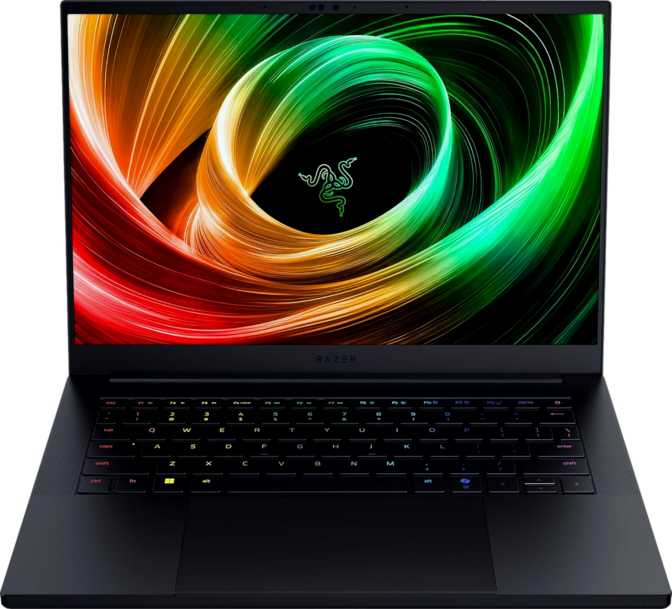
Razer Blade 14 (2025) Full Review: Portable Power, Premium Price
LaptopsKey Specifications at a Glance
Six numbers that define this machine before you read a single paragraph.
14″ OLED
2880×1800 · 120Hz
Blackwell GPU
23.22 TFLOPS · GDDR7
64GB DDR5
8,000 MHz Dual-Ch.
2TB NVMe SSD
PCIe 4.0 Gen4
1.63kg · 16mm
310×224mm chassis
72Wh Battery
Wi-Fi 7 · BT 5.4
Design and Build: Still the Benchmark for Portable Gaming
Razer’s CNC-machined aluminum chassis remains one of the most recognizable in the laptop category, and the Blade 14 continues that tradition with a body that feels dense and precisely assembled without being ostentatious about it.
The matte black anodized finish resists fingerprints better than glossy alternatives and wears confidently whether the lid is open on a desk or closed in a backpack. At 310mm wide, 224mm deep, and a mere 16mm at its thickest point, this is a genuinely slim machine for what lives inside it. The 1,630-gram weight sits near the lighter end of the gaming laptop spectrum — roughly comparable to many productivity ultrabooks with a fraction of the GPU horsepower.
Slipping it into a commuter bag is not an afterthought; it is a legitimate daily option. The keyboard delivers per-key RGB control via Razer Synapse software. The chassis does not carry an IP rating for splash resistance, which is worth knowing if you work in variable environments — but the material quality and tight panel tolerances mean it feels anything but fragile.
Physical Specifications
- Width310mm
- Depth224mm
- Thickness16mm
- Weight1,630g
- Volume1,111 cm³
- Chassis MaterialCNC Aluminum
- Keyboard BacklightPer-Key RGB
- Warranty1 Year
The fan system runs audibly during sustained gaming sessions — the direct thermal trade-off of packing this much performance into 16mm. With headphones on, which most gamers use during sessions, fan noise becomes a functional non-issue in practice.
The Display: OLED at 120Hz Is the Real Story
Gaming laptops have historically shipped with fast panels at the expense of color quality. The Blade 14 inverts that compromise in a meaningful way.
242 PPI
At normal viewing distance, individual pixels are effectively invisible. Text appears sharp enough to rival printed media; game environments and UI elements gain a level of fine detail standard panels cannot match at this size.
True Blacks
OLED switches off individual pixels completely for absolute black — contrast that IPS and VA panels cannot approach. Critical for games with dark scenes, HDR content, and cinematic cutscenes.
120Hz Motion
OLED’s inherently near-zero pixel response time means motion clarity is strong at 120Hz, avoiding the ghosting that affects some IPS high-refresh panels at this update rate.
Display Specifications
| Panel Type | OLED / AMOLED |
|---|---|
| Screen Size | 14 inches |
| Resolution | 2880 × 1800 px |
| Pixel Density | 242 PPI |
| Refresh Rate | 120Hz |
| Touch Screen | No |
| Anti-Reflection Coating | Not included |
| Max Simultaneous Displays | Up to 4 |
Multi-Display Flexibility
The display controller supports up to four simultaneous outputs — the built-in screen plus three external monitors. With HDMI 2.1 and two high-bandwidth USB4 ports capable of carrying DisplayPort signal, connecting a full multi-monitor desk setup requires no dock or adapter beyond what most users already own.
There is no anti-reflection coating on the panel. OLED panels are naturally more reflective than matte IPS screens. In brightly lit rooms or near windows, deliberate placement is needed for comfortable use.
Performance: New Architecture, New Tier
Built on the latest 4-nanometer node, the Blade 14 pairs a ten-core processor with NVIDIA’s Blackwell GPU — the most current architecture available in a laptop this size.
Processor: Efficient, Fast, and Purposefully Tuned
The 4-nanometer manufacturing process delivers significantly better performance per watt than older 5nm or 7nm designs. Ten physical cores running twenty simultaneous threads, with peaks reaching five gigahertz, give this processor more than enough headroom for both games and professional workloads without artificial constraints.
The 50-watt thermal design envelope sits deliberately between productivity ultrabooks (typically 15–28W) and heavier gaming laptops (55–75W). More sustained performance than a thin-and-light; less thermal headroom than a 15-inch gaming machine. The trade-off is real and deliberate. Cache architecture is generous — 24MB of L3 spread across all cores keeps frequently accessed game assets and data close to the processor, reducing latency in CPU-bound scenarios.
CPU Highlights
- 4nm process node
- 10 cores / 20 threads
- 5GHz peak boost clock
- 50W TDP (balanced design)
- 24MB L3 cache total
- Multithreading enabled
- Intel Resizable BAR support
GPU: NVIDIA Blackwell in Fourteen Inches
The discrete GPU is the headline. Built on NVIDIA’s Blackwell architecture — the most recent GPU microarchitecture available — this brings updated ray tracing hardware, the latest DLSS AI upscaling, and the most current DirectX 12 Ultimate feature set to a sub-1.7kg machine. That matters for software support as much as raw performance.
| GPU Specification | Value | What It Means in Practice |
|---|---|---|
| Compute Performance | 23.22 TFLOPS | Competitive high-end laptop GPU tier |
| Video Memory | 8GB GDDR7 | Faster memory standard than previous-gen GDDR6 |
| Memory Bandwidth | 405.8 GB/s | Exceeds most laptop GPUs at this class |
| Texture Rate | 362.9 GTexels/s | Handles complex scene rendering efficiently |
| GPU Boost Clock | 2,520 MHz | High sustained clock for a mobile GPU |
| Memory Bus Width | 128-bit | Standard for this VRAM class |
| Shading Units | 4,608 | Full-featured Blackwell GPU complement |
| DirectX Support | DirectX 12 Ultimate | Full feature set including ray tracing tier 1.1 |
| Architecture | Blackwell | NVIDIA’s most current GPU generation |
RAM: Speed Matters as Much as Capacity
64GB of DDR5 running at 8,000 MHz is exceptional by any current laptop standard. Most laptops ship with 16GB or 32GB at considerably lower speeds. The combination of capacity and clock rate means the system handles memory-hungry workloads — large game asset streaming, open browser tabs alongside gaming sessions, 4K video editing timelines — without the bottleneck that limited-RAM machines hit under multitasking. The memory controller supports a maximum of 256GB, suggesting significant architectural headroom beyond this already-generous configuration.
Storage: Two Terabytes of NVMe Speed
The 2TB NVMe SSD communicates over PCIe 4.0, delivering read and write speeds that keep game load times short and OS responsiveness snappy. Two terabytes is a meaningful allocation for gaming — a library of ten to fifteen AAA titles fills storage faster than most buyers expect, and 2TB avoids the constant game-deletion management that 1TB machines force on their owners. Unlike most competitors at a similar form factor, the full 2TB is standard on this configuration.
Benchmark Results in Context
These scores place the Blade 14 firmly in the top tier of current portable machines. Percentages reflect relative positioning within the current laptop generation.
Top-tier single-core result for current laptop processors
Sustained parallel output reflects the 50W TDP design well
Outpaces the vast majority of current mainstream laptops
High-performance laptop GPU range within slim-chassis thermal limits
Key Features Explained
Specifications only tell half the story. Here is what these features actually mean in daily use.
DLSS AI Upscaling
DLSS renders at a lower internal resolution and reconstructs a higher-quality image using a trained neural network, delivering significantly higher frame rates with minimal visual quality loss. On a 2880×1800 OLED panel, DLSS is not a luxury — it is the practical tool that makes high-frame-rate gaming at this resolution achievable where brute-force rendering would fall short.
Ray Tracing
Ray tracing calculates light behavior more physically accurately than traditional rasterization, adding realistic reflections, shadows, and ambient occlusion in supported games. It is computationally expensive. Using it alongside DLSS is the standard approach on laptop hardware — maintaining playable frame rates while enabling the visual upgrade.
3D Facial Recognition
The front camera supports 3D facial recognition login — the same biometric category used in high-end business laptops. Lifting the lid and having the system authenticate you before your hands reach the keyboard is a quality-of-life improvement that is easy to underestimate before you have it every day.
Wi-Fi 7
Wi-Fi 7 (802.11be) is the current leading wireless standard, offering substantially higher throughput and lower latency than Wi-Fi 6E. Multi-gigabit wireless performance is achievable with a compatible router — relevant for high-speed file transfers, cloud gaming, and latency-sensitive online play. Bluetooth 5.4 covers all modern wireless peripherals without issue.
AirPlay Support
AirPlay compatibility enables wireless streaming to Apple TV devices and AirPlay-compatible displays from within supported applications. For buyers who operate in Apple-ecosystem homes or offices, this adds a level of display flexibility that Windows gaming laptops do not typically offer, without requiring any additional hardware.
Per-Key RGB Keyboard
The backlit keyboard offers individual key RGB control via Razer Synapse software. For gamers who use zone-specific lighting to mark WASD clusters or custom macros, per-key control is the highest level of keyboard customization available on any laptop and allows fully personalized lighting profiles.
Connectivity: Premium Ports, Deliberate Omissions
The port layout reflects Razer’s design philosophy — fewer ports than a thick gaming laptop, but higher-quality ones than most ultrabooks. Every port that made the cut operates at the highest available standard.
Available Ports
-
2× Thunderbolt 4 / USB4 40Gbps (USB-C)
Supports charging, data transfer, and DisplayPort video simultaneously. Maximum versatility from each port — one cable for power, display, and peripherals.
-
2× USB 3.2 Gen 2 Type-A (10Gbps)
For mice, keyboards, drives, and legacy peripherals. Full 10Gbps bandwidth on both ports — not bottlenecked legacy ports.
-
HDMI 2.1
Connects to external monitors and TVs at up to 4K/120Hz or 8K. No adapter required for the vast majority of external displays.
-
3.5mm Audio Jack
Wired headphones and headsets connect directly. Two built-in microphones also handle calls and recording without external hardware.
-
External Memory Card Slot
For photographers and videographers pulling files from cameras — a welcome inclusion in a machine this thin.
Notable Omissions
-
No RJ45 Ethernet Port
Wired network access requires a USB-C or Thunderbolt Ethernet adapter. Competitive gamers who prioritize wired network stability need one in their bag at all times.
-
No Dedicated DisplayPort Output
Native DisplayPort cables require adapters. The HDMI 2.1 and Thunderbolt ports cover most display needs, but pure-DP monitor users need a dongle.
-
Only Two USB-A Ports
Users running a wired mouse, keyboard, headset, and external drive simultaneously will hit this limit. A USB hub is the practical solution for a fully wired desk setup.
Wireless Standards
- Wi-Fi 7 (802.11be) — latest generation
- Wi-Fi 6E, 6, 5, 4 — full backward compatibility
- Bluetooth 5.4 — current generation standard
Battery Life: Reasonable Expectations for a Gaming Laptop
The 72Wh cell is among the larger batteries fitted to laptops this slim. Honest runtimes vary significantly depending on what you are actually doing.
Under gaming loads with the discrete GPU fully active, runtimes measured in hours rather than most of a workday are the realistic expectation. Under lighter tasks — web browsing, document work, video streaming — where the system routes work through the integrated graphics and throttles the discrete GPU, battery life extends meaningfully.
The OLED panel draws more power than a comparable IPS panel at similar brightness settings. Calibrating screen brightness to the task at hand — dimmer for productivity work, brighter for gaming — is the most practical way to extend unplugged sessions. For any sustained gaming session beyond around ninety minutes, mains power is the working assumption. This is consistent with the gaming laptop category, not a unique weakness of this machine.
The USB ports deliver power even when the laptop is completely off or sleeping — useful for keeping a phone or peripheral charged overnight without powering the whole system.
Estimated Runtimes
Estimates reflect typical usage patterns for a 72Wh gaming laptop. Actual results vary with screen brightness and sustained workload intensity.
Who Should Buy the Razer Blade 14 — and Who Should Not
The Blade 14 is strongly positioned for a specific buyer. Knowing whether that buyer is you saves both money and disappointment.
This Machine Is Right for You If…
-
You travel and you game.
Serious gaming performance that fits in a commuter bag without a rolling luggage requirement. One of a small number of credible options at this size and weight.
-
You create content and you game.
The OLED display’s color quality, 64GB of RAM, and 2TB of storage form a legitimate content creation workstation. Video editors and 3D artists get a genuinely dual-purpose machine.
-
You want a multi-monitor desk setup.
Up to four simultaneous displays via HDMI, Thunderbolt, and USB4 make this a capable hub machine when docked at a desk, despite the portable form factor.
-
Build quality is non-negotiable.
If the laptop you carry is partly a statement about the seriousness of your tools, the Blade 14 holds its own against any laptop in any category.
Consider Alternatives If…
-
Maximum frame rate is your only metric.
A 15-inch gaming laptop with a 175W GPU and a 360Hz IPS panel will outperform this machine in raw frame counts. The thermal physics of a 16mm chassis impose a ceiling larger machines do not face.
-
Budget is the primary constraint.
Competitive GPU performance is available at significantly lower price points. Those machines sacrifice display quality, build, and portability — but they exist and deliver real gaming performance.
-
You play competitive multiplayer wired.
No Ethernet, fan noise under load, and a 120Hz (not 240Hz+) panel make this a poorer fit for someone optimizing purely for competitive online gaming performance.
-
You run many wired peripherals simultaneously.
Two USB-A ports limit simultaneous wired connections. A USB hub becomes mandatory for a fully wired desk setup with mouse, keyboard, headset, and external storage all connected at once.
How It Compares to the Alternatives
The Blade 14 sits between two categories. Understanding exactly where it lands makes the purchase decision clear.
| Feature | Razer Blade 14 | Thick 14″ Gaming Laptop | Thin Gaming Ultrabook |
|---|---|---|---|
| Chassis Thickness | 16mm | 22–26mm | 15–17mm |
| Weight | ~1.63kg | ~2.0–2.3kg | ~1.4–1.7kg |
| GPU Performance Tier | High (Blackwell) | High to Very High | Mid to High |
| Display Technology | OLED 120Hz | IPS/VA 144–240Hz | OLED or IPS 60–120Hz |
| RAM (Typical Config.) | 64GB DDR5 | 16–32GB | 16–32GB |
| Storage (Typical Config.) | 2TB NVMe | 512GB–1TB | 512GB–1TB |
| Port Count | Moderate | High | Low to Moderate |
| Build Quality | Premium Aluminum | Plastic/Aluminum Mix | Aluminum |
| Battery Capacity | 72Wh | 90–99Wh | 50–65Wh |
The Blade 14 trades peak GPU thermal headroom for a dramatically thinner and lighter package than comparably spec’d gaming machines, while offering better display technology and more premium construction than most alternatives its size. The 64GB RAM and 2TB storage configurations are significantly ahead of what similarly priced or similarly slim competitors typically ship with.
Honest Strengths and Weaknesses
No product review is complete without candor. Here is where the Blade 14 genuinely excels — and where it does not.
What It Gets Right
The Razer Blade 14 earns its reputation through consistency. The combination of Blackwell GPU architecture, an OLED panel at this resolution and density, 64GB of cutting-edge DDR5, and a sub-1.7kg chassis simply does not have many direct competitors. Razer has built something that genuinely covers multiple buyer profiles — the gamer who travels, the creative professional who games, the desk worker who wants a capable and beautiful machine.
The display alone is enough reason to consider this machine over almost any same-size IPS alternative. The 64GB RAM and 2TB storage configurations are significantly ahead of what similarly priced or similarly thin competitors typically offer, giving this machine a meaningful longevity advantage as software demands grow.
Where It Falls Short
The weaknesses are structural and honest. The 16mm chassis means the GPU operates within tighter thermal constraints than larger machines — sustained gaming in the most demanding titles will see more performance throttling than a thicker machine would exhibit. Fan noise under load is a real, audible presence, not a background hum.
The OLED panel introduces glare in bright environments that a matte IPS screen handles more gracefully. The absent Ethernet port is a minor but persistent inconvenience for network-sensitive users. And the premium price means buyers are paying for design and material quality alongside the specifications — there is no budget option here, and Razer does not waiver from that positioning.
Common Buyer Questions Answered
These are the questions real buyers search for before making a purchase decision of this size.
Final Verdict
Editor’s conclusion on the Razer Blade 14 (2025)
The Razer Blade 14 is the answer to a specific question: what is the best laptop available if portability and premium quality matter as much as gaming performance?
OLED display, Blackwell GPU architecture, 64GB of DDR5 running at 8,000 MHz, 2TB of PCIe 4.0 storage, and a sub-1.7kg chassis at 16mm thick — this configuration does not have many direct competitors. Razer has hit the combination that matters for the buyer this laptop is designed for, and the result is one of the most complete 14-inch laptops available at any price in any category.
If your priorities are the highest raw frame rates regardless of portability, the longest battery regardless of display quality, or the maximum port count regardless of chassis size — the Blade 14 is not the optimal answer, and there are honest alternatives for each of those priorities. For the traveler who games, the creative professional who plays, the buyer who wants a machine that performs seriously and looks seriously good doing it: this earns a strong recommendation with clear eyes about its thermal constraints and an honest acknowledgment that you are paying for what Razer delivers.
BEST FOR
Mobile-first gaming, creative professionals, premium build requirements, multi-display desk setups
NOT IDEAL FOR
Maximum raw frame rates, wired competitive gaming, budget-conscious buyers