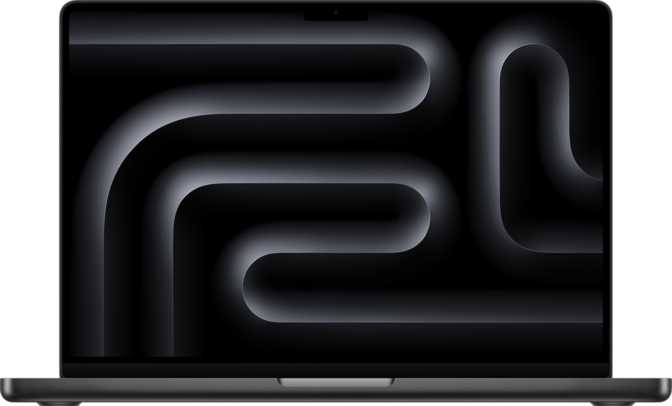
Apple MacBook Pro 14-Inch M5 (2025): An Honest Full Review
LaptopsAt a Glance
Core specifications translated into what they mean for real daily work
Design and Build Quality
Physical Presence and Portability
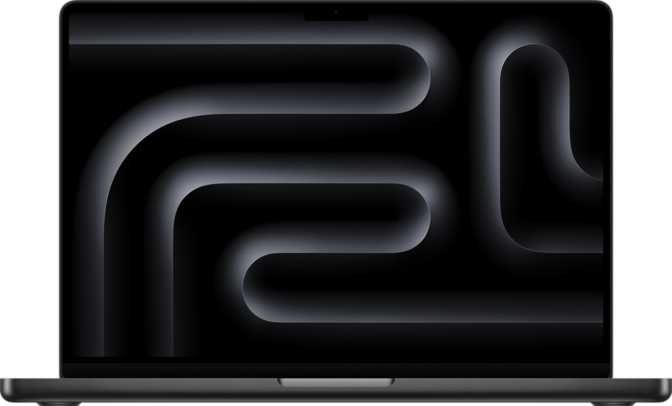
At 1,550 grams, the 14-inch MacBook Pro occupies a considered middle ground. It is not so light that it disappears in a bag, nor heavy enough to make daily commuting a burden. The chassis measures 312mm wide and 221mm deep — a footprint that fits comfortably in a standard laptop sleeve and leaves meaningful desk space around it. At just 15mm from lid to base, it slides into the tightest carry-on pocket without difficulty.
The all-aluminum unibody construction delivers rigidity in every direction. There is no flex in the keyboard deck when typing hard, no give when picking the machine up from a corner, and no creaking anywhere along the hinge. This is not a machine that feels like it will degrade after a year of daily transport — it is built to last, and that translates directly into retained resale value.
Keyboard, Input, and Security
The backlit keyboard adjusts to ambient light and keeps key legends clearly visible in dark environments — a feature that sounds minor until you are working on a red-eye flight or in a dimmed conference room. The Touch ID fingerprint scanner built into the keyboard delivers authentication that is faster than typing a password and more convenient than reaching for a separate security device.
3D facial recognition adds a second biometric layer using a dedicated sensor rather than a standard camera, making it reliably accurate across varied lighting conditions and significantly harder to deceive. For enterprise environments with strict authentication requirements, these hardware-level security features matter considerably during procurement and compliance review.
The Display: Where Productivity Becomes Visible
A Mini-LED panel that raises the bar for professional laptop displays
Mini-LED Technology Explained
The panel uses thousands of individually controlled LED zones behind the LCD layer. Each zone dims independently, producing near-OLED contrast — deep blacks alongside blazing highlights — without the long-term burn-in risk that OLED panels accumulate over extended professional use. For anyone spending hours daily on this display, that durability advantage is a meaningful long-term consideration.
Resolution and Pixel Density
At 253 pixels per inch, text renders with sharp, clean edges at any size. Fine lines in vector artwork remain crisp. Color gradients appear smooth rather than banded. For designers, photographers, and anyone whose work involves fine visual judgment, this level of clarity means what you see on screen accurately reflects what your final output will look like — eliminating guesswork during the review and approval process.
Brightness and Adaptive Refresh
At 1,000 sustained nits, this display remains comfortable under fluorescent office lighting and readable in indirect outdoor sunlight — environments where most laptops operating in the 300–400 nit range struggle noticeably. The adaptive 120Hz refresh makes scrolling through documents and panning across timelines perceptibly smoother than a standard 60Hz display, while dropping to lower rates during static content to preserve battery.
Core Performance: What the M5 Chip Actually Means
Benchmark results in context — and why the architecture behind them matters more than the numbers alone
Geekbench 6 Benchmark Results
Measures sequential task speed: app launches, script execution, and single-threaded processes. Scores above 4,000 place this chip at the front of the portable computing field — ahead of the fastest x86 alternatives available in any laptop.
Reflects parallel workload capacity: video exports, large compilations, multi-track audio rendering. This result matches or exceeds premium Windows workstation laptops that run hotter and louder to reach equivalent figures.
Architecture and Efficiency
The M5 chip is built on a 3-nanometer process and packs 38 billion transistors into its die. Denser transistor packing means more computational work per watt — the foundational reason this machine runs hard without the constant fan noise that marks Windows competitors at equivalent performance levels.
The CPU uses a heterogeneous core layout: four high-performance cores handle demanding, time-sensitive work, while six efficiency cores manage lighter background tasks without engaging the power-hungry cores unnecessarily. This is what allows the MacBook Pro to remain snappy across dozens of open apps while still enduring a full working day on battery.
Unified Memory Architecture
With 32GB of unified memory delivering 153 GB/s of bandwidth, the CPU, GPU, and Neural Engine all draw from one fast shared pool rather than separate, slower pools. This bandwidth advantage is particularly visible in memory-intensive tasks — large texture operations, 8K video handling, machine learning inference — where conventional laptop GPU memory architectures fall measurably behind at comparable price points.
Key Features Explained
What the specifications actually deliver in day-to-day professional use
M5 Integrated GPU
The M5 GPU handles color grading, motion graphics, GPU-accelerated 3D rendering, and ProRes video encode without a discrete chip. It does not support ray tracing or AI-upscaling features, which matters specifically for high-end gaming and ray-traced rendering workflows.
Thunderbolt 4 Connectivity
Four Thunderbolt 4 ports — each running at 40 Gbps — allow simultaneous connection of external monitors, high-speed drives, and full docking stations. Any port accepts a high-wattage USB-C charger, giving complete flexibility for how your desk is arranged.
Wi-Fi 6E and Bluetooth 5.3
Wi-Fi 6E accesses the 6GHz band — a less congested frequency range that provides more consistent throughput in open-plan offices and co-working spaces with many competing devices. Bluetooth 5.3 maintains reliable, low-latency links to peripherals and headphones.
Dual Biometric Security
Touch ID and 3D facial recognition provide two independent hardware-level authentication methods. The facial recognition uses a dedicated sensor — not a basic camera — making it reliable in low light and significantly more resistant to spoofing than software-based alternatives common on competing laptops.
12MP Webcam and Three-Mic Array
The 12-megapixel front camera produces noticeably sharper, better-exposed video in calls compared to the webcams that populated professional laptops for most of the past decade. Three directional microphones reduce background noise for cleaner audio in remote meetings.
Dolby Atmos Speaker System
The stereo speaker system supports Dolby Atmos for spatial audio — giving compatible content a genuine sense of directionality and depth. For a built-in laptop speaker array, the quality comfortably removes the need for external speakers in most professional working environments.
Battery Life: The Operational Reality
The 16-hour rating reflects mixed use — document editing, web browsing, and video playback at moderate brightness. Under real working conditions, knowledge workers handling email, video calls, and light browsing will realistically land between 11 and 14 hours on a full charge. Sustained CPU-intensive tasks reduce that figure more significantly, but even then, most users will complete a full workday without hunting for an outlet.
At this performance tier, competing Windows machines typically deliver 8 to 12 hours under comparable workloads. The M5's efficiency architecture is the reason this gap exists — the chip does more computational work per milliwatt than its x86 counterparts, and that difference accumulates into hours of additional operating time each day.
Who Should Buy This — and Who Shouldn't
Matching the right machine to the right buyer prevents expensive mistakes
Built For
- Video and photo professionals who need accurate color reproduction, fast export performance, and a display that correctly represents their finished work — with 4TB of local storage for a large on-device media library.
- Software engineers and developers who run compilation jobs, local development servers, containers, and multiple IDEs simultaneously and need strong performance without fan noise interrupting focus.
- Data analysts and researchers working with large datasets, Python or R processing jobs, or machine learning frameworks that benefit from high memory bandwidth and sustained CPU efficiency.
- Frequent travelers who need genuine professional performance in carry-on luggage without planning their entire day around finding a power outlet.
Not the Right Fit For
- Dedicated gamers who need ray tracing support, AI upscaling, and access to the full AAA title library — a Windows machine with a discrete GPU is a more appropriate choice.
- Enterprise users requiring wired ethernet whose network environments mandate hardwired connections for security or reliability — there is no built-in RJ45 port, requiring a dongle or dock.
- Touch and pen workflow users who have integrated stylus or touchscreen input into their process — macOS does not support this input modality and the hardware does not include it.
- Budget-conscious buyers whose workloads do not realistically require 4TB of storage or 32GB of unified memory — a lower-specification configuration may be a far more sensible match.
Competitive Positioning
How the MacBook Pro 14-inch M5 measures up against premium Windows alternatives in the same performance bracket
| Criterion | MacBook Pro 14″ M5 | Premium Windows 14–16″ Alternatives |
|---|---|---|
| CPU Performance (Single-Core) | Class-leading | Competitive but generally behind the M5 |
| CPU Performance (Multi-Core) | Class-leading | Broadly competitive; sometimes higher with TDP unlocked under active cooling |
| GPU Creative Workloads | Excellent (integrated) | Discrete GPU advantage for GPU-heavy 3D rendering and gaming |
| Display Quality | Mini-LED · 120Hz · 1,000 nits | Varies widely — OLED available in some models at a similar price tier |
| Battery Endurance | Industry-leading | Typically 8–12 hours under comparable workloads |
| Fan Noise Under Load | Minimal — near-silent at moderate loads | Often audible; loud under sustained high CPU draw |
| Port Selection | 4× Thunderbolt 4 · HDMI · SD · MagSafe | Typically broader variety including USB-A; ethernet sometimes present |
| Software Ecosystem | macOS — excellent for creative tools; limited for Windows-only enterprise software | Windows — broadest software compatibility across all professional categories |
| Weight | 1,550 g | 1,600–2,100 g in this performance class |
Strengths and Weaknesses
An honest accounting of what this machine does exceptionally well — and where it genuinely falls short
Where It Excels
- Class-leading single-core CPU performance — the fastest sequential processing available in any 14-inch laptop today
- Battery endurance that leaves every Windows competitor at this performance tier measurably behind
- Mini-LED display with 120Hz adaptive refresh and 1,000 sustained nits — among the best available on any portable
- Near-silent thermal management — workloads that make Windows alternatives audible run quietly here
- Four Thunderbolt 4 ports provide professional connectivity depth typically reserved for larger 16-inch machines
- 153 GB/s unified memory bandwidth outperforms conventional discrete laptop GPU memory in bandwidth-sensitive workflows
- Dual biometric security via Touch ID and 3D facial recognition meets demanding enterprise authentication requirements
- 12MP webcam and three-microphone array deliver noticeably better video call quality than the competing category norm
Where It Falls Short
- No ethernet port — wired network connections require a separate adapter or dock, a recurring friction point in enterprise environments
- No touchscreen or stylus input — buyers coming from Windows convertibles or pen-workflow setups will find no equivalent here
- Memory and storage are non-upgradeable after purchase — the wrong configuration choice cannot be corrected later
- Premium price demands honest evaluation of whether your actual workloads justify 4TB of storage and 32GB of memory
- No ray tracing support and no DLSS-equivalent AI upscaling limit the GPU's usefulness for high-end 3D gaming
- Two external display limit requires planning for anyone building a three-or-more-monitor professional workstation
- macOS platform commitment is real — Windows-only enterprise applications require virtualization, adding cost and overhead
Questions Real Buyers Ask
The most searched questions about the MacBook Pro 14-inch M5 — answered directly
Final Verdict
The Apple MacBook Pro 14-inch with the M5 chip is the strongest 14-inch professional laptop currently available for the specific audience it was designed for: creative professionals, engineers, and knowledge workers who need peak performance, a world-class display, and genuine all-day battery endurance in a portable form factor.
Its core advantage over Windows alternatives is not a single specification — it is the combination of class-leading CPU speed, industry-best battery endurance, near-silent thermal management, and a display that genuinely raises the bar. Competing machines can match individual elements; few match all of them simultaneously in a chassis this size and weight.
The weaknesses are real and specific. The absence of ethernet, the non-upgradeable internals, the touchscreen gap, and the premium price all represent genuine constraints that matter to specific buyer profiles. If those constraints apply to your workflow, look elsewhere. If they do not, this machine is difficult to argue against.