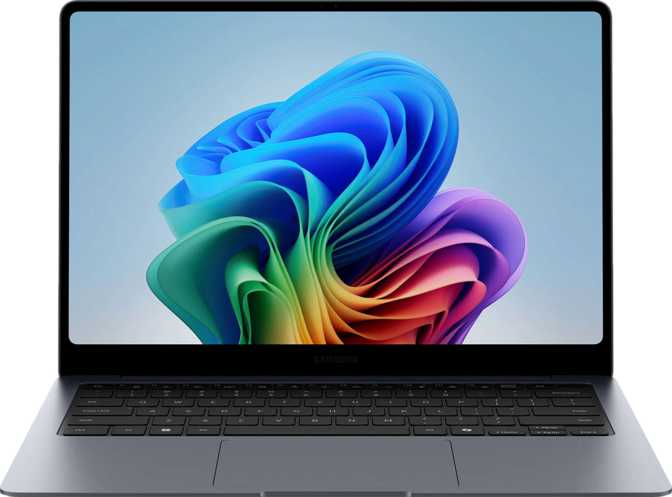
Samsung Galaxy Book6 Pro 14 Full Review: Beauty Meets Productivity
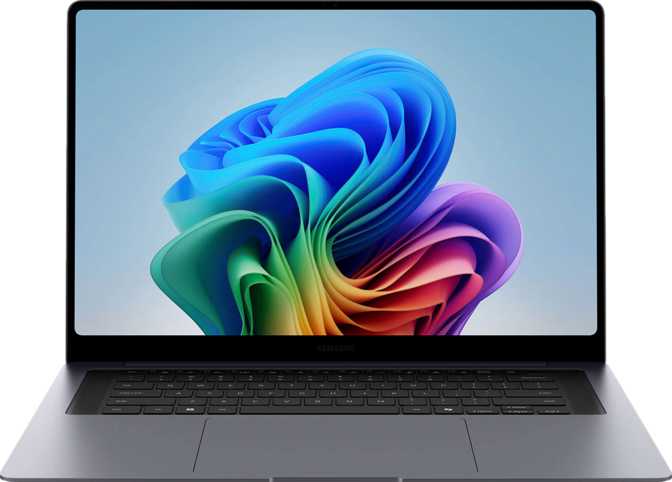
LaptopsThe premium 14-inch laptop market is overcrowded with machines that make bold promises on paper but disappoint in daily use. The Samsung Galaxy Book6 Pro 14 takes a different angle: it leads with a display that genuinely stops people mid-scroll, pairs it with a processor architecture borrowed from the mobile efficiency playbook, and packages everything into a chassis thin enough to slide into a document sleeve. Whether you are a professional who bills by the hour or a power user who refuses to carry a charger everywhere, the Galaxy Book6 Pro 14 is making a case that you should not have to choose between beauty and productivity.
Design and Build: Disciplined Elegance at 1.24 Kilograms
A body built for professionals who travel light
A Body That Means Business
At just 11mm thick and weighing 1,240 grams, the Galaxy Book6 Pro 14 sits firmly in the almost-forgot-it-is-in-my-bag category. A standard hardcover novel weighs more. The footprint — 314mm wide and 220mm deep — is compact enough for a tray table or a crowded café corner, yet the 14-inch display does not feel cramped.
The total chassis volume comes in under 760 cubic centimeters, the result of deliberate engineering trade-offs. One of those trade-offs is the use of active cooling rather than a fanless design. That is the right call at this performance level — passive cooling at this thermal envelope would throttle the processor under sustained workloads, and Samsung has chosen real-world capability over the marketing appeal of complete silence.
Keyboard and Input Experience
The backlit keyboard is standard and expected at this price tier, but worth confirming for anyone who works in dim environments or late at night. The absence of an optical disc drive and physical memory card slot signals a machine designed for the cloud-first professional of today. If you regularly pull photos from SD cards or handle physical media, you will need a USB hub from day one.
Physical Specifications
- Width
- 314 mm
- Depth
- 220 mm
- Thickness
- 11 mm
- Weight
- 1,240 g
- Backlit Keyboard
- Weather Sealed
- Ruggedized Build
- Fanless Design
The Display: Where the Galaxy Book6 Pro 14 Earns Its Pro Name
OLED technology at 242 pixels per inch
The screen is the most compelling reason to consider this laptop. The 14-inch OLED panel runs at 2880 × 1800 pixels — 242 pixels per inch — a density at which individual pixels are invisible to the naked eye at any normal viewing distance. Text appears with a crisp, ink-on-paper quality that makes reading long documents significantly less fatiguing than on a standard 1080p or even 1440p display.
OLED technology means each pixel generates its own light rather than relying on a backlight. The practical result: blacks are genuinely black rather than dark grey, contrast is dramatic, and colors have a vibrancy that IPS panels simply cannot match. For anyone working with photography, design, video, or even just consuming content, this distinction is visible and meaningful from the first minute of use.
Touch and Anti-Reflection
The panel supports touch input — genuinely useful for annotation, quick scrolling, and certain creative workflows. The anti-reflection coating addresses OLED's traditional vulnerability to glare, making the screen usable in bright environments like open-plan offices or near windows without the washed-out experience of uncoated OLED panels.
Multi-Display Capability
The GPU can simultaneously drive up to four external displays alongside the built-in screen. With two Thunderbolt 4 ports and a dedicated HDMI 2.1 output, a fully equipped desk setup with multiple monitors is achievable without a complex docking station — a strong story for professionals who split time between travel and a fixed desk.
Performance: A 3-Nanometer Processor That Plays the Long Game
Efficiency-first architecture designed for all-day sustained use
Core Architecture and What It Means
The processor inside the Galaxy Book6 Pro 14 is built on a 3-nanometer manufacturing process — the same generation of chip fabrication used in the most advanced mobile processors. Smaller semiconductor nodes deliver more performance per watt and less heat generated, allowing the chip to sustain performance under load without immediately throttling to prevent overheating.
The CPU uses a heterogeneous core design — commonly known as big.LITTLE — which assigns different types of tasks to different types of cores. Performance cores handle demanding applications, efficiency cores manage background tasks with minimal power draw, and a third tier of ultra-efficiency cores keeps the system ticking over during light work. Sixteen execution threads are available across these cores, meaning multitasking-heavy workflows — multiple browser tabs, a video call, a document editor, and a music app simultaneously — are handled without the bottlenecks that older processor designs create.
The processor reaches a turbo clock speed of 4.7 GHz when a task demands it, covering bursts of activity like opening large files, rendering a batch of photos, or compiling code. The chip operates within a 25-watt Thermal Design Power budget — deliberately moderate, optimized for efficiency and sustained performance in a thin chassis rather than peak benchmark numbers achieved at the cost of heat and fan noise.
Memory and Storage Architecture
The 16GB of DDR5 RAM runs at speeds up to 8,533 MHz across dual memory channels. DDR5 at this speed tier is meaningfully faster than DDR4 found in older machines, particularly in memory-bandwidth-sensitive tasks like handling large datasets or working with high-resolution images. The system supports a maximum of 128GB of RAM — an unusual ceiling for a laptop this thin, signaling that the platform can scale for serious professional demands.
The 512GB NVMe SSD uses PCIe 5 — the latest generation of storage interface. Launching applications, opening large project files, and booting the system happen nearly instantly. The gap between PCIe 5 and the PCIe 4 drives found in competing machines is tangible in day-to-day use, not just synthetic benchmarks.
Processor Specifications
- Manufacturing Node
- 3 nm
- CPU Threads
- 16
- Turbo Speed
- 4.7 GHz
- L3 Cache
- 18 MB
- Thermal Envelope
- 25W TDP
- big.LITTLE Design
- Multithreading
Memory and Storage
- RAM
- 16 GB DDR5
- RAM Speed
- Up to 8,533 MHz
- Memory Channels
- Dual-channel
- Max RAM
- 128 GB
- Storage
- 512 GB NVMe
- PCIe Generation
- PCIe 5
Connectivity: Everything Except What You Probably Do Not Need
A port selection built for the Thunderbolt era
| Port / Feature | Available | Detail |
|---|---|---|
| Thunderbolt 4 | 2 ports — 40 Gbps data, video out, charging | |
| USB4 (40 Gbps) | 2 ports (same physical connectors as Thunderbolt 4) | |
| HDMI | 1 × HDMI 2.1 — supports 4K/8K at high refresh rates | |
| 3.5mm Audio Jack | Headphone / headset combo jack | |
| USB-A (any speed) | None — adapter or hub required | |
| SD Card Slot | No external memory slot | |
| Ethernet (RJ45) | No wired network — adapter required |
Wireless Connectivity
Wi-Fi 7 (802.11be) is the current-generation standard, offering lower latency and higher theoretical speeds that become tangible in environments with many competing devices or when transferring large files over a network. For most home and office users, real-world gains over Wi-Fi 6E will be modest — but as Wi-Fi 7 routers become more common, this machine is fully prepared.
- Wi-Fi Standard
- Wi-Fi 7 (802.11be)
- Bluetooth
- 5.4
- AirPlay Support
Battery Life: A 67 Wh Cell Built for the Working Day
Endurance shaped by processor efficiency, not just raw capacity
The 67 Wh battery is a reasonable capacity for this class of laptop — not class-leading, but not undersized either. What determines real-world endurance is not just the battery size but how efficiently the processor uses each watt-hour. The 3-nanometer chip with its efficiency-core architecture is specifically designed to minimize power draw during light tasks, extending the practical gap between charges in ways that a larger battery in a less efficient machine would not.
Light productivity use — documents, email, browser tabs, video calls — should carry most users through a full working day on a single charge. Sustained heavy workloads will shorten that window considerably. The OLED display's power consumption also varies with screen brightness and content; a white-background document is more power-hungry than a dark-mode interface, which is worth knowing if battery longevity is a priority during long travel days.
The sleep-and-charge ports allow the laptop to charge connected devices even when the lid is closed and the machine is in standby — a minor but genuinely useful feature when your phone needs topping up overnight without leaving the laptop fully powered on.
- Sleep-and-charge USB ports
- Charges via Thunderbolt 4
- No MagSafe power adapter
Features Worth Calling Out
Audio, biometrics, camera, and ecosystem connectivity
Dolby Atmos Audio
Stereo speakers with Dolby Atmos spatial processing create a wider, more dimensional sound stage than typical laptop speakers. Not a substitute for dedicated audio hardware, but noticeably better than the flat output common on thin laptops — meaningfully strong for video calls, background music, and casual media.
Biometric Security
A fingerprint scanner provides quick, reliable login for most users. There is no 3D facial recognition — Windows Hello face unlock relies on 2D camera recognition, which is less secure in theory than IR-based face scanning. The fingerprint scanner is the recommended primary login method for anyone who prioritizes security.
Webcam
The 2-megapixel front camera with dual microphones is adequate for standard video calls but unremarkable. It reflects the constraints of an 11mm-thin lid. Anyone who video conferences heavily in professional settings or records video content will want an external webcam for noticeably better image quality.
AirPlay and Ecosystem
AirPlay support enables direct wireless streaming to Apple TV and compatible displays — a useful cross-ecosystem feature for users who mix Windows and Apple hardware at home or in the office. Combined with Bluetooth 5.4, the Galaxy Book6 Pro 14 connects reliably with the latest wireless peripherals and audio devices.
Who This Laptop Is For — and Who Should Look Elsewhere
Matching the Samsung Galaxy Book6 Pro 14 to the right buyer
The Right Choice If You:
- Work primarily in productivity applications — documents, spreadsheets, presentations, email, and web-based tools
- Value a premium display above almost everything else and spend hours daily reading or working with visual content
- Travel frequently and want a laptop that barely registers in a bag at 1,240 grams
- Work from multiple monitors and need versatile display output without a complex dock
- Have moved to USB-C and Thunderbolt as your peripheral standard, or are willing to make the transition
- Want a machine that stays efficient through a full working day without constant fan noise
Look at Alternatives If You:
- Need dedicated graphics for gaming, 3D rendering, video editing with heavy effects, or machine learning workloads — integrated graphics only, no ray tracing
- Rely heavily on USB-A peripherals and do not want to carry adapters or a hub at all times
- Need an SD card slot built in for photography or content creation workflows
- Work in environments with water or dust exposure — this chassis is not weather-sealed or ruggedized in any way
- Require wired Ethernet for stable network connection — adapters will always be necessary
- Prefer a larger screen; the 14-inch form factor has hard limits for users who favor 15.6 or 16-inch panels
How It Compares to the Competition
The Galaxy Book6 Pro 14 positioned against logical alternatives
| Feature | Samsung Galaxy Book6 Pro 14 | Typical 14" OLED Rival | Typical 14" Non-OLED Rival |
|---|---|---|---|
| Display | OLED 2880×1800 · 242 ppi | OLED, varies | IPS/LCD, typically 1920×1200 |
| Chip Generation | 3nm, efficiency-first | Varies by model | Often older node |
| RAM Standard | DDR5 up to 8,533 MHz | DDR5 or LPDDR5 | DDR4 or DDR5 |
| Storage Interface | PCIe 5 NVMe | PCIe 4 or 5 | Often PCIe 4 |
| Thunderbolt 4 | 2 ports | 1–2 ports | 0–1 ports typically |
| Wi-Fi Generation | Wi-Fi 7 | Wi-Fi 6E or 7 | Wi-Fi 6 typically |
| Weight | 1,240g (ultralight) | 1,300–1,500g | 1,500–2,000g |
| USB-A Ports | None | 0–1 typically | 1–2 typically |
| Discrete GPU | No | Sometimes | Rarely at this weight |
The Galaxy Book6 Pro 14 wins clearly on display quality, wireless connectivity generation, and weight. It concedes on USB-A availability and discrete GPU performance compared to heavier competitors.
Honest Assessment: Strengths and Limitations
A balanced look at what the Galaxy Book6 Pro 14 delivers and where it concedes
Where It Excels
The single biggest strength is the display-to-weight combination. Getting a 14-inch OLED panel at 242 ppi into a laptop that weighs just over 1.2kg is a genuine engineering achievement, and the daily experience of using that screen for eight or more hours is meaningfully different — better — than working on a conventional display. The PCIe 5 NVMe storage and DDR5 memory ensure the rest of the machine keeps pace with what the display promises.
The efficiency-oriented processor is the right engine for this chassis. It will not win benchmarks against 45W workstation chips, but it sustains solid performance through a full working day without the fan becoming intrusive or the chassis growing uncomfortable to touch. For productivity professionals, that real-world consistency matters more than benchmark ceiling.
Where It Falls Short
Dropping USB-A entirely is a statement Samsung is making about where computing is heading — and it is not wrong — but it imposes an immediate, real cost on users who have not fully transitioned their peripheral ecosystem. The lack of an SD card reader will frustrate photographers. The missing Ethernet port will frustrate IT professionals and anyone in a wired-first office environment.
The integrated graphics are also a firm boundary. For the productivity professional this laptop is designed for, integrated graphics are perfectly capable. For anyone with a creative or technical workflow that demands GPU compute — video rendering, 3D work, or data visualization at scale — this is the wrong machine, regardless of how beautiful the screen is.
Real Buyer Questions Answered
Answers to what people actually search for before purchasing
Final Verdict
Recommended for Productivity ProfessionalsThe Samsung Galaxy Book6 Pro 14 is a highly refined productivity laptop that has made very deliberate choices about what to prioritize: an exceptional display, near-ultrabook weight, modern wireless connectivity, and a processor architecture that sustains performance over a full working day rather than burning bright for benchmarks.
It is genuinely excellent for the professional who spends their day in documents, spreadsheets, email, and communication tools — particularly one who travels frequently and values a premium visual experience. The screen alone justifies serious consideration for anyone whose work involves sustained reading or any visual content.
The trade-offs are real and non-trivial — no USB-A, no SD card, no wired Ethernet, no discrete graphics. If any one of those is a dealbreaker for your workflow, it is a dealbreaker, and no amount of display quality changes that. But for the user this laptop is designed for, the Galaxy Book6 Pro 14 is one of the most thoughtfully assembled thin-and-light laptops available. Buy it knowing what it is, and it will not disappoint.